


What You’ll Learn
In this lesson, you’ll learn how Python variables store information that your program can use later. You will use variables to calculate and display a shopping cart total.
- Create variables and assign values to them.
- Use meaningful variable names.
- Use variables in calculations.
- Update and display stored values.
The Concept
A variable is a name that refers to a value in your program. The value might be text, a whole number, or a decimal number.
In Python, you create a variable by writing its name, followed by an equals sign (=), followed by the value you want to store:
item_price = 4.50This statement stores the number 4.50 in a variable named item_price. The equals sign assigns the value; it does not mean that the two sides are being compared.
Variables are useful because they let you give names to information. Instead of writing the price directly in every calculation, you can use item_price. If the price changes, you only need to update the variable’s value.
Python determines the type of value automatically. For example, "Notebook" is text, 3 is a whole number, and 4.50 is a decimal number.
Basic Example
The following program uses variables to calculate the cost of three notebooks, add sales tax, and display the result.
item_name = "Notebook"
item_price = 4.50
item_quantity = 3
tax_rate = 0.08

subtotal = item_price * item_quantity
tax_amount = subtotal * tax_rate
total = subtotal + tax_amount

print(f"{item_quantity} x {item_name}")
print(f"Subtotal: ${subtotal:.2f}")
print(f"Tax: ${tax_amount:.2f}")
print(f"Total: ${total:.2f}")
Expected Output
3 x Notebook
Subtotal: $13.50
Tax: $1.08
Total: $14.58
How the Code Works
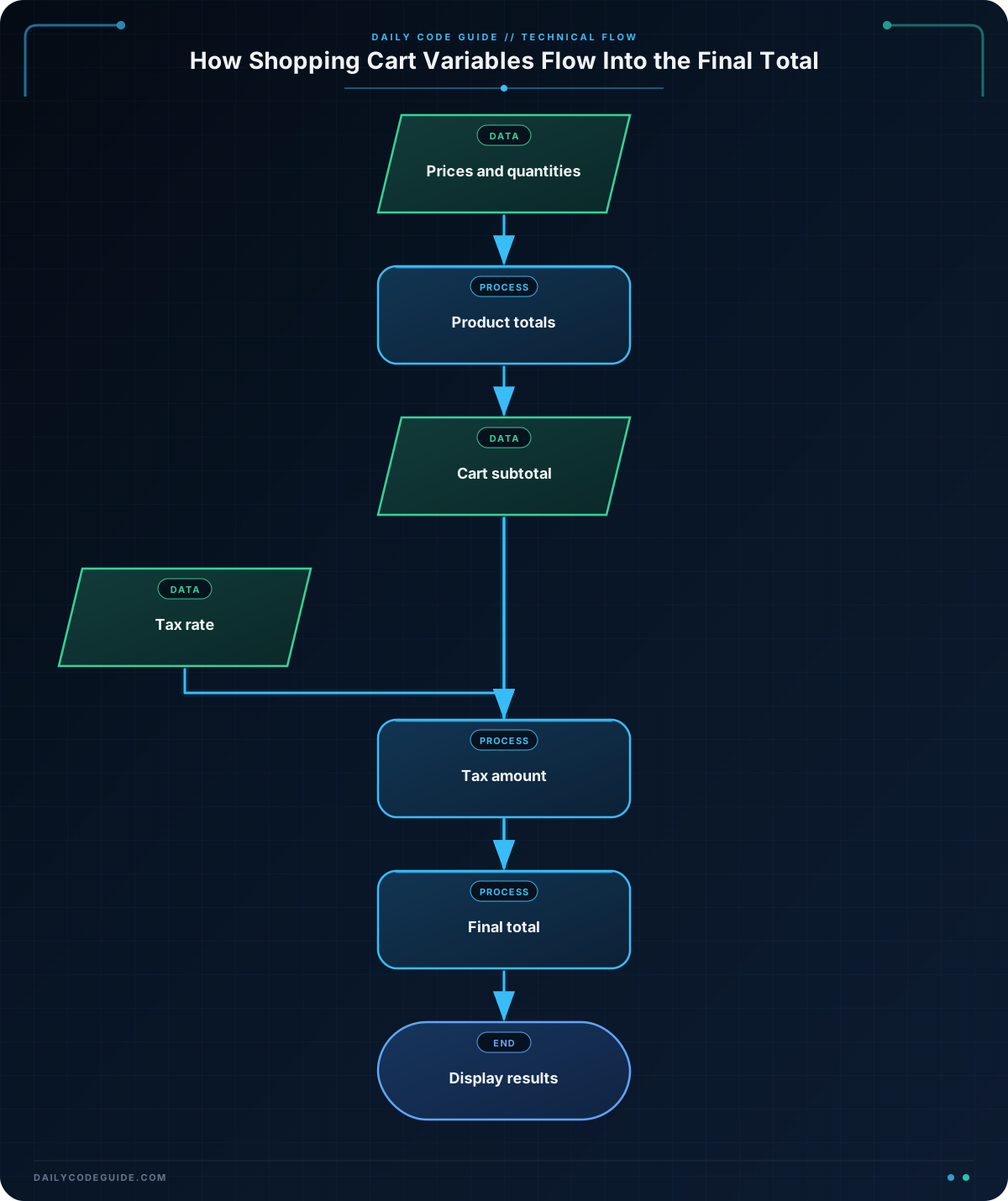
The first four lines create variables for the product name, price, quantity, and tax rate:
item_name = "Notebook"
item_price = 4.50
item_quantity = 3
tax_rate = 0.08item_namestores text, so its value is surrounded by quotation marks.item_pricestores the price of one notebook.item_quantitystores how many notebooks are in the cart.tax_ratestores 8 percent as the decimal value0.08.
Next, the program uses those variables in calculations:
subtotal = item_price * item_quantity
tax_amount = subtotal * tax_rate
total = subtotal + tax_amount
The subtotal is the price of one item multiplied by the quantity. The tax amount is the subtotal multiplied by the tax rate. Finally, the total adds the tax to the subtotal.
The print() statements display the results. An f-string lets you place variable values inside text. For example, {subtotal:.2f} displays the subtotal with exactly two digits after the decimal point, which is useful for currency.
Another Example
A cart can also include a shipping charge. This example stores the item cost and shipping cost in separate variables before calculating the final amount.
product_name = "Water bottle"
product_price = 18.00
shipping_cost = 4.99

item_total = product_price
order_total = item_total + shipping_cost

print(f"Product: {product_name}")
print(f"Items: ${item_total:.2f}")
print(f"Shipping: ${shipping_cost:.2f}")
print(f"Order total: ${order_total:.2f}")
Each piece of information has its own variable. This makes the calculation easy to read and makes it simple to change the product price or shipping cost later.
Common Mistakes
Using a variable before creating it
Python must know a variable’s value before you use it. Create the variables first, then perform calculations with them.
Using unclear names
Names such as x or n do not explain what a value represents. Names such as item_price and shipping_cost make your code easier to understand. Python variable names commonly use lowercase letters with underscores between words.
Putting text and numbers together incorrectly
Text and numbers have different types. For example, you cannot directly combine a string and a number with the + operator. An f-string is a simple way to place a number inside a sentence:
total = 14.58
print(f"Total: ${total:.2f}")
Try It Yourself
Create a Python program for a shopping cart containing two identical headphones that cost $24.99 each. Store the product name, price, and quantity in variables. Then calculate and print the subtotal.
As an extra step, change the quantity and run the program again. Notice how the subtotal changes without changing the calculation itself.
Challenge
Create a shopping cart program with these products:
- Two mugs costing $12.00 each
- Three stickers costing $2.50 each
Store the prices and quantities in variables. Calculate the subtotal for both products, calculate 6 percent sales tax, and calculate the final total. Display the subtotal, tax, and total with two digits after the decimal point.
Solution
mug_price = 12.00
mug_quantity = 2
sticker_price = 2.50
sticker_quantity = 3
tax_rate = 0.06

mug_total = mug_price * mug_quantity
sticker_total = sticker_price * sticker_quantity
subtotal = mug_total + sticker_total
tax_amount = subtotal * tax_rate
total = subtotal + tax_amount

print(f"Subtotal: ${subtotal:.2f}")
print(f"Tax: ${tax_amount:.2f}")
print(f"Total: ${total:.2f}")
The program uses separate variables for each product’s price and quantity. It calculates each product total, adds those values for the subtotal, and then uses the tax rate to calculate the final total.
Key Takeaways
- A Python variable stores a value under a readable name.
- Use the assignment operator (
=) to give a variable a value. - Variables can store text, whole numbers, and decimal numbers.
- Meaningful variable names make calculations easier to read and change.
- F-strings are useful for displaying variable values in formatted text.

