


What You’ll Learn
In this lesson, you will learn how to use a Python while loop to repeat an action while a condition remains true. You will use a retry system that gives an operation several chances to succeed.
- Understand how a while loop works.
- Track retry attempts with a variable.
- Stop a loop when an operation succeeds or attempts run out.
- Avoid creating an infinite loop.
The Concept
A while loop repeats a block of code as long as its condition is true. Python checks the condition before each repetition.
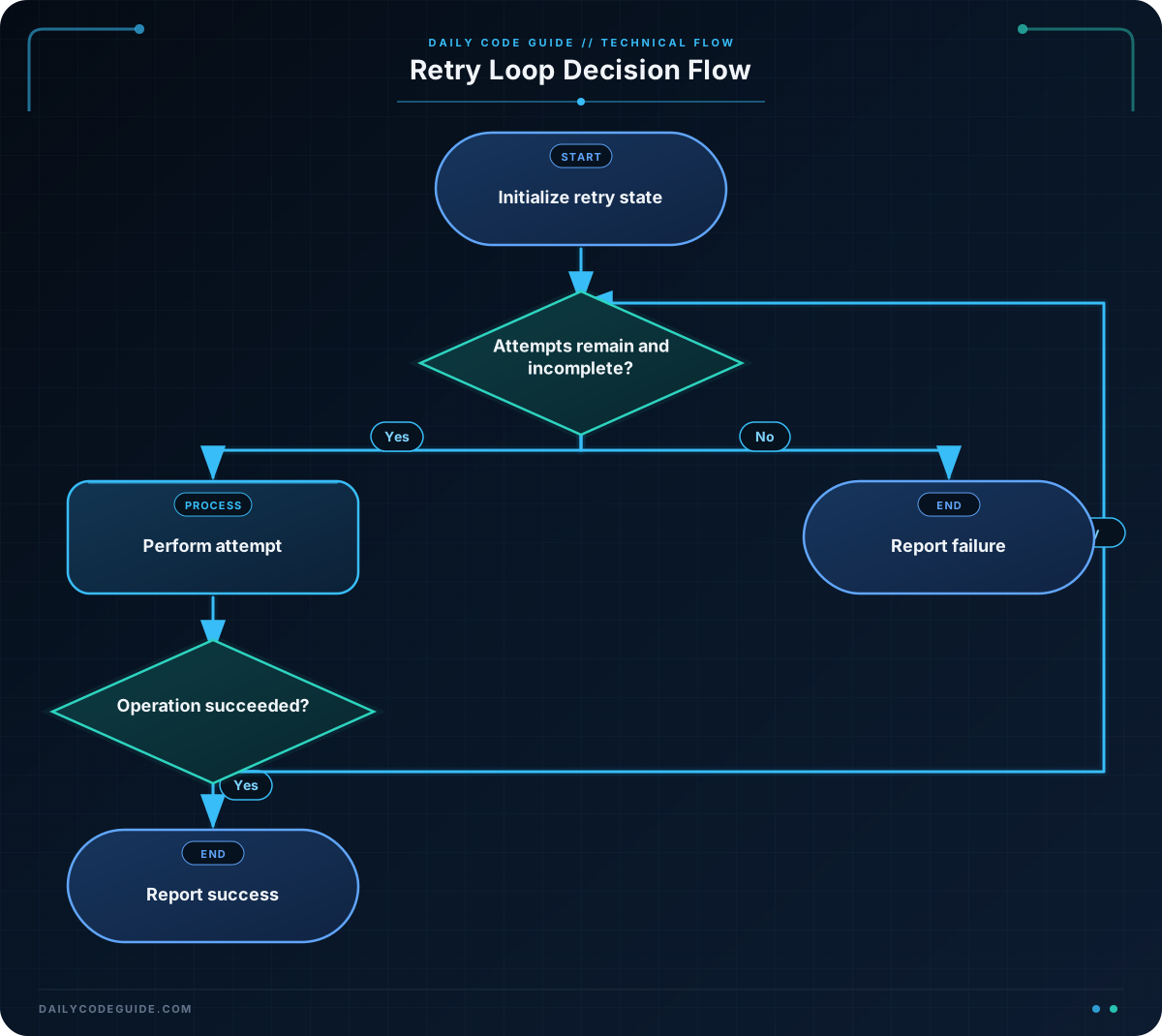
For example, a retry system might continue trying an operation while both of these statements are true:
- The operation has not succeeded.
- The maximum number of attempts has not been reached.
A while loop is useful when you do not know exactly how many repetitions are needed ahead of time. The loop can stop as soon as a condition changes. Common examples include retrying a failed connection, asking for valid input, or waiting for a task to finish.
A typical while loop has this shape:
while condition:
    # Code that repeats
The indented code runs repeatedly while condition is true. Something inside the loop must eventually change the condition, or the loop may run forever.
Basic Example
This program simulates a task that may fail before it eventually succeeds. The list contains the result of each retry, and the while loop processes one result at a time.
retry_results = ["failed", "failed", "success"]
attempt = 0
maximum_attempts = 3
completed = False

while not completed and attempt < maximum_attempts:
    result = retry_results[attempt]
    attempt += 1

    print(f"Attempt {attempt}: {result}")

    if result == "success":
        completed = True

if completed:
    print("Task completed successfully.")
else:
    print("Task failed after all attempts.")
Expected Output
Attempt 1: failed
Attempt 2: failed
Attempt 3: success
Task completed successfully.
How the Code Works
The variable retry_results represents the result of each attempt. The first two attempts fail, and the third attempt succeeds.
attempt starts at zero because Python list positions begin at zero. The first result is therefore at position zero.
maximum_attempts limits the number of retries. This prevents the program from trying forever.
completed is a Boolean variable. A Boolean value is either true or false. It starts as false because the task has not completed yet.
The loop condition has two parts:
while not completed and attempt < maximum_attempts:- not completed means the task should continue only if it has not succeeded.
- attempt < maximum_attempts means the program must stop after the maximum number of attempts.
- and requires both conditions to be true.
Inside the loop, the program gets the result for the current attempt and then increases attempt by one. Increasing the variable is important because it moves the program to the next result and eventually makes the loop condition false.
When the result is “success”, the program changes completed to true. On the next condition check, not completed is false, so the loop stops.
Another Example
Retry systems often need to stop after a fixed number of failed attempts. This example checks a list of entered access codes. It uses a while loop to allow up to three attempts and stops immediately when the correct code is found.
entered_codes = ["2468", "1357", "8642"]
correct_code = "8642"
attempt = 0
maximum_attempts = 3
access_granted = False

while attempt < maximum_attempts and not access_granted:
    entered_code = entered_codes[attempt]
    attempt += 1

    if entered_code == correct_code:
        access_granted = True
        print(f"Attempt {attempt}: Access granted.")
    else:
        print(f"Attempt {attempt}: Incorrect code.")

if not access_granted:
    print("Access denied after all attempts.")
The third code is correct, so the loop ends before the program needs to use all possible retries. In a real application, a code would usually come from a user or another system. This example uses a list so that the retry behavior is predictable while you practice the loop.
Common Mistakes
Forgetting to update the counter
A retry loop needs a value that changes. If attempt never increases, the condition may stay true forever. Always check that the loop changes something related to its condition.
Allowing too many attempts
A loop that retries without a limit can waste time or keep a program stuck. Include a maximum-attempt condition when the operation should not continue indefinitely.
Using the wrong list position
In the examples, attempt is used as a list index before it is increased. The first attempt uses position zero, then the counter increases to one for the next attempt. Changing the order without thinking about it can skip the first result or go past the end of the list.
Checking success too late
A retry loop should stop as soon as the operation succeeds. Updating a success variable inside the loop and including it in the condition prevents unnecessary extra attempts.
Try It Yourself
Modify the following program so it prints a message for each retry and stops when the result is “success”. Keep the maximum number of attempts at four.
retry_results = ["failed", "failed", "failed", "success"]
attempt = 0
maximum_attempts = 4
completed = False

# Add your while loop here

if completed:
    print("The operation succeeded.")
else:
    print("The operation did not succeed.")
Challenge
Create a retry system for checking a backup job.
- Use the results “failed”, “failed”, and “success”.
- Allow no more than three attempts.
- Print the attempt number and result during each attempt.
- Stop immediately when the backup succeeds.
- Print “Backup completed.” if it succeeds.
- Print “Backup failed after all attempts.” if every attempt fails.
Solution
backup_results = ["failed", "failed", "success"]
attempt = 0
maximum_attempts = 3
backup_completed = False

while attempt < maximum_attempts and not backup_completed:
    result = backup_results[attempt]
    attempt += 1

    print(f"Attempt {attempt}: {result}")

    if result == "success":
        backup_completed = True

if backup_completed:
    print("Backup completed.")
else:
    print("Backup failed after all attempts.")
The loop continues while there are attempts remaining and the backup has not completed. After each attempt, the counter increases. When the result is successful, backup_completed becomes true, which causes the loop to stop on its next condition check.
Key Takeaways
- A while loop repeats code while its condition is true.
- A retry loop commonly tracks both the current attempt and the maximum number of attempts.
- Update a variable inside the loop so the condition can eventually become false.
- Stop as soon as the operation succeeds instead of using unnecessary retries.
- Always consider what should happen if every attempt fails.

