


What You’ll Learn
In this lesson, you’ll learn how to create and use Python functions by building simple temperature conversion tools. Functions help you organize code so you can reuse an operation whenever you need it.
- What a function is and why functions are useful
- How to define a function with
def - How to pass information into a function with parameters
- How to send a result back with
return - How to call a function from your program
The Concept
A function is a named group of instructions that performs a specific task. Instead of writing the same instructions repeatedly, you write them once inside a function and call the function whenever you need that task.
For example, a temperature conversion formula can be placed inside a function. The function can receive a Celsius temperature, calculate the Fahrenheit equivalent, and return the result.
In Python, you define a function with the def keyword:
def function_name(parameter):
    # instructions go here
    return result
A parameter is a variable that receives information when the function is called. The return statement sends a result back to the part of the program that called the function.
Functions are useful when you need to repeat an operation, make a program easier to read, or separate a large program into smaller tasks.
Basic Example
The following function converts a temperature from Celsius to Fahrenheit. The formula is (Celsius * 9 / 5) + 32.
def celsius_to_fahrenheit(celsius):
    fahrenheit = (celsius * 9 / 5) + 32
    return fahrenheit


morning_temperature = 18
converted_temperature = celsius_to_fahrenheit(morning_temperature)

print(f"{morning_temperature} C is {converted_temperature} F")
Expected Output
18 C is 64.4 FHow the Code Works
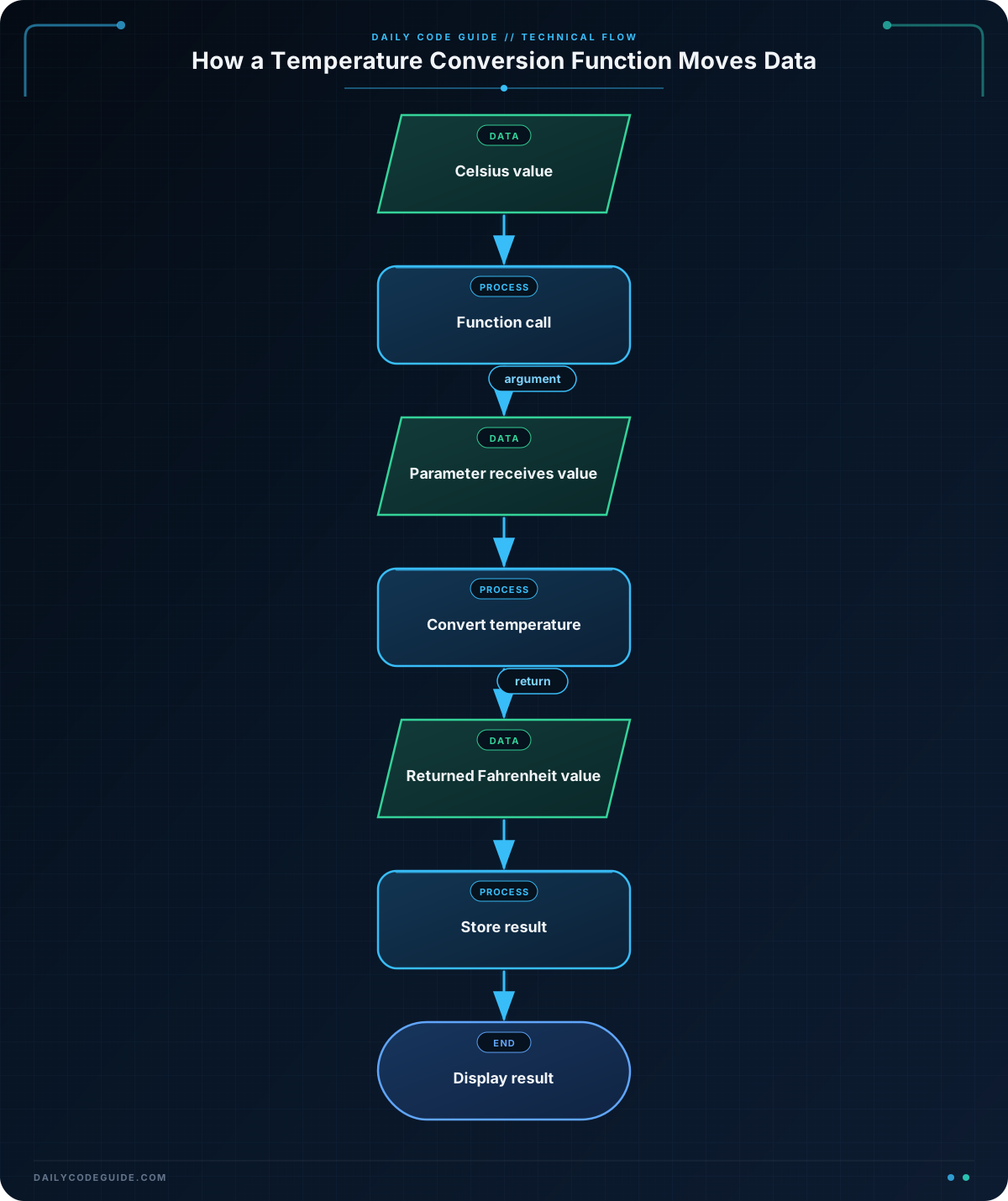
The first line defines the function:
def celsius_to_fahrenheit(celsius):def tells Python that you are creating a function. The name celsius_to_fahrenheit describes what the function does. The variable celsius is the parameter. It will hold the temperature supplied when the function is called.
The indented lines belong to the function:
fahrenheit = (celsius * 9 / 5) + 32
return fahrenheit
Python calculates the Fahrenheit value and stores it in fahrenheit. The return statement sends that value back to the caller.
Defining a function does not run it immediately. The function runs when you call it:
converted_temperature = celsius_to_fahrenheit(morning_temperature)Here, Python passes the value of morning_temperature, which is 18, into the function. Inside the function, celsius temporarily represents that value. The returned result is then stored in converted_temperature.
Another Example
Functions can also convert a temperature in the opposite direction. This example takes a Fahrenheit reading from a weather service and converts it to Celsius before displaying it.
def fahrenheit_to_celsius(fahrenheit):
    celsius = (fahrenheit - 32) * 5 / 9
    return round(celsius, 1)


weather_reading = 75.2
celsius_reading = fahrenheit_to_celsius(weather_reading)

print(f"The weather reading is {celsius_reading} C")
This function has a different parameter and uses the Fahrenheit-to-Celsius formula. The built-in round() function keeps the returned temperature to one decimal place.
The function still follows the same pattern: receive a value, perform a task, and return a result.
Common Mistakes
- Forgetting to call the function: Defining
celsius_to_fahrenheit()only creates the function. You must write a function call, such ascelsius_to_fahrenheit(18), to run it. - Using the wrong indentation: Instructions inside a Python function must be indented. Use four spaces for each indentation level.
- Printing instead of returning:
print()displays a value, butreturnsends a value back so the rest of the program can store or use it. - Passing the wrong kind of value: Temperature calculations require numbers. Passing text such as
"eighteen"will not work in the arithmetic formula.
Try It Yourself
Write a function named celsius_to_kelvin. It should receive a Celsius temperature, add 273.15, and return the result in Kelvin. Then use the function to convert 25 degrees Celsius and print the result.
Use this starter code:
def celsius_to_kelvin(celsius):
    # Calculate and return the Kelvin temperature here
    pass


temperature_in_celsius = 25
temperature_in_kelvin = celsius_to_kelvin(temperature_in_celsius)

print(f"{temperature_in_celsius} C is {temperature_in_kelvin} K")
Challenge
Create a function named convert_for_display that:
- Accepts a Celsius temperature as a parameter
- Converts it to Fahrenheit
- Rounds the result to one decimal place
- Returns a sentence in this format:
20 C equals 68.0 F
Call the function with 20 and print the returned sentence.
Solution
def convert_for_display(celsius):
    fahrenheit = (celsius * 9 / 5) + 32
    fahrenheit = round(fahrenheit, 1)
    return f"{celsius} C equals {fahrenheit} F"


temperature_message = convert_for_display(20)
print(temperature_message)
The function receives 20, calculates its Fahrenheit equivalent, rounds the result, and builds a sentence with an f-string. The return statement sends that sentence back, where it is stored in temperature_message and printed.
Key Takeaways
- A function is a reusable group of instructions that performs a specific task.
- Use
defto define a function and parentheses to list its parameters. - Call a function by writing its name followed by parentheses and any required arguments.
- Use
returnwhen a function needs to send a result back to the program. - Temperature conversion is one practical example of placing a reusable calculation inside a function.

