


What You’ll Learn
In this lesson, you will learn how Bash environment variables let deployment scripts read configuration from the shell instead of storing sensitive values directly in source code.
- Define and read environment variables in Bash.
- Understand the difference between a shell variable and an exported environment variable.
- Use environment variables for deployment settings and secrets.
- Check that a required secret exists without printing its value.
The Concept
An environment variable is a named value that a process can read from its environment. In Bash, you create a regular shell variable with an assignment:
APP_ENV="staging"A regular shell variable is available in the current shell. To make it available to programs started by that shell, use export:
export APP_ENV="staging"Deployment scripts commonly read environment variables for values such as:
- The target environment, such as
stagingorproduction. - The name of a deployment user.
- An API token or other secret.
- A service URL or application name.
This keeps configuration separate from source code. A CI system, deployment server, or terminal session can provide the values when the script runs. The script can use a secret without displaying it or committing it to a source code repository.
Environment variables are read with the dollar sign, such as $APP_ENV. Quoting variable expansions, such as "$APP_ENV", is a good habit because it preserves spaces and prevents unexpected word splitting.
Basic Example
First, define and export deployment settings in the terminal. The token below is only a sample value for practice, not a real secret.
export APP_ENV="staging"
export DEPLOY_USER="release-bot"
export DEPLOY_TOKEN="practice-token-only"

chmod +x deploy.sh
./deploy.sh
Save the following as deploy.sh in the same directory:
#!/usr/bin/env bash

set -u

if [[ -z "${DEPLOY_TOKEN:-}" ]]; then
    echo "DEPLOY_TOKEN is required."
    exit 1
fi

printf 'Deploying as %s\n' "$DEPLOY_USER"
printf 'Target environment: %s\n' "$APP_ENV"
echo "Authentication token loaded."
echo "Deployment would start here."
Expected Output
Deploying as release-bot
Target environment: staging
Authentication token loaded.
Deployment would start here.
How the Code Works
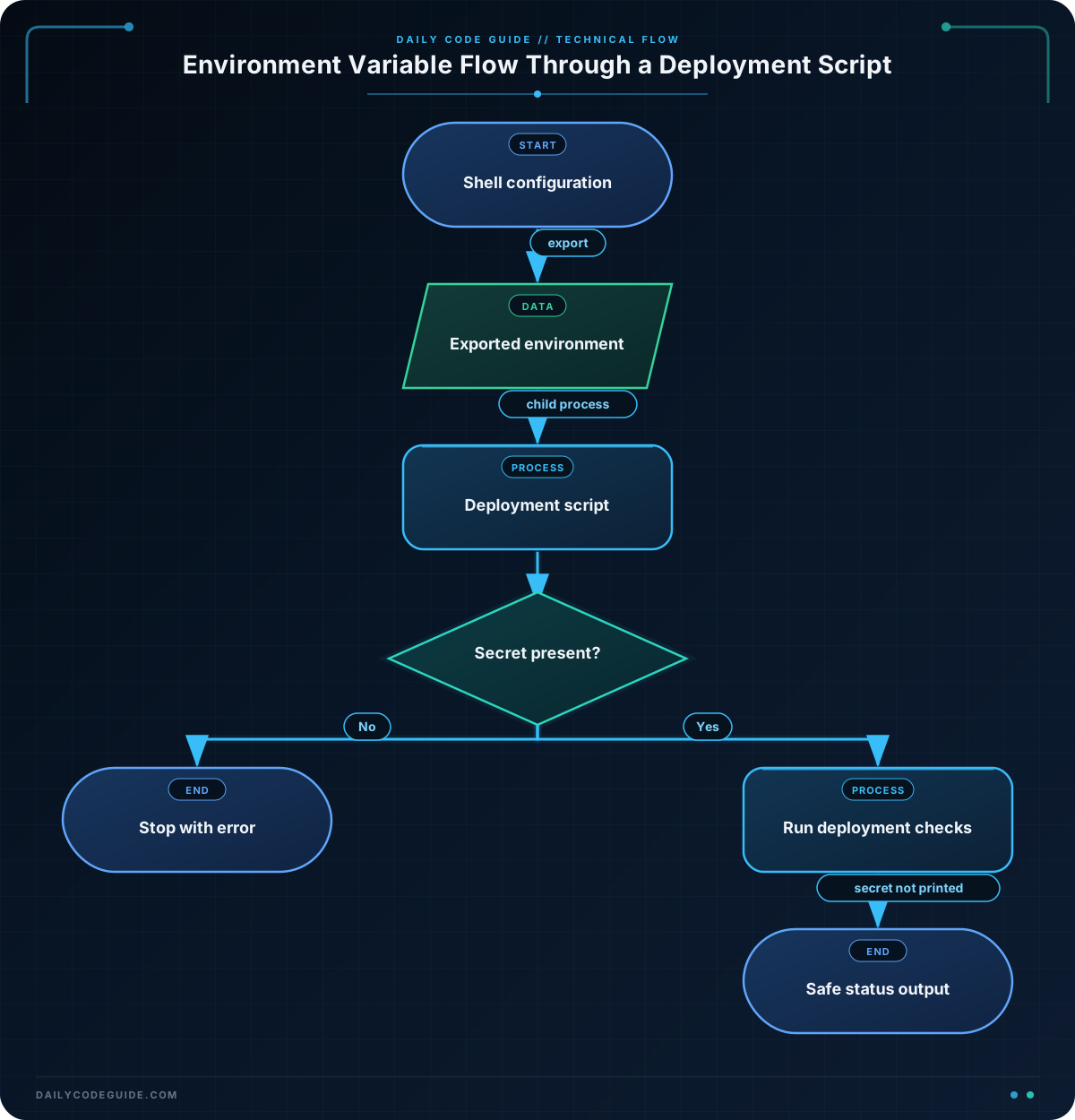
The first commands use export to place three values in the shell environment:
APP_ENVidentifies the deployment target.DEPLOY_USERidentifies the account performing the deployment.DEPLOY_TOKENrepresents a secret needed by the deployment.
When you run ./deploy.sh, Bash starts the script as a child process. Because the variables were exported, the script can read them.
The set -u command tells Bash to treat an unset variable as an error. The expression ${DEPLOY_TOKEN:-} safely substitutes an empty string when DEPLOY_TOKEN is missing. This lets the script check the variable and display a useful message instead of failing unexpectedly.
The condition checks whether the token is empty:
if [[ -z "${DEPLOY_TOKEN:-}" ]]; thenThe -z test is true when the value has zero characters. The script exits with status 1 if the token is missing. It never prints the token itself; it only confirms that a value was provided.
The script safely prints ordinary configuration values with quoted expansions:
printf 'Deploying as %s\n' "$DEPLOY_USER"The %s placeholder is replaced by the value of DEPLOY_USER. The token is deliberately not included in any output command.
Another Example
A script can also use an environment variable to choose deployment settings. In this example, the same script supports staging and production while keeping the service token outside the script.
#!/usr/bin/env bash

set -u

if [[ -z "${APP_ENV:-}" ]]; then
    echo "APP_ENV is required."
    exit 1
fi

if [[ -z "${SERVICE_TOKEN:-}" ]]; then
    echo "SERVICE_TOKEN is required."
    exit 1
fi

case "$APP_ENV" in
    staging)
        SERVICE_URL="https://staging.example.com"
        ;;
    production)
        SERVICE_URL="https://example.com"
        ;;
    *)
        printf 'Unknown APP_ENV: %s\n' "$APP_ENV"
        exit 1
        ;;
esac

printf 'Preparing deployment for %s\n' "$APP_ENV"
printf 'Service URL: %s\n' "$SERVICE_URL"
echo "Service token is configured."
echo "The application package is ready to upload."
You could run this script with different environments without changing the file:
export APP_ENV="production"
export SERVICE_TOKEN="practice-token-only"
./prepare-deploy.sh
The URL is configuration that can safely remain in the script for this example, while the token is supplied at runtime. In a real project, a CI platform or secret manager would usually provide the token.
Common Mistakes
Forgetting to export a variable
This creates a variable only in the current shell:
DEPLOY_TOKEN="practice-token-only"
./deploy.sh
Unless the script is designed to receive the value another way, deploy.sh will not see this variable. Use export when a child script or command needs it:
export DEPLOY_TOKEN="practice-token-only"
./deploy.sh
Adding spaces around the assignment
Bash assignments must not have spaces around the equals sign. Use APP_ENV="staging", not APP_ENV = "staging".
Printing a secret for debugging
A command such as echo "$DEPLOY_TOKEN" can expose the secret in terminal history, CI logs, or recorded build output. Check whether a secret exists, but do not print its value.
Expecting variables to persist forever
An exported variable normally exists only for the current shell session and the processes it starts. Closing the terminal removes it. This is useful for temporary deployment configuration, but persistent values should be managed carefully by the operating system, CI system, or deployment platform.
Try It Yourself
Create a script named show-deploy-config.sh that reads an exported APP_NAME and APP_ENV variable. Have it print both values in a short deployment message.
Then run these commands with your own sample values:
export APP_NAME="inventory-service"
export APP_ENV="staging"
chmod +x show-deploy-config.sh
./show-deploy-config.sh
As an extra safety step, add a check that displays an error and exits if either variable is missing.
Challenge
Write a Bash script named deploy-app.sh that prepares a deployment using environment variables.
- Read
APP_NAME,APP_ENV, andDEPLOY_TOKENfrom the environment. - Stop with an error if any required variable is missing or empty.
- Allow only
stagingandproductionas values forAPP_ENV. - Print the application name and environment.
- Confirm that the token is configured without printing the token.
Solution
#!/usr/bin/env bash

set -u

if [[ -z "${APP_NAME:-}" ]]; then
    echo "APP_NAME is required."
    exit 1
fi

if [[ -z "${APP_ENV:-}" ]]; then
    echo "APP_ENV is required."
    exit 1
fi

if [[ -z "${DEPLOY_TOKEN:-}" ]]; then
    echo "DEPLOY_TOKEN is required."
    exit 1
fi

case "$APP_ENV" in
    staging|production)
        ;;
    *)
        printf 'APP_ENV must be staging or production, not: %s\n' "$APP_ENV"
        exit 1
        ;;
esac

printf 'Preparing %s for %s\n' "$APP_NAME" "$APP_ENV"
echo "Deployment token is configured."
echo "Deployment checks passed."
The solution uses the :- form to safely handle variables that were never set. Each required value is checked before it is used. The case statement rejects unsupported environments, and the token is never written to the output.
Key Takeaways
- Use
export NAME="value"to make a variable available to child processes such as deployment scripts. - Read an environment variable with an expansion such as
"$NAME". - Use
${NAME:-}when checking a possibly unset variable in a script usingset -u. - Keep secrets out of source code and never print them in deployment logs.
- Validate required environment variables before a deployment begins.

