


What You’ll Learn
In this lesson, you will learn how to use Python’s built-in logging module to record useful application events, warnings, and errors without relying on print().
- Configure basic logging output.
- Choose an appropriate log level.
- Write informational messages and error messages.
- Record an exception with its traceback.
The Concept
Logging is a way for a program to record what it is doing. For example, an application might log when it starts, when a file is saved, or when an operation fails.
Although print() can display messages while you are developing, logging is more useful for real applications because log messages have levels and can later be sent to a file or another system.
The most common logging levels are:
- DEBUG: Detailed information useful while troubleshooting.
- INFO: Normal events, such as an application starting or completing a task.
- WARNING: Something unexpected happened, but the program can continue.
- ERROR: An operation failed.
- CRITICAL: A serious failure that may prevent the application from continuing.
Python provides the logging module in its standard library, so no separate installation is required. A simple configuration uses logging.basicConfig():
level=logging.INFOallows INFO messages and more serious messages to appear.format="%(levelname)s: %(message)s"controls how each message is displayed.
Basic Example
This program records events while saving a report. It uses INFO for normal events and ERROR when the report name is missing.
import logging

logging.basicConfig(
    level=logging.INFO,
    format="%(levelname)s: %(message)s"
)

logger = logging.getLogger(__name__)


def save_report(report_name):
    logger.info("Starting report save")

    try:
        if not report_name:
            raise ValueError("The report name cannot be empty")

        logger.info("Report saved: %s", report_name)
        return True
    except ValueError as error:
        logger.error("Could not save report: %s", error)
        return False


save_report("weekly-summary.txt")
save_report("")
Expected Output
The messages are written by the logging system rather than by print().
INFO: Starting report save
INFO: Report saved: weekly-summary.txt
INFO: Starting report save
ERROR: Could not save report: The report name cannot be empty
How the Code Works
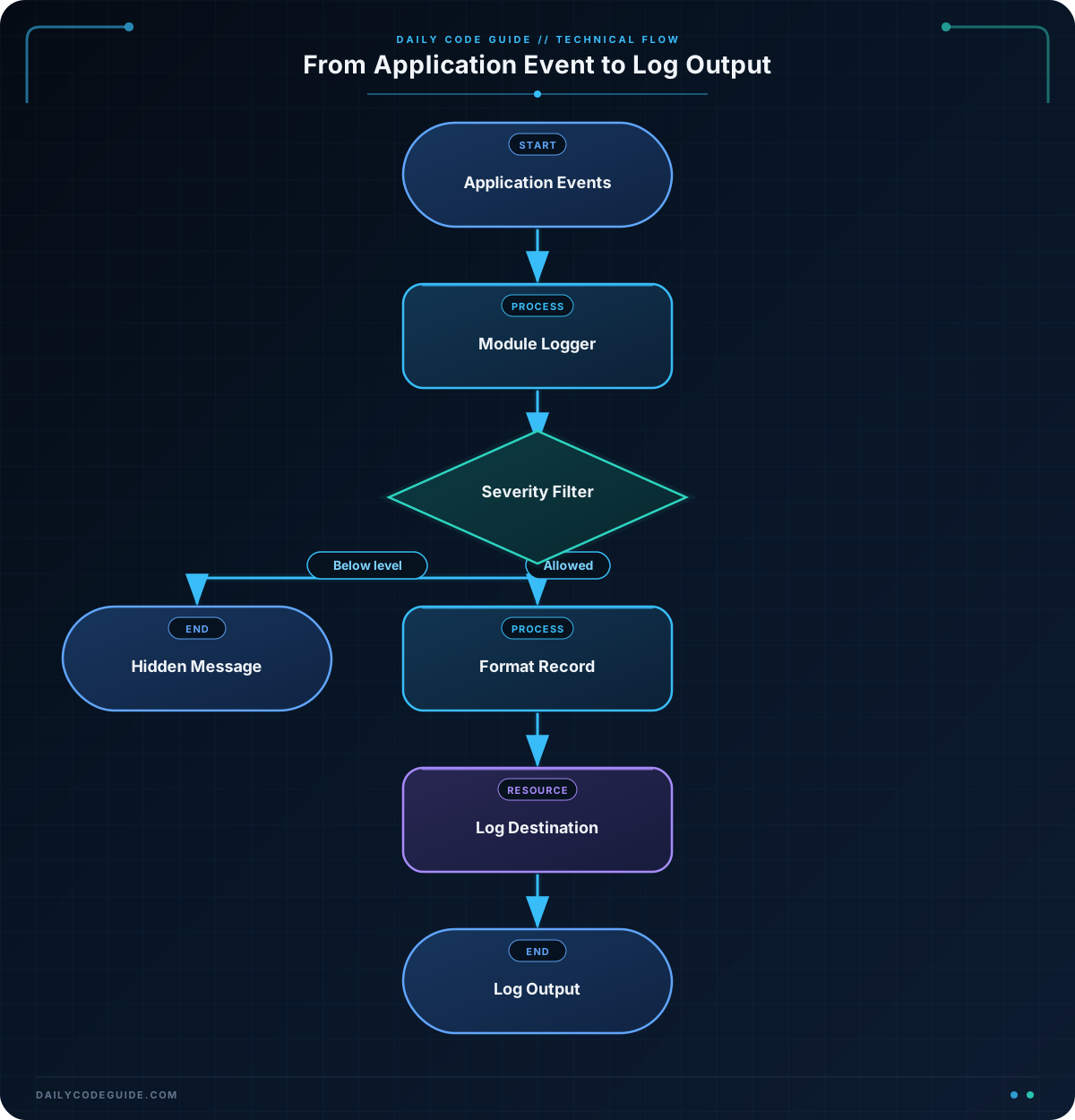
The first line imports Python’s standard logging module:
import loggingThe call to basicConfig() sets up a simple default logging configuration. It should usually appear near the beginning of a small program and before any log messages are created.
logging.basicConfig(
    level=logging.INFO,
    format="%(levelname)s: %(message)s"
)
The level setting determines the least serious message that will be shown. With INFO selected, INFO, WARNING, ERROR, and CRITICAL messages are displayed. DEBUG messages are hidden.
The format contains placeholders supplied by the logging module. %(levelname)s becomes the message level, such as INFO or ERROR, and %(message)s becomes the text you provide.
This line creates a logger for the current module:
logger = logging.getLogger(__name__)Using a logger object makes it easy to add messages throughout your functions. The __name__ value identifies the current Python module.
Logging methods can receive additional values. In this example, %s is replaced by report_name:
logger.info("Report saved: %s", report_name)This is preferable to building the message with string concatenation. The logging module can decide whether a message should be written before formatting all of its values.
The logger.error() call records that the operation failed, while the try and except blocks allow the program to handle the problem without stopping.
Another Example
Applications often need to record warnings as well as successful events and errors. This example checks user login attempts. A wrong password creates a WARNING message, while a missing account creates an ERROR message.
import logging

logging.basicConfig(
    level=logging.INFO,
    format="%(levelname)s: %(message)s"
)

logger = logging.getLogger(__name__)

accounts = {
    "maya": "green-tree",
    "devon": "river-stone"
}


def check_login(username, password):
    logger.info("Login attempt for user: %s", username)

    try:
        expected_password = accounts[username]
    except KeyError:
        logger.error("Unknown user: %s", username)
        return False

    if password != expected_password:
        logger.warning("Incorrect password for user: %s", username)
        return False

    logger.info("Login successful for user: %s", username)
    return True


check_login("maya", "green-tree")
check_login("maya", "wrong-password")
check_login("sam", "green-tree")
The successful login is an INFO event. An incorrect password is a WARNING because the program can continue, but the event may deserve attention. An unknown user is an ERROR because the requested account could not be found.
In a larger application, these messages could be configured to go to a log file instead of the console. The logging calls inside check_login() would not need to change.
Common Mistakes
- Calling
basicConfig()too late: Configure logging before the first log message. In larger programs, another module may already have configured logging, sobasicConfig()may not change that existing configuration. - Using ERROR for every message: Choose a level that describes the event accurately. Normal progress should use INFO, and recoverable unusual situations often fit WARNING.
- Expecting DEBUG messages to appear: DEBUG messages are hidden when the level is INFO. To see them during troubleshooting, use
level=logging.DEBUG. - Logging sensitive information: Do not record passwords, private keys, or other confidential data in log messages.
- Using
logger.exception()outside an exception handler: This method is designed to be used inside anexceptblock so it can include the current exception traceback.
Try It Yourself
Create a function named read_settings(settings) that accepts a dictionary. It should:
- Log an INFO message when it starts reading settings.
- Return and log the value of the
"theme"setting when it exists. - Log a WARNING and return
"light"when the setting is missing.
Configure the logger so INFO and WARNING messages are visible. Test the function with one dictionary containing a theme and one empty dictionary.
Challenge
Build a small function named process_payment(amount) that records payment events without using print().
- Log an INFO message when processing begins.
- Raise a
ValueErrorwhen the amount is less than or equal to zero. - Catch the error and record it with
logger.exception(). - Log an INFO message when a valid payment is completed.
- Return
Truefor a successful payment andFalsefor an invalid payment.
Solution
import logging

logging.basicConfig(
    level=logging.INFO,
    format="%(levelname)s: %(message)s"
)

logger = logging.getLogger(__name__)


def process_payment(amount):
    logger.info("Starting payment for $%.2f", amount)

    try:
        if amount <= 0:
            raise ValueError("Payment amount must be greater than zero")
    except ValueError:
        logger.exception("Payment could not be processed")
        return False

    logger.info("Payment completed for $%.2f", amount)
    return True


process_payment(24.50)
process_payment(0)
The function logs the beginning of every attempt. A non-positive amount raises a ValueError, and logger.exception() records both the error message and the traceback. A valid amount reaches the completion message and returns True.
Key Takeaways
- Python’s
loggingmodule records application events without relying onprint(). - Use logging levels such as INFO, WARNING, and ERROR to describe the importance of an event.
- Call
logging.basicConfig()before writing log messages in a small script. - Pass changing values as additional logging arguments, such as
logger.info("User: %s", username). - Use
logger.exception()inside anexceptblock when you need the exception traceback.

