


What You’ll Learn
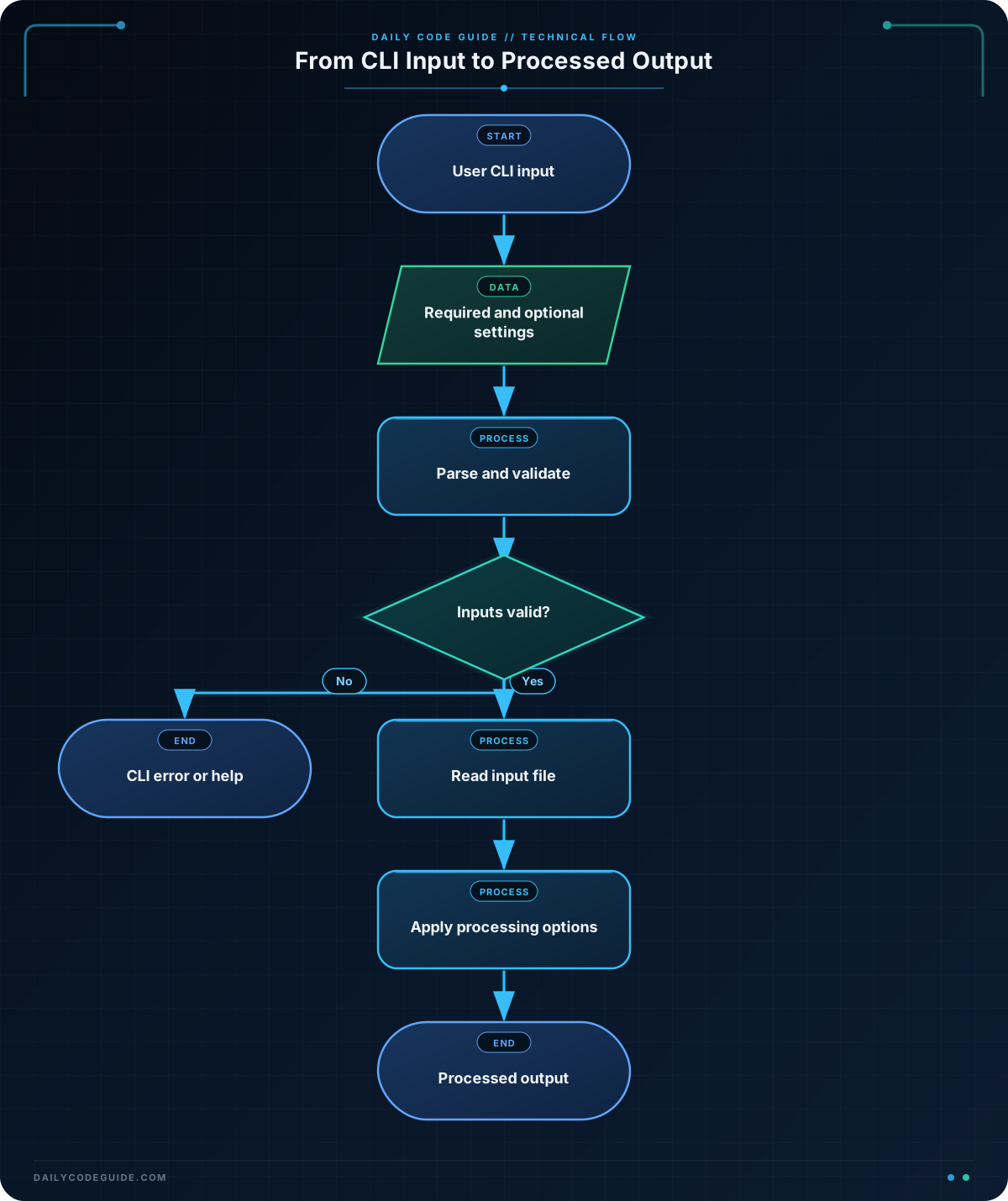
In this lesson, you will learn how to build a simple command-line interface (CLI) with Python’s argparse module. You will create a configurable data-processing script that accepts a required input file and optional settings.
- Understand positional arguments and optional flags.
- Provide default values and helpful descriptions.
- Validate command-line input with a custom type function.
- Read and process data based on the user’s options.
The Concept
A command-line interface lets users control a program by typing commands and options in a terminal. For example, a data-processing script might accept the name of a file and let the user choose how many records to process.
Python’s built-in argparse module makes this easier. Instead of manually examining a list of strings from sys.argv, you describe the arguments your program expects. argparse then:
- Reads the values supplied by the user.
- Converts values to types such as integers.
- Displays useful help text.
- Reports missing or invalid arguments.
There are two important kinds of arguments:
- Positional arguments: Required values identified by their position, such as an input filename.
- Optional arguments: Settings that usually begin with one or two hyphens, such as
--limit 3or--uppercase.
A typical argparse program creates a parser, adds arguments, and then calls parse_args().
Basic Example
The following script reads non-empty lines from a text file. It requires the input filename, allows the user to limit the number of records, and includes an optional flag for converting records to uppercase.
import argparse


def positive_int(value):
    try:
        number = int(value)
    except ValueError as error:
        raise argparse.ArgumentTypeError("must be an integer") from error

    if number < 1:
        raise argparse.ArgumentTypeError("must be at least 1")

    return number


def main():
    parser = argparse.ArgumentParser(
        description="Process non-empty records from a text file."
    )
    parser.add_argument(
        "input_file",
        help="path to the text file to process",
    )
    parser.add_argument(
        "--limit",
        type=positive_int,
        default=5,
        help="maximum number of records to process (default: 5)",
    )
    parser.add_argument(
        "--uppercase",
        action="store_true",
        help="convert each processed record to uppercase",
    )

    args = parser.parse_args()

    try:
        with open(args.input_file, encoding="utf-8") as file:
            records = [line.strip() for line in file if line.strip()]
    except OSError as error:
        parser.error(f"could not read {args.input_file}: {error}")

    selected_records = records[:args.limit]

    for record in selected_records:
        if args.uppercase:
            record = record.upper()
        print(record)

    print(
        f"Processed {len(selected_records)} of {len(records)} records."
    )


if __name__ == "__main__":
    main()
Create a file named records.txt with the following sample data:
order-1042
order-1043
order-1044
order-1045
order-1046
order-1047
Run the script with its required positional argument:
python record_processor.py records.txtExpected Output
order-1042
order-1043
order-1044
order-1045
order-1046
Processed 5 of 6 records.
The default limit is 5. You can change it and enable uppercase processing with optional arguments:
python record_processor.py records.txt --limit 2 --uppercaseExpected Output
ORDER-1042
ORDER-1043
Processed 2 of 6 records.
How the Code Works
import argparse loads Python’s standard command-line parsing module. You do not need to install it separately.
The positive_int() function validates values passed to --limit. The int() function converts text such as "3" into the integer 3. If conversion fails, the function raises argparse.ArgumentTypeError, which causes argparse to display a clear error message.
The check for number < 1 prevents values such as zero or negative numbers. A limit of zero would not be useful for this script, so rejecting it keeps the input meaningful.
ArgumentParser stores the program’s description and eventually manages the help screen:
parser = argparse.ArgumentParser(
    description="Process non-empty records from a text file."
)
The positional argument is added without leading hyphens. Because it is positional and no nargs or required setting changes its behavior, the user must provide it:
parser.add_argument(
    "input_file",
    help="path to the text file to process",
)
The --limit option is optional because its name begins with hyphens. Its value is validated by positive_int, and it uses 5 when the user does not provide the option:
parser.add_argument(
    "--limit",
    type=positive_int,
    default=5,
    help="maximum number of records to process (default: 5)",
)
The --uppercase option is a Boolean flag. With action="store_true", args.uppercase is False when the flag is absent and True when the user includes it.
Calling parse_args() reads the command line and creates an object named args. The values can then be accessed as args.input_file, args.limit, and args.uppercase.
The with open(...) block reads the input file safely. The list comprehension keeps only non-empty lines and removes surrounding whitespace. The try and except block turns file errors into a readable command-line error instead of an unhandled traceback.
You can also ask the program to explain its options:
python record_processor.py --helpThis displays the parser description, the required input filename, the optional settings, and their help text.
Another Example
Here is a different data-processing CLI. It reads a file of log entries, counts entries by severity, and lets the user select which severity levels to include. The positional file argument is still required, but this example uses an optional --level option with choices and a --show-counts flag.
import argparse
from collections import Counter


def main():
    parser = argparse.ArgumentParser(
        description="Summarize severity levels in a log file."
    )
    parser.add_argument(
        "log_file",
        help="path to the log file",
    )
    parser.add_argument(
        "--level",
        choices=["INFO", "WARNING", "ERROR"],
        help="include only one severity level",
    )
    parser.add_argument(
        "--show-counts",
        action="store_true",
        help="display the number of entries found for each level",
    )

    args = parser.parse_args()

    try:
        with open(args.log_file, encoding="utf-8") as file:
            entries = [line.strip() for line in file if line.strip()]
    except OSError as error:
        parser.error(f"could not read {args.log_file}: {error}")

    if args.level is not None:
        entries = [
            entry for entry in entries
            if entry.startswith(args.level)
        ]

    print(f"Matching entries: {len(entries)}")

    if args.show_counts:
        counts = Counter(
            entry.split(maxsplit=1)[0]
            for entry in entries
        )
        for level in ["INFO", "WARNING", "ERROR"]:
            print(f"{level}: {counts[level]}")


if __name__ == "__main__":
    main()
For a log file containing lines that begin with INFO, WARNING, or ERROR, a user could run:
python log_summary.py application.log --level ERROR --show-countsThe choices setting performs validation automatically. If the user types a severity that is not one of the three listed choices, argparse reports the valid options.
Common Mistakes
- Forgetting the required positional argument: Running the first script without a filename causes an error because
input_fileis required. - Using a string as a number: Without
type=positive_int, an option value would remain text. Providing a conversion or validation function makes numeric processing safer. - Expecting a flag to need a value: A flag using
action="store_true"is enabled simply by including it. Write--uppercase, not--uppercase true. - Using the wrong option name in the code: The option
--show-countsbecomesargs.show_counts. Hyphens are converted to underscores in the attribute name. - Skipping help text: Descriptions and
helpmessages make a CLI much easier to use, especially when someone returns to the script later.
Try It Yourself
Extend the record processor so it accepts an optional --contains argument. When supplied, print only records that contain the given text. Keep the existing input filename, limit, and uppercase options.
For example, a command like this should process only records containing 1044:
python record_processor.py records.txt --contains 1044Challenge
Build a command-line script named score_report.py that processes a text file containing one student score per line.
Your script should:
- Require the input filename as a positional argument.
- Accept an optional
--passing-scoreinteger with a default of 60. - Reject a passing score below 0 or above 100.
- Accept an optional
--failed-onlyflag. - Print each selected score and a final count.
For the input file below, the command should print scores below the passing score when --failed-only is used.
88
54
72
41
95
Solution
import argparse


def score_value(value):
    try:
        score = int(value)
    except ValueError as error:
        raise argparse.ArgumentTypeError(
            "score must be an integer"
        ) from error

    if score < 0 or score > 100:
        raise argparse.ArgumentTypeError(
            "score must be between 0 and 100"
        )

    return score


def main():
    parser = argparse.ArgumentParser(
        description="Report student scores from a text file."
    )
    parser.add_argument(
        "input_file",
        help="path to the file containing one score per line",
    )
    parser.add_argument(
        "--passing-score",
        type=score_value,
        default=60,
        help="minimum passing score (default: 60)",
    )
    parser.add_argument(
        "--failed-only",
        action="store_true",
        help="show only scores below the passing score",
    )

    args = parser.parse_args()

    try:
        with open(args.input_file, encoding="utf-8") as file:
            scores = [
                score_value(line.strip())
                for line in file
                if line.strip()
            ]
    except OSError as error:
        parser.error(f"could not read {args.input_file}: {error}")
    except argparse.ArgumentTypeError as error:
        parser.error(f"invalid score in {args.input_file}: {error}")

    selected_scores = scores

    if args.failed_only:
        selected_scores = [
            score for score in scores
            if score < args.passing_score
        ]

    for score in selected_scores:
        print(score)

    print(f"Selected {len(selected_scores)} of {len(scores)} scores.")


if __name__ == "__main__":
    main()
Run the solution with the sample data:
python score_report.py scores.txt --passing-score 60 --failed-onlyThe output is:
54
41
Selected 2 of 5 scores.
The custom score_value function validates both the optional passing score and every score read from the file. The flag controls whether the script filters the data, while the default passing score is used when the option is omitted.
Key Takeaways
argparsecreates user-friendly command-line interfaces for Python programs.- Positional arguments are required by default, while options such as
--limitare optional. - Use
defaultto provide a setting when the user does not specify one. - Use
action="store_true"for simple on/off flags. - Use
type, custom validation functions, andchoicesto reject invalid input.

