


What You’ll Learn
In this lesson, you’ll learn how to use Terraform variable validation rules to reject unsafe or unsupported configuration values before infrastructure is deployed.
- Write validation rules with the
validationblock. - Restrict environment names, AWS regions, and EC2 instance types.
- Understand how validation failures appear during
terraform plan. - Recognize common mistakes involving case sensitivity, allowed values, and validation scope.
The Concept
Terraform input variables make a configuration reusable. However, accepting any string can allow invalid deployment settings, such as an unknown environment name, an unsupported AWS region, or an instance type that your team does not permit.
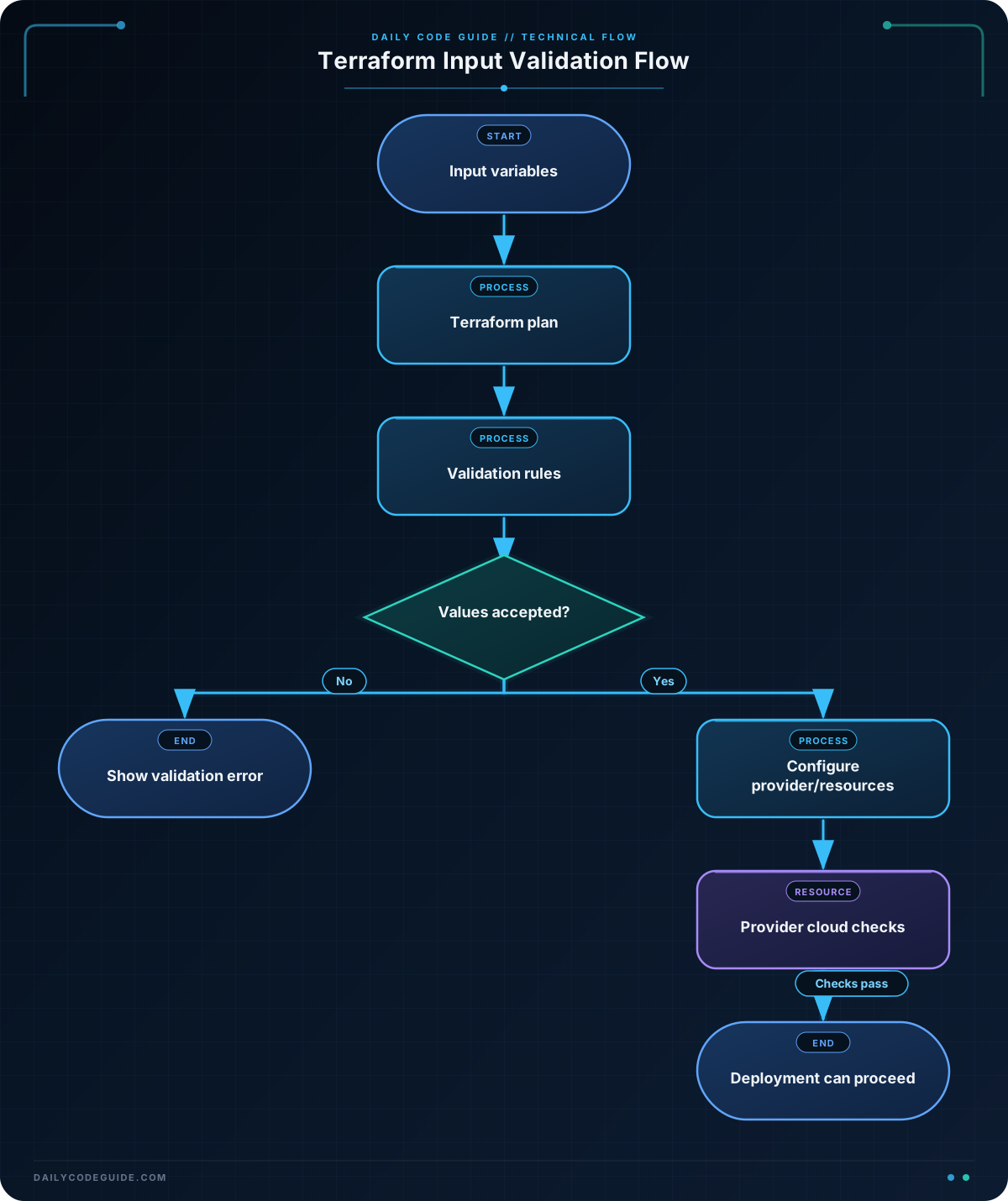
A variable’s validation block defines a condition that must evaluate to true. If the condition is false, Terraform stops and displays the associated error_message before it creates or changes infrastructure.
A validation rule belongs inside a variable block and has two required arguments:
condition: an expression that returnstruefor acceptable input.error_message: a helpful explanation shown when the condition fails.
Validation is especially useful for project conventions and deployment guardrails. It can prevent typos and restrict values to a documented set, but it does not replace every other kind of check. For example, a region may be in your approved list but still lack a particular AWS resource or AMI. Provider-level errors and resource-specific checks are still necessary.
Basic Example
The following configuration accepts only three environment names, three AWS regions, and three approved EC2 instance types. The resource uses those values to configure an EC2 instance.
terraform {
  required_providers {
    aws = {
      source  = "hashicorp/aws"
      version = "~> 5.0"
    }
  }

  required_version = ">= 1.2.0"
}

variable "environment_name" {
  description = "Deployment environment name"
  type        = string
  default     = "staging"

  validation {
    condition     = contains(["development", "staging", "production"], var.environment_name)
    error_message = "environment_name must be development, staging, or production."
  }
}

variable "aws_region" {
  description = "AWS region for the deployment"
  type        = string
  default     = "us-east-1"

  validation {
    condition     = contains(["us-east-1", "us-west-2", "eu-west-1"], var.aws_region)
    error_message = "aws_region must be us-east-1, us-west-2, or eu-west-1."
  }
}

variable "instance_type" {
  description = "Approved EC2 instance size"
  type        = string
  default     = "t3.micro"

  validation {
    condition     = contains(["t3.micro", "t3.small", "t3.medium"], var.instance_type)
    error_message = "instance_type must be t3.micro, t3.small, or t3.medium."
  }
}

variable "ami_id" {
  description = "An AMI ID that exists in aws_region"
  type        = string
}

provider "aws" {
  region = var.aws_region
}

resource "aws_instance" "web" {
  ami           = var.ami_id
  instance_type = var.instance_type

  tags = {
    Name        = "${var.environment_name}-web"
    Environment = var.environment_name
  }
}

output "instance_name" {
  value = aws_instance.web.tags.Name
}
After supplying a valid AMI ID, you could create a plan with commands like these:
terraform init
terraform plan -var="ami_id=ami-0123456789abcdef0"
Expected Output
If someone supplies an unsupported instance type, Terraform rejects the value during planning instead of continuing toward deployment.
Error: Invalid value for variable

  on main.tf line 31:
  31: variable "instance_type" {

instance_type must be t3.micro, t3.small, or t3.medium.

This was checked by the validation rule declared at main.tf:36,3-13.
How the Code Works
The contains function checks whether a value exists in a list. For example:
contains(["development", "staging", "production"], var.environment_name)This expression returns true when the variable matches one of the three strings. Terraform strings are case-sensitive, so "Production" does not match "production".
The aws_region variable is used twice: its validation rule checks the approved list, and the provider uses the accepted value to select the AWS region. The instance_type variable is similarly validated before it is assigned to aws_instance.web.
The ami_id variable is intentionally not validated against a fixed list. AMI IDs are region-specific and change over time. A hard-coded list would quickly become difficult to maintain. The caller must provide an AMI that is valid for the selected region.
Terraform evaluates variable validation when it has a concrete value for the variable, commonly during terraform plan. terraform validate is still useful for checking configuration structure and syntax, but it does not replace planning with real input values.
Another Example
Real projects often pass deployment settings together as an object. You can validate each attribute of that object in one variable. This example also uses a numeric validation rule for a minimum number of application nodes.
variable "deployment_settings" {
  description = "Validated settings for an application deployment"

  type = object({
    environment  = string
    region       = string
    instance_size = string
    node_count   = number
  })

  validation {
    condition = (
      contains(["development", "staging", "production"], var.deployment_settings.environment) &&
      contains(["us-east-1", "us-west-2", "eu-west-1"], var.deployment_settings.region) &&
      contains(["t3.small", "t3.medium", "t3.large"], var.deployment_settings.instance_size) &&
      var.deployment_settings.node_count >= 2
    )

    error_message = "Use an approved environment, region, and instance size; node_count must be at least 2."
  }
}

locals {
  application_name = "orders-api-${var.deployment_settings.environment}"
}

output "deployment_summary" {
  value = {
    name          = local.application_name
    region        = var.deployment_settings.region
    instance_size = var.deployment_settings.instance_size
    node_count    = var.deployment_settings.node_count
  }
}
A value for this object could be supplied in a Terraform variable file:
deployment_settings = {
  environment   = "staging"
  region        = "us-west-2"
  instance_size = "t3.medium"
  node_count    = 3
}
This pattern keeps related settings together, while the validation rule still protects each important deployment choice. For larger configurations, separate validation blocks may produce more specific error messages than one combined condition.
Common Mistakes
- Using an unsupported expression: A validation condition must evaluate to a Boolean value. Functions such as
contains, comparisons, and logical operators are appropriate; returning a string is not. - Forgetting case sensitivity: A value such as
"STAGING"fails a list containing only"staging". Either standardize the input convention or explicitly support the alternative values. - Using validation as a cloud availability check: An approved region or instance type may still be unavailable for a particular account, subscription, quota, or resource. Validation enforces your known policy; the provider still performs cloud-specific checks.
- Writing an unhelpful error message: Tell the user which values are accepted and how to correct the input.
- Assuming
terraform validatetests variable values: Useterraform planwith the relevant variable file or-vararguments to exercise value validation.
Try It Yourself
Create a variable named backup_retention_days with type number. Add a validation rule that accepts values from 1 through 30, inclusive. Then create a variable named log_level that accepts only "error", "warning", or "info".
Run a plan with one valid value and one invalid value. Observe how Terraform reports the validation error before any resource changes are proposed.
Challenge
Create a Terraform configuration for a web deployment with these requirements:
environment_namemust be"dev","qa", or"prod".aws_regionmust be"us-east-1"or"us-west-2".instance_typemust be"t3.micro","t3.small", or"t3.medium".instance_countmust be between 1 and 5, inclusive.- Create a local value named
deployment_labelin the formatenvironment_name-region. - Output the label, selected region, instance type, and count as an object.
Add a validation block to every variable that needs one. Use different error messages so a user can identify which setting needs correction.
Solution
variable "environment_name" {
  description = "Short name for the deployment environment"
  type        = string
  default     = "dev"

  validation {
    condition     = contains(["dev", "qa", "prod"], var.environment_name)
    error_message = "environment_name must be dev, qa, or prod."
  }
}

variable "aws_region" {
  description = "AWS region for the web deployment"
  type        = string
  default     = "us-east-1"

  validation {
    condition     = contains(["us-east-1", "us-west-2"], var.aws_region)
    error_message = "aws_region must be us-east-1 or us-west-2."
  }
}

variable "instance_type" {
  description = "EC2 instance type for web servers"
  type        = string
  default     = "t3.micro"

  validation {
    condition     = contains(["t3.micro", "t3.small", "t3.medium"], var.instance_type)
    error_message = "instance_type must be t3.micro, t3.small, or t3.medium."
  }
}

variable "instance_count" {
  description = "Number of web instances"
  type        = number
  default     = 1

  validation {
    condition     = var.instance_count >= 1 && var.instance_count <= 5
    error_message = "instance_count must be between 1 and 5."
  }
}

locals {
  deployment_label = "${var.environment_name}-${var.aws_region}"
}

output "deployment_summary" {
  value = {
    label         = local.deployment_label
    region        = var.aws_region
    instance_type = var.instance_type
    count         = var.instance_count
  }
}
Each list-based rule uses contains to enforce an approved set. The count rule uses two comparisons joined with &&, so both the lower and upper limits must be satisfied. The local value combines already validated inputs, and the output exposes the resulting deployment settings.
Key Takeaways
- Terraform variable validation rejects invalid input before a plan proceeds toward deployment.
- Use
containsfor approved environment names, regions, and instance types. - Use comparison expressions for numeric limits such as instance counts.
- Validation rules are case-sensitive and should have clear corrective error messages.
- Variable validation provides policy guardrails, but it does not guarantee that a cloud resource is available or deployable.

