


What You’ll Learn
In this lesson, you’ll use Bash and xargs to run a command for many backup files at the same time. You’ll learn how to use -P to limit the number of concurrent jobs so parallel processing does not overload the system.
- How
xargsconverts input lines into command arguments - How
-Pcontrols the maximum number of parallel jobs - How
-0safely handles filenames containing spaces or unusual characters - How to pass each filename into a Bash command running through
xargs - Why parallel output order and resource usage require attention
The Concept
Normally, a pipeline processes input one item at a time. For example, a command might find hundreds of backup files and then run a verification command sequentially for each file.
xargs can take items from standard input and use them as arguments to another command. Its -P option allows several invocations of that command to run concurrently:
-n 1passes one input item to each command invocation.-P 3allows up to three command invocations to run at once.-0expects null-delimited input, which safely supports filenames containing spaces, quotes, or newlines.-rprevents GNUxargsfrom running the command when there is no input.
This is useful when processing many independent files, such as verifying, compressing, uploading, or generating checksums for backups. The parallel limit is important: unrestricted concurrency can consume too much CPU, memory, disk bandwidth, or network bandwidth.
The examples use GNU xargs, which is common on Linux systems. Check xargs --help on your platform if an option behaves differently.
Basic Example
The following script finds compressed backup archives and verifies each one. The sleep command represents a more expensive backup-processing operation. Replace it with the real command used by your backup workflow.
#!/usr/bin/env bash
set -euo pipefail

backup_dir="${1:-./backups}"
max_jobs="${2:-3}"

if [[ ! -d "$backup_dir" ]]; then
    printf 'Backup directory does not exist: %s\n' "$backup_dir" >&2
    exit 1
fi

if [[ ! "$max_jobs" =~ ^[1-9][0-9]*$ ]]; then
    printf 'The job limit must be a positive integer.\n' >&2
    exit 1
fi

find "$backup_dir" -type f -name '*.tar.gz' -print0 |
    xargs -0 -r -n 1 -P "$max_jobs" bash -c '
        backup_file=$1

        printf "Starting %s (PID %s)\n" "$backup_file" "$BASHPID"
        sleep 1
        printf "Finished %s (PID %s)\n" "$backup_file" "$BASHPID"
    ' _
Save the script as process-backups.sh, make it executable, and run it with a backup directory and a maximum number of jobs:
chmod +x process-backups.sh
./process-backups.sh /srv/backups 3
Expected Output
If the directory contains several archives, up to three files will be processed at the same time. The exact order depends on file-system traversal and process scheduling.
Starting /srv/backups/server-a.tar.gz (PID 24110)
Starting /srv/backups/server-b.tar.gz (PID 24111)
Starting /srv/backups/server-c.tar.gz (PID 24112)
Finished /srv/backups/server-a.tar.gz (PID 24110)
Starting /srv/backups/server-d.tar.gz (PID 24125)
Finished /srv/backups/server-b.tar.gz (PID 24111)
Finished /srv/backups/server-c.tar.gz (PID 24112)
Finished /srv/backups/server-d.tar.gz (PID 24125)
Process IDs and output order will differ on your system. The important behavior is that no more than three jobs run concurrently.
How the Code Works
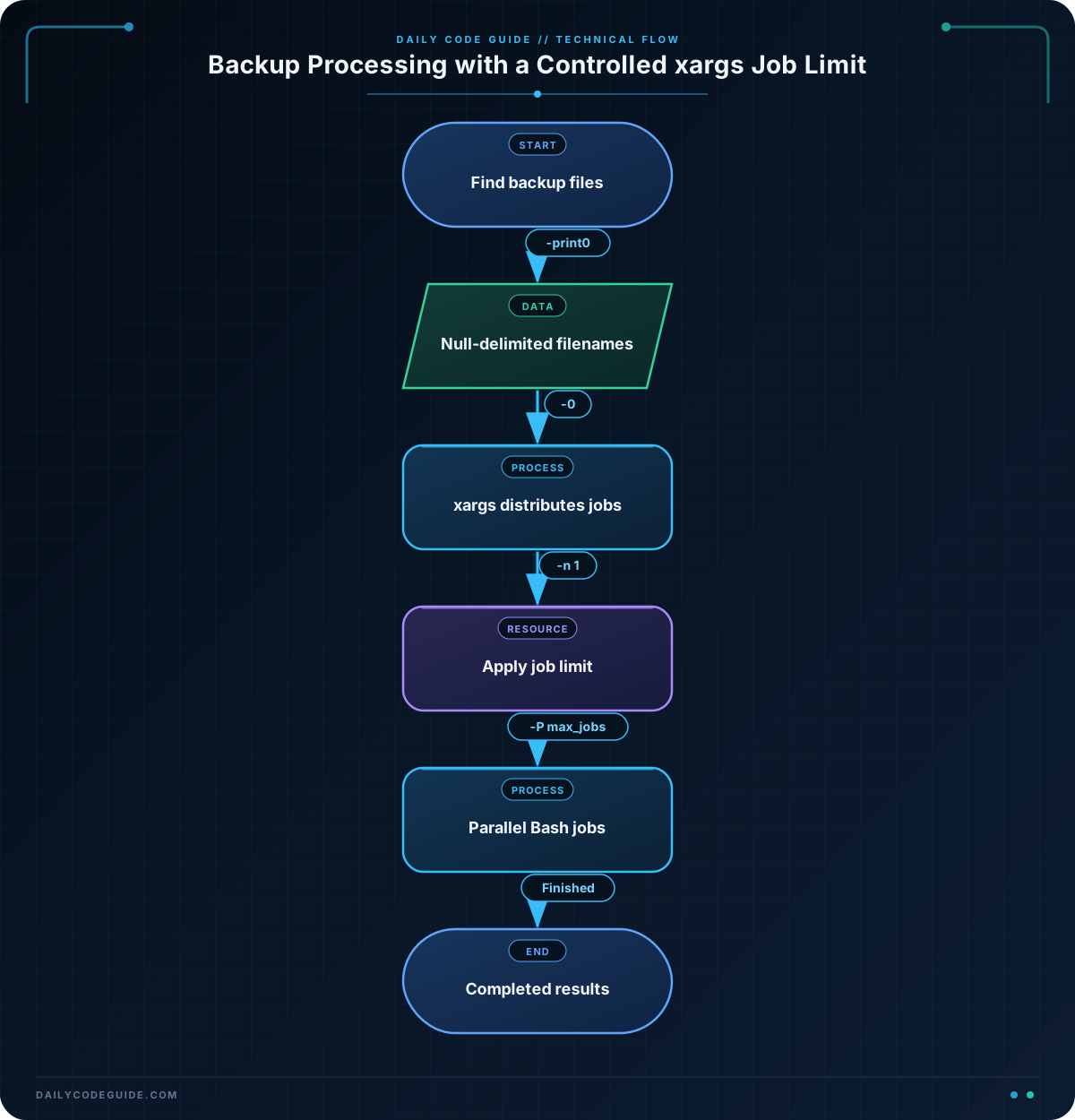
The find command produces matching files recursively:
-type fselects regular files.-name '*.tar.gz'selects compressed tar archives.-print0separates filenames with a null character instead of a newline.
Null delimiters matter because a filename such as weekly backup.tar.gz contains a space. Using find with -print0 and xargs -0 keeps that filename as one argument.
The pipeline then passes each filename to:
xargs -0 -r -n 1 -P "$max_jobs" bash -c '...'-n 1 means that each Bash process receives one backup filename. -P "$max_jobs" caps the number of Bash processes running simultaneously. If the limit is three, xargs starts three jobs, waits for one to finish, and then starts another.
The bash -c command needs special argument handling. The underscore after the script becomes $0 inside the new Bash process, while the filename becomes $1:
bash -c 'backup_file=$1' _ "$filename"That placeholder is intentional. Without it, the first filename would be assigned to $0 instead of $1.
Parallel jobs do not finish in input order, so their output can appear interleaved. Also, the best value for -P depends on the work. CPU-heavy tasks may benefit from a limit near the number of CPU cores, while disk-heavy tasks may need a smaller limit to avoid saturating storage.
Another Example
This example performs a real validation operation instead of using sleep. It checks every gzip-compressed backup concurrently with gzip -t. A successful check means the compressed stream can be read without detecting corruption.
#!/usr/bin/env bash
set -euo pipefail

backup_dir="${1:-./backups}"
max_jobs="${2:-2}"

if [[ ! -d "$backup_dir" ]]; then
    printf 'Backup directory does not exist: %s\n' "$backup_dir" >&2
    exit 1
fi

find "$backup_dir" -type f -name '*.tar.gz' -print0 |
    xargs -0 -r -n 1 -P "$max_jobs" bash -c '
        backup_file=$1

        if gzip -t -- "$backup_file"; then
            printf "OK: %s\n" "$backup_file"
        else
            printf "FAILED: %s\n" "$backup_file" >&2
            exit 1
        fi
    ' _
Here, a maximum of two archives are checked at once. The -- after gzip -t prevents a filename beginning with a hyphen from being interpreted as an option.
Common Mistakes
- Using
find ... -printwith ordinaryxargs: Newlines and spaces in filenames can cause one filename to be split into multiple arguments. Use-print0andxargs -0together. - Forgetting the
bash -cplaceholder: The argument immediately after the command string becomes$0. Use a placeholder such as_so the filename is available as$1. - Assuming output order is preserved: Parallel processes finish at different times. Do not use printed order as evidence of processing order.
- Setting
-Ptoo high: More jobs are not always faster. Test a reasonable limit and consider CPU, memory, storage, and network capacity. - Using
-P 0carelessly: On GNUxargs, zero means to run as many processes as possible. That can overwhelm a production system.
Try It Yourself
Create a directory containing several files ending in .tar.gz, then run the basic script with a job limit of two. Change the limit to one and compare the timing and output order. Finally, rename one file so that it contains a space and confirm that the null-delimited pipeline still processes it as one file.
Challenge
Write a Bash script named write-checksums.sh that meets these requirements:
- Accept a backup directory as the first argument, defaulting to
./backups. - Accept a maximum parallel job count as the second argument, defaulting to
2. - Find
.tar.gzfiles directly inside that directory. - Use
xargswith null-delimited input and a bounded number of parallel jobs. - Write one SHA-256 checksum file beside an output directory named
checksums. - For example,
server-a.tar.gzshould producechecksums/server-a.tar.gz.sha256. - Print a message after each checksum has been written.
Solution
#!/usr/bin/env bash
set -euo pipefail

backup_dir="${1:-./backups}"
max_jobs="${2:-2}"
output_dir="$backup_dir/checksums"

if [[ ! -d "$backup_dir" ]]; then
    printf 'Backup directory does not exist: %s\n' "$backup_dir" >&2
    exit 1
fi

if [[ ! "$max_jobs" =~ ^[1-9][0-9]*$ ]]; then
    printf 'The job limit must be a positive integer.\n' >&2
    exit 1
fi

mkdir -p "$output_dir"
export output_dir

find "$backup_dir" -maxdepth 1 -type f -name '*.tar.gz' -print0 |
    xargs -0 -r -n 1 -P "$max_jobs" bash -c '
        backup_file=$1
        archive_name=$(basename "$backup_file")
        checksum_file="$output_dir/$archive_name.sha256"

        sha256sum -- "$backup_file" > "$checksum_file"
        printf "Wrote %s\n" "$checksum_file"
    ' _
The script exports output_dir so each Bash process started by xargs can access it. Each process receives one archive, calculates its checksum, and writes to a separate output file. Because the output filenames are different, the parallel jobs do not overwrite one another.
Key Takeaways
xargs -Pruns independent commands concurrently while enforcing a maximum number of active jobs.- Use
find -print0together withxargs -0for robust filename handling. - When using
bash -c, provide a placeholder for$0so the input filename arrives as$1. - Parallel output can be unordered, and increasing concurrency can increase system load rather than improve performance.
- Choose a job limit based on the resources consumed by the actual backup operation.

