


What You’ll Learn
In this lesson, you will learn how to use SQL temporary tables to stage intermediate customer data during a multi-step reporting workflow. The examples use PostgreSQL syntax, including CREATE TEMPORARY TABLE, INSERT, updates, queries, and cleanup.
- Create and populate a temporary table.
- Transform staged customer data across multiple SQL statements.
- Query temporary data to produce a report.
- Understand temporary-table scope, cleanup, and common mistakes.
The Concept
A temporary table is a table created for short-term work. It behaves much like a regular table while your session is using it, but the database automatically removes it when its scope ends.
Temporary tables are useful when a reporting workflow has several stages. Instead of repeating a complicated query in every step, you can calculate an intermediate result once, store it temporarily, and then query or transform that result with simpler statements.
For example, a customer report might need to:
- Select active customers.
- Calculate the number of orders and total spending for each customer.
- Classify customers into reporting segments.
- Summarize those segments by region.
A common PostgreSQL pattern is:
CREATE TEMPORARY TABLE table_name (
    column_name data_type
);
The table exists only for the current database session unless you explicitly choose a different transaction behavior. Other database systems use slightly different syntax, such as CREATE TEMP TABLE, so check the documentation for the database engine you are using.
Basic Example
Assume the database already contains these permanent tables:
customers(customer_id, customer_name, region, is_active)orders(order_id, customer_id, order_total, order_status)
The following workflow stages active customers, inserts order metrics, classifies each customer, and produces a regional summary.
CREATE TEMPORARY TABLE customer_stage (
    customer_id integer PRIMARY KEY,
    customer_name varchar(100) NOT NULL,
    region varchar(50) NOT NULL,
    lifetime_value numeric(12, 2) NOT NULL DEFAULT 0,
    order_count integer NOT NULL DEFAULT 0,
    customer_segment varchar(20)
);

INSERT INTO customer_stage (
    customer_id,
    customer_name,
    region
)
SELECT
    customer_id,
    customer_name,
    region
FROM customers
WHERE is_active = true;

UPDATE customer_stage AS stage
SET
    lifetime_value = metrics.lifetime_value,
    order_count = metrics.order_count
FROM (
    SELECT
        customer_id,
        COALESCE(SUM(order_total), 0) AS lifetime_value,
        COUNT(*) AS order_count
    FROM orders
    WHERE order_status = 'completed'
    GROUP BY customer_id
) AS metrics
WHERE stage.customer_id = metrics.customer_id;

UPDATE customer_stage
SET customer_segment = CASE
    WHEN lifetime_value >= 1000 THEN 'high-value'
    WHEN lifetime_value >= 250 THEN 'growing'
    ELSE 'standard'
END;

SELECT
    region,
    customer_segment,
    COUNT(*) AS customer_count,
    ROUND(AVG(lifetime_value), 2) AS average_lifetime_value
FROM customer_stage
GROUP BY region, customer_segment
ORDER BY region, customer_segment;

DROP TABLE customer_stage;
Expected Output
The exact values depend on the data in customers and orders. For example, if the staged data contains the following customer segments, the final query could produce:
region  customer_segment  customer_count  average_lifetime_value
East    growing            1               480.00
East    high-value         1               1520.00
West    standard           2               125.00
How the Code Works
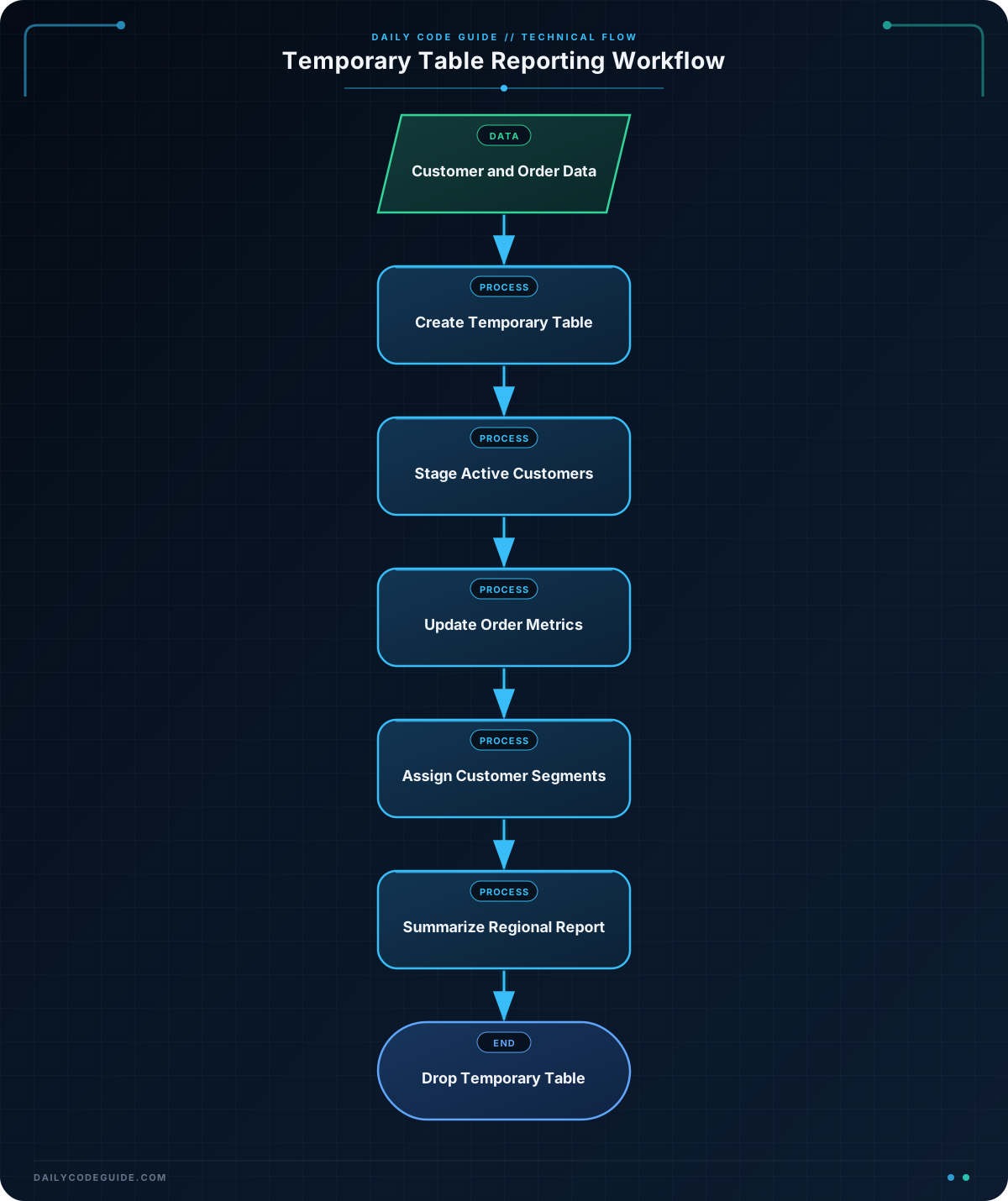
The CREATE TEMPORARY TABLE statement creates a staging table with a defined structure. The primary key prevents two rows from having the same customer_id. The default values allow the first insert to create customer rows before order metrics are calculated.
The first INSERT copies only active customers into the temporary table. This gives the rest of the workflow a smaller, focused dataset.
The next statement calculates completed-order metrics in a derived query. The UPDATE ... FROM syntax then joins those metrics to the staged customers and fills in lifetime_value and order_count.
COALESCE(SUM(order_total), 0) ensures that a customer without completed orders receives a value of zero instead of NULL. The COUNT(*) value is zero for such a customer because customers without matching orders do not appear in the aggregate result; their default value remains in the staging table.
The second update uses a CASE expression to assign a reporting segment. Since this work happens in the temporary table, the original customer and order data is not modified.
The final SELECT reads only from the staged data. This is the main benefit of the pattern: later report queries do not need to repeat the customer filtering and order aggregation.
Finally, DROP TABLE removes the temporary table explicitly. PostgreSQL would normally remove it when the session ends, but explicit cleanup makes the workflow’s lifecycle clear and prevents a later statement in the same session from accidentally reading stale staging data.
Another Example
A report may need to compare each customer’s latest completed order with that customer’s lifetime spending. This example uses two temporary tables: one for customer metrics and another for a regional summary. The second table is populated with INSERT, which is useful when a workflow builds several intermediate results.
CREATE TEMPORARY TABLE customer_metrics
ON COMMIT DROP AS
SELECT
    c.customer_id,
    c.customer_name,
    c.region,
    COALESCE(SUM(o.order_total), 0) AS lifetime_value,
    MAX(o.order_date) AS latest_order_date
FROM customers AS c
LEFT JOIN orders AS o
    ON o.customer_id = c.customer_id
    AND o.order_status = 'completed'
WHERE c.is_active = true
GROUP BY
    c.customer_id,
    c.customer_name,
    c.region;

CREATE TEMPORARY TABLE regional_customer_report (
    region varchar(50) PRIMARY KEY,
    active_customer_count integer NOT NULL,
    customers_with_recent_orders integer NOT NULL,
    total_lifetime_value numeric(14, 2) NOT NULL
)
ON COMMIT DROP;

INSERT INTO regional_customer_report (
    region,
    active_customer_count,
    customers_with_recent_orders,
    total_lifetime_value
)
SELECT
    region,
    COUNT(*) AS active_customer_count,
    COUNT(*) FILTER (
        WHERE latest_order_date >= CURRENT_DATE - INTERVAL '90 days'
    ) AS customers_with_recent_orders,
    SUM(lifetime_value) AS total_lifetime_value
FROM customer_metrics
GROUP BY region;

SELECT
    region,
    active_customer_count,
    customers_with_recent_orders,
    total_lifetime_value
FROM regional_customer_report
ORDER BY region;
ON COMMIT DROP tells PostgreSQL to remove each temporary table when the current transaction is committed. This is different from relying only on session cleanup. Use it when the staged data should never survive the transaction that created it.
Common Mistakes
- Expecting a temporary table to be permanent: Temporary tables are session-scoped or transaction-scoped, depending on how they are created. A different database connection generally cannot query the table.
- Forgetting that temporary tables can hide permanent tables: If a temporary table has the same name as a permanent table, unqualified queries may resolve to the temporary table first. Use clear names such as
customer_stage, or schema-qualify permanent tables when necessary. - Leaving stale data in a reused session: A connection pool may reuse the same database session. Drop temporary tables explicitly, use
ON COMMIT DROP, or useCREATE TEMPORARY TABLE ... ON COMMIT DROPwhen appropriate. - Using a temporary table when a CTE is enough: A CTE is often simpler for a single statement. A temporary table is more useful when multiple statements need to read or modify the intermediate data.
- Ignoring indexes on larger staging tables: A temporary table may still contain many rows. If later joins or filters repeatedly use a column such as
customer_id, an index can improve performance, although creating and maintaining that index also has a cost.
Try It Yourself
Create a temporary table named customer_order_stage that contains active customers and these columns:
customer_idcustomer_nameregioncompleted_order_countcompleted_order_value
Populate the customer columns from customers, then use a separate UPDATE statement to fill in the completed-order metrics from orders. Finally, query customers whose completed order value is at least 500 and drop the temporary table.
Challenge
Build a temporary-table workflow for a customer retention report.
Your solution must:
- Stage every active customer in a temporary table.
- Calculate each customer’s completed order count and completed order value.
- Assign the segment
loyalto customers with at least five completed orders and at least 1000 in completed order value. - Assign
engagedto customers with at least two completed orders who do not qualify as loyal. - Assign
newto all remaining active customers. - Return one row per region and segment, including customer count and total completed order value.
- Remove the temporary table after the report query.
Solution
CREATE TEMPORARY TABLE customer_retention_stage (
    customer_id integer PRIMARY KEY,
    region varchar(50) NOT NULL,
    completed_order_count integer NOT NULL DEFAULT 0,
    completed_order_value numeric(12, 2) NOT NULL DEFAULT 0,
    retention_segment varchar(20)
);

INSERT INTO customer_retention_stage (
    customer_id,
    region
)
SELECT
    customer_id,
    region
FROM customers
WHERE is_active = true;

UPDATE customer_retention_stage AS stage
SET
    completed_order_count = order_metrics.completed_order_count,
    completed_order_value = order_metrics.completed_order_value
FROM (
    SELECT
        customer_id,
        COUNT(*) AS completed_order_count,
        COALESCE(SUM(order_total), 0) AS completed_order_value
    FROM orders
    WHERE order_status = 'completed'
    GROUP BY customer_id
) AS order_metrics
WHERE stage.customer_id = order_metrics.customer_id;

UPDATE customer_retention_stage
SET retention_segment = CASE
    WHEN completed_order_count >= 5
         AND completed_order_value >= 1000
        THEN 'loyal'
    WHEN completed_order_count >= 2
        THEN 'engaged'
    ELSE 'new'
END;

SELECT
    region,
    retention_segment,
    COUNT(*) AS customer_count,
    SUM(completed_order_value) AS total_completed_order_value
FROM customer_retention_stage
GROUP BY region, retention_segment
ORDER BY region, retention_segment;

DROP TABLE customer_retention_stage;
The workflow first creates one row for every active customer, so customers without completed orders are still included. Their metric columns retain the default value of zero. The aggregate update fills in metrics for customers with completed orders, and the CASE expression applies the segment rules in priority order: loyal customers are identified before engaged customers. The final query summarizes the staged results, and the explicit drop removes the temporary table.
Key Takeaways
- Temporary tables store intermediate results for a limited database session or transaction.
- They are useful when several SQL statements need to reuse or transform the same staged data.
- Use
INSERT,UPDATE, and ordinarySELECTstatements to build a multi-step reporting workflow. - Use defaults or
COALESCEto handle customers with no matching orders. - Choose a CTE for a single-statement transformation and a temporary table when intermediate data must be reused across statements.

