


What You’ll Learn
In this lesson, you’ll use the AWS CLI to search CloudTrail events and determine which IAM identity changed an AWS resource, which API action was called, and when the change occurred.
- Filter CloudTrail events by resource name and time range.
- Extract useful fields such as the event time, API action, user, and event ID.
- Investigate a resource change with a second lookup for the complete event.
- Recognize regional, retention, permission, and pagination limitations.
The Concept
AWS CloudTrail records API activity in your AWS account. When someone changes an AWS resource through the console, AWS CLI, SDK, or another AWS service, CloudTrail may record an event describing that operation.
The AWS CLI cloudtrail lookup-events command searches CloudTrail event history. It is useful during incident investigations, change reviews, and troubleshooting. For example, if an S3 bucket’s configuration changed unexpectedly, you can search for events associated with that bucket and inspect:
- EventTime: When the API request occurred.
- EventName: The API action, such as
PutBucketVersioning. - Username: The IAM identity associated with the request as reported by CloudTrail.
- EventId: A unique identifier that lets you retrieve the event again.
The most important filter is --lookup-attributes. It accepts an attribute key and value, such as a resource name, event name, username, or event ID. In this lesson, the resource name is the primary filter because we want to investigate one AWS resource.
CloudTrail event history lookup is regional and normally covers only the most recent 90 days of management events. Set --region to the region where the activity was recorded, and make sure the identity running the command has permission to call cloudtrail:LookupEvents.
Basic Example
Suppose an administrator notices that versioning settings on the S3 bucket prod-orders-bucket changed. The following command searches for CloudTrail events involving that bucket during a one-hour investigation window.
aws cloudtrail lookup-events \
    --lookup-attributes AttributeKey=ResourceName,AttributeValue=prod-orders-bucket \
    --start-time "2025-02-14T09:00:00Z" \
    --end-time "2025-02-14T10:00:00Z" \
    --max-results 50 \
    --query 'Events[].{Time:EventTime,Action:EventName,User:Username,Id:EventId}' \
    --output table \
    --region us-east-1
The timestamps use UTC and are written in ISO 8601 format. Replace them, the bucket name, and the region with values from your own investigation.
Expected Output
CloudTrail data depends on your account, so the exact rows will differ. With matching events, the table has a shape similar to this:
---------------------------------------------------------------------------
|                              LookupEvents                               |
+----------------------+--------------------------+------------------------+
|  Action              |  Id                      |  Time                  |
+----------------------+--------------------------+------------------------+
|  PutBucketVersioning |  8d7c1f24-1234-4d8a-9f20-example | 2025-02-14T09:42:18Z |
+----------------------+--------------------------+------------------------+
|  User                |  analyst@example.com     |
+----------------------+--------------------------+------------------------+
If no events match, the command returns an empty result set rather than inventing a result. A missing result does not always prove that no change occurred; the resource may be in another region, the event may be older than the available history, or the action may not be covered by the event history you are searching.
How the Code Works
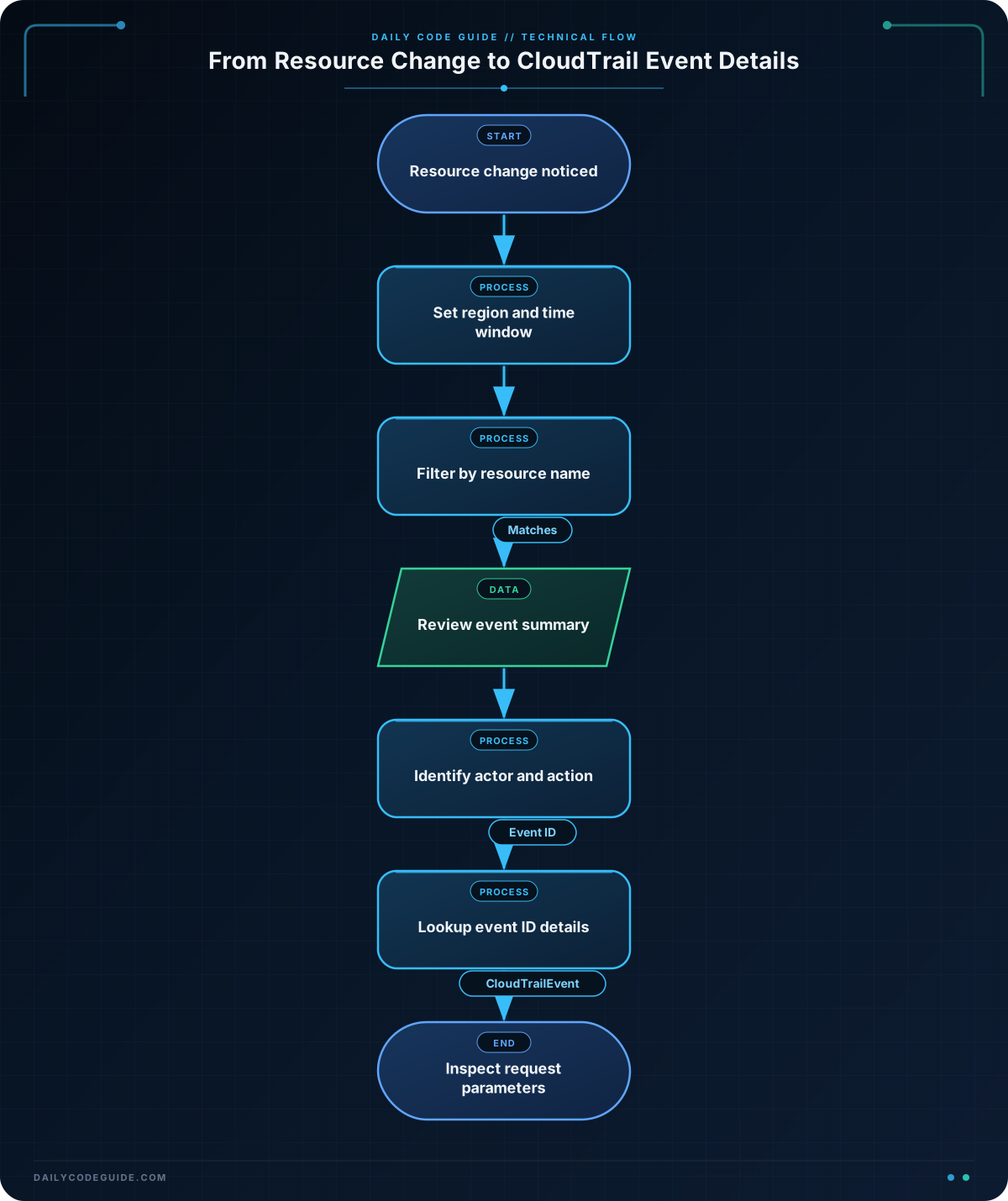
The command uses several important options:
--lookup-attributes AttributeKey=ResourceName,AttributeValue=prod-orders-bucketrestricts the search to events associated with the specified resource. The resource value must match the name recorded by CloudTrail.--start-timeand--end-timelimit the search window. Using a narrow window reduces unrelated results and makes the investigation easier to review.--max-results 50requests up to 50 events in the response. A busy resource may have more events, so inspect pagination or use a narrower time range when necessary.--queryapplies a JMESPath expression to the AWS CLI response. It selects theEventsarray and creates shorter objects containing only the four fields needed for an initial review.--output tabledisplays those selected fields in a readable table. Use--output jsonwhen you need machine-readable output or more detailed processing.--region us-east-1tells the CLI which regional CloudTrail event history to search.
The first lookup is usually a discovery step. Once you find a suspicious event ID, search by that ID to retrieve the complete event record, including the request parameters. Those parameters can reveal exactly what changed, such as whether bucket versioning was enabled or suspended.
aws cloudtrail lookup-events \
    --lookup-attributes AttributeKey=EventId,AttributeValue=8d7c1f24-1234-4d8a-9f20-example \
    --query 'Events[0].CloudTrailEvent' \
    --output text \
    --region us-east-1
The CloudTrailEvent field is returned as a JSON string. The detailed record can include the source IP address, user agent, request parameters, and the identity’s ARN. These details help distinguish a human console action from an automated deployment or AWS service operation.
Another Example
Now investigate a different type of change: an IAM role named application-deployer may have received a new policy. Searching by the role’s resource name and selecting the event name, user, and time can reveal whether the change came from an expected deployment identity.
aws cloudtrail lookup-events \
    --lookup-attributes AttributeKey=ResourceName,AttributeValue=application-deployer \
    --start-time "2025-02-14T00:00:00Z" \
    --end-time "2025-02-15T00:00:00Z" \
    --query 'Events[?EventName==`AttachRolePolicy` || EventName==`PutRolePolicy` || EventName==`DeleteRolePolicy`].{When:EventTime,Action:EventName,Actor:Username,EventId:EventId}' \
    --output table \
    --region us-east-1
This query adds a JMESPath filter before constructing the output objects. It keeps only three policy-related API actions. If the output is empty, broaden the event-name filter or first run a query without the filter to discover the exact action recorded in your account.
Common Mistakes
- Searching the wrong region: CloudTrail lookup-events searches the region specified by the command. Check the resource’s region and repeat the lookup there if necessary.
- Using a display name that CloudTrail did not record: The value for
ResourceNamemust match the resource identifier in the event. For some services, this may be a name; for others, it may be an ARN or resource ID. - Assuming the username is always a human: An assumed role, federated session, or AWS service may appear in the identity information. Inspect the full
CloudTrailEventwhenUsernameis ambiguous. - Ignoring the time zone: CloudTrail timestamps are commonly displayed in UTC. Convert local incident times to UTC before setting the lookup window.
- Stopping after the first page: A resource with frequent activity can produce more results than one response contains. Narrow the time range, use CLI pagination options, or repeat the lookup with the returned pagination token when working directly with the API.
- Expecting every data access operation to appear: Lookup-events is primarily used for CloudTrail management event history. Data events and other event categories may require a trail or event data store configured to record them.
Try It Yourself
Choose an AWS resource that you are authorized to investigate, such as an S3 bucket or IAM role. Search a recent time window and produce a table containing the event time, event name, username, and event ID.
After finding a likely change event, run a second lookup by its event ID and inspect the complete CloudTrailEvent value. Identify the request parameter that shows what setting or policy changed.
Challenge
An EC2 security group may have been modified unexpectedly. Write a Bash command that:
- Searches the security group
sg-0123456789abcdef0. - Checks the previous 24 hours.
- Uses the
us-east-1region. - Shows the event time, API action, actor, and event ID.
- Limits the results to ingress and egress rule changes.
Use these event names in your filter: AuthorizeSecurityGroupIngress, RevokeSecurityGroupIngress, AuthorizeSecurityGroupEgress, and RevokeSecurityGroupEgress.
Solution
The solution calculates UTC timestamps in Bash and passes them to the AWS CLI. The date -d form is available on GNU/Linux systems. On macOS, use an equivalent timestamp method or provide explicit ISO 8601 timestamps.
END_TIME=$(date -u +"%Y-%m-%dT%H:%M:%SZ")
START_TIME=$(date -u -d "24 hours ago" +"%Y-%m-%dT%H:%M:%SZ")

aws cloudtrail lookup-events \
    --lookup-attributes AttributeKey=ResourceName,AttributeValue=sg-0123456789abcdef0 \
    --start-time "$START_TIME" \
    --end-time "$END_TIME" \
    --query 'Events[?EventName==`AuthorizeSecurityGroupIngress` || EventName==`RevokeSecurityGroupIngress` || EventName==`AuthorizeSecurityGroupEgress` || EventName==`RevokeSecurityGroupEgress`].{Time:EventTime,Action:EventName,Actor:Username,EventId:EventId}' \
    --output table \
    --region us-east-1
START_TIME and END_TIME define a moving 24-hour window. The JMESPath expression filters the returned events to security-group rule operations and then selects the fields needed to identify who made each change and when it occurred.
Key Takeaways
aws cloudtrail lookup-eventscan connect an AWS resource change to an API action, identity, and timestamp.- Use
--lookup-attributeswith a resource name, then narrow the search with UTC time boundaries. - Use
--queryto turn large CloudTrail responses into focused investigation tables. - Search by
EventIdto inspect the complete event and its request parameters. - Always verify the region, retention period, permissions, resource identifier, and pagination when interpreting results.


Thank you for this information. I was able to run through this without any issues and I have been testing other ways to use the CLI as well.