


What You’ll Learn
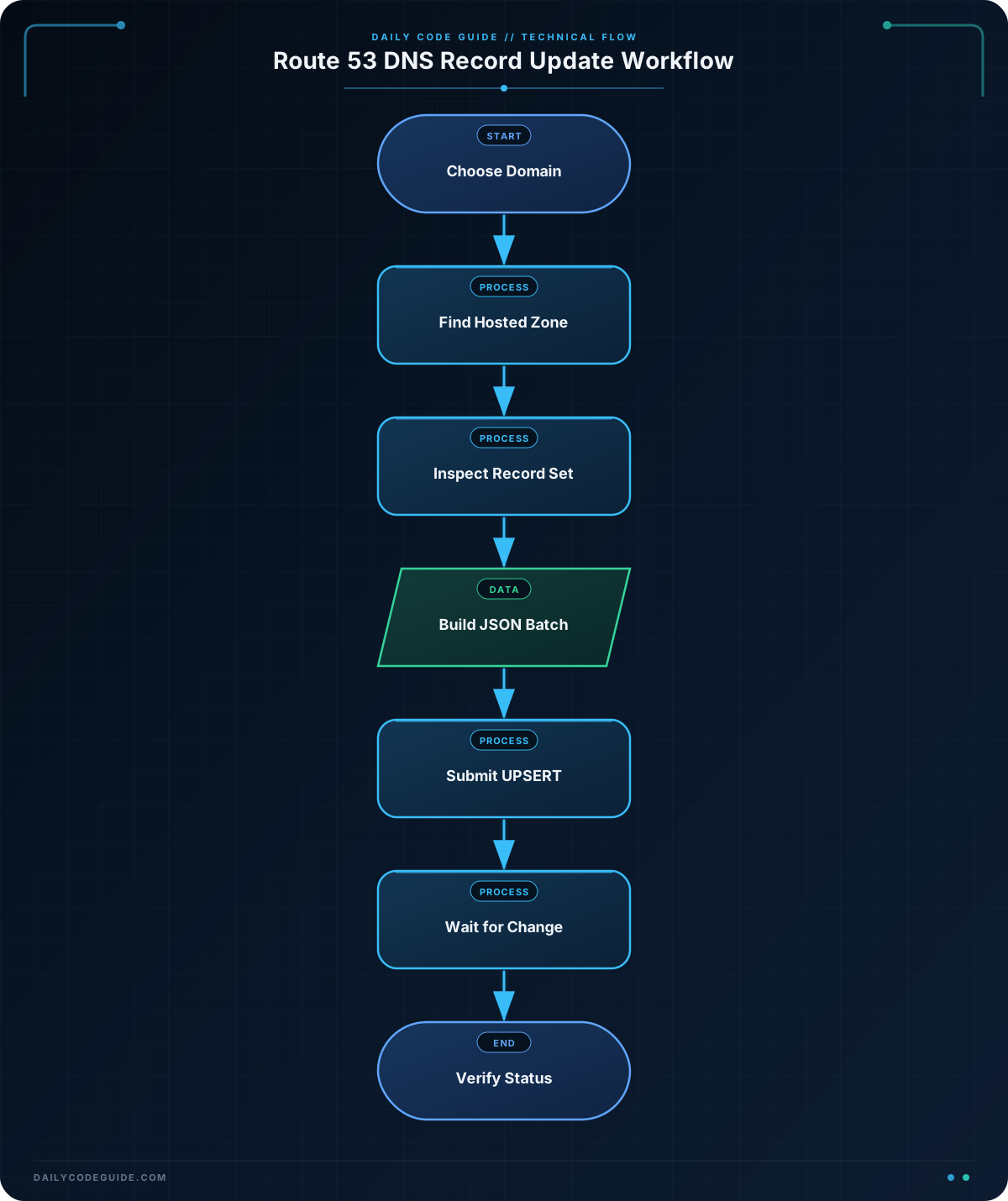
In this lesson, you will use AWS CLI Route 53 commands to inspect and safely update DNS records for a cloud-hosted application. You will work with hosted zone IDs, record sets, JMESPath queries, and change batches.
- Find the hosted zone for a domain.
- List and filter DNS record sets.
- Create or update records with
UPSERT. - Wait for a Route 53 change to complete.
- Avoid common mistakes involving trailing dots, record types, and hosted zone selection.
The Concept
Amazon Route 53 stores DNS records inside hosted zones. A hosted zone represents the DNS data for a domain, such as example.com. Its record sets contain names such as app.example.com, record types such as A or CNAME, and values that point clients to an application endpoint.
The AWS CLI provides several Route 53 commands for working with these records:
list-hosted-zones-by-namefinds hosted zones by domain name.list-resource-record-setsdisplays records in a hosted zone.change-resource-record-setscreates, updates, or deletes records.get-changechecks the status of a submitted change.
Route 53 changes are submitted as a change batch. Each change specifies an action such as CREATE, DELETE, or UPSERT. UPSERT is useful in deployment scripts because it creates a record when it does not exist or replaces its current values when it does.
Before you begin, confirm that you are using a supported AWS CLI version. The AWS CLI v2 migration guide explains why upgrading from CLI v1 may be important for continued support.
Basic Example
Suppose a cloud-hosted application is served at app.example.com. The following commands find the authoritative hosted zone and inspect the record set for the application.
DOMAIN="example.com"
RECORD_NAME="app.example.com."
HOSTED_ZONE_ID=$(aws route53 list-hosted-zones-by-name \
    --dns-name "$DOMAIN" \
    --query 'HostedZones[0].Id' \
    --output text)

echo "Hosted zone: $HOSTED_ZONE_ID"

aws route53 list-resource-record-sets \
    --hosted-zone-id "$HOSTED_ZONE_ID" \
    --query "ResourceRecordSets[?Name == \`$RECORD_NAME\`]" \
    --output table
Expected Output
The hosted zone ID and record values depend on your AWS account. A matching record might produce output similar to this:
Hosted zone: /hostedzone/Z0123456789ABCDEF

-----------------------------------------------------------------------
|                         ListResourceRecordSets                      |
+----------------------+--------+-------------------------------------+
|  app.example.com.    |  CNAME |  app-alb-123456.us-east-1.elb.amazonaws.com. |
+----------------------+--------+-------------------------------------+
How the Code Works
list-hosted-zones-by-name returns hosted zones beginning at the requested domain name. The JMESPath expression HostedZones[0].Id selects the first matching zone’s ID.
The returned ID usually looks like /hostedzone/Z0123456789ABCDEF. Pass that complete value to --hosted-zone-id; the leading /hostedzone/ is accepted by the AWS CLI.
The record name includes a trailing dot because DNS represents a fully qualified domain name that way. Route 53 commonly returns names with this dot, so including it makes exact filtering predictable.
The second command lists every record in the zone and filters the response with JMESPath. This is preferable to manually scanning a large hosted zone. You can remove the query when you need to inspect all records:
aws route53 list-resource-record-sets \
    --hosted-zone-id "$HOSTED_ZONE_ID" \
    --output table
When a record points to an Application Load Balancer, inspect the load balancer separately before changing DNS. The AWS CLI load balancer commands guide covers listeners, target groups, and backend health.
Another Example
During a deployment, you may need to update an API hostname and a verification TXT record together. The following change batch uses UPSERT, so it works whether these records already exist or need to be created.
DOMAIN="example.com"
HOSTED_ZONE_ID=$(aws route53 list-hosted-zones-by-name \
    --dns-name "$DOMAIN" \
    --query 'HostedZones[0].Id' \
    --output text)

cat > dns-change.json <<'JSON'
{
  "Comment": "Point the production API at the current application endpoint",
  "Changes": [
    {
      "Action": "UPSERT",
      "ResourceRecordSet": {
        "Name": "api.example.com.",
        "Type": "CNAME",
        "TTL": 60,
        "ResourceRecords": [
          {
            "Value": "api-green.internal.example.net."
          }
        ]
      }
    },
    {
      "Action": "UPSERT",
      "ResourceRecordSet": {
        "Name": "_deployment.example.com.",
        "Type": "TXT",
        "TTL": 300,
        "ResourceRecords": [
          {
            "Value": "\"release-2025-03-08\""
          }
        ]
      }
    }
  ]
}
JSON

CHANGE_ID=$(aws route53 change-resource-record-sets \
    --hosted-zone-id "$HOSTED_ZONE_ID" \
    --change-batch file://dns-change.json \
    --query 'ChangeInfo.Id' \
    --output text)

aws route53 wait resource-record-sets-changed --id "$CHANGE_ID"

aws route53 get-change \
    --id "$CHANGE_ID" \
    --query 'ChangeInfo.[Id,Status,SubmittedAt]' \
    --output table
The file:// prefix tells the AWS CLI to load the change batch from a local JSON file. The two changes are submitted together, and the wait command does not return until Route 53 reports that the change has propagated through the Route 53 system.
A CNAME is appropriate here because the application hostname points to another DNS hostname. If the target is an AWS resource that supports Route 53 alias records, such as an Application Load Balancer, an alias record may be more appropriate than a CNAME. Alias records use fields such as AliasTarget rather than TTL and ResourceRecords.
Common Mistakes
Using the wrong hosted zone
AWS accounts can contain multiple hosted zones for similar domains, and public and private hosted zones can have the same domain name. Inspect the complete result from list-hosted-zones-by-name when the first match is ambiguous. A private hosted zone is only used for DNS resolution inside its associated VPCs.
Forgetting the trailing dot
Route 53 normally displays a fully qualified record name as api.example.com.. An exact query for api.example.com without the dot may not match the returned value.
Using CREATE when the record already exists
CREATE fails if a record with the same name and type already exists. Use UPSERT when the deployment should work in both the create and update cases. However, do not use UPSERT blindly for records managed by another system; it can overwrite values that system owns.
Deleting without the complete current record
A DELETE operation must describe the record’s current name, type, TTL, and values. Inspect the record first and preserve its exact values. For sensitive production changes, save the current record output so you have a recovery reference.
Assuming DNS changes are instant everywhere
Route 53 reports the status of its change, but recursive DNS resolvers may continue serving cached answers until the previous TTL expires. Also verify that your AWS identity has permissions such as route53:ListHostedZonesByName, route53:ListResourceRecordSets, and route53:ChangeResourceRecordSets.
Try It Yourself
Choose a test or staging domain that you control. Find its hosted zone, list all records, and then filter the results to one application hostname such as staging.example.com.. Compare the record’s current type, TTL, and target with the endpoint your application is actually using.
Do not change a production record yet. The goal is to practice identifying the correct hosted zone and record set before submitting a change.
Challenge
Write a Bash-based Route 53 update for a staging application with these requirements:
- Find the hosted zone for
example.com. - Update
staging.example.com.to the CNAME targetstaging-alb-987654.us-west-2.elb.amazonaws.com.. - Use a TTL of 120 seconds.
- Use
UPSERTso the script supports both a first deployment and later deployments. - Wait for the change to complete.
- Print the final change ID and status.
Use a JSON change-batch file rather than placing the entire JSON document directly in the command arguments.
Solution
DOMAIN="example.com"
HOSTED_ZONE_ID=$(aws route53 list-hosted-zones-by-name \
    --dns-name "$DOMAIN" \
    --query 'HostedZones[0].Id' \
    --output text)

cat > staging-dns-change.json <<'JSON'
{
  "Comment": "Route staging traffic to the current load balancer",
  "Changes": [
    {
      "Action": "UPSERT",
      "ResourceRecordSet": {
        "Name": "staging.example.com.",
        "Type": "CNAME",
        "TTL": 120,
        "ResourceRecords": [
          {
            "Value": "staging-alb-987654.us-west-2.elb.amazonaws.com."
          }
        ]
      }
    }
  ]
}
JSON

CHANGE_ID=$(aws route53 change-resource-record-sets \
    --hosted-zone-id "$HOSTED_ZONE_ID" \
    --change-batch file://staging-dns-change.json \
    --query 'ChangeInfo.Id' \
    --output text)

aws route53 wait resource-record-sets-changed --id "$CHANGE_ID"

STATUS=$(aws route53 get-change \
    --id "$CHANGE_ID" \
    --query 'ChangeInfo.Status' \
    --output text)

printf 'Change %s completed with status: %s\n' "$CHANGE_ID" "$STATUS"
The script discovers the hosted zone before making the change, writes a valid Route 53 change batch, and captures the returned change ID. The waiter prevents the script from reporting completion until Route 53 has processed the request. For an audit trail after a change, use a CloudTrail event lookup to identify the IAM identity and API request associated with the update.
Key Takeaways
- Use
list-hosted-zones-by-nameto locate a domain’s hosted zone before inspecting records. - Use
list-resource-record-setswith a JMESPath query to inspect a specific application record. - Use a JSON change batch with
UPSERTfor repeatable create-or-update deployments. - Preserve exact record names, including trailing dots, and verify the correct public or private hosted zone.
- Use
wait resource-record-sets-changedand CloudTrail auditing when DNS updates are part of a production workflow.

