


What You’ll Learn
In this lesson, you’ll learn how Python’s asyncio library coordinates I/O-bound work without making your program wait for each operation to finish before starting the next one. You’ll use it to request multiple HTTP resources concurrently with aiohttp.
- Understand coroutines, the event loop, and
await. - Run multiple HTTP requests concurrently with
asyncio.gather(). - Handle request timeouts and HTTP errors.
- Limit concurrency when sending many requests.
The Concept
Network requests are I/O-bound: most of their time is spent waiting for a remote server to respond. If a program makes five requests one after another, it waits for the first request before starting the second.
Asynchronous programming allows a coroutine to pause while it waits for I/O. During that pause, the event loop can let another coroutine run. This does not make Python execute all code simultaneously on multiple CPU cores. Instead, it efficiently shares waiting time between tasks.
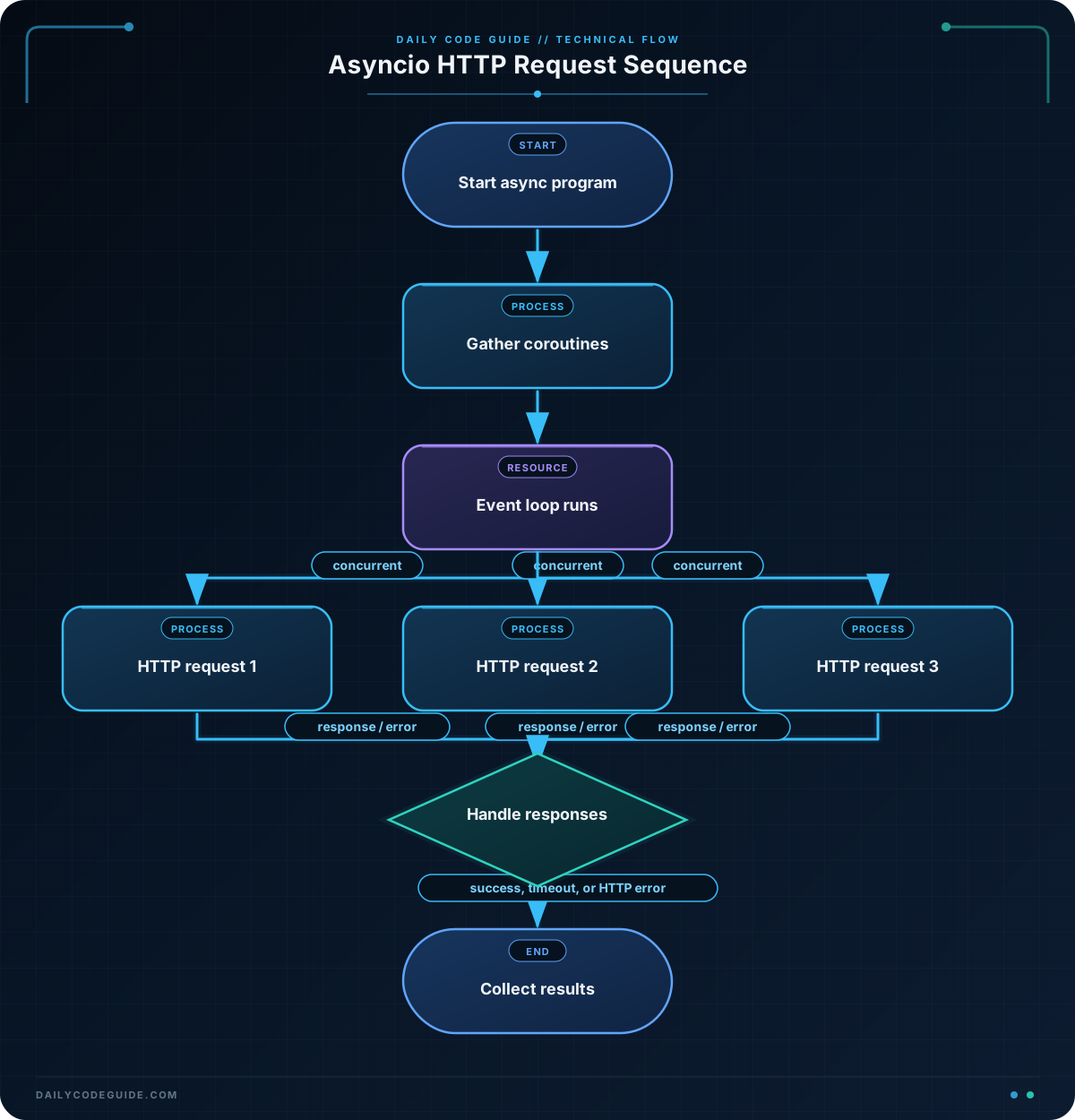
An async function is declared with async def and returns a coroutine. The await keyword pauses that coroutine until an asynchronous operation completes. asyncio.gather() schedules several awaitable operations and waits for all of them.
For HTTP requests, an asynchronous client such as aiohttp is needed. A regular blocking HTTP library called inside an async function would still block the event loop unless it is moved to a separate thread.
Install aiohttp in your environment with:
python -m pip install aiohttpBasic Example
The following program requests three posts from JSONPlaceholder. The requests are started together, so the program can use the waiting time for one response to make progress on the others.
import asyncio
from time import perf_counter

import aiohttp


async def fetch_post(session, post_id):
    url = f"https://jsonplaceholder.typicode.com/posts/{post_id}"

    try:
        async with session.get(url) as response:
            response.raise_for_status()
            post = await response.json()
            return post["id"], post["title"]
    except (aiohttp.ClientError, asyncio.TimeoutError) as error:
        return post_id, f"Request failed: {error}"


async def main():
    post_ids = [1, 2, 3]
    timeout = aiohttp.ClientTimeout(total=10)

    start = perf_counter()

    async with aiohttp.ClientSession(timeout=timeout) as session:
        requests = [fetch_post(session, post_id) for post_id in post_ids]
        results = await asyncio.gather(*requests)

    elapsed = perf_counter() - start

    for post_id, title in results:
        print(f"Post {post_id}: {title}")

    print(f"Completed {len(results)} requests in {elapsed:.2f} seconds")


if __name__ == "__main__":
    asyncio.run(main())
Expected Output
The titles come from the remote API, so their exact text can change. The result order matches post_ids because asyncio.gather() returns results in the order the awaitables were supplied, even if the requests finish in a different order.
Post 1: sunt aut facere repellat provident occaecati excepturi optio reprehenderit
Post 2: qui est esse
Post 3: ea molestias quasi exercitationem repellat qui ipsa sit aut
Completed 3 requests in less than a few seconds
How the Code Works
fetch_post() is a coroutine. The async with session.get(url) statement starts an asynchronous HTTP request and makes sure the response is closed correctly when the block ends.
await response.json() pauses the coroutine while the response body is read and decoded. During that pause, the event loop can process another request.
The list comprehension creates coroutine objects:
requests = [fetch_post(session, post_id) for post_id in post_ids]Nothing has been awaited individually yet. Passing those coroutines to asyncio.gather() schedules them as a group:
results = await asyncio.gather(*requests)The asterisk unpacks the list so each coroutine becomes a separate argument. If three requests each take about one second, concurrent execution can finish in roughly one second plus overhead, rather than roughly three seconds sequentially. Actual timing depends on the network and the remote server.
ClientSession is created once and shared across requests. This allows the HTTP client to reuse connections instead of creating a separate session for every URL.
The timeout prevents a request from waiting indefinitely. raise_for_status() turns HTTP error responses such as 404 or 500 into an exception, while the except block converts expected network failures into a result that the program can report.
As asynchronous code grows, annotations can make coroutine parameters and returned results easier to understand. The guide to Python type hints and mypy covers techniques that are useful for documenting this kind of HTTP client.
Another Example
When an application checks many service endpoints, launching every request at once may overload the local machine or the remote service. An asyncio.Semaphore limits how many requests can be active at the same time.
This example allows at most two requests to run concurrently and uses asyncio.as_completed() to process each result as soon as it finishes.
import asyncio

import aiohttp


async def check_endpoint(session, semaphore, url):
    async with semaphore:
        try:
            async with session.get(url) as response:
                response.raise_for_status()
                return url, response.status, None
        except (aiohttp.ClientError, asyncio.TimeoutError) as error:
            return url, None, str(error)


async def main():
    urls = [
        "https://jsonplaceholder.typicode.com/posts/1",
        "https://jsonplaceholder.typicode.com/users/1",
        "https://jsonplaceholder.typicode.com/comments/1",
        "https://jsonplaceholder.typicode.com/invalid-endpoint",
    ]

    semaphore = asyncio.Semaphore(2)
    timeout = aiohttp.ClientTimeout(total=5)

    async with aiohttp.ClientSession(timeout=timeout) as session:
        checks = [
            check_endpoint(session, semaphore, url)
            for url in urls
        ]

        for completed_check in asyncio.as_completed(checks):
            url, status, error = await completed_check

            if error is None:
                print(f"OK {status}: {url}")
            else:
                print(f"FAILED: {url} ({error})")


if __name__ == "__main__":
    asyncio.run(main())
Unlike gather(), as_completed() lets the program handle each result immediately when its corresponding request completes. The output order is therefore not guaranteed. The invalid endpoint should produce a failed result, while the other endpoints should normally return status 200.
Common Mistakes
- Calling a coroutine without awaiting it: Writing
fetch_post(session, 1)creates a coroutine but does not run it by itself. Await it directly or pass it to a scheduling function such asgather(). - Using a blocking HTTP client in an async function: A synchronous request can freeze the entire event loop. Use an asynchronous client such as
aiohttp, or deliberately move blocking work to a thread. - Creating one session per request: Reuse a single
ClientSessionfor a group of requests. This is more efficient and allows connection reuse. - Starting unlimited requests: A large URL list can create too many simultaneous connections. Use a semaphore or another concurrency limit.
- Assuming concurrent results arrive in input order:
gather()preserves input order, butas_completed()returns tasks in completion order.
Try It Yourself
Modify the first example so that it requests posts 4, 5, and 6. Add the post body to the returned result and print both the title and the first 40 characters of each body.
Keep the shared ClientSession, timeout, exception handling, and concurrent call to asyncio.gather().
Challenge
Build an asynchronous post-title fetcher with these requirements:
- Request posts with IDs 1 through 8 from JSONPlaceholder.
- Allow no more than three requests to run at once.
- Use a ten-second total timeout.
- Print each successful post ID and title.
- Print a failure message instead of stopping the entire program if a request fails.
Solution
import asyncio

import aiohttp


async def fetch_title(session, semaphore, post_id):
    url = f"https://jsonplaceholder.typicode.com/posts/{post_id}"

    async with semaphore:
        try:
            async with session.get(url) as response:
                response.raise_for_status()
                post = await response.json()
                return post_id, post["title"], None
        except (aiohttp.ClientError, asyncio.TimeoutError) as error:
            return post_id, None, str(error)


async def main():
    post_ids = range(1, 9)
    semaphore = asyncio.Semaphore(3)
    timeout = aiohttp.ClientTimeout(total=10)

    async with aiohttp.ClientSession(timeout=timeout) as session:
        tasks = [
            fetch_title(session, semaphore, post_id)
            for post_id in post_ids
        ]

        results = await asyncio.gather(*tasks)

    for post_id, title, error in results:
        if error is None:
            print(f"{post_id}: {title}")
        else:
            print(f"{post_id}: request failed ({error})")


if __name__ == "__main__":
    asyncio.run(main())
The semaphore is acquired before each HTTP request and released when the async with semaphore block ends, so no more than three requests are active at once. Each task catches its own expected network errors and returns an error value, allowing the remaining requests to finish. gather() then collects all eight results without aborting because of one failed request.
Key Takeaways
asynciois useful for coordinating I/O-bound operations such as HTTP requests.awaitpauses one coroutine while allowing other asynchronous tasks to make progress.asyncio.gather()runs multiple awaitables concurrently and preserves their input order in its results.- Use timeouts, exception handling, and a shared HTTP session in real applications.
- Limit concurrency with a semaphore when making many requests or when the remote service has rate limits.

