


What You’ll Learn
In this lesson, you’ll learn how Python recursion lets a function solve a problem by calling itself on smaller parts of the same problem. We’ll use a nested directory tree to calculate folder sizes and traverse every folder in a predictable way.
- Identify the base case and recursive case in a function.
- Traverse nested dictionaries representing folders.
- Calculate a directory’s total size, including files in subdirectories.
- Recognize common recursion errors and practical limitations.
The Concept
Recursion occurs when a function calls itself. A recursive function usually has two parts:
- Base case: The condition that stops recursion.
- Recursive case: The part that calls the function again with a smaller or simpler value.
A directory tree is a natural fit for recursion because a directory can contain files and other directories. Each subdirectory has the same general structure as its parent, so the same function can process both.
For example, a function calculating a directory’s size can follow this process:
- If the current item is a file, return its file size. This is the base case.
- If the current item is a directory, visit each child item recursively.
- Add the sizes returned by those recursive calls.
Python recursion is useful for tree-shaped data such as file systems, menus, organizational charts, and nested configuration objects. However, every recursive call uses stack space. Very deeply nested data can eventually raise a RecursionError, so iterative approaches may be preferable for unusually deep structures.
Basic Example
The following program represents a directory tree with nested dictionaries. File names map to integer sizes, while directory names map to more dictionaries.
def calculate_size(item):
    if isinstance(item, int):
        return item

    total_size = 0

    for child_name, child_item in item.items():
        child_size = calculate_size(child_item)
        total_size += child_size

    return total_size


project_files = {
    "README.md": 2_400,
    "src": {
        "app.py": 8_500,
        "database.py": 6_200,
        "utils": {
            "formatting.py": 3_100,
            "validation.py": 2_700,
        },
    },
    "tests": {
        "test_app.py": 4_800,
        "test_database.py": 3_600,
    },
}

project_size = calculate_size(project_files)
print(f"Project size: {project_size:,} bytes")
Expected Output
Project size: 31,300 bytesHow the Code Works
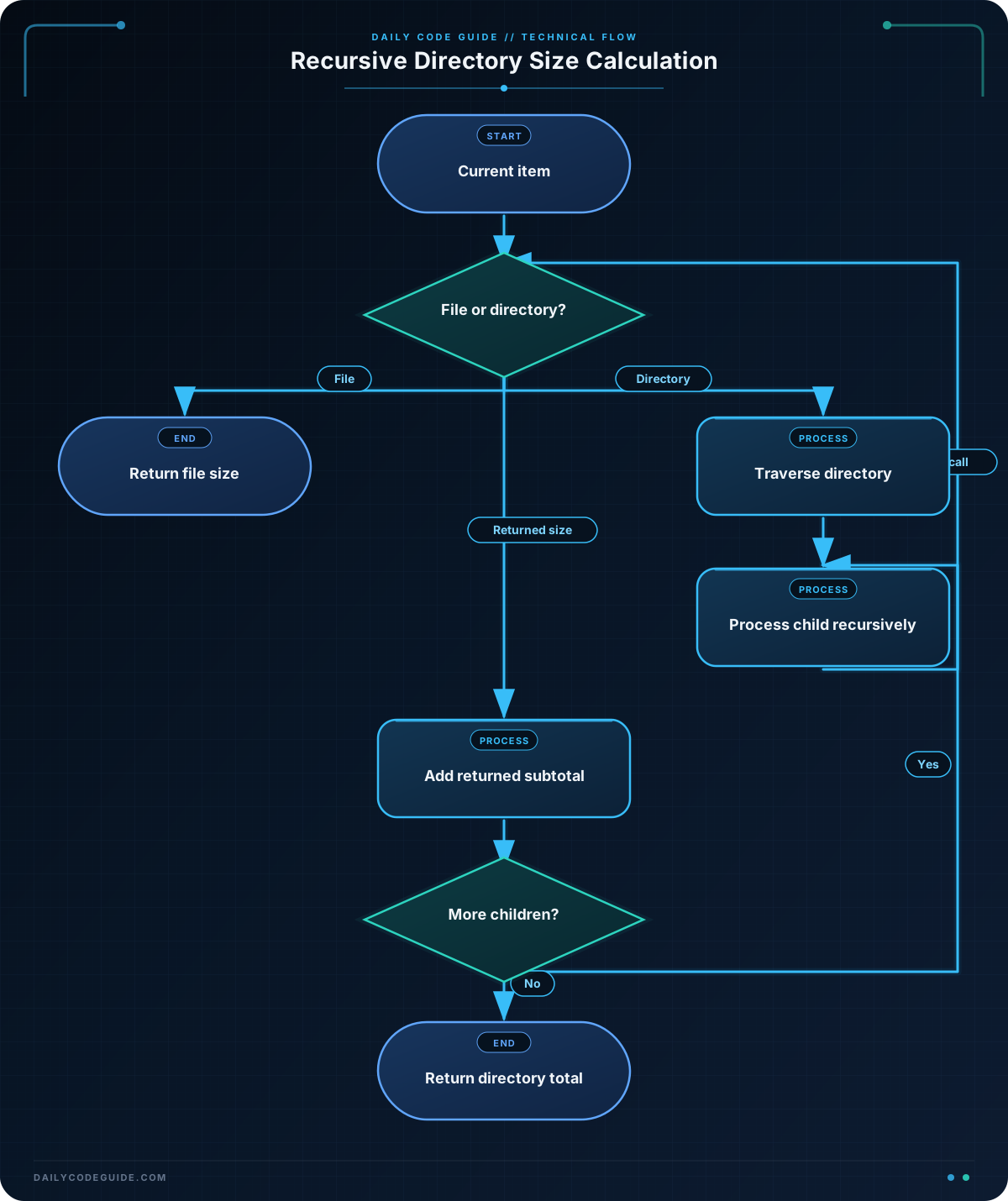
calculate_size accepts one item at a time. That item can be either a file size represented by an integer or a directory represented by a dictionary.
This condition is the base case:
if isinstance(item, int):
    return item
When the function receives a file size, it returns immediately. There is no deeper structure to explore.
When the item is a directory, the function creates total_size and loops through its children:
for child_name, child_item in item.items():
    child_size = calculate_size(child_item)
    total_size += child_size
The recursive call receives either another integer or another nested dictionary. If it receives a subdirectory, it repeats the same process until it reaches files. The returned values are added as the call stack unwinds.
For example, the utils directory returns the combined size of formatting.py and validation.py. That result is then included in the size of src, which is included in the total project size.
For a larger codebase, type annotations can make recursive function inputs and return values clearer. You can learn more about Python type hints for recursive functions when you are ready to annotate nested data structures.
Another Example
Recursion can also traverse a directory tree to display its structure. This version does not calculate a total. Instead, it prints each directory and file with indentation based on its depth.
def print_directory_tree(directory, indent=0):
    for name, item in directory.items():
        prefix = "  " * indent

        if isinstance(item, dict):
            print(f"{prefix}[DIR] {name}")
            print_directory_tree(item, indent + 1)
        else:
            print(f"{prefix}[FILE] {name} ({item:,} bytes)")


backup_files = {
    "photos": {
        "2025": {
            "january.jpg": 1_250_000,
            "february.jpg": 980_000,
        },
        "2026": {
            "january.jpg": 1_400_000,
        },
    },
    "documents": {
        "taxes": {
            "2025.pdf": 420_000,
        },
        "notes.txt": 12_000,
    },
}

print_directory_tree(backup_files)
The indent argument carries state between calls. Each time the function enters a subdirectory, it increases the indentation level before traversing that directory’s children.
Common Mistakes
- Forgetting the base case: Without a condition that returns a result, the function keeps calling itself until Python raises
RecursionError. - Not making progress toward the base case: A recursive call must receive a smaller or more deeply focused part of the data. Calling the function again with the same directory would never finish.
- Adding directory values incorrectly: In this representation, directories are dictionaries and files are integers. The function must inspect the item before deciding whether to return it or iterate through it.
- Assuming all file sizes are integers: A real file-system implementation might receive paths, metadata objects, symbolic links, or errors from inaccessible files. Those cases need explicit handling.
- Using recursion for extremely deep structures: Python limits recursion depth. For deeply nested or untrusted data, an iterative solution using an explicit stack can avoid call-stack limits.
Try It Yourself
Extend the directory traversal example so it prints only files larger than 500,000 bytes. Keep the recursive structure, pass the size limit as an additional parameter, and make sure the limit is applied to files rather than directories.
Challenge
Write a recursive function named directory_report that accepts a nested directory dictionary and returns a tuple containing:
- The total size of all files in the directory tree.
- The total number of files in the directory tree.
Use the function with the provided media_library data and print both results. The function must work for directories nested to any reasonable depth and must count each file exactly once.
Solution
def directory_report(directory):
    total_size = 0
    file_count = 0

    for name, item in directory.items():
        if isinstance(item, dict):
            child_size, child_file_count = directory_report(item)
            total_size += child_size
            file_count += child_file_count
        else:
            total_size += item
            file_count += 1

    return total_size, file_count


media_library = {
    "music": {
        "album_a": {
            "track_01.mp3": 4_200_000,
            "track_02.mp3": 3_800_000,
        },
        "album_b": {
            "track_01.mp3": 5_100_000,
        },
    },
    "videos": {
        "conference.mp4": 12_500_000,
        "demo.mp4": 7_300_000,
    },
    "cover.png": 850_000,
}

library_size, library_file_count = directory_report(media_library)

print(f"Total size: {library_size:,} bytes")
print(f"File count: {library_file_count}")
Each recursive call returns a partial size and file count for one subdirectory. The parent call adds those partial results to its own totals. When the function reaches a file, it adds that file’s size and increases the count by one. The output is:
Total size: 33,750,000 bytes
File count: 6
Key Takeaways
- A recursive function needs a base case and a recursive case.
- Nested directories are tree-shaped data, making them a practical use for recursion.
- Each recursive call should process a smaller or more focused part of the directory tree.
- Recursive results can be combined as calls return to their parent calls.
- Very deep structures may require an iterative solution to avoid Python’s recursion-depth limit.

