What You’ll Learn
Terraform identifies managed objects by their resource addresses. When you rename a resource label or move a resource into a module, Terraform may otherwise interpret the change as deleting one object and creating another. In this lesson, you’ll use moved blocks to tell Terraform that the address changed but the infrastructure did not.
- Understand how Terraform resource addresses relate to state.
- Rename a resource without destroying and recreating it.
- Move a resource into a module while preserving its state.
- Recognize common mistakes involving state, modules, and resource instances.
The Concept
A Terraform resource address includes the resource type and local name. For example, this resource has the address aws_s3_bucket.assets:
resource "aws_s3_bucket" "assets" {
    bucket = "daily-code-guide-assets"
}
The address is stored in Terraform state. The physical S3 bucket also exists outside Terraform, but Terraform uses the state address to associate that bucket with its configuration.
If you rename the resource to aws_s3_bucket.static_assets without telling Terraform about the change, Terraform sees this situation:
aws_s3_bucket.assetsno longer exists in the configuration.aws_s3_bucket.static_assetsis a new resource.
Terraform may then plan to destroy the old address and create the new one, even though both configuration blocks describe the same bucket.
A moved block records the address transition:
moved {
    from = aws_s3_bucket.assets
    to   = aws_s3_bucket.static_assets
}
During planning, Terraform uses this mapping to update the state address. It does not rename the S3 bucket and does not recreate the remote object. The mapping can also point from a root resource to a resource inside a module.
Basic Example
Assume the following configuration has already been applied. The bucket exists, and the state contains the address aws_s3_bucket.assets.
Original configuration:
terraform {
    required_providers {
        aws = {
            source  = "hashicorp/aws"
            version = "~> 5.0"
        }
    }
}

provider "aws" {
    region = "us-east-1"
}

resource "aws_s3_bucket" "assets" {
    bucket = "daily-code-guide-assets"
}
Now the team wants a clearer name: static_assets. Replace the resource label and add a moved block.
Refactored configuration:
terraform {
    required_providers {
        aws = {
            source  = "hashicorp/aws"
            version = "~> 5.0"
        }
    }
}

provider "aws" {
    region = "us-east-1"
}

resource "aws_s3_bucket" "static_assets" {
    bucket = "daily-code-guide-assets"
}

moved {
    from = aws_s3_bucket.assets
    to   = aws_s3_bucket.static_assets
}
Run a plan after making the change:
terraform planExpected Output
Assuming the bucket is already managed by the old address and no other changes are pending, Terraform should report that there are no infrastructure changes. The plan may also mention that the resource was moved in state.
No changes. Your infrastructure matches the configuration.How the Code Works
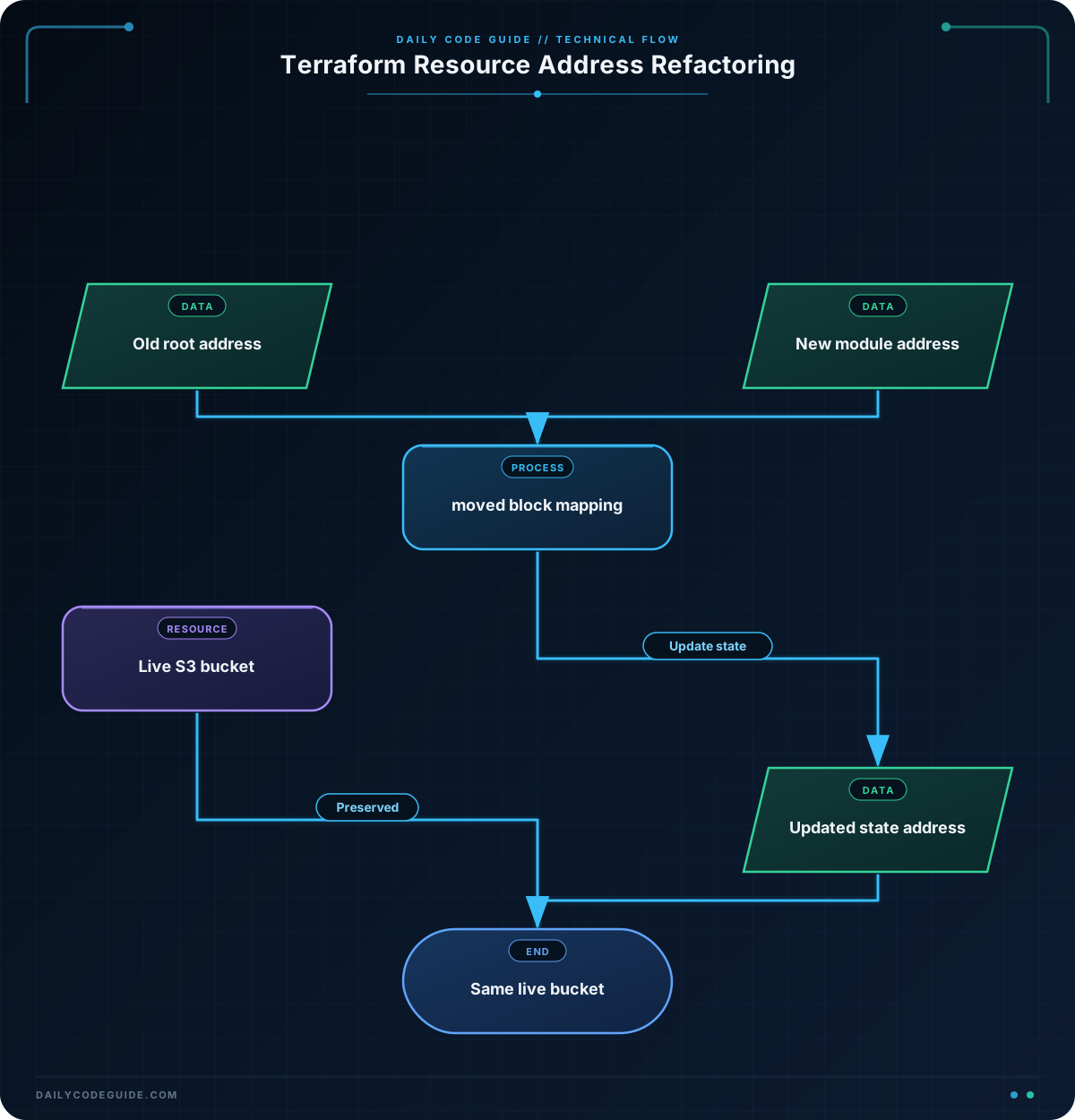
The resource type remains aws_s3_bucket, and the bucket argument remains unchanged. Only the local label changes from assets to static_assets.
The moved block connects the old and new addresses:
fromidentifies the address currently recorded in state.toidentifies the address in the refactored configuration.
Terraform processes the move during planning and updates the state after you apply the plan. The remote bucket keeps the same name and contents. This is why a resource rename can be made safely without a delete-and-create operation.
Keep the moved block in the configuration for as long as your team may need to initialize from older state or review the history of the refactor. Removing it too early can cause older state to lose the address mapping.
A moved block does not import an object that Terraform has never managed. If the bucket is not already present in the state, you need an import workflow instead. A moved block also does not override a real resource change, such as changing the bucket name to a different bucket.
Another Example
A common larger refactor is moving a root resource into a reusable module. Suppose the root module currently manages a logging bucket with the address aws_s3_bucket.logs.
The module can own the resource instead:
modules/logging/main.tf:
variable "bucket_name" {
    type = string
}

resource "aws_s3_bucket" "logs" {
    bucket = var.bucket_name
}
The root module calls the child module and maps the old root address to the new module address:
Root module configuration:
terraform {
    required_providers {
        aws = {
            source  = "hashicorp/aws"
            version = "~> 5.0"
        }
    }
}

provider "aws" {
    region = "us-east-1"
}

module "logging" {
    source      = "./modules/logging"
    bucket_name = "daily-code-guide-logs"
}

moved {
    from = aws_s3_bucket.logs
    to   = module.logging.aws_s3_bucket.logs
}
The old root resource declaration must be removed. Otherwise, the configuration would still describe a root resource as well as the module resource.
Terraform sees that the resource moved from the root module into module.logging. It updates the state address while keeping the same S3 bucket associated with Terraform.
Common Mistakes
- Changing the remote object unintentionally: A moved block preserves an object only when the destination configuration still represents that object. Changing the bucket name can cause a different resource change.
- Using the wrong old address: The
fromaddress must match the address in the current state. Useterraform state listto inspect addresses before writing the mapping. - Leaving the old resource block in place: When moving into a module, remove the original root resource declaration. Keep the module resource and the moved block instead.
- Moving an instance without considering its key: Resources using
countorfor_eachhave instance addresses such asaws_s3_bucket.logs[0]oraws_s3_bucket.logs["prod"]. Each relevant instance may need an explicit mapping. - Assuming a moved block changes the cloud provider: The block changes Terraform’s state address. It does not rename, copy, or migrate the physical infrastructure itself.
- Applying without reviewing the plan: Always run
terraform planand confirm that Terraform is not proposing a destroy-and-create action.
Try It Yourself
Imagine that your existing configuration manages an S3 bucket at aws_s3_bucket.reports. Refactor it to use the address aws_s3_bucket.monthly_reports.
Keep the bucket’s bucket argument unchanged, add the correct moved block, and run terraform plan. Verify that Terraform does not plan to destroy the existing bucket.
Challenge
Your team currently manages a logging bucket directly in the root module:
resource "aws_s3_bucket" "logs" {
    bucket = "daily-code-guide-central-logs"
}
Refactor this configuration so that:
- The bucket resource is defined in
modules/logging/main.tf. - The root module calls the child module using
source = "./modules/logging". - The bucket name is passed into the module through a variable.
- A
movedblock preserves the state transition fromaws_s3_bucket.logstomodule.logging.aws_s3_bucket.logs. - The bucket name and provider configuration remain unchanged.
Solution
Define the resource and its input variable in the child module:
variable "bucket_name" {
    type = string
}

resource "aws_s3_bucket" "logs" {
    bucket = var.bucket_name
}
Then configure the root module like this:
terraform {
    required_providers {
        aws = {
            source  = "hashicorp/aws"
            version = "~> 5.0"
        }
    }
}

provider "aws" {
    region = "us-east-1"
}

module "logging" {
    source      = "./modules/logging"
    bucket_name = "daily-code-guide-central-logs"
}

moved {
    from = aws_s3_bucket.logs
    to   = module.logging.aws_s3_bucket.logs
}
The resource now has a module address, but the moved block tells Terraform that it is the same state-managed object as the former root resource. After reviewing terraform plan, applying the configuration updates the state address without destroying and recreating the bucket.
Key Takeaways
- A Terraform resource address is part of how Terraform associates configuration with remote infrastructure.
- Use a
movedblock when renaming a resource or changing its module path. - A moved block updates Terraform state; it does not rename or recreate the physical resource.
- Check existing addresses with
terraform state listand review the plan before applying a refactor. - Resources using
countorfor_eachrequire careful attention to instance addresses.