What You’ll Learn
In this lesson, you’ll learn how to create protected passwords with SecureString, package them with usernames as PSCredential objects, and pass those credentials to administrative commands without putting plaintext passwords in a script.
- Create a credential interactively with
Read-Host -AsSecureString. - Use a
PSCredentialobject with PowerShell remoting. - Store and retrieve an encrypted credential file for later automation.
- Recognize the security limitations of SecureString-based storage.
The Concept
A SecureString represents sensitive text, such as a password, in a protected form instead of an ordinary PowerShell string. A PSCredential combines a username with a password stored as a SecureString.
Many administrative commands accept a -Credential parameter. Passing a PSCredential object lets a script authenticate without containing a line such as $password = "PlaintextPassword".
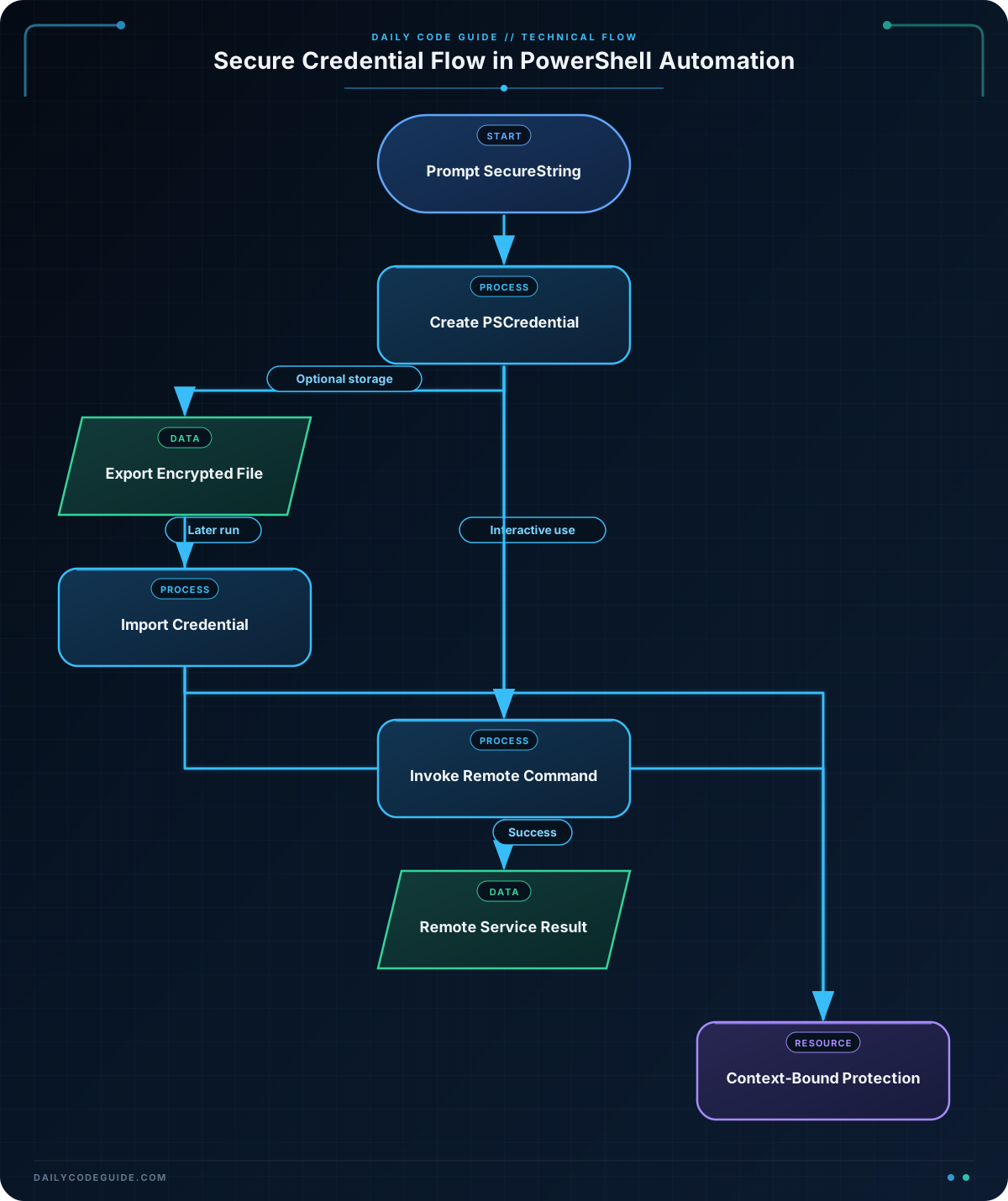
The usual interactive pattern is:
- Prompt the operator for a password with
Read-Host -AsSecureString. - Create a
PSCredentialfrom the username and protected password. - Pass the credential to a command such as
Invoke-Command.
This is useful for scheduled maintenance, remote service checks, and administrative scripts. However, SecureString is not a replacement for a dedicated secrets-management system. On modern PowerShell platforms, its protection is primarily useful for avoiding accidental plaintext exposure; it does not make a password impossible to recover while it is being used.
Basic Example
This script prompts an operator for a remote administrator’s password, then checks the status of the Print Spooler service on a remote computer. The password is never written directly into the script.
$computerName = "server01"
$username = "CONTOSO\svc-maintenance"

$password = Read-Host -Prompt "Enter the password for $username" -AsSecureString
$credential = [System.Management.Automation.PSCredential]::new(
    $username,
    $password
)

$service = Invoke-Command -ComputerName $computerName -Credential $credential -ScriptBlock {
    Get-Service -Name "Spooler" |
        Select-Object Name, Status, StartType
}

$service
Expected Output
The exact formatting depends on the remote computer and the current service state. A running Print Spooler service could produce output similar to this:
Name    Status StartType
----    ------ ---------
Spooler Running Automatic
How the Code Works
$password contains a SecureString because the -AsSecureString switch prevents the password from being returned as ordinary visible text.
The static constructor creates a credential object:
$usernameidentifies the account used for authentication.$passwordsupplies the protected password.$credentialis then suitable for commands that support-Credential.
Invoke-Command uses PowerShell remoting to run the script block on server01. The service query runs on the remote computer, not on the workstation where the script starts. Remoting must be enabled and the account must have appropriate permissions.
Do not convert the SecureString back to plaintext merely to inspect it or pass it to a command that does not support credentials. If a command requires a different authentication mechanism, use that mechanism rather than exposing the password unnecessarily.
Once you are comfortable passing credentials to remote work, you can combine this pattern with PowerShell background jobs to run credential-aware administrative tasks asynchronously.
Another Example
Interactive prompting is safer than embedding a password, but it does not work well for every scheduled task. The following two-stage pattern stores a credential in an encrypted CLIXML file and later imports it.
First, run this setup script interactively under the same Windows user account that will run the maintenance script:
$credentialPath = Join-Path $HOME "maintenance-credential.xml"
$username = "CONTOSO\svc-maintenance"

$password = Read-Host -Prompt "Enter the password for $username" -AsSecureString
$credential = [System.Management.Automation.PSCredential]::new(
    $username,
    $password
)

$credential | Export-Clixml -Path $credentialPath

Write-Output "Credential saved to $credentialPath"
The maintenance script can then import the credential and use it for a remote restart operation. The script does not contain the password.
param(
    [string]$ComputerName = "server01",
    [string]$CredentialPath = (Join-Path $HOME "maintenance-credential.xml")
)

if (-not (Test-Path -LiteralPath $CredentialPath)) {
    throw "Credential file was not found: $CredentialPath"
}

$credential = Import-Clixml -LiteralPath $CredentialPath

Invoke-Command -ComputerName $ComputerName -Credential $credential -ScriptBlock {
    Restart-Service -Name "PrintSpooler" -ErrorAction Stop
    Get-Service -Name "PrintSpooler" |
        Select-Object Name, Status
}
On Windows, Export-Clixml protects the SecureString using the current user’s Windows data protection mechanism. The resulting file is not a universally portable secret: another user generally cannot decrypt it, and moving it to another computer may prevent it from being imported successfully. This makes the file safer than plaintext for a single-user, single-computer workflow, but it is not appropriate as a shared credential store.
Common Mistakes
- Embedding the password in the script: A plaintext variable, command-line argument, or source-control file can appear in logs, history, backups, or process inspection. Prompt for the password or use an approved secret-management solution.
- Assuming SecureString is a complete security boundary: A process that can inspect the running script or memory may still access credentials while they are being used.
- Sharing an exported CLIXML file: The file is tied to its encryption context. Do not copy it between users or machines and assume it will work.
- Forgetting remoting requirements:
Invoke-Commandrequires PowerShell remoting, name resolution, network access, and sufficient permissions on the target computer. - Using a credential with an unsupported command: Only commands that expose a credential parameter can consume a
PSCredentialdirectly. Check the command’s help before designing the authentication flow.
Try It Yourself
Create a script that prompts for a username and password, builds a PSCredential, and uses Invoke-Command to query the current date on a computer named server01. Then modify it so the remote script block returns the computer name and the date together.
Challenge
Write a reusable function named Test-RemoteService that:
- Accepts
ComputerName,ServiceName, andCredentialPathparameters. - Stops with a clear error if the credential file does not exist.
- Imports the credential from the CLIXML file.
- Uses
Invoke-Commandto retrieve the named service from the remote computer. - Returns the computer name, service name, status, and start type.
The function should not prompt for or contain a plaintext password.
Solution
function Test-RemoteService {
    param(
        [Parameter(Mandatory)]
        [string]$ComputerName,

        [Parameter(Mandatory)]
        [string]$ServiceName,

        [Parameter(Mandatory)]
        [string]$CredentialPath
    )

    if (-not (Test-Path -LiteralPath $CredentialPath)) {
        throw "Credential file was not found: $CredentialPath"
    }

    $credential = Import-Clixml -LiteralPath $CredentialPath

    Invoke-Command -ComputerName $ComputerName -Credential $credential -ScriptBlock {
        param($RequestedServiceName)

        Get-Service -Name $RequestedServiceName -ErrorAction Stop |
            Select-Object @{
                Name = "ComputerName"
                Expression = { $env:COMPUTERNAME }
            }, Name, Status, StartType
    } -ArgumentList $ServiceName
}

$credentialPath = Join-Path $HOME "maintenance-credential.xml"

Test-RemoteService `
    -ComputerName "server01" `
    -ServiceName "Spooler" `
    -CredentialPath $credentialPath
The function validates the file before importing it, passes the imported PSCredential to Invoke-Command, and supplies the requested service name as an argument to the remote script block. The password remains outside the source code. The exported credential must still be created and used by the appropriate account and computer context.
Key Takeaways
SecureStringprotects a password from being handled as ordinary plaintext in a PowerShell script.PSCredentialpackages a username and SecureString password for commands that support-Credential.Read-Host -AsSecureStringis useful for interactive administrative scripts.Export-Clixmlcan persist credentials for a particular user and encryption context, but the file is not a portable shared secret.- For production automation, consider a purpose-built secrets-management solution and grant the account only the permissions it needs.