What You’ll Learn
In this lesson, you will use Python’s concurrent.futures.ProcessPoolExecutor to distribute CPU-bound image-processing tasks across multiple processes.
- Understand when processes are a better choice than threads.
- Submit image-processing work with
map()andsubmit(). - Collect results and handle exceptions from worker processes.
- Start multiprocessing code safely on different operating systems.
The Concept
ProcessPoolExecutor manages a pool of separate Python processes. Each process can run on a different CPU core, which makes this approach useful for CPU-bound work such as resizing, filtering, encoding, or analyzing many images.
Separate processes are important because Python’s Global Interpreter Lock can prevent multiple threads from executing Python bytecode at the same time. Processes avoid sharing that interpreter lock, although they also have extra startup and data-transfer costs.
A worker function submitted to a process pool should usually be defined at the top level of the module. The worker also needs to receive arguments that can be serialized and sent to another process, such as strings, numbers, lists, and Path objects.
For image examples, this lesson uses the simple text-based PPM format. That keeps the examples dependency-free while demonstrating the same process-pool structure you can apply to a Pillow-based image pipeline.
Basic Example
This program creates a small collection of PPM images, converts each image to grayscale, and writes the results to a separate directory. The grayscale operation runs in worker processes.
from concurrent.futures import ProcessPoolExecutor
from pathlib import Path
import os
import shutil


def create_sample_image(path, width, height, offset):
    values = ["P3", f"{width} {height}", "255"]

    for y in range(height):
        for x in range(width):
            red = (x * 17 + offset) % 256
            green = (y * 19 + offset) % 256
            blue = (x + y + offset) % 256
            values.extend([str(red), str(green), str(blue)])

    path.write_text("\n".join(values), encoding="ascii")


def convert_to_grayscale(input_path, output_directory):
    tokens = input_path.read_text(encoding="ascii").split()

    if tokens[0] != "P3":
        raise ValueError(f"{input_path.name} is not a P3 image")

    width = int(tokens[1])
    height = int(tokens[2])
    maximum = int(tokens[3])
    pixels = tokens[4:]

    grayscale_values = []
    for index in range(0, len(pixels), 3):
        red = int(pixels[index])
        green = int(pixels[index + 1])
        blue = int(pixels[index + 2])
        gray = round(0.299 * red + 0.587 * green + 0.114 * blue)
        grayscale_values.append(str(gray))
        grayscale_values.extend([str(gray), str(gray)])

    output_path = output_directory / input_path.name
    output_tokens = ["P3", f"{width} {height}", str(maximum)]
    output_tokens.extend(grayscale_values)
    output_path.write_text("\n".join(output_tokens), encoding="ascii")

    return input_path.name


def main():
    input_directory = Path("sample_images")
    output_directory = Path("grayscale_images")

    shutil.rmtree(input_directory, ignore_errors=True)
    shutil.rmtree(output_directory, ignore_errors=True)
    input_directory.mkdir()
    output_directory.mkdir()

    for image_number in range(6):
        create_sample_image(
            input_directory / f"image_{image_number}.ppm",
            width=40,
            height=40,
            offset=image_number * 20,
        )

    image_paths = sorted(input_directory.glob("*.ppm"))
    worker_count = min(os.cpu_count() or 1, len(image_paths))

    with ProcessPoolExecutor(max_workers=worker_count) as executor:
        results = executor.map(
            convert_to_grayscale,
            image_paths,
            [output_directory] * len(image_paths),
        )

        for image_name in results:
            print(f"Finished {image_name}")

    print(f"Created {len(image_paths)} grayscale images")


if __name__ == "__main__":
    main()
Expected Output
The exact worker scheduling is not important here. Because map() returns results in input order, this program prints the image names in sorted order.
Finished image_0.ppm
Finished image_1.ppm
Finished image_2.ppm
Finished image_3.ppm
Finished image_4.ppm
Finished image_5.ppm
Created 6 grayscale images
How the Code Works
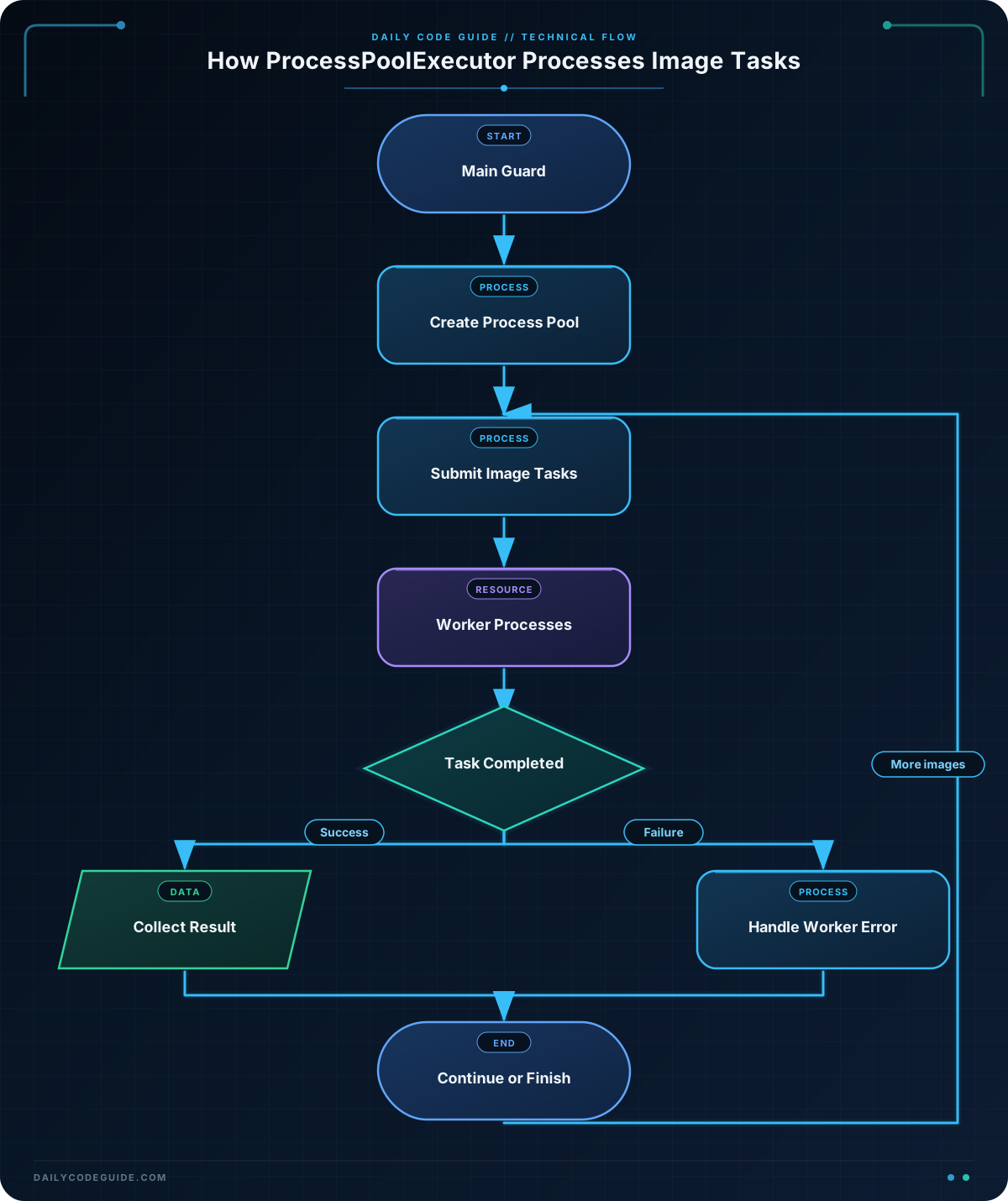
convert_to_grayscale() is the worker function. Each process receives one input path and the output directory. It reads the PPM pixels, calculates a luminance value, and writes a new image containing three equal color components for every pixel.
The ProcessPoolExecutor is used as a context manager, so the pool is shut down cleanly when the block ends. max_workers limits the number of processes. The example uses no more workers than there are images, which avoids starting unnecessary processes for a small batch.
executor.map() is convenient when every task uses the same function and argument structure. It schedules work concurrently but yields results in the order of the input iterable. The image processing itself can finish in a different order internally.
The if __name__ == "__main__": guard is essential. Without it, some platforms may import the module in each child process and execute the pool-creation code again. For more background on version-specific behavior, see these Python multiprocessing compatibility changes.
Another Example
This example uses submit() and as_completed() instead of map(). It analyzes the average brightness of each image and continues processing when one input file is invalid.
from concurrent.futures import ProcessPoolExecutor, as_completed
from pathlib import Path
import shutil


def write_ppm(path, brightness):
    values = ["P3", "3 2", "255"]
    for _ in range(6):
        values.extend([str(brightness), str(brightness), str(brightness)])
    path.write_text("\n".join(values), encoding="ascii")


def average_brightness(image_path):
    tokens = image_path.read_text(encoding="ascii").split()

    if len(tokens) < 5 or tokens[0] != "P3":
        raise ValueError(f"{image_path.name} is not a valid P3 image")

    pixels = [int(value) for value in tokens[4:]]
    if len(pixels) % 3 != 0:
        raise ValueError(f"{image_path.name} has incomplete pixel data")

    channel_total = sum(pixels)
    average = channel_total / len(pixels)
    return image_path.name, round(average, 1)


def main():
    image_directory = Path("brightness_samples")
    shutil.rmtree(image_directory, ignore_errors=True)
    image_directory.mkdir()

    write_ppm(image_directory / "dark.ppm", 35)
    write_ppm(image_directory / "medium.ppm", 130)
    write_ppm(image_directory / "bright.ppm", 225)
    (image_directory / "damaged.ppm").write_text(
        "not an image",
        encoding="ascii",
    )

    image_paths = sorted(image_directory.glob("*.ppm"))

    with ProcessPoolExecutor() as executor:
        future_to_path = {
            executor.submit(average_brightness, image_path): image_path
            for image_path in image_paths
        }

        for future in as_completed(future_to_path):
            image_path = future_to_path[future]
            try:
                image_name, average = future.result()
            except (OSError, ValueError) as error:
                print(f"Skipped {image_path.name}: {error}")
            else:
                print(f"{image_name}: average brightness {average}")


if __name__ == "__main__":
    main()
Here, each call to submit() returns a Future. The dictionary keeps the original path associated with that future, so an error can identify the failed image. Calling future.result() either returns the worker’s value or raises the exception that occurred in the worker process.
as_completed() yields futures as they finish, which is useful when you want to report completed images immediately rather than waiting for earlier, slower tasks.
Common Mistakes
- Forgetting the main guard: Always create the process pool from code protected by
if __name__ == "__main__":. - Using a nested worker function: Define the worker at module level so it can be imported by child processes.
- Sending unnecessarily large data: Passing image bytes directly to workers can require copying a lot of data. Passing file paths often reduces transfer overhead.
- Expecting output order from completion order:
map()preserves input order, whileas_completed()reports completion order. - Using processes for tiny tasks: Process creation and serialization have overhead. A process pool is most useful when each image task does enough CPU work to justify that cost.
Try It Yourself
Modify the first example so that the worker also returns the number of pixels it processed. Print a message containing both the image name and its pixel count. Then try increasing the image dimensions and compare the behavior with one worker versus several workers.
Challenge
Create a program that processes every .ppm file in an existing incoming_images directory.
- Use a
ProcessPoolExecutorand submit one grayscale task per image. - Write successful results to a
processed_imagesdirectory. - Use
as_completed()so results are reported as soon as they finish. - Catch invalid-image errors in the parent process and continue processing other files.
- Print a final count of successful and failed images.
Solution
from concurrent.futures import ProcessPoolExecutor, as_completed
from pathlib import Path
import os


def grayscale_image(input_path, output_directory):
    tokens = input_path.read_text(encoding="ascii").split()

    if len(tokens) < 5 or tokens[0] != "P3":
        raise ValueError(f"{input_path.name} is not a valid P3 image")

    width = int(tokens[1])
    height = int(tokens[2])
    maximum = int(tokens[3])
    pixels = tokens[4:]

    if len(pixels) != width * height * 3:
        raise ValueError(f"{input_path.name} has an unexpected pixel count")

    output_pixels = []
    for index in range(0, len(pixels), 3):
        red = int(pixels[index])
        green = int(pixels[index + 1])
        blue = int(pixels[index + 2])
        gray = round(0.299 * red + 0.587 * green + 0.114 * blue)
        output_pixels.extend([str(gray), str(gray), str(gray)])

    output_path = output_directory / input_path.name
    output_path.write_text(
        "\n".join(
            ["P3", f"{width} {height}", str(maximum), *output_pixels]
        ),
        encoding="ascii",
    )

    return input_path.name


def main():
    input_directory = Path("incoming_images")
    output_directory = Path("processed_images")
    output_directory.mkdir(exist_ok=True)

    image_paths = sorted(input_directory.glob("*.ppm"))
    if not image_paths:
        print("No PPM images found")
        return

    worker_count = min(os.cpu_count() or 1, len(image_paths))
    successful = 0
    failed = 0

    with ProcessPoolExecutor(max_workers=worker_count) as executor:
        future_to_path = {
            executor.submit(grayscale_image, image_path, output_directory):
            image_path
            for image_path in image_paths
        }

        for future in as_completed(future_to_path):
            image_path = future_to_path[future]
            try:
                image_name = future.result()
            except (OSError, ValueError) as error:
                failed += 1
                print(f"Failed {image_path.name}: {error}")
            else:
                successful += 1
                print(f"Processed {image_name}")

    print(f"Successful: {successful}")
    print(f"Failed: {failed}")


if __name__ == "__main__":
    main()
The solution creates one future per image, tracks each future back to its input path, and handles failures when the result is requested. A failed worker does not stop the remaining futures from being collected. The output directory is created before workers start, and the main guard keeps process startup safe.
Key Takeaways
ProcessPoolExecutoris a practical choice for CPU-bound image processing.- Worker functions should be top-level functions that accept serializable arguments.
- Use
map()for straightforward ordered results andsubmit()withas_completed()for individual completion and error handling. - Always protect process-pool startup with
if __name__ == "__main__":. - Processes add overhead, so use them when each task performs enough CPU work to benefit from parallel execution.