What You’ll Learn
By the end of this lesson, you will understand how SQL transaction isolation levels control what one transaction can see while another transaction changes order records.
- Recognize dirty reads, non-repeatable reads, phantom reads, and lost updates.
- Choose an isolation level for a concurrent order-processing operation.
- Use
SELECT ... FOR UPDATEwhen a transaction must safely modify a specific order. - Understand why stronger isolation can improve consistency but may increase waiting or transaction failures.
The Concept
A transaction groups related SQL statements into one logical operation. Isolation determines how much that transaction is protected from changes made by other transactions running at the same time.
Consider two customer-service users updating the same order. If both users read the order’s current status, make decisions, and then write changes, the timing of those operations can affect the final result. Without suitable isolation, one user might read data that another transaction has not committed, or one update might silently overwrite another.
The commonly discussed isolation levels are:
- READ UNCOMMITTED: A transaction may see uncommitted changes from another transaction. This permits dirty reads. Many database systems do not implement this level literally.
- READ COMMITTED: A query sees data committed before that query begins. A later query in the same transaction may see different committed data, causing non-repeatable reads.
- REPEATABLE READ: Rows read by a transaction remain consistent for the transaction’s snapshot. Depending on the database system, phantom rows may still be possible or may also be prevented.
- SERIALIZABLE: The database provides results equivalent to running transactions one at a time. A transaction may need to wait or may fail with a serialization error that the application must retry.
Isolation is not the same as durability or atomicity. COMMIT and ROLLBACK control whether a transaction’s changes are kept, while isolation controls how concurrent transactions interact.
The examples below use PostgreSQL syntax and behavior. Other database systems may use different locking and snapshot rules, so always check the documentation for your database engine.
Basic Example
First, create a small order table. The foreign key connects each order to a customer; for more background on maintaining these relationships, see SQL foreign-key actions for customer and order data.
CREATE TABLE customers (
    customer_id integer PRIMARY KEY,
    customer_name text NOT NULL
);

CREATE TABLE orders (
    order_id integer PRIMARY KEY,
    customer_id integer NOT NULL REFERENCES customers(customer_id),
    order_status text NOT NULL,
    total_amount numeric(10, 2) NOT NULL,
    updated_at timestamptz NOT NULL DEFAULT CURRENT_TIMESTAMP
);

INSERT INTO customers (customer_id, customer_name)
VALUES (101, 'Avery Chen');

INSERT INTO orders (
    order_id,
    customer_id,
    order_status,
    total_amount
)
VALUES (
    5001,
    101,
    'processing',
    125.00
);
Open two database sessions connected to the same database. In Session A, use REPEATABLE READ and read the order.
BEGIN TRANSACTION ISOLATION LEVEL REPEATABLE READ;

SELECT order_id, order_status, total_amount
FROM orders
WHERE order_id = 5001;

-- Leave this transaction open while Session B runs.

SELECT order_id, order_status, total_amount
FROM orders
WHERE order_id = 5001;

COMMIT;
Before running Session A’s second SELECT, execute this transaction in Session B:
BEGIN;

UPDATE orders
SET total_amount = 135.00,
    updated_at = CURRENT_TIMESTAMP
WHERE order_id = 5001;

COMMIT;
Expected Output
In PostgreSQL, both reads in Session A use the same repeatable-read snapshot. The second read therefore returns the original amount even though Session B has committed a change.
Session A, first SELECT:
order_id | order_status | total_amount
---------+--------------+-------------
5001     | processing    | 125.00

Session A, second SELECT:
order_id | order_status | total_amount
---------+--------------+-------------
5001     | processing    | 125.00

Session B after COMMIT:
order_id | total_amount
----------+-------------
5001     | 135.00
How the Code Works
BEGIN TRANSACTION ISOLATION LEVEL REPEATABLE READ starts a transaction with a consistent snapshot. Session A sees the order as it existed when its first statement established the snapshot. Session B can still update and commit the row, but Session A does not see that later committed version during its transaction.
This prevents a non-repeatable read: the same query in one transaction does not return different versions of the same order. Under PostgreSQL’s repeatable-read behavior, if Session A attempted to update a row that Session B had already changed, PostgreSQL could raise a serialization failure instead of silently combining the changes. The application should then roll back and retry the whole transaction.
For comparison, under PostgreSQL’s default READ COMMITTED level, each statement gets a new snapshot. Session A’s second query could therefore see 135.00. That behavior is often appropriate for short operations, but it is not suitable when several reads must describe one stable view of the order.
A dirty read would occur if Session A saw a value written by Session B before Session B committed. A rollback by Session B would make Session A’s earlier observation invalid. PostgreSQL does not allow dirty reads, even when READ UNCOMMITTED is requested.
A phantom read occurs when a repeated search returns a different set of rows, such as a query for all processing orders returning a newly inserted order later in the transaction. Whether repeatable read prevents phantoms depends on the database engine. Serializable isolation is the portable choice when the correctness of a predicate-based decision depends on no matching rows appearing or disappearing.
Another Example
Isolation levels do not automatically express every business rule. To prevent two support agents from changing the same order based on the same old value, lock the specific row while reading and updating it.
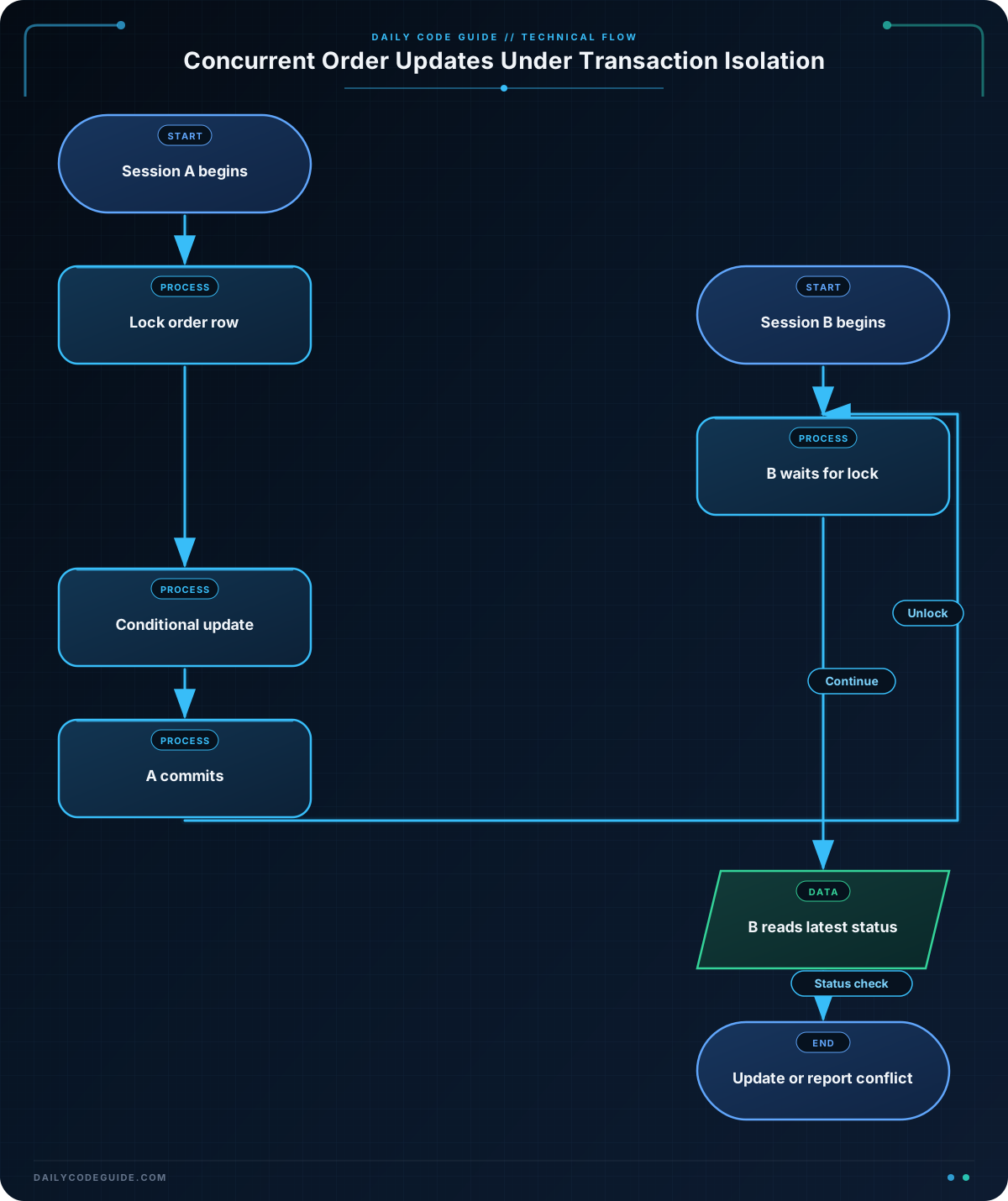
Session A begins a transaction and locks the order. The lock remains until the transaction commits or rolls back.
BEGIN;

SELECT order_id, order_status
FROM orders
WHERE order_id = 5001
FOR UPDATE;

UPDATE orders
SET order_status = 'packed',
    updated_at = CURRENT_TIMESTAMP
WHERE order_id = 5001
  AND order_status = 'processing';

COMMIT;
While Session A is still open, Session B attempts to process the same order. Its SELECT ... FOR UPDATE waits for Session A to finish. After Session A commits, Session B reads the latest committed row instead of proceeding with the old value.
BEGIN;

SELECT order_id, order_status
FROM orders
WHERE order_id = 5001
FOR UPDATE;

UPDATE orders
SET order_status = 'packed',
    updated_at = CURRENT_TIMESTAMP
WHERE order_id = 5001
  AND order_status = 'processing';

COMMIT;
After Session A has changed the status to packed, Session B’s conditional UPDATE affects zero rows. The second worker can inspect the affected-row count and report that another worker already processed the order.
Common Mistakes
- Choosing the strongest level for every transaction: Serializable isolation can cause more blocking or serialization failures. Use the weakest level that correctly protects the business operation, and make retry handling part of the design when necessary.
- Assuming a transaction prevents all lost updates: A transaction by itself does not always stop two sessions from reading the same value and later overwriting one another. Use
FOR UPDATE, an optimistic version column, or a carefully designed conditional update. - Holding locks while doing unrelated work: A transaction that waits for network calls or user input can block other order processors. Read and update the necessary rows in a short transaction.
- Ignoring the affected-row count: A conditional update that affects zero rows may mean that the order no longer has the expected status. Treat that result explicitly instead of assuming success.
- Retrying only one statement after a serialization error: A serialization failure invalidates the transaction’s assumptions. Roll back and retry the complete transaction, usually with a bounded retry count.
Try It Yourself
Using the orders table, open two sessions and investigate the difference between READ COMMITTED and REPEATABLE READ:
- In Session A, start a transaction and read order
5001. - In Session B, change its amount and commit.
- Run the same
SELECTagain in Session A. - Repeat the experiment with both isolation levels and record whether Session A sees the old or new amount.
Then modify the experiment to select all orders with order_status = 'processing'. Insert a new processing order in Session B and observe whether Session A sees a changed set of rows.
Challenge
Design a safe transaction for a fulfillment worker that marks an order as shipped.
- The worker must lock the requested order before deciding what to do.
- It may ship the order only when its current status is
packed. - If another worker already changed the status, it must not overwrite that change.
- The transaction must return the final status so the application can report whether shipping succeeded.
Solution
The following solution locks the row, checks the current status, updates only a packed order, and returns the resulting status. The conditional update provides an additional safeguard and makes the success condition explicit.
BEGIN;

SELECT order_id, order_status
FROM orders
WHERE order_id = 5001
FOR UPDATE;

UPDATE orders
SET order_status = 'shipped',
    updated_at = CURRENT_TIMESTAMP
WHERE order_id = 5001
  AND order_status = 'packed'
RETURNING order_id, order_status;

COMMIT;
If the order was packed, the UPDATE ... RETURNING statement returns the order with status shipped. If the row was already shipped, cancelled, or otherwise not packed, the update returns no row and the application can report that shipping was not performed. The row lock ensures that another transaction cannot change the order between the worker’s read and its update.
Key Takeaways
- Isolation levels determine how concurrent transactions observe one another’s changes.
- Repeatable read provides a stable view for multi-query work, while serializable provides the strongest general concurrency guarantee.
- Use
SELECT ... FOR UPDATEwhen a transaction must read and then safely modify a specific order row. - Conditional updates and affected-row checks make business rules visible and prevent silent overwrites.
- Stronger isolation can cause waits or serialization failures, so production applications should keep transactions short and retry safely when required.