What You’ll Learn
In this lesson, you will learn how to use Python’s zip() and enumerate() functions together. This combination lets you process related values from multiple lists while also keeping track of an item number.
- Use
zip()to iterate over multiple lists at the same time. - Use
enumerate()to add an index or readable item number. - Unpack values from a zipped pair inside a
forloop. - Understand what happens when lists have different lengths.
The Concept
Sometimes two lists contain related information. For example, one list might contain product names while another contains their prices:
product_names = ["Notebook", "Desk Lamp", "Coffee Mug"]
prices = [4.99, 18.50, 7.25]
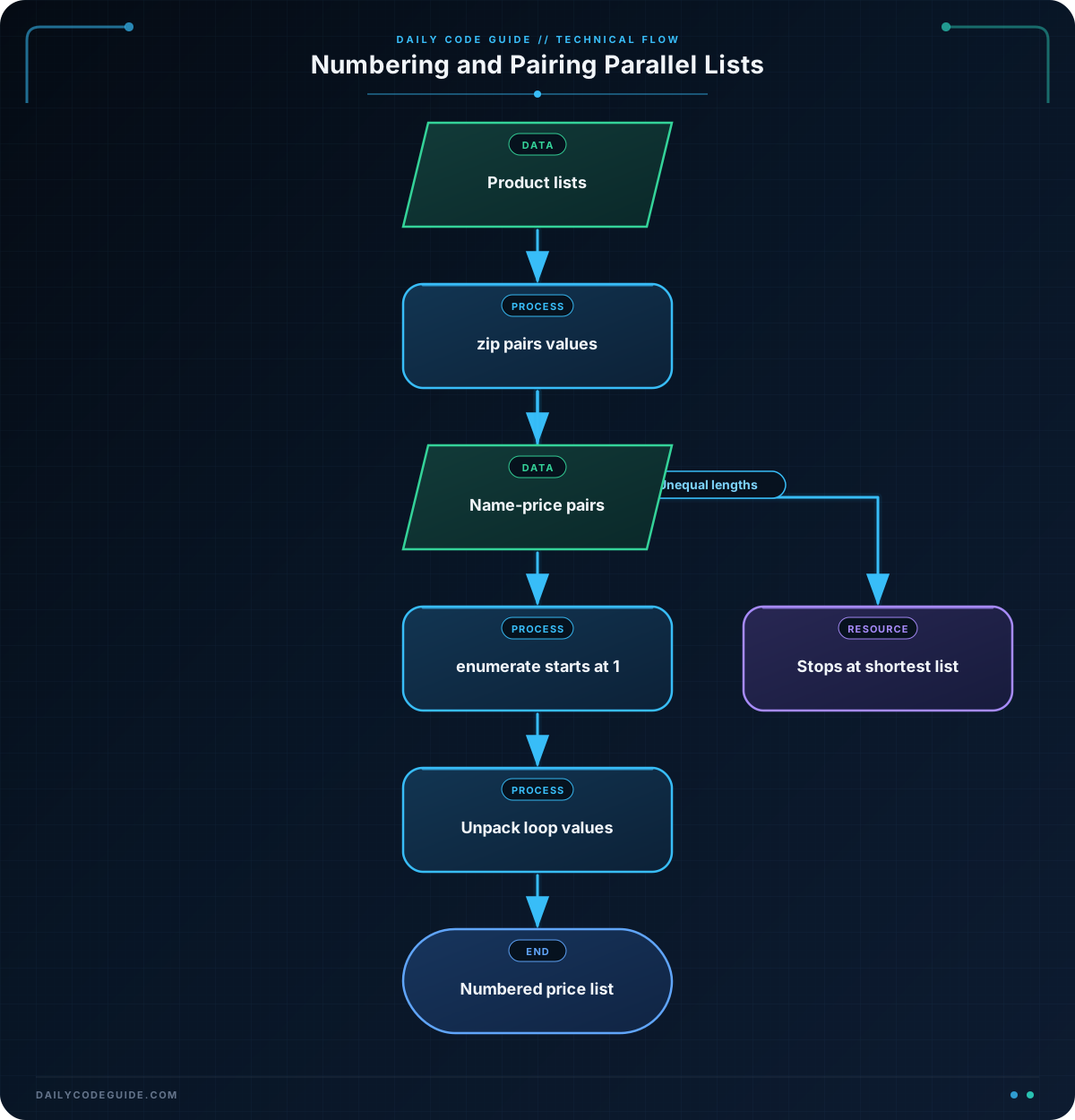
The first name belongs with the first price, the second name belongs with the second price, and so on. Python’s zip() function combines values at matching positions so that you can process them together.
The result of zip(product_names, prices) produces pairs like these:
("Notebook", 4.99)
("Desk Lamp", 18.50)
("Coffee Mug", 7.25)
Each pair is a tuple, which is a small group of values. A for loop can unpack each tuple into two variables.
By itself, zip() gives you the related values, but it does not give you a counter. The enumerate() function adds a number to each item. Using start=1 makes the first number 1 instead of the default 0.
Together, enumerate(zip(...), start=1) means: “Go through these paired values and number them starting at 1.”
Basic Example
This program combines product names with prices and prints a numbered price list.
product_names = ["Notebook", "Desk Lamp", "Coffee Mug"]
prices = [4.99, 18.50, 7.25]

for item_number, (name, price) in enumerate(zip(product_names, prices), start=1):
    print(f"{item_number}. {name}: ${price:.2f}")
Expected Output
1. Notebook: $4.99
2. Desk Lamp: $18.50
3. Coffee Mug: $7.25
How the Code Works
The first two lines create two lists. The values at the same position are related:
"Notebook"is paired with4.99."Desk Lamp"is paired with18.50."Coffee Mug"is paired with7.25.
The expression zip(product_names, prices) creates one pair for each product and price. The loop then processes one pair at a time.
This part of the loop uses tuple unpacking:
item_number, (name, price)The outer value, item_number, comes from enumerate(). The inner values, name and price, come from each tuple created by zip().
For the first loop iteration, Python effectively assigns:
item_number = 1
name = "Notebook"
price = 4.99
The f-string creates the displayed line. The format specifier :.2f displays the price with exactly two digits after the decimal point, which is useful for currency.
Another Example
You can use zip() with more than two lists. This example creates numbered stock labels using product names, aisle locations, and quantities.
product_names = ["Wireless Mouse", "Keyboard", "USB Cable"]
aisles = ["A3", "A3", "B1"]
stock_counts = [12, 7, 24]

for label_number, (name, aisle, stock) in enumerate(
    zip(product_names, aisles, stock_counts),
    start=1
):
    print(f"{label_number}. {name} | Aisle {aisle} | In stock: {stock}")
Here, each iteration receives three related values: a product name, an aisle, and a stock count. The item number comes from enumerate(), while the three product details come from zip().
Common Mistakes
Forgetting that numbering starts at zero
By default, enumerate() starts counting at 0:
for item_number, name in enumerate(product_names):
    print(item_number, name)
If you want human-friendly numbering that starts at 1, pass start=1:
for item_number, name in enumerate(product_names, start=1):
    print(item_number, name)
Using the lists separately
A loop such as for name in product_names only gives you names. It does not automatically provide the matching price. Use zip(product_names, prices) when the values belong together.
Lists with different lengths
Regular zip() stops when the shortest input is exhausted. If there are four product names but only three prices, the fourth product will not be processed. For reliable results, make sure related lists contain the same number of values.
Try It Yourself
Create a numbered list of products and their prices. Use these lists:
product_names = ["Water Bottle", "Lunch Box", "Travel Towel"]
prices = [12.00, 15.75, 9.50]
Use zip() and enumerate() to print each product in this format:
1. Water Bottle - $12.00
2. Lunch Box - $15.75
3. Travel Towel - $9.50
Challenge
Create a numbered inventory report using the following three lists:
product_names = ["Notebook", "Desk Lamp", "Coffee Mug"]
prices = [4.99, 18.50, 7.25]
stock_counts = [20, 8, 15]
Your program should:
- Use
zip()to combine the three lists. - Use
enumerate()to number the products starting at 1. - Print each product name, price, and stock count.
- Format each price with two decimal places.
The output should look like this:
1. Notebook - $4.99 - Stock: 20
2. Desk Lamp - $18.50 - Stock: 8
3. Coffee Mug - $7.25 - Stock: 15
Solution
product_names = ["Notebook", "Desk Lamp", "Coffee Mug"]
prices = [4.99, 18.50, 7.25]
stock_counts = [20, 8, 15]

for item_number, (name, price, stock) in enumerate(
    zip(product_names, prices, stock_counts),
    start=1
):
    print(f"{item_number}. {name} - ${price:.2f} - Stock: {stock}")
zip() combines the matching product name, price, and stock count into one tuple. enumerate() adds the item number, beginning with 1. The loop unpacks all three product details, and the formatted string prints them in the required layout.
Key Takeaways
- Use
zip()to iterate over related values from two or more sequences at the same time. - Use
enumerate()when you need an index or item number during a loop. - Use
start=1when the displayed numbering should begin at 1. - With
enumerate(zip(...)), unpack the number separately from the tuple of related values. - Regular
zip()stops when its shortest input sequence runs out of values.