


What You’ll Learn
In this lesson, you will learn how Bash reports whether a command succeeded or failed, and how that result controls what happens next in a deployment script.
- Understand what an exit status means in Bash.
- Use a command directly in an
ifstatement. - Stop a deployment when validation fails.
- Recognize how
&&,||, and pipelines use exit statuses.
The Concept
After a Bash command finishes, it produces an exit status. This is a number that describes the result of the command:
- 0 means success.
- Any nonzero value means failure or another condition that was not successful.
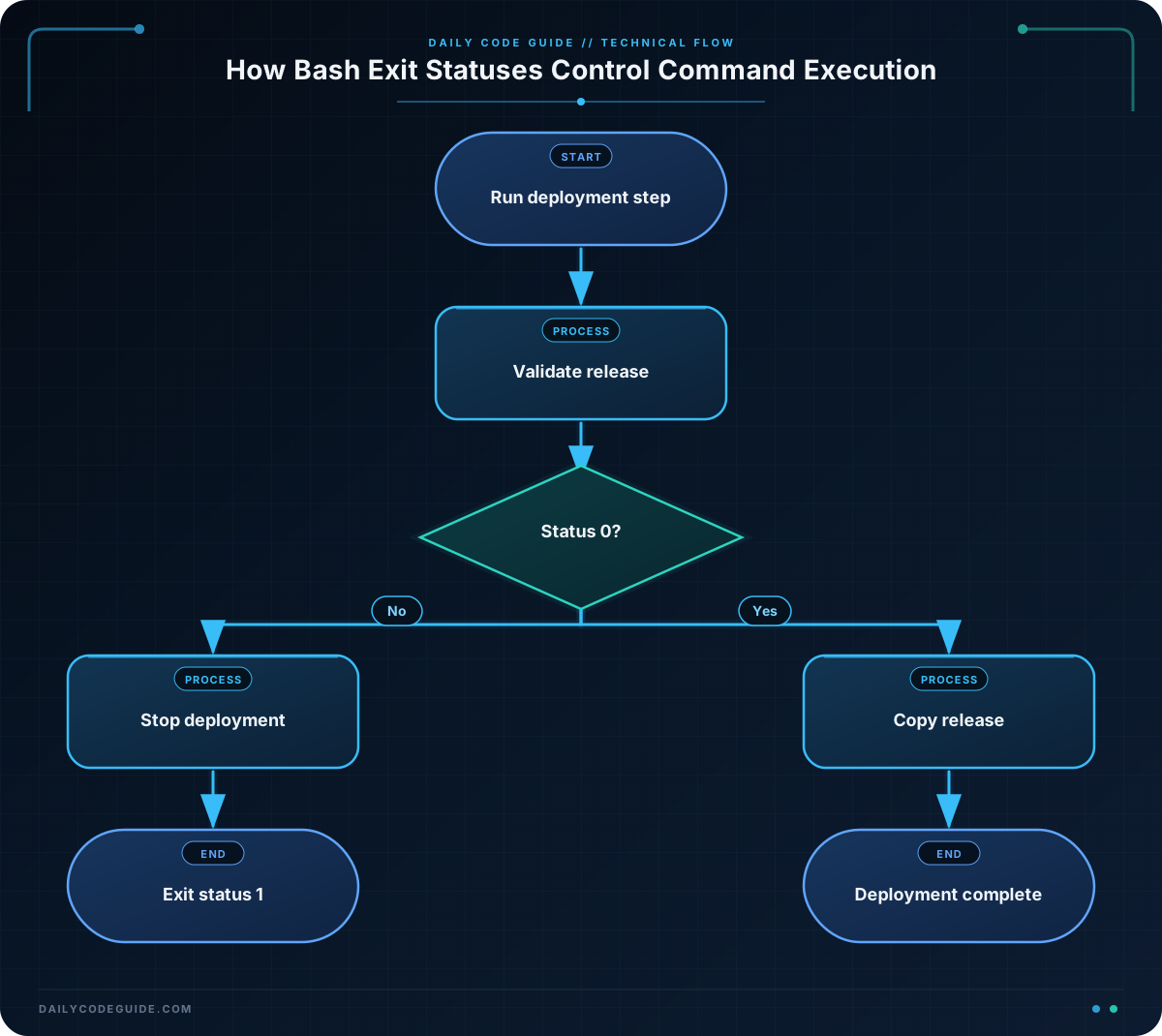
Bash uses these statuses for conditional execution. A command can be placed directly after if. Bash runs the command and checks its exit status. If the status is 0, the then section runs. If the status is nonzero, the else section runs, if one exists.
This is especially useful in deployment scripts. A deployment should not continue if a build, validation check, backup, or file operation fails. Checking the status lets the script stop before it makes a partial or unsafe deployment.
The && operator runs the command on its right only when the command on its left succeeds. The || operator runs the command on its right only when the command on its left fails. A semicolon runs the next command regardless of the previous command’s result.
For a pipeline, Bash normally uses the exit status of the last command in the pipeline. Bash can be configured with set -o pipefail so that a pipeline also fails when an earlier command fails. The examples below use direct checks so the result is easy to see.
Basic Example
This deployment script creates a build configuration file and checks whether it contains an approval setting. Because the file is not approved, the validation command fails and the deployment stops before copying the file.
#!/usr/bin/env bash

build_directory="build"
release_directory="release"

mkdir -p "$build_directory" "$release_directory"
printf 'version=1.0\n' > "$build_directory/release.conf"

if grep -q '^approved=true$' "$build_directory/release.conf"; then
    cp "$build_directory/release.conf" "$release_directory/release.conf"
    echo "Deployment completed."
else
    echo "Deployment stopped: release was not approved."
    exit 1
fi

echo "This line runs only after a successful deployment."
Expected Output
Deployment stopped: release was not approved.
The script exits with status 1.
How the Code Works
The variables store the names of the build and release directories. Quoting the variables protects the script if a directory name later contains spaces.
mkdir -p creates both directories. The -p option also avoids an error when a directory already exists. The printf command writes the configuration text into the build file.
The important part is the conditional command:
grep -qsearches quietly for the exact lineapproved=true.- If the line is found,
grepreturns status0. - If the line is not found,
grepreturns status1. - Bash uses that status to choose between
thenandelse.
In this example, the file contains only version=1.0, so grep returns a nonzero status. The script prints an error message and runs exit 1. The nonzero status tells the calling shell or deployment system that the script failed.
The cp command is inside the successful branch. It cannot run unless the approval check succeeds. The final message is also protected by the conditional flow, so it does not falsely report a successful deployment.
Another Example
A deployment may need to create a backup before changing live files. This script performs the next step only when the backup command succeeds.
#!/usr/bin/env bash

data_directory="app-data"
backup_directory="backups"
backup_file="$backup_directory/app-data.tar.gz"

mkdir -p "$data_directory" "$backup_directory"
printf 'database_host=db.internal\n' > "$data_directory/settings.conf"

if tar -czf "$backup_file" "$data_directory"; then
    echo "Backup created."
    echo "It is safe to continue with the deployment."
else
    echo "Backup failed. Deployment was not started."
    exit 1
fi
The tar command returns status 0 when it successfully creates the compressed archive. Only then does Bash run the success branch. If the archive cannot be created, the script exits with a failure status instead of continuing.
The same idea can be written with && for a short sequence:
tar -czf "$backup_file" "$data_directory" && echo "Backup created."Here, the message is printed only if tar succeeds. For a deployment with several important steps, an if statement is often clearer because it gives you room to print an explanation and exit deliberately.
Common Mistakes
Running the next command with a semicolon
A semicolon does not check the previous command’s result. The second command runs even if the first one fails.
run_build; deploy_releaseUse an if statement or && when the deployment must wait for a successful build.
Checking command output instead of its status
Bash conditionals normally use the command’s exit status, not the text that the command prints. A command can print a message and still return a failure status, or print nothing and succeed.
Overwriting the status before checking it
If you store the last status in a variable, do it immediately after the command. Running another command first may replace the value of $?, which represents the most recently completed command’s status.
Assuming every nonzero status means the same thing
Nonzero statuses all indicate that the command did not report success, but the exact value can have a command-specific meaning. For basic conditional execution, treat zero as success and nonzero as failure unless the command’s documentation says otherwise.
Try It Yourself
Create a Bash script that checks whether a file named build/release.conf contains the line approved=true.
- Use
grep -qin anifstatement. - Print
Release approved.when the check succeeds. - Print
Release rejected.and exit with status1when it fails. - Run the script once with an approved file and once without the approval line.
Challenge
Write a small deployment script that promotes a release only when it is marked ready.
- Create a directory named
stagingand a directory namedlive. - Create
staging/release.txtcontaining the linestatus=ready. - Use
grep -qin anifstatement to check that line. - If the check succeeds, copy the file to
live/release.txtand printRelease promoted.. - If the check fails, print
Promotion stopped.and exit with status1. - Print a final message only after the successful copy.
Solution
#!/usr/bin/env bash

staging_directory="staging"
live_directory="live"

mkdir -p "$staging_directory" "$live_directory"
printf 'status=ready\n' > "$staging_directory/release.txt"

if grep -q '^status=ready$' "$staging_directory/release.txt"; then
    cp "$staging_directory/release.txt" "$live_directory/release.txt"
    echo "Release promoted."
    echo "Deployment can continue."
else
    echo "Promotion stopped."
    exit 1
fi
grep returns status 0 because the file contains the required line. That allows the copy command and the final message to run. If the file content changes so the line is missing, the condition becomes false, the copy is skipped, and the script exits with status 1.
Key Takeaways
- Bash uses exit status
0for success and a nonzero value for failure. - A command can be placed directly in an
ifstatement to control conditional execution. - Use explicit status checks to prevent a deployment from continuing after a failed step.
&&continues only after success, while||runs after failure.- Exit with a nonzero status when a deployment script stops because something went wrong.

