


What You’ll Learn
In this lesson, you will learn how Bash functions make deployment scripts easier to reuse and maintain. By the end, you will know how to:
- Define and call a Bash function.
- Pass information into a function with parameters.
- Return a success or failure status code.
- Use a function directly in an
ifstatement.
The Concept
A Bash function is a named group of commands. Instead of writing the same status-checking commands in several places, you can put them in a function and call that function whenever you need it.
A basic function has this structure:
function_name() {
    commands
}
You call the function by writing its name:
function_nameFunctions can receive parameters. Inside a function, $1 means the first parameter, $2 means the second parameter, and so on.
A function also has an exit status. By convention, status code 0 means success, while a nonzero status means failure. The Bash return command sets this status:
return 0This makes functions especially useful for deployment scripts. A function can check whether a deployment directory is ready and return a status that the rest of the script can use.
Basic Example
The following script defines a reusable function named check_deployment. It checks whether a deployment directory exists and contains a file named healthy.
#!/usr/bin/env bash

deployment_dir="/tmp/daily-code-guide-app"
health_file="$deployment_dir/healthy"

mkdir -p "$deployment_dir"
touch "$health_file"

check_deployment() {
    local directory="$1"

    if [[ -d "$directory" && -f "$directory/healthy" ]]; then
        echo "Deployment directory is ready."
        return 0
    else
        echo "Deployment directory is not ready."
        return 1
    fi
}

if check_deployment "$deployment_dir"; then
    echo "Deployment check passed."
else
    echo "Deployment check failed."
fi
Expected Output
Deployment directory is ready.
Deployment check passed.
How the Code Works
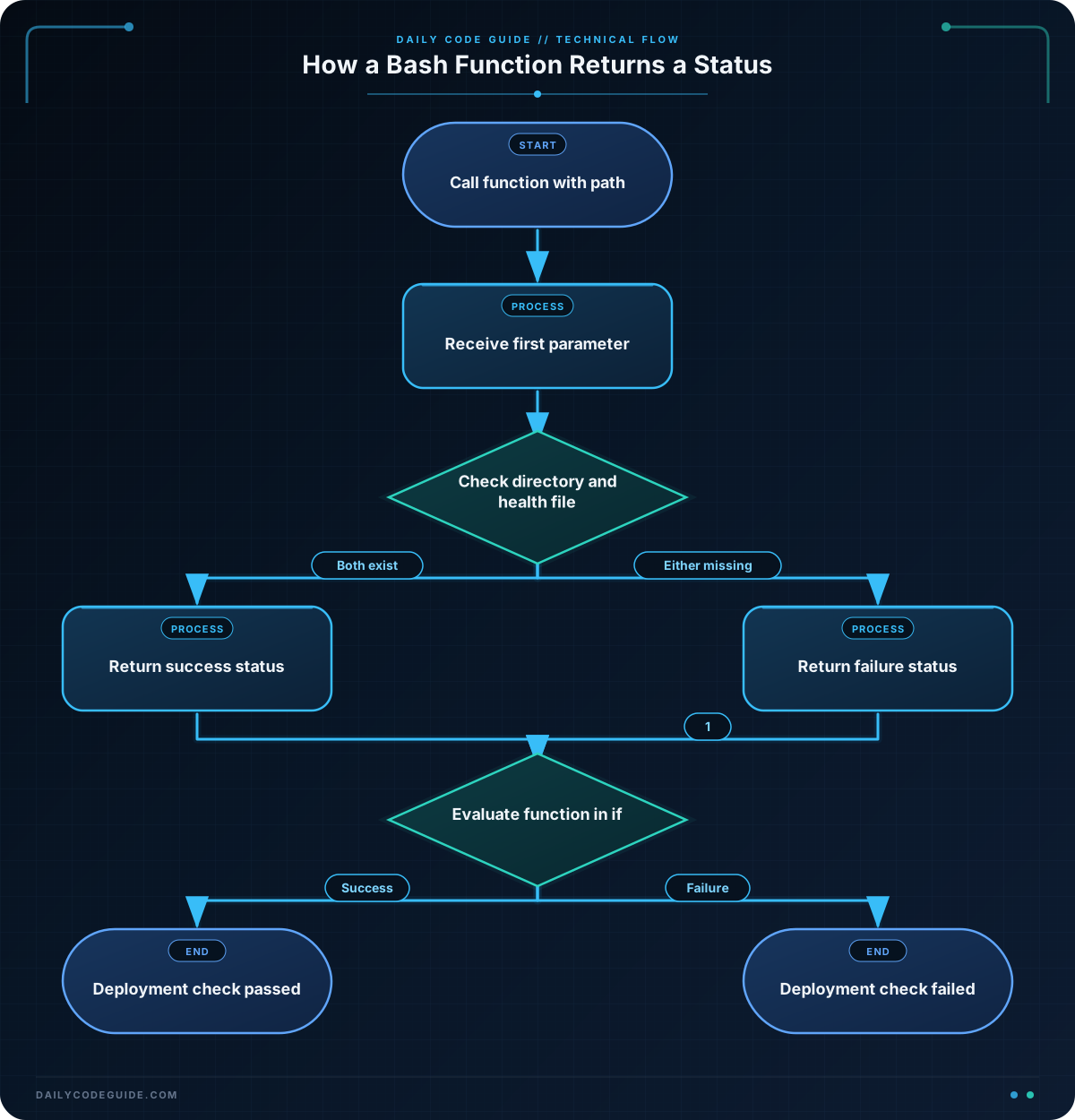
The first variables describe where the example deployment is stored:
deployment_dir="/tmp/daily-code-guide-app"
health_file="$deployment_dir/healthy"
mkdir -p creates the deployment directory if it does not already exist. The touch command creates the health marker file. In a real deployment script, an earlier deployment step might create this file after the application has been prepared.
The function definition starts with the function name followed by parentheses and braces:
check_deployment() {
    local directory="$1"
The script calls the function with "$deployment_dir". That value becomes the function’s first parameter, which is available as $1.
local creates a variable that is used only inside the function. This prevents the function’s directory variable from unexpectedly changing a variable with the same name elsewhere in the script.
The condition checks two things:
-d "$directory"checks whether the path is a directory.-f "$directory/healthy"checks whether the health file exists.
The && operator means both checks must succeed. If they do, the function prints a success message and returns 0. Otherwise, it prints a failure message and returns 1.
This call places the function directly in an if statement:
if check_deployment "$deployment_dir"; then
    echo "Deployment check passed."
else
    echo "Deployment check failed."
fi
Bash uses the function’s return status to choose the then or else branch. This is usually clearer than manually checking a status variable.
Another Example
A deployment script may also need to verify that required commands are available before it begins. This function accepts a command name and uses Bash’s built-in command -v command to check for it.
#!/usr/bin/env bash

check_required_command() {
    local command_name="$1"

    if command -v "$command_name" >/dev/null 2>&1; then
        printf 'Available: %s\n' "$command_name"
        return 0
    else
        printf 'Missing: %s\n' "$command_name"
        return 1
    fi
}

if check_required_command "bash" && check_required_command "mkdir"; then
    echo "Deployment prerequisites are ready."
else
    echo "Deployment cannot start."
fi
This is a different reusable status check: it can test any command name passed as its parameter. The two calls check for bash and mkdir. On a typical system where both commands are installed, the final success message is printed.
Common Mistakes
- Forgetting to call the function: Defining a function does not run it. You must write its name later, such as
check_deployment "$deployment_dir". - Printing instead of returning: A message such as
echo "failed"does not create a failure status. Usereturn 1when the caller needs to detect failure. - Forgetting the parameter: If a function expects a path in
$1, pass that path when calling it. - Using an unquoted path: Write
"$directory"instead of$directory. Quoting protects paths that contain spaces or wildcard characters. - Assuming every nonzero status is the same: All nonzero values indicate failure to an
ifstatement, but the specific number can carry more detail when a script needs it.
Try It Yourself
Create a function named check_release_file that accepts a file path as its first parameter. It should:
- Print
Release file found.and return0when the file exists. - Print
Release file is missing.and return1when it does not exist. - Call the function inside an
ifstatement.
Test it with a path such as /tmp/daily-code-guide-release.txt. Use the -f file test and create the file with touch if you want to test the successful branch.
Challenge
Write a small deployment verification script that uses a reusable function named check_deployment_file.
Your function should:
- Accept a file path as its first parameter.
- Print
Found: FILE_PATHand return0when the file exists. - Print
Missing: FILE_PATHand return1when the file does not exist. - Check a deployment file named
release.txt. - Print
Deployment is ready.when the check succeeds. - Print
Deployment is blocked.when the check fails.
Make the script self-contained by creating the temporary deployment directory and its release.txt file before calling the function.
Solution
#!/usr/bin/env bash

deployment_dir="/tmp/daily-code-guide-challenge"
release_file="$deployment_dir/release.txt"

mkdir -p "$deployment_dir"
touch "$release_file"

check_deployment_file() {
    local file_path="$1"

    if [[ -f "$file_path" ]]; then
        printf 'Found: %s\n' "$file_path"
        return 0
    else
        printf 'Missing: %s\n' "$file_path"
        return 1
    fi
}

if check_deployment_file "$release_file"; then
    echo "Deployment is ready."
else
    echo "Deployment is blocked."
fi
The function receives the release file path through $1 and uses -f to test whether it is a regular file. Because the script creates the file before checking it, the function returns 0, causing the success branch to run.
Key Takeaways
- A Bash function groups reusable commands under a name.
- Function parameters are accessed with positional variables such as
$1. - Use
return 0for success and a nonzero status such asreturn 1for failure. - A function can be placed directly in an
ifstatement to make deployment decisions. - Quoting function parameters helps status checks work correctly with paths containing spaces.

