


What You’ll Learn
In this lesson, you’ll learn how Python context managers and the with statement manage resources safely. You will use them to control database connections, commit successful work, roll back failed work, and close connections even when an exception occurs.
- Understand how the
withstatement controls setup and cleanup. - Use a context manager with a SQLite database connection.
- Distinguish transaction management from connection closing.
- Create a custom context manager for reusable database operations.
The Concept
A resource is something your program acquires and must eventually release. Files, database connections, network sockets, and locks are common examples.
Without a context manager, cleanup often requires a try and finally block:
- Open the resource.
- Use it.
- Release it in
finally, whether the operation succeeds or fails.
A context manager packages that pattern. The with statement runs setup before its indented block and cleanup afterward. Cleanup still happens if code inside the block raises an exception.
Many built-in Python objects support this pattern. For example, a file object closes automatically when this block ends:
with open("activity.log", "a", encoding="utf-8") as log_file:
    log_file.write("Database sync completed\n")
The object used after with must support the context manager protocol. Internally, Python calls methods commonly known as __enter__ and __exit__.
For database code, there are two related responsibilities:
- Transaction management: commit changes when the block succeeds and roll them back when an exception occurs.
- Connection cleanup: close the database connection when it is no longer needed.
These responsibilities are not always handled by the same context manager. In particular, a sqlite3.Connection context manager manages transactions, but exiting a with connection: block does not close the connection. The connection must still be closed separately.
Basic Example
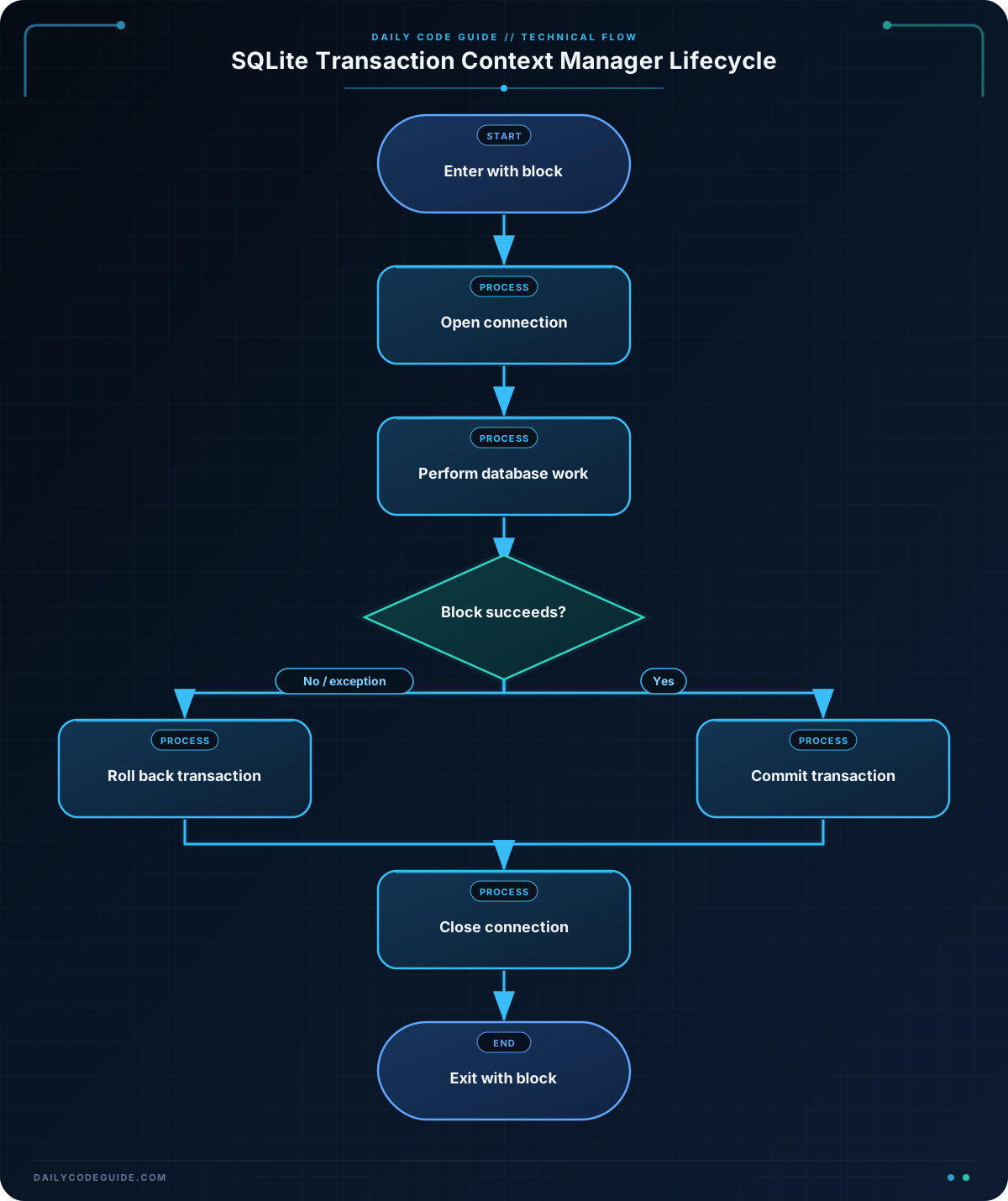
The following program records two orders in a SQLite database. The outer context manager, supplied by closing, closes the connection. The connection’s own context manager commits the transaction if the block succeeds or rolls it back if an exception occurs.
from contextlib import closing
import sqlite3

with closing(sqlite3.connect("orders.db")) as connection, connection:
    connection.execute(
        """
        CREATE TABLE IF NOT EXISTS orders (
            order_id INTEGER PRIMARY KEY,
            customer TEXT NOT NULL,
            total_cents INTEGER NOT NULL
        )
        """
    )

    connection.execute("DELETE FROM orders")

    connection.executemany(
        "INSERT INTO orders (customer, total_cents) VALUES (?, ?)",
        [
            ("Ava Patel", 4599),
            ("Marcus Lee", 1250),
        ],
    )

    orders = connection.execute(
        "SELECT order_id, customer, total_cents FROM orders ORDER BY order_id"
    ).fetchall()

    print(f"Saved {len(orders)} orders.")
    for order_id, customer, total_cents in orders:
        print(f"{order_id}: {customer} - ${total_cents / 100:.2f}")
Expected Output
The program clears the table before inserting the sample data, so the output is deterministic each time it runs:
Saved 2 orders.
1: Ava Patel - $45.99
2: Marcus Lee - $12.50
How the Code Works
sqlite3.connect("orders.db") opens a connection to a SQLite database file. SQLite creates the file if it does not already exist.
closing(...) is a context manager from the standard library. It calls the resource’s close() method when its block ends. This is important because the SQLite connection context manager does not close the connection by itself.
The line below combines two context managers:
with closing(sqlite3.connect("orders.db")) as connection, connection:The context managers enter from left to right and exit from right to left. The connection context manager handles the transaction first. Then closing closes the connection.
Parameterized SQL is used for the inserted values:
connection.executemany(
    "INSERT INTO orders (customer, total_cents) VALUES (?, ?)",
    [
        ("Ava Patel", 4599),
        ("Marcus Lee", 1250),
    ],
)
The question marks are placeholders. SQLite supplies the values separately, which is safer than building SQL statements by concatenating strings.
If an exception occurs after an insert but before the block finishes, the connection context manager rolls back the transaction. The outer closing manager still closes the connection. This is the main reliability benefit: cleanup is tied to leaving the block, not to remembering a separate cleanup statement on every possible execution path.
Another Example
When an application uses the same transaction policy in many places, a custom context manager can make that policy explicit and reusable. The following function opens a connection, yields it to the caller, commits on success, rolls back on failure, and closes the connection in all cases.
from contextlib import contextmanager
import sqlite3

@contextmanager
def database_transaction(database_path):
    connection = sqlite3.connect(database_path)

    try:
        yield connection
    except Exception:
        connection.rollback()
        raise
    else:
        connection.commit()
    finally:
        connection.close()


try:
    with database_transaction(":memory:") as connection:
        connection.execute(
            """
            CREATE TABLE audit_events (
                event_name TEXT NOT NULL,
                details TEXT NOT NULL
            )
            """
        )

        connection.execute(
            "INSERT INTO audit_events (event_name, details) VALUES (?, ?)",
            ("invoice_created", "Invoice 1042"),
        )

        raise RuntimeError("The audit batch could not be completed")
except RuntimeError as error:
    print(f"Batch failed: {error}")
    print("The transaction was rolled back and the connection was closed.")
Here, @contextmanager turns a generator function into a context manager. The code before yield performs setup. The caller receives the connection at yield. Code after yield determines what happens after the with block finishes.
The raise statement in the except block re-raises the original exception after the rollback. This lets the calling code handle the failure instead of silently hiding it.
Common Mistakes
- Assuming every
withblock closes a database connection: A context manager only performs the cleanup defined by its object. With SQLite, useclosing(connection)or explicitly close the connection. - Calling
commit()after every individual statement: This can leave a partially completed operation if a later statement fails. Group related changes in one transaction and commit them together. - Suppressing exceptions accidentally: A custom context manager should usually use
raiseafter rollback so callers know the operation failed. - Building SQL with string concatenation: Use parameter placeholders such as
?and pass values separately. This avoids quoting problems and reduces SQL injection risk. - Using a closed resource: A file or connection should not be used after its
withblock. Put all operations that need the resource inside the block.
Try It Yourself
Write a program that uses with to open a file named connection_status.txt for writing. Store three lines describing database checks, then open the same file with another with block and print each line after reading it.
Make sure both file operations are inside context manager blocks. The file should be closed automatically after each block.
Challenge
Create a reusable database_transaction(database_path) context manager for processing payments.
- Open and close the SQLite connection inside the context manager.
- Commit all inserts if the block completes successfully.
- Roll back all inserts if an exception occurs.
- Create a
paymentstable with an ID, customer name, and amount in cents. - Process a list containing at least three payments.
- Raise
ValueErrorwhen a payment has an amount less than or equal to zero. - Catch the error outside the
withblock and print a useful message.
Solution
from contextlib import contextmanager
import sqlite3

@contextmanager
def database_transaction(database_path):
    connection = sqlite3.connect(database_path)

    try:
        yield connection
    except Exception:
        connection.rollback()
        raise
    else:
        connection.commit()
    finally:
        connection.close()


payments = [
    ("Ava Patel", 4599),
    ("Marcus Lee", 0),
    ("Sofia Nguyen", 2750),
]

try:
    with database_transaction(":memory:") as connection:
        connection.execute(
            """
            CREATE TABLE payments (
                payment_id INTEGER PRIMARY KEY,
                customer TEXT NOT NULL,
                amount_cents INTEGER NOT NULL
            )
            """
        )

        for customer, amount_cents in payments:
            if amount_cents <= 0:
                raise ValueError(
                    f"Payment for {customer} must be greater than zero cents"
                )

            connection.execute(
                """
                INSERT INTO payments (customer, amount_cents)
                VALUES (?, ?)
                """,
                (customer, amount_cents),
            )

        print(f"Processed {len(payments)} payments.")
except ValueError as error:
    print(f"Payment batch rejected: {error}")
    print("All payment inserts were rolled back.")
The second payment causes a ValueError. The custom context manager catches that exception, rolls back the transaction, closes the connection, and re-raises the error. The outer except block then reports the rejected batch. Because the transaction never reaches its successful completion path, none of the payment inserts are committed.
Key Takeaways
- The
withstatement connects resource setup and cleanup to a clearly defined block. - Cleanup occurs even when code inside the block raises an exception.
- SQLite connection context management handles commit and rollback, but it does not automatically close the connection.
contextlib.closingcan close objects that provide aclose()method.- Custom context managers let you standardize transaction and cleanup behavior across a project.

