


What You’ll Learn
In this lesson, you will learn how Python decorators add reusable behavior around existing functions without changing the functions’ source code. You will build logging decorators that record function calls, successful results, and failures.
- Understand how a decorator wraps a function.
- Create decorators that accept arbitrary positional and keyword arguments.
- Preserve a wrapped function’s name and documentation with
functools.wraps. - Use decorators to add logging consistently across multiple functions.
The Concept
A decorator is a function that receives another function, adds behavior around it, and returns a new function. The original function can then be used with the added behavior without modifying its implementation.
Decorators are useful when the same behavior belongs around many functions. Common examples include logging, timing, permission checks, caching, retry logic, and input validation.
Python provides the @decorator_name syntax for applying a decorator:
@log_calls
def calculate_total(items):
    return sum(items)
This syntax is equivalent to assigning the decorated function manually:
def calculate_total(items):
    return sum(items)

calculate_total = log_calls(calculate_total)
The decorator runs when Python creates the function, while the wrapper’s code runs each time the decorated function is called. The wrapper usually accepts *args and **kwargs so it can work with functions having different parameter lists.
Basic Example
The following decorator logs when a function starts and what value it returns. The reusable business logic in format_customer_summary does not contain any logging code.
from functools import wraps


def log_calls(function):
    @wraps(function)
    def wrapper(*args, **kwargs):
        print(f"[LOG] Calling {function.__name__}")
        result = function(*args, **kwargs)
        print(f"[LOG] {function.__name__} returned {result!r}")
        return result

    return wrapper


@log_calls
def format_customer_summary(name, orders):
    total = sum(order["amount"] for order in orders)
    return f"{name}: {len(orders)} orders, ${total:.2f}"


customer_orders = [
    {"order_id": "A104", "amount": 18.50},
    {"order_id": "A105", "amount": 24.00},
]

summary = format_customer_summary("Mina", customer_orders)
print(summary)
Expected Output
[LOG] Calling format_customer_summary
[LOG] format_customer_summary returned 'Mina: 2 orders, $42.50'
Mina: 2 orders, $42.50
How the Code Works
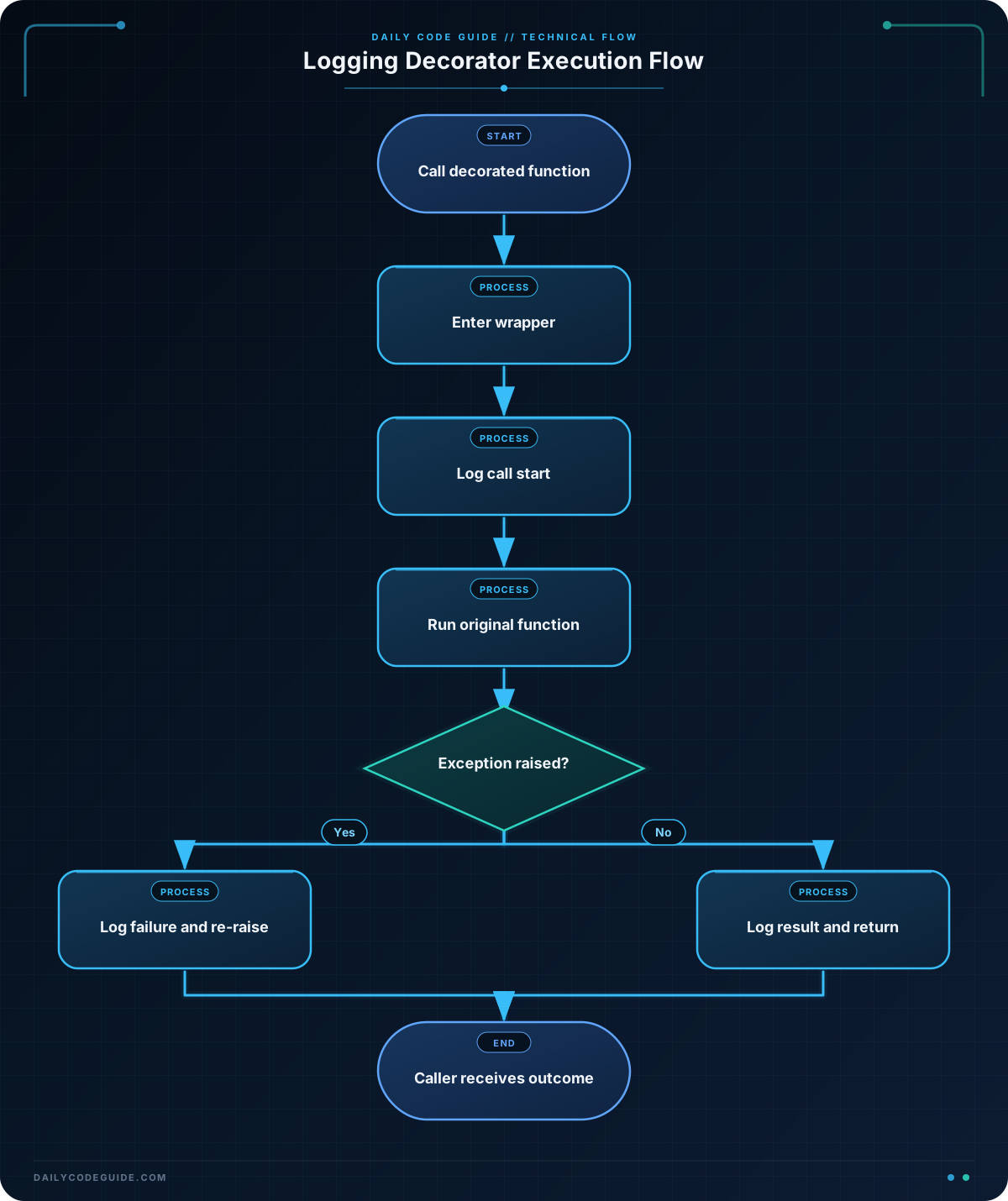
log_calls is the decorator. It receives the original function through its function parameter.
The nested wrapper function is the replacement that runs when the decorated function is called. Its *args collects positional arguments, such as "Mina" and customer_orders. Its **kwargs collects keyword arguments if the function is called with them.
The wrapper calls the original function with both argument collections:
result = function(*args, **kwargs)Saving the return value is important. Without return result, the decorated function would return None even though the original function produced a summary.
@wraps(function) copies useful metadata from the original function, including its name and docstring. Without it, tools that inspect format_customer_summary would usually see the name wrapper instead.
The decorator logs the function name and result, but it does not log the arguments. That can be a safer default because arguments may contain passwords, payment information, or other sensitive customer data.
Another Example
Logging successful calls is useful, but production code also needs visibility into failures. This decorator records whether a function completed or raised an exception, then re-raises the exception so the calling code can handle it normally.
import logging
from functools import wraps


logging.basicConfig(level=logging.INFO, format="%(levelname)s:%(message)s")


def log_failures(function):
    @wraps(function)
    def wrapper(*args, **kwargs):
        try:
            result = function(*args, **kwargs)
        except Exception as error:
            logging.error(
                "%s failed with %s",
                function.__name__,
                type(error).__name__,
            )
            raise
        else:
            logging.info("%s completed successfully", function.__name__)
            return result

    return wrapper


@log_failures
def find_customer_record(records, customer_id):
    for record in records:
        if record["id"] == customer_id:
            return record

    raise KeyError(customer_id)


customer_records = [
    {"id": 201, "name": "Mina Patel"},
    {"id": 202, "name": "Jon Bell"},
]

print(f"Customer: {find_customer_record(customer_records, 201)['name']}")

try:
    find_customer_record(customer_records, 404)
except KeyError:
    print("Customer ID 404 was not found.")
Here, the decorator adds operational logging while leaving the customer lookup function focused on lookup behavior. The exception is not swallowed; it is logged and then sent back to the try/except statement.
Common Mistakes
- Forgetting to return the wrapper: The decorator must finish with
return wrapper. Otherwise, applying it replaces the function withNone. - Forgetting to return the original result: A wrapper that calls the original function but does not return its result changes the function’s behavior.
- Using only fixed parameters: A wrapper such as
def wrapper(name)can only decorate functions with that exact calling pattern. Use*argsand**kwargsfor a reusable decorator. - Leaving out
wraps: The decorator may still run, but function metadata and debugging information become less useful. - Logging every argument automatically: Arguments can contain secrets or personal information. Log only the information needed for diagnosis.
- Swallowing exceptions: Logging an exception should not usually make the failure disappear. Re-raise it unless the decorator intentionally defines a recovery policy.
Try It Yourself
Create a log_calls-style decorator named log_result. It should print the decorated function’s name before the call and print its returned value afterward.
Apply it to a function named build_shipping_label that accepts a recipient name and a postal code and returns a formatted label. Call the function with sample data and confirm that the logging appears before the final label.
Challenge
Create a decorator named audit_operation for a small order-processing module.
- Log
STARTandSUCCESSmessages using theloggingmodule. - If the decorated function raises an exception, log a
FAILEDmessage and re-raise the exception. - Use
functools.wraps. - Decorate a function named
cancel_order. cancel_ordershould accept an order ID and a set of cancellable order IDs.- It should return a confirmation message when the order can be cancelled and raise
ValueErrorwhen it cannot. - Call it once successfully and once with an unavailable order ID, handling the failure with
tryandexcept.
Solution
import logging
from functools import wraps


logging.basicConfig(level=logging.INFO, format="%(levelname)s:%(message)s")


def audit_operation(function):
    @wraps(function)
    def wrapper(*args, **kwargs):
        logging.info("START %s", function.__name__)

        try:
            result = function(*args, **kwargs)
        except Exception as error:
            logging.error(
                "FAILED %s with %s",
                function.__name__,
                type(error).__name__,
            )
            raise
        else:
            logging.info("SUCCESS %s", function.__name__)
            return result

    return wrapper


@audit_operation
def cancel_order(order_id, cancellable_order_ids):
    if order_id not in cancellable_order_ids:
        raise ValueError(f"Order {order_id} cannot be cancelled.")

    return f"Order {order_id} cancelled."


cancellable_orders = {"ORD-104", "ORD-105"}

print(cancel_order("ORD-104", cancellable_orders))

try:
    cancel_order("ORD-999", cancellable_orders)
except ValueError as error:
    print(error)
The decorator surrounds every call with the same audit behavior. A successful call returns the confirmation from cancel_order and produces a SUCCESS log. A failed call produces a FAILED log, then re-raises ValueError so the caller can display the error.
Key Takeaways
- A decorator wraps a function to add reusable behavior without changing the function’s source code.
- The
@decoratorsyntax applies a decorator when the function is defined. - Use
*argsand**kwargswhen the decorator should support many function signatures. - Use
functools.wrapsto preserve the wrapped function’s metadata. - Logging decorators should preserve return values and should not hide exceptions accidentally.

