


What You’ll Learn
In this lesson, you’ll learn how to handle invalid user input in Python without allowing your program to crash. You will practice catching specific exceptions, validating values after conversion, and separating input handling from the rest of your program’s logic.
- Understand how
tryandexceptcontrol errors. - Catch
ValueErrorwhen user input cannot be converted to the expected type. - Use loops to let users correct invalid input.
- Raise and handle meaningful validation errors in a larger program.
The Concept
Exception handling lets a program respond to an error while it is running. An exception is an event that interrupts the normal flow of a program, such as trying to convert "twenty" to an integer.
Without exception handling, an invalid conversion stops the program:
When user input is involved, errors are expected rather than exceptional. A user may type letters when a number is required, enter a negative quantity, or leave a required response blank. A robust program catches these problems, explains what went wrong, and gives the user another opportunity.
Python commonly uses try and except for this purpose:
- The
tryblock contains code that might fail. - The
exceptblock handles a particular exception. - An optional
elseblock runs only when thetryblock succeeds. - An optional
finallyblock runs whether an exception occurred or not.
Catch the most specific exception you can. For invalid numeric input, ValueError is more useful than a broad except Exception, which can hide unrelated programming errors.
Basic Example
This program repeatedly asks for an age. It handles text that cannot be converted to an integer and separately validates whether the number is within a reasonable range.
while True:
    age_text = input("Enter your age: ")

    try:
        age = int(age_text)
    except ValueError:
        print("Please enter a whole number.")
        continue

    if age < 0 or age > 120:
        print("Please enter an age from 0 to 120.")
        continue

    print(f"Age accepted: {age}")
    break
Expected Output
The exact interaction depends on what the user types. For example:
Enter your age: nineteen
Please enter a whole number.
Enter your age: -4
Please enter an age from 0 to 120.
Enter your age: 32
Age accepted: 32
How the Code Works
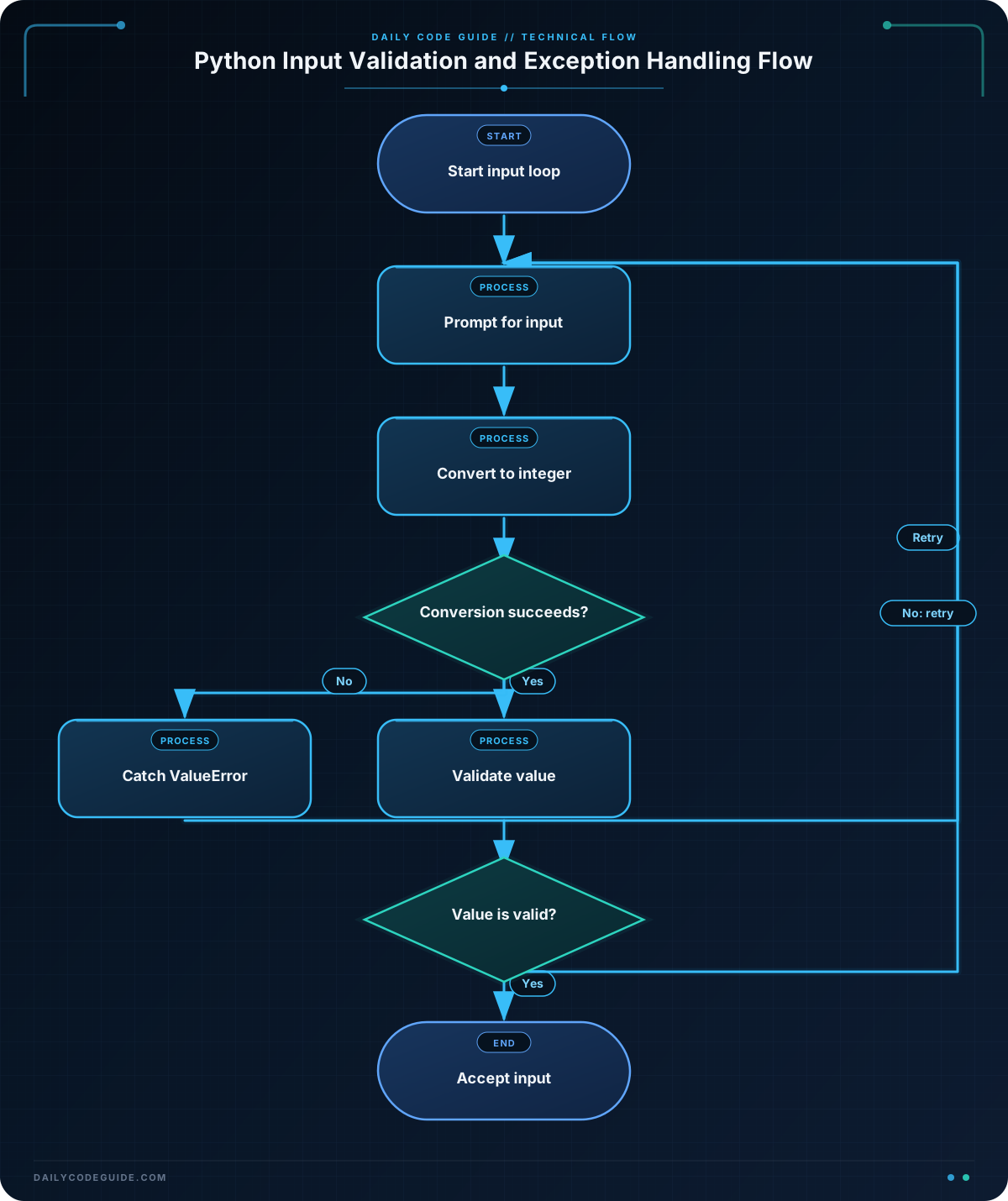
The call to input() always returns a string, even when the user enters digits. The int() function attempts to convert that string into an integer.
If the user enters nineteen, the conversion raises ValueError. The matching except block displays a useful message, and continue starts the next loop iteration.
A successful conversion does not guarantee valid data. For example, -4 is a valid integer, but it is not a sensible age for this program. That is why conversion and validation are separate steps:
- Exception handling checks whether the input has the correct form.
- Conditional validation checks whether the resulting value makes sense.
The break statement runs only after both checks succeed. This keeps the program in the loop until it has acceptable input.
A common design choice is whether to put the validation condition inside the try block. It is usually clearer to keep conversion-related exceptions in the try block and handle ordinary validation with conditionals. This makes it easier to see which operation can raise the exception.
Another Example
In a ticket-ordering program, the input function can validate several related fields and raise a ValueError with a specific message. The outer loop decides how to respond and retries the entire request when necessary.
def read_ticket_order(available_tickets):
    quantity_text = input("How many tickets would you like? ")
    email = input("What email should receive the tickets? ").strip()

    try:
        quantity = int(quantity_text)
    except ValueError as error:
        raise ValueError("Ticket quantity must be a whole number.") from error

    if quantity < 1:
        raise ValueError("Ticket quantity must be at least 1.")

    if quantity > available_tickets:
        raise ValueError(
            f"Only {available_tickets} tickets are available."
        )

    if "@" not in email or "." not in email:
        raise ValueError("Please enter a valid email address.")

    return quantity, email


available_tickets = 8

while True:
    try:
        quantity, email = read_ticket_order(available_tickets)
    except ValueError as error:
        print(f"Order not accepted: {error}")
    else:
        available_tickets -= quantity
        print(f"Order confirmed for {email}.")
        print(f"Tickets remaining: {available_tickets}")
        break
This pattern is useful when the validation rules belong together but the user-interface code should decide what happens after a failure. The function reports invalid data by raising ValueError; the caller catches it and displays the message.
The email check here is intentionally simple. In a production application, email validation may need a more carefully designed rule, and the final value should still be validated by the system that sends the message.
Common Mistakes
Catching every exception
Using except Exception: for all failures can conceal bugs such as misspelled variable names or incorrect program logic. Catch ValueError for a conversion problem, and handle other exception types only when you know what they represent.
Assuming conversion means validation succeeded
int("0") succeeds, but zero may not be valid for a ticket quantity. Always apply business rules after converting the input.
Putting too much code in the try block
A large try block makes it difficult to tell which operation caused the exception. Keep it focused on operations that are expected to fail, such as converting a string or calling a validation function.
Creating an infinite retry loop
A retry loop should have a clear success path, usually a break, return, or a maximum-attempt rule. Otherwise, the program may continue asking for input forever.
Try It Yourself
Write a program that asks a user for the number of seats they want to reserve.
- Catch non-numeric input with
ValueError. - Reject numbers less than 1.
- Reject numbers greater than 6.
- Continue prompting until the user enters an acceptable number.
- Print a confirmation containing the accepted number.
Test the program with text, zero, a number greater than 6, and a valid number.
Challenge
Create a small checkout input flow for a product with a limited stock.
- Set the available stock to
12. - Repeatedly ask the user how many items they want to purchase.
- Catch input that is not a whole number.
- Reject zero or negative quantities.
- Reject quantities greater than the available stock.
- After valid input, subtract the quantity from stock and display the remaining stock.
- Allow the user up to three invalid attempts. If all three attempts fail, display a cancellation message.
Use a specific except ValueError block rather than catching every possible exception.
Solution
available_stock = 12
attempts = 0
max_attempts = 3

while attempts < max_attempts:
    quantity_text = input("How many items would you like to buy? ")

    try:
        quantity = int(quantity_text)
    except ValueError:
        attempts += 1
        print("Please enter a whole number.")
        continue

    if quantity < 1:
        attempts += 1
        print("Quantity must be at least 1.")
        continue

    if quantity > available_stock:
        attempts += 1
        print(f"Only {available_stock} items are available.")
        continue

    available_stock -= quantity
    print(f"Purchase confirmed for {quantity} item(s).")
    print(f"Remaining stock: {available_stock}")
    break
else:
    print("Purchase cancelled after three invalid attempts.")
The conversion is protected by try and except, while the quantity rules use ordinary conditionals. Each invalid attempt increments the counter. The loop’s else block runs only when the loop ends naturally because the maximum number of attempts was reached; it does not run when the loop exits with break.
Key Takeaways
- Use
tryandexceptto handle expected runtime problems without crashing the program. - Catch
ValueErrorwhen converting invalid user input to a number. - Separate type conversion from business-rule validation.
- Prefer specific exception types over broad exception handlers.
- Retry loops should have a clear success condition and, when appropriate, a limit on attempts.

