


What You’ll Learn
In this lesson, you will learn how Python iterators keep track of a current position and how to control iteration with iter() and next(). You will apply the iterator protocol to process records returned from multiple pages without loading every record into one large list.
- Understand the difference between an iterable and an iterator.
- Use
iter()to create or retrieve an iterator. - Use
next()to retrieve one item at a time. - Handle
StopIterationwhen an iterator is exhausted. - Use the callable-and-sentinel form of
iter()for paginated data.
The Concept
An iterable is an object that can provide its items one at a time. Lists, tuples, strings, dictionaries, files, and generators are common iterables.
An iterator is the object that performs the actual one-at-a-time traversal. It remembers its current position and provides a __next__() method. Calling the built-in next() function invokes that method:
iter(iterable)returns an iterator for an iterable.next(iterator)returns the next item.- When there are no more items,
next()raisesStopIteration.
A for loop uses this same protocol automatically. It obtains an iterator and repeatedly calls next() until Python catches StopIteration. Using iter() and next() directly is useful when you need precise control, such as reading a page of records, stopping at a boundary, or combining data from a paginated source.
The two-argument form, iter(callable, sentinel), is especially useful for pagination. Python repeatedly calls the callable and yields each result until the result equals the sentinel value.
Basic Example
This example simulates an API that returns one page of records each time fetch_next_page() is called. An empty list signals that there are no more pages.
pages = [
    [
        {"id": 101, "email": "ana@example.com"},
        {"id": 102, "email": "ben@example.com"},
    ],
    [
        {"id": 103, "email": "chloe@example.com"},
        {"id": 104, "email": "dev@example.com"},
    ],
]

page_number = 0


def fetch_next_page():
    global page_number

    if page_number == len(pages):
        return []

    page = pages[page_number]
    page_number += 1
    return page


page_iterator = iter(fetch_next_page, [])

while True:
    try:
        page = next(page_iterator)
    except StopIteration:
        break

    record_iterator = iter(page)

    while True:
        try:
            record = next(record_iterator)
        except StopIteration:
            break

        print(f"Processing record {record['id']}: {record['email']}")
Expected Output
Processing record 101: ana@example.com
Processing record 102: ben@example.com
Processing record 103: chloe@example.com
Processing record 104: dev@example.com
How the Code Works
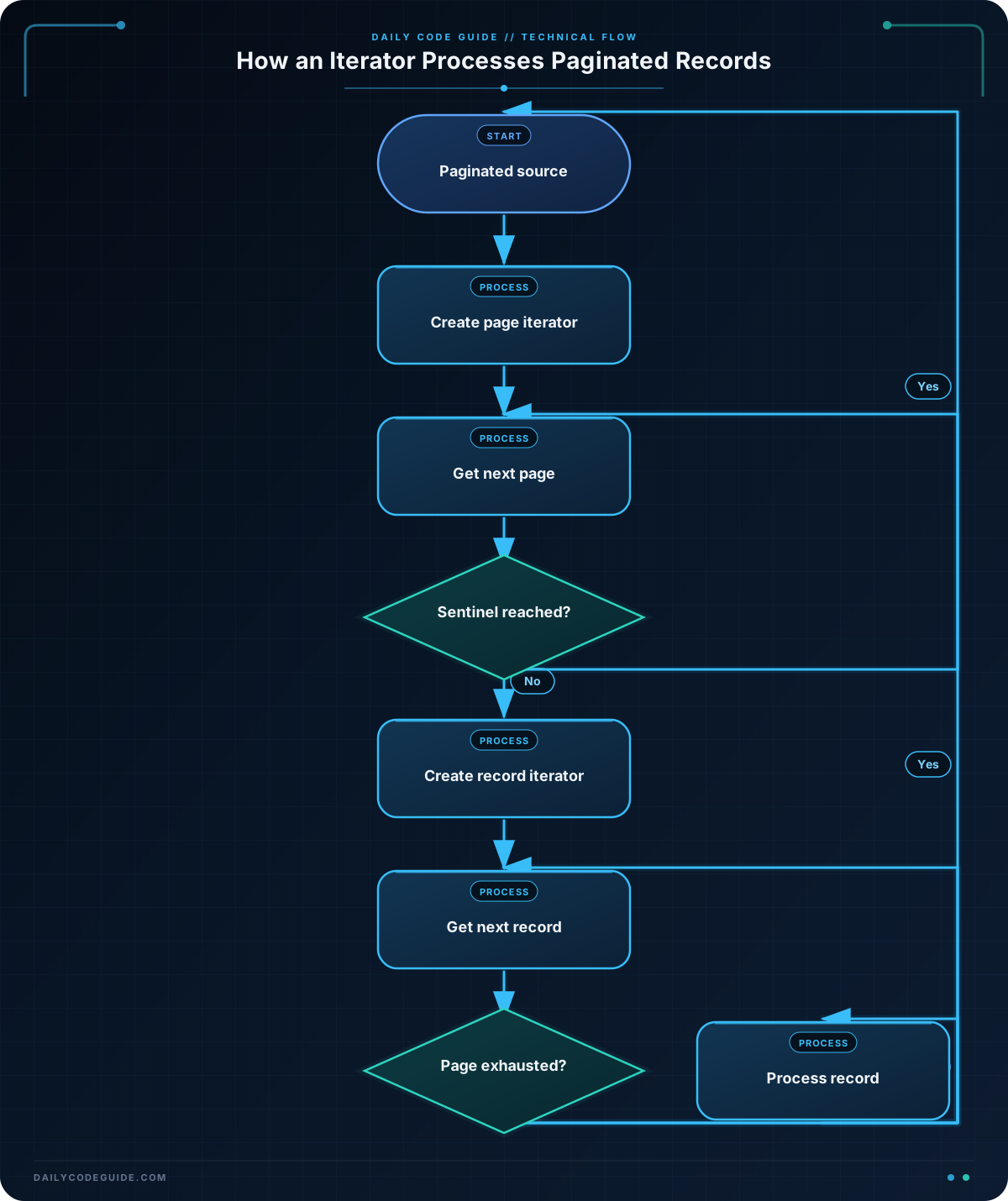
pages represents the responses that might come from a paginated service. The fetch_next_page() function returns the next page and eventually returns an empty list.
The expression iter(fetch_next_page, []) creates an iterator that calls fetch_next_page() repeatedly. Each nonempty page becomes the next item produced by page_iterator. When the function returns [], iteration ends.
The outer while loop calls next(page_iterator) and catches StopIteration. The inner loop does the same thing for the records in the current page. This means the program processes one record at a time instead of first combining all pages into a single list.
In production code, a normal for loop is often clearer when you do not need manual control:
- Use
for page in page_iteratorwhen you only need to process every page. - Use
next()when you need to inspect, skip, pause, or stop at a specific point.
The sentinel must match the completion value returned by the callable. Here, [] means “no more pages.” If a valid page could also be an empty list, choose a different completion design, such as returning None and using None as the sentinel.
Another Example
For a reusable design, a class can implement the iterator protocol directly. The PaginatedRecords object below fetches a new page only when the current page has been consumed. Its __next__() method returns individual records, so callers do not need to know how pages are managed.
class PaginatedRecords:
    def __init__(self, pages):
        self.pages = iter(pages)
        self.current_page = iter(())
        self.finished = False

    def __iter__(self):
        return self

    def __next__(self):
        while True:
            try:
                return next(self.current_page)
            except StopIteration:
                if self.finished:
                    raise

                try:
                    next_page = next(self.pages)
                except StopIteration:
                    self.finished = True
                    raise

                self.current_page = iter(next_page)


record_pages = [
    [
        {"id": 201, "status": "ready"},
        {"id": 202, "status": "pending"},
    ],
    [
        {"id": 203, "status": "ready"},
    ],
]

records = PaginatedRecords(record_pages)

for record in records:
    if record["status"] == "ready":
        print(f"Queueing record {record['id']}")
PaginatedRecords is both an iterable and an iterator because __iter__() returns self, and __next__() supplies the next record. The class first tries to read from the current page. Only when that page is exhausted does it fetch the next page.
This pattern can be useful when a page-fetching operation involves authentication, network requests, rate limits, or logging. In a real client, the pages iterator could be replaced by a method that requests the next page. The iterator should also define what happens when a request fails; silently treating a network error as the end of the data can hide incomplete processing.
Common Mistakes
- Calling
next()on an iterable that is not an iterator: A list is iterable, but it does not itself provide iterator state fornext(). Usenext(iter(records)), or save the iterator in a variable before callingnext(). - Creating a new iterator for every item: Calling
iter(records)repeatedly can restart traversal, depending on the object. Create the iterator once and reuse it. - Ignoring
StopIteration: Callingnext()after the iterator is exhausted raises an exception. Catch it when manually controlling iteration, or provide a default such asnext(iterator, None). - Confusing the sentinel with an exception: In
iter(fetch_next_page, []), the empty list stops the page iterator. It is not yielded as a page.
Try It Yourself
Create an iterator from the following page data. Use next() to print each record’s name value, and stop cleanly when all pages and records have been processed. Keep the page-level and record-level iterators separate.
Challenge
Write a function named process_new_records(fetch_page) that accepts a callable returning one page at a time.
- Call
fetch_page()repeatedly throughiter(). - Use an empty list as the sentinel meaning that there are no more pages.
- Process records one at a time with
next(). - Print
Sending record ID: emailonly for records whoseactivevalue isTrue. - Return the number of active records processed.
Test the function with at least two nonempty pages and one final empty page.
Solution
def process_new_records(fetch_page):
    page_iterator = iter(fetch_page, [])
    active_count = 0

    while True:
        try:
            page = next(page_iterator)
        except StopIteration:
            break

        record_iterator = iter(page)

        while True:
            try:
                record = next(record_iterator)
            except StopIteration:
                break

            if record["active"]:
                print(f"Sending record {record['id']}: {record['email']}")
                active_count += 1

    return active_count


pages = [
    [
        {"id": 301, "email": "lee@example.com", "active": True},
        {"id": 302, "email": "maya@example.com", "active": False},
    ],
    [
        {"id": 303, "email": "niko@example.com", "active": True},
        {"id": 304, "email": "olivia@example.com", "active": True},
    ],
]

page_index = 0


def fetch_page():
    global page_index

    if page_index == len(pages):
        return []

    page = pages[page_index]
    page_index += 1
    return page


processed_count = process_new_records(fetch_page)
print(f"Active records processed: {processed_count}")
process_new_records() creates one page iterator from the callable-and-sentinel form of iter(). For each page, it creates a record iterator and manually retrieves records with next(). Both iterators stop through StopIteration, and the function increments its counter only for active records.
Key Takeaways
- An iterable can produce items, while an iterator remembers the current position.
- Use
iter()to obtain an iterator andnext()to retrieve one item. - Exhausted iterators raise
StopIteration; handle it when usingnext()directly. iter(callable, sentinel)is a convenient pattern for repeated page retrieval.- Iterators support incremental processing, which can avoid combining all paginated records in memory.

