


What You’ll Learn
In this lesson, you will learn how Python modules and imports help you split a program into multiple reusable files. You will organize validation functions in one file and use them from another file.
- Understand what a Python module is.
- Import a complete module and use its functions.
- Import specific functions from another file.
- Organize reusable validation and utility code.
The Concept
A module is a Python file containing code that can be used by another Python file. Any file ending in .py can act as a module.
As a program grows, placing every function in one file can make the code difficult to read and maintain. You can move related functions into separate modules and import them when needed.
For example, a program that registers users might use one module for validation and another file for the main program:
validation_utils.pycontains reusable validation functions.register_user.pycollects user information and calls those functions.
Python provides two common import styles:
Import the module itself:
import validation_utils

validation_utils.is_valid_username("maria")
Or import a specific function:
from validation_utils import is_valid_username

is_valid_username("maria")
The first style keeps the module name visible. This can make it clear where a function came from. The second style is shorter when you only need one or two functions.
Basic Example
Create a folder containing these two files. The first file stores reusable validation code.
# validation_utils.py

def is_valid_username(username):
    return len(username) >= 3 and username.isalnum()


def is_valid_email(email):
    return "@" in email and "." in email
Now create a second file that imports and uses the validation functions.
# register_user.py

from validation_utils import is_valid_username, is_valid_email


username = "maria23"
email = "maria@example.com"

if is_valid_username(username) and is_valid_email(email):
    print("User information is valid.")
else:
    print("Please check the username and email.")
Run the main file from the same folder:
python register_user.pyExpected Output
User information is valid.How the Code Works
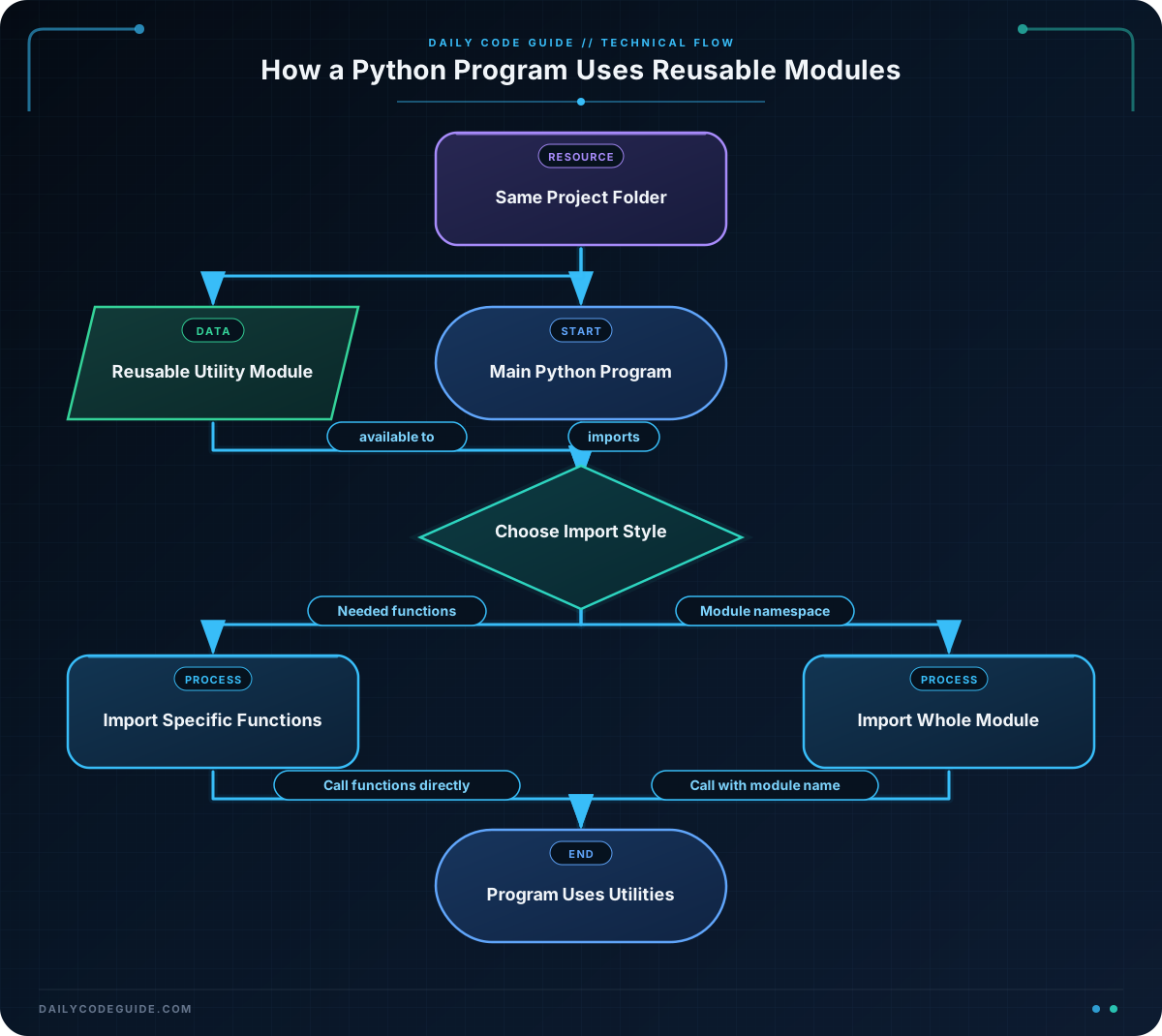
The file named validation_utils.py is a module. It contains two functions related to checking user information.
The expression len(username) >= 3 checks that the username contains at least three characters. The isalnum() method returns True when all characters are letters or numbers.
The email check is intentionally simple for this beginner example. It checks that the text contains both an at sign and a period.
In register_user.py, this line imports two functions:
from validation_utils import is_valid_username, is_valid_emailfrom validation_utils tells Python which module to use. The names after import identify the functions to bring into the current file.
After the import, the functions can be called without the module prefix:
is_valid_username(username)
is_valid_email(email)
Both files need to be in the same folder for this simple example. Python looks in the current project folder when it searches for a local module.
The condition uses and, so both checks must return True before the success message is printed. The main file controls the program flow, while the module provides reusable validation details.
Another Example
Modules can contain utility functions as well as validation functions. The following example separates order calculations from the file that displays an order summary.
Create order_utils.py:
# order_utils.py

def calculate_subtotal(items):
    subtotal = 0

    for item in items:
        subtotal += item["price"] * item["quantity"]

    return subtotal


def format_order_summary(customer_name, subtotal):
    return f"{customer_name}'s order total is ${subtotal:.2f}."
Create order_app.py and import the whole module:
# order_app.py

import order_utils


order_items = [
    {"name": "Notebook", "price": 4.50, "quantity": 2},
    {"name": "Pen set", "price": 3.25, "quantity": 1},
]

subtotal = order_utils.calculate_subtotal(order_items)
summary = order_utils.format_order_summary("Jordan", subtotal)

print(summary)
Expected Output
Jordan's order total is $12.25.This time, import order_utils imports the module itself. Each function call starts with order_utils.. That prefix helps readers see that the functions belong to the order utilities module.
Common Mistakes
Using the wrong file name
The module name in the import must match the Python file name without the .py extension. A file named validation_utils.py is imported as validation_utils.
Running the command from the wrong folder
When you use a simple local import, run the program from the folder containing both files. Otherwise, Python may not find the module.
Importing a name that does not exist
This import only works if the function is actually defined in validation_utils.py:
from validation_utils import is_valid_phoneIf that function is missing, Python reports an ImportError. Check the spelling and capitalization of both the function and file name.
Putting program actions in a utility module
A utility module should usually define reusable functions. Keep actions such as asking for input or starting the program in the main file. This makes the utilities easier to reuse in other programs.
Try It Yourself
Create a module named profile_utils.py with a function called is_valid_age. The function should return True when the age is between 13 and 120, inclusive.
Then create profile_app.py. Import is_valid_age, store an age in a variable, and print Profile age is valid. when the function returns True. Otherwise, print Profile age is not valid.
Challenge
Create a reusable module named profile_utils.py containing these two functions:
is_valid_age(age)returnsTruefor ages from 13 through 120.is_valid_display_name(name)returnsTruewhen the name contains at least two characters after removing surrounding spaces.
Then create profile_app.py. Import both functions, test the display name " Avery " and the age 16, and print Profile information is valid. only when both checks pass.
Solution
Save this first file as profile_utils.py:
# profile_utils.py

def is_valid_age(age):
    return 13 <= age <= 120


def is_valid_display_name(name):
    return len(name.strip()) >= 2
Save this second file as profile_app.py:
# profile_app.py

from profile_utils import is_valid_age, is_valid_display_name


display_name = " Avery "
age = 16

if is_valid_age(age) and is_valid_display_name(display_name):
    print("Profile information is valid.")
else:
    print("Profile information is not valid.")
The import makes both functions available in profile_app.py. The age check accepts 16, and strip() removes the spaces around " Avery " before checking its length. Because both functions return True, the program prints the valid message.
Key Takeaways
- A Python module is a
.pyfile that can contain reusable code. - Use
from module_name import function_nameto import specific functions. - Use
import module_namewhen you want to keep the module name before each function call. - Keep related validation and utility functions in their own modules.
- For simple local projects, imported files should be in the same folder as the main program.

