


What You’ll Learn
In this lesson, you will learn how to use Python’s requests library to communicate with a REST API. You will install the library, request product data, inspect the HTTP response status, handle request errors, and convert a JSON response into a Python dictionary.
- Install the
requestslibrary from the command line. - Send a GET request to a REST API.
- Check whether a request succeeded.
- Parse JSON product data in Python.
- Handle common network and HTTP errors.
The Concept
An HTTP request allows a program to communicate with a web server. For example, an online store might provide an API endpoint that returns information about a product.
Python does not include a convenient HTTP client for this kind of work in its standard library, so many Python programs use the third-party requests library. A library is reusable code written by other developers that you can install and import into your program.
Install requests with this command:
python -m pip install requestsAn API response contains an HTTP status code. Common status codes include:
- 200 means the request succeeded.
- 404 means the requested resource was not found.
- 500 or another 5xx code means the server encountered a problem.
Many REST APIs return data in JSON format. JSON objects look similar to Python dictionaries, and the response.json() method converts a JSON response into Python data that you can inspect and use.
Basic Example
The following program fetches one product from the DummyJSON product API. It prints the status code and, when the request succeeds, displays product information.
import requests


def fetch_product(product_id):
    url = f"https://dummyjson.com/products/{product_id}"

    try:
        response = requests.get(url, timeout=10)
        print(f"HTTP status: {response.status_code}")

        if response.status_code == 200:
            product = response.json()
            print(f"Product: {product['title']}")
            print(f"Price: ${product['price']}")
        elif response.status_code == 404:
            print("Product was not found.")
        else:
            print("The API returned an unexpected status.")

    except requests.exceptions.RequestException as error:
        print(f"Request failed: {error}")


fetch_product(1)
Expected Output
The exact product details come from the API and may change, but a successful request has output similar to this:
HTTP status: 200
Product: Essence Mascara Lash Princess
Price: $9.99
How the Code Works
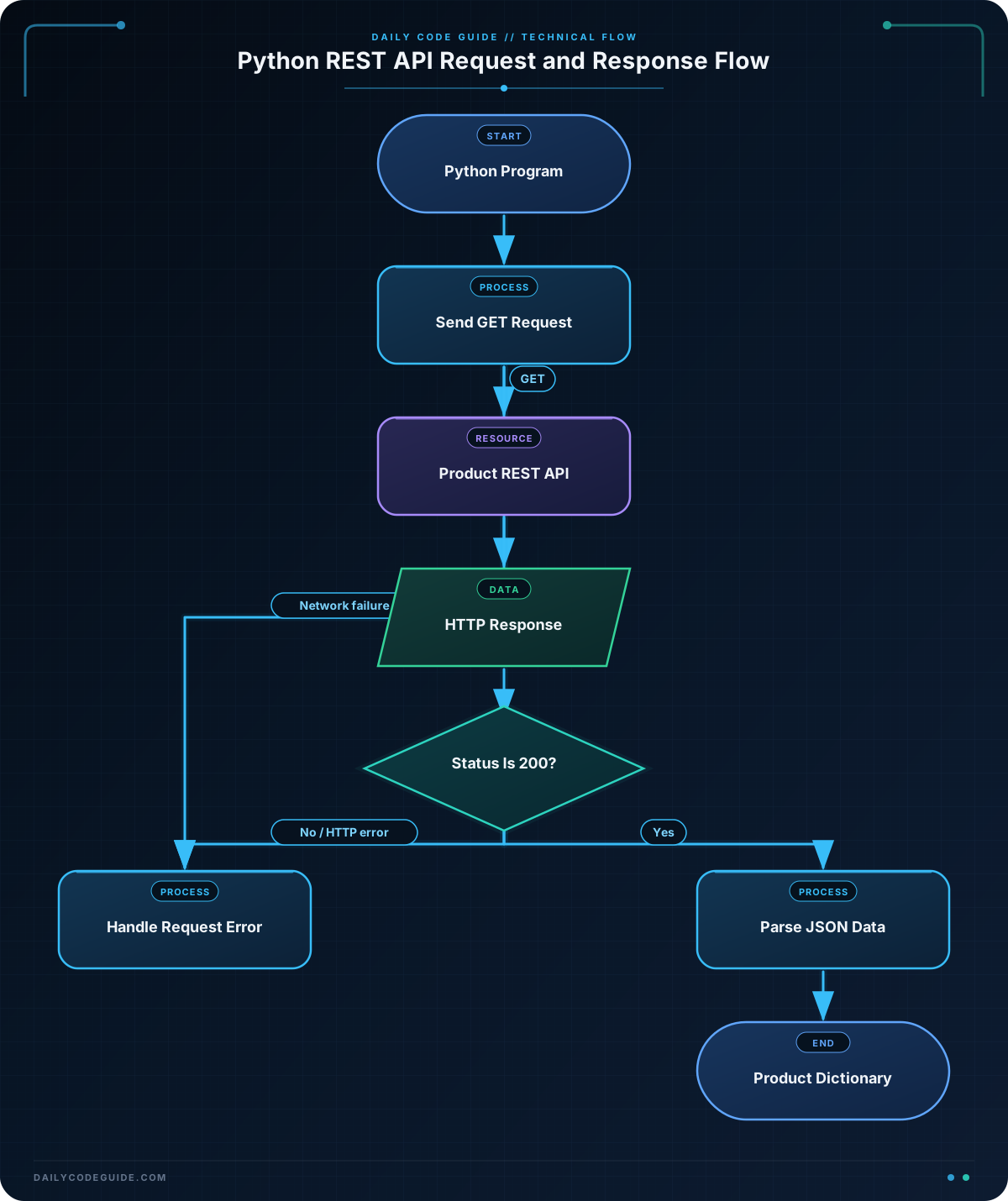
import requests loads the installed library so the program can use its functions.
The fetch_product function accepts a product ID. The f-string builds a URL such as https://dummyjson.com/products/1.
requests.get() sends an HTTP GET request. A GET request asks a server to return information. The timeout=10 argument prevents the program from waiting forever if the server does not respond within 10 seconds.
The value returned by requests.get() is a response object. Its status_code attribute contains the HTTP status code returned by the server.
When the status code is 200, the program calls response.json(). The result is a Python dictionary containing fields such as title and price. Dictionary keys are used with square brackets, as in product['title'].
The try and except statements handle request failures. For example, the request might fail because the computer is offline, the domain cannot be found, or the timeout is reached. These problems happen before the program receives a normal API response.
Notice that an HTTP error such as 404 is handled by checking response.status_code. A server response is different from a network failure: in a 404 case, the server responded and told us that the product was not found.
Another Example
An API can also return a collection of products. This example requests three products and loops through the list in the response. It demonstrates how to find the list under the JSON response’s products key.
import requests


def show_products():
    url = "https://dummyjson.com/products?limit=3"

    try:
        response = requests.get(url, timeout=10)
        print(f"HTTP status: {response.status_code}")

        if response.status_code != 200:
            print("Could not load the product list.")
            return

        data = response.json()

        for product in data["products"]:
            print(f"{product['id']}: {product['title']} - ${product['price']:.2f}")

    except requests.exceptions.RequestException as error:
        print(f"Request failed: {error}")


show_products()
The limit=3 part is a query parameter. It asks the API for up to three products. The response is a dictionary, and its products value is a list of product dictionaries. The for loop processes each product one at a time.
Common Mistakes
- Forgetting to install the library: If Python reports
ModuleNotFoundError: No module named 'requests', runpython -m pip install requestsin the terminal. Make sure you install it in the same Python environment that runs your program. - Assuming every request succeeds: Always inspect
response.status_codebefore reading fields from the response. - Using the wrong dictionary key: API field names must match exactly. For example,
product["title"]andproduct["name"]are different keys. - Confusing JSON with a Python dictionary: The response body is JSON text from the server. Call
response.json()to convert it into Python data. - Leaving out a timeout: A timeout gives the request a reasonable limit instead of allowing it to wait indefinitely.
Try It Yourself
Modify the basic example so it requests product ID 2. Print the product’s title, price, and rating when the request succeeds. Keep the status-code check and exception handling.
Challenge
Write a program that requests product ID 5 from the same API and displays a short product summary.
Your program should:
- Use a function named
print_product_summary. - Send the request with a 10-second timeout.
- Print the HTTP status code.
- Print the product title and category if the status code is 200.
- Print a helpful message for a 404 response.
- Handle other request failures with
requests.exceptions.RequestException.
Solution
import requests


def print_product_summary(product_id):
    url = f"https://dummyjson.com/products/{product_id}"

    try:
        response = requests.get(url, timeout=10)
        print(f"HTTP status: {response.status_code}")

        if response.status_code == 200:
            product = response.json()
            print(f"Title: {product['title']}")
            print(f"Category: {product['category']}")
        elif response.status_code == 404:
            print("No product exists with that ID.")
        else:
            print("The API returned an unexpected status.")

    except requests.exceptions.RequestException as error:
        print(f"Request failed: {error}")


print_product_summary(5)
This solution builds the product URL from the supplied ID, sends a GET request, checks the response before parsing its JSON data, and handles both HTTP errors and network-related exceptions.
Key Takeaways
- The
requestslibrary lets Python programs send HTTP requests to web APIs. - Use
requests.get()for a simple GET request and include a timeout. - Check
response.status_codebefore using data from the response. - Use
response.json()to convert a JSON response into Python dictionaries and lists. - Use
tryandexcept requests.exceptions.RequestExceptionto handle request failures.

