


What You’ll Learn
In this lesson, you will learn how to create a table for customer orders and safely change its structure later. These operations are part of SQL’s Data Definition Language, or DDL.
- Define a table with columns, data types, and constraints.
- Use a primary key to identify each order.
- Add new columns with
ALTER TABLE. - Choose safe defaults when changing a table that already contains rows.
The Concept
A database table stores related information in rows and columns. Before you can insert customer orders, you need to define the table’s structure with CREATE TABLE.
Each column has a data type. For example, VARCHAR(100) stores text up to 100 characters, DECIMAL(10, 2) stores an exact number with two decimal places, and DATE stores a calendar date.
Constraints add rules to your table:
PRIMARY KEYidentifies each row uniquely.NOT NULLrequires a value in the column.DEFAULTsupplies a value when an insert does not provide one.
As an application grows, you may need more information. For example, an order table might initially contain the customer and price, but later need a shipping address or order status. ALTER TABLE changes the structure of an existing table without recreating it.
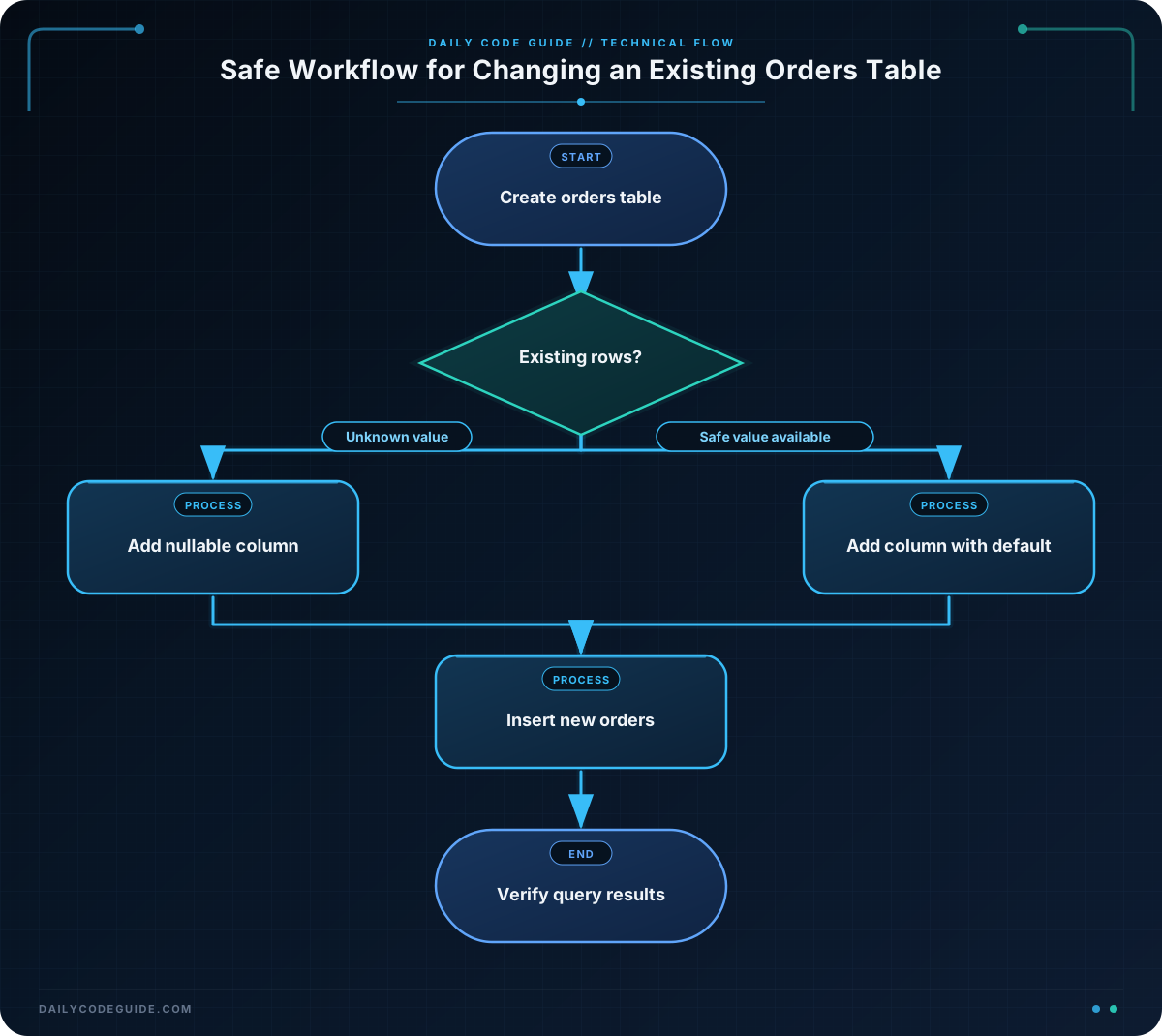
When adding a column to a table that already has rows, consider whether old rows can have a value. A nullable column, which allows NULL, is often the safest choice when no value is available yet. A column with a sensible DEFAULT can also provide a value for existing and new rows.
Basic Example
The following script creates a customer orders table, adds two columns, inserts sample orders, and displays the result. The order status is required and receives a default value, while the shipping address is allowed to remain unknown.
CREATE TABLE customer_orders (
    order_id INTEGER PRIMARY KEY,
    customer_name VARCHAR(100) NOT NULL,
    total_amount DECIMAL(10, 2) NOT NULL,
    ordered_on DATE NOT NULL
);

ALTER TABLE customer_orders
ADD COLUMN shipping_address VARCHAR(200);

ALTER TABLE customer_orders
ADD COLUMN order_status VARCHAR(20) NOT NULL DEFAULT 'pending';

INSERT INTO customer_orders (
    order_id,
    customer_name,
    total_amount,
    ordered_on,
    shipping_address
)
VALUES
    (1001, 'Ava Patel', 84.50, '2025-03-01', '18 Lake Street'),
    (1002, 'Noah Williams', 129.99, '2025-03-02', '42 Garden Avenue');

SELECT
    order_id,
    customer_name,
    order_status,
    shipping_address
FROM customer_orders
ORDER BY order_id;
Expected Output
The new order_status column receives pending because the inserts do not specify a status. The address column contains the supplied addresses.
order_id  customer_name  order_status  shipping_address
1001      Ava Patel      pending       18 Lake Street
1002      Noah Williams  pending       42 Garden Avenue
How the Code Works
The first statement creates the table:
order_id INTEGER PRIMARY KEYgives every order a unique identifier.customer_name VARCHAR(100) NOT NULLstores the customer’s name and requires it to be present.total_amount DECIMAL(10, 2) NOT NULLstores prices accurately with two digits after the decimal point.ordered_on DATE NOT NULLstores the date when the order was placed.
The table starts with four columns. The first ALTER TABLE statement adds shipping_address. It does not use NOT NULL, so existing orders can have NULL when an address has not been collected.
The second ALTER TABLE statement adds order_status. It is required for every row, but the DEFAULT 'pending' clause gives existing orders and future inserts an initial status.
The INSERT statement adds two rows. It leaves out order_status, so the database uses the default value. Finally, SELECT reads the columns and ORDER BY order_id displays the orders in a predictable order.
Before running an alteration on important data, check your database system’s documentation for details about locking, transactions, and how defaults are applied. Test schema changes in a development database first.
Another Example
A separate shipment table can keep delivery information organized. It may be created with only the information known at first. Later, columns for the shipping carrier and tracking number can be added as the business begins recording them.
CREATE TABLE order_shipments (
    shipment_id INTEGER PRIMARY KEY,
    order_id INTEGER NOT NULL,
    shipped_on DATE
);

ALTER TABLE order_shipments
ADD COLUMN carrier_name VARCHAR(50);

ALTER TABLE order_shipments
ADD COLUMN tracking_number VARCHAR(100);

INSERT INTO order_shipments (
    shipment_id,
    order_id,
    shipped_on,
    carrier_name,
    tracking_number
)
VALUES
    (501, 1001, '2025-03-03', 'Parcel Express', 'PX1001001');

SELECT
    shipment_id,
    order_id,
    carrier_name,
    tracking_number
FROM order_shipments;
Both new shipment columns are initially nullable. That is useful because older shipment rows might not have carrier or tracking information. You can add the information later without making the earlier rows invalid.
Common Mistakes
Adding a required column without a value
If a table already contains rows, adding a new NOT NULL column without a default may fail because the database has no value to place in existing rows. Start with a nullable column or provide a suitable default.
Using the wrong data type
Use numeric types for amounts instead of storing prices as text. A value such as 84.50 should be stored in a decimal column, not a text column.
Trying to create a table that already exists
CREATE TABLE normally fails if a table with the same name already exists. Check your database before running setup scripts. Some database systems support CREATE TABLE IF NOT EXISTS, but its exact behavior can vary and it does not update an existing table’s structure.
Adding the same column twice
Running the same ALTER TABLE ... ADD COLUMN statement twice usually produces an error because the column already exists. Keep track of which schema changes have been applied, especially when working on a shared database.
Try It Yourself
Create a table named store_orders with these columns:
order_id: an integer primary keycustomer_name: text up to 100 characters and requiredtotal_amount: a decimal amount with two decimal places and required
Then use ALTER TABLE to add a nullable contact_email column. Insert one order without an email address and select all of the rows.
Challenge
Design a table named customer_orders_challenge for a small online store.
- Create
order_idas an integer primary key. - Create a required
customer_namecolumn that stores up to 100 characters. - Create a required
total_amountcolumn using a decimal type with two decimal places. - Add a nullable
delivery_instructionscolumn withALTER TABLE. - Add a required
order_statuscolumn with a default of'new'. - Insert one order without specifying either newly added column.
- Select the order ID, customer name, status, and delivery instructions.
Solution
CREATE TABLE customer_orders_challenge (
    order_id INTEGER PRIMARY KEY,
    customer_name VARCHAR(100) NOT NULL,
    total_amount DECIMAL(10, 2) NOT NULL
);

ALTER TABLE customer_orders_challenge
ADD COLUMN delivery_instructions VARCHAR(250);

ALTER TABLE customer_orders_challenge
ADD COLUMN order_status VARCHAR(20) NOT NULL DEFAULT 'new';

INSERT INTO customer_orders_challenge (
    order_id,
    customer_name,
    total_amount
)
VALUES
    (2001, 'Mia Chen', 64.75);

SELECT
    order_id,
    customer_name,
    order_status,
    delivery_instructions
FROM customer_orders_challenge;
This solution adds the optional instructions column without requiring old rows to contain a value. It adds the required status column with a default, so the inserted order receives new automatically.
Key Takeaways
CREATE TABLEdefines a new table and its columns.- Data types describe what each column can store.
PRIMARY KEY,NOT NULL, andDEFAULThelp protect data quality.ALTER TABLE ... ADD COLUMNevolves an existing table’s structure.- When adding columns safely, allow missing values or provide a meaningful default for existing rows.

