


What You’ll Learn
In this lesson, you will learn how database normalization in SQL helps you separate repeated customer and order data into consistent, related tables.
- Recognize update, insertion, and deletion anomalies in a denormalized table.
- Apply the first three normal forms to customer and order data.
- Model one-to-many relationships with primary and foreign keys.
- Use JOIN queries to reconstruct useful results from normalized tables.
The Concept
Normalization is the process of organizing data so that each fact is stored in the appropriate place and unnecessary duplication is reduced. Instead of storing a customer’s name and email on every order row, store the customer once and reference that customer from an orders table.
A denormalized table might look like this:
| customer_name | customer_email | order_id | order_date |
|---|---|---|---|
| Ada Lovelace | ada@example.com | 1001 | 2025-03-01 |
| Ada Lovelace | ada@example.com | 1002 | 2025-03-05 |
Repeated customer data creates several problems:
- Update anomaly: changing Ada’s email requires updating multiple rows.
- Insertion anomaly: you may be unable to add a customer until that customer places an order.
- Deletion anomaly: deleting a customer’s only order might accidentally remove the only record of that customer.
The first three normal forms provide a practical design checklist:
- First normal form (1NF): each column contains one value, and each row represents one record.
- Second normal form (2NF): every non-key column depends on the entire primary key. This matters especially when a table uses a composite key.
- Third normal form (3NF): non-key columns depend on the key, the whole key, and nothing but the key. For example, customer_email depends on customer_id, not on order_id.
For a one-to-many relationship, one customer can have many orders, but each order belongs to one customer. The customers table stores the parent records, while orders stores a customer_id foreign key.
Basic Example
The following schema separates customers from orders. A customer can exist without an order, and changing customer information requires changing only one row.
DROP TABLE IF EXISTS orders;
DROP TABLE IF EXISTS customers;

CREATE TABLE customers (
    customer_id INTEGER PRIMARY KEY,
    full_name VARCHAR(100) NOT NULL,
    email VARCHAR(255) NOT NULL UNIQUE
);

CREATE TABLE orders (
    order_id INTEGER PRIMARY KEY,
    customer_id INTEGER NOT NULL,
    order_date DATE NOT NULL,
    status VARCHAR(20) NOT NULL,
    total_amount DECIMAL(10, 2) NOT NULL CHECK (total_amount >= 0),
    CONSTRAINT fk_orders_customer
        FOREIGN KEY (customer_id) REFERENCES customers(customer_id)
);

INSERT INTO customers (customer_id, full_name, email)
VALUES
    (1, 'Ada Lovelace', 'ada@example.com'),
    (2, 'Grace Hopper', 'grace@example.com');

INSERT INTO orders (order_id, customer_id, order_date, status, total_amount)
VALUES
    (1001, 1, '2025-03-01', 'paid', 149.99),
    (1002, 1, '2025-03-05', 'pending', 75.00),
    (1003, 2, '2025-03-06', 'paid', 220.50);

SELECT
    o.order_id,
    c.full_name,
    c.email,
    o.order_date,
    o.status,
    o.total_amount
FROM orders AS o
JOIN customers AS c
    ON c.customer_id = o.customer_id
ORDER BY o.order_id;
Expected Output
order_id | full_name      | email             | order_date | status  | total_amount
1001     | Ada Lovelace   | ada@example.com   | 2025-03-01 | paid    | 149.99
1002     | Ada Lovelace   | ada@example.com   | 2025-03-05 | pending | 75.00
1003     | Grace Hopper   | grace@example.com | 2025-03-06 | paid    | 220.50
How the Code Works
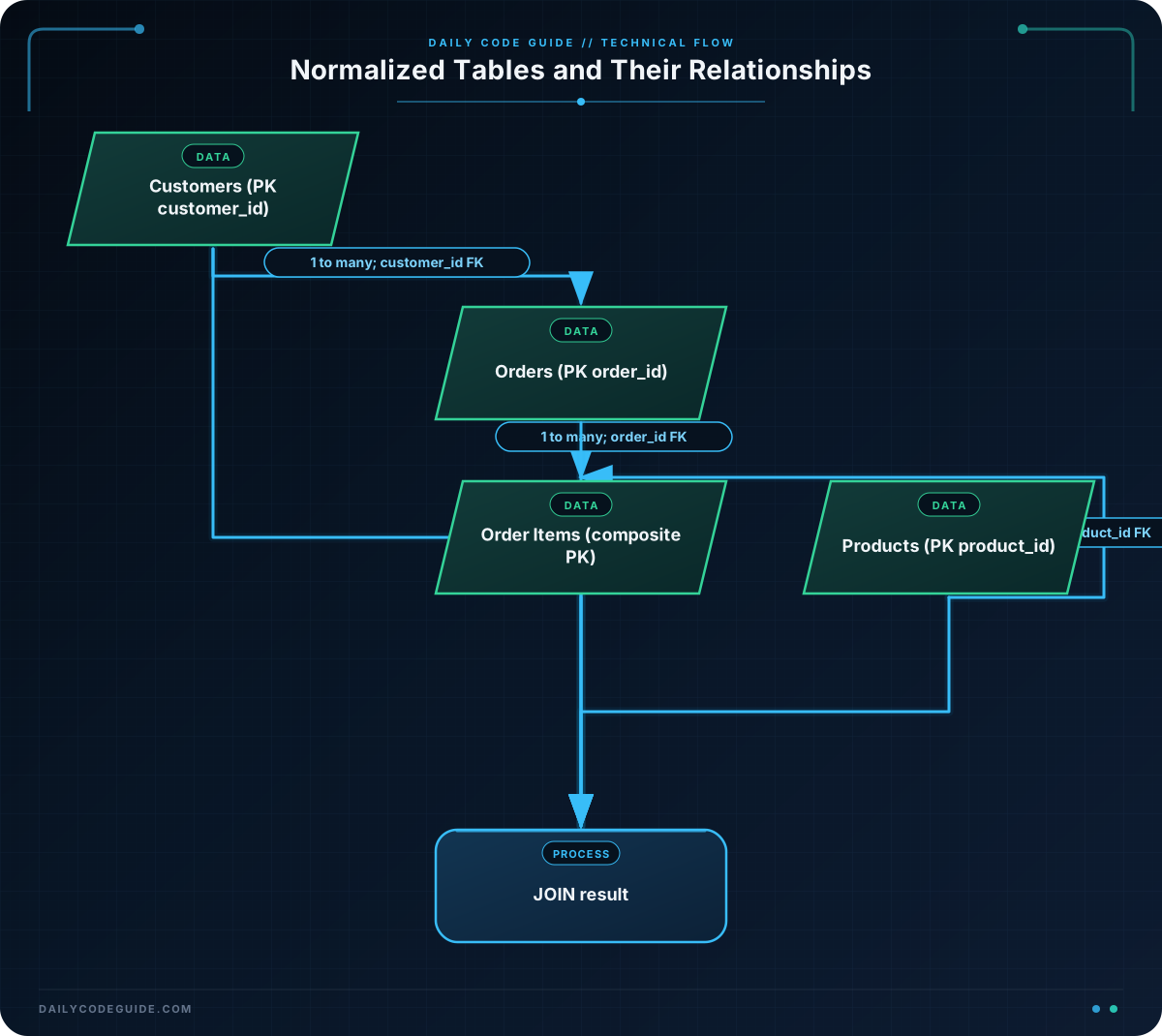
The customers table owns customer facts such as the name and email address. The orders table owns order facts such as the date, status, and amount.
customer_id is the primary key in customers. The same column in orders is a foreign key, so every order must reference an existing customer. The NOT NULL constraint prevents an order from being created without a customer.
The UNIQUE constraint prevents two customer rows from using the same email address. The CHECK constraint prevents negative order totals.
The JOIN does not duplicate stored data. It combines related rows when you need to display them. The relationship is represented by:
customers.customer_id: the parent key.orders.customer_id: the referencing foreign key.
A useful design consideration is whether total_amount should be stored. It can be derived from order line items, but storing a finalized total may be appropriate when prices, discounts, taxes, or shipping charges must remain historically accurate. If you store both a calculated total and its components, define a clear rule for keeping them consistent.
Another Example
Orders commonly contain multiple products. Putting product names and prices directly on the orders table would repeat product information and make multi-product orders difficult to represent. A separate order_items table resolves this by creating one row per product on an order.
DROP TABLE IF EXISTS order_items;
DROP TABLE IF EXISTS products;
DROP TABLE IF EXISTS orders;
DROP TABLE IF EXISTS customers;

CREATE TABLE customers (
    customer_id INTEGER PRIMARY KEY,
    full_name VARCHAR(100) NOT NULL,
    email VARCHAR(255) NOT NULL UNIQUE
);

CREATE TABLE orders (
    order_id INTEGER PRIMARY KEY,
    customer_id INTEGER NOT NULL,
    order_date DATE NOT NULL,
    CONSTRAINT fk_orders_customer
        FOREIGN KEY (customer_id) REFERENCES customers(customer_id)
);

CREATE TABLE products (
    product_id INTEGER PRIMARY KEY,
    product_name VARCHAR(100) NOT NULL,
    current_price DECIMAL(10, 2) NOT NULL CHECK (current_price >= 0)
);

CREATE TABLE order_items (
    order_id INTEGER NOT NULL,
    product_id INTEGER NOT NULL,
    quantity INTEGER NOT NULL CHECK (quantity > 0),
    unit_price DECIMAL(10, 2) NOT NULL CHECK (unit_price >= 0),
    PRIMARY KEY (order_id, product_id),
    CONSTRAINT fk_items_order
        FOREIGN KEY (order_id) REFERENCES orders(order_id),
    CONSTRAINT fk_items_product
        FOREIGN KEY (product_id) REFERENCES products(product_id)
);

INSERT INTO customers (customer_id, full_name, email)
VALUES (10, 'Katherine Johnson', 'katherine@example.com');

INSERT INTO orders (order_id, customer_id, order_date)
VALUES (2001, 10, '2025-04-12');

INSERT INTO products (product_id, product_name, current_price)
VALUES
    (501, 'Mechanical Keyboard', 89.00),
    (502, 'USB-C Cable', 12.50);

INSERT INTO order_items (order_id, product_id, quantity, unit_price)
VALUES
    (2001, 501, 1, 89.00),
    (2001, 502, 2, 12.50);

SELECT
    o.order_id,
    c.full_name,
    p.product_name,
    oi.quantity,
    oi.unit_price,
    oi.quantity * oi.unit_price AS line_total
FROM orders AS o
JOIN customers AS c
    ON c.customer_id = o.customer_id
JOIN order_items AS oi
    ON oi.order_id = o.order_id
JOIN products AS p
    ON p.product_id = oi.product_id
ORDER BY oi.product_id;
Here, order_items represents the relationship between orders and products. Its composite primary key prevents the same product from appearing twice on the same order. If your business allows separate lines for the same product, such as different discounts, use a separate order_item_id primary key instead.
Common Mistakes
- Repeating customer columns in orders: store customer details only in
customersand reference them withcustomer_id. - Using names as relationships: names can change and may not be unique. Use stable numeric or generated identifiers as keys.
- Forgetting foreign keys: a column named
customer_idis not automatically a relationship. Add a foreign key constraint. - Putting multiple products in one column: values such as
'Keyboard, Cable, Mouse'violate 1NF. Store one product perorder_itemsrow. - Confusing current and historical prices: a product’s current price may change after an order is placed. Store the charged
unit_priceon the order item when historical accuracy matters.
Try It Yourself
Extend the basic customer and order schema so that a customer may have more than one phone number without storing comma-separated values in the customers table.
Create a customer_phones table with:
- A primary key named
phone_id. - A
customer_idforeign key. - A required
phone_numbercolumn. - A query that lists each customer and their phone numbers.
Challenge
You receive data from an import process in which each row contains:
customer_nameandcustomer_emailorder_idandorder_dateproduct_nameandunit_pricequantity
Design a normalized SQL schema for this data. Your solution must:
- Store each customer once.
- Store each product once.
- Allow one order to contain multiple products.
- Prevent duplicate products on the same order.
- Use primary keys, foreign keys, and suitable constraints.
- Return a query showing the order, customer, product, quantity, and line total.
Solution
CREATE TABLE customers (
    customer_id INTEGER PRIMARY KEY,
    full_name VARCHAR(100) NOT NULL,
    email VARCHAR(255) NOT NULL UNIQUE
);

CREATE TABLE orders (
    order_id INTEGER PRIMARY KEY,
    customer_id INTEGER NOT NULL,
    order_date DATE NOT NULL,
    CONSTRAINT fk_orders_customer
        FOREIGN KEY (customer_id) REFERENCES customers(customer_id)
);

CREATE TABLE products (
    product_id INTEGER PRIMARY KEY,
    product_name VARCHAR(100) NOT NULL UNIQUE
);

CREATE TABLE order_items (
    order_id INTEGER NOT NULL,
    product_id INTEGER NOT NULL,
    quantity INTEGER NOT NULL CHECK (quantity > 0),
    unit_price DECIMAL(10, 2) NOT NULL CHECK (unit_price >= 0),
    PRIMARY KEY (order_id, product_id),
    CONSTRAINT fk_order_items_order
        FOREIGN KEY (order_id) REFERENCES orders(order_id),
    CONSTRAINT fk_order_items_product
        FOREIGN KEY (product_id) REFERENCES products(product_id)
);

INSERT INTO customers (customer_id, full_name, email)
VALUES
    (1, 'Maya Chen', 'maya@example.com'),
    (2, 'Luis Ortega', 'luis@example.com');

INSERT INTO orders (order_id, customer_id, order_date)
VALUES
    (301, 1, '2025-05-02'),
    (302, 2, '2025-05-03');

INSERT INTO products (product_id, product_name)
VALUES
    (701, 'Notebook'),
    (702, 'Desk Lamp'),
    (703, 'Pen Set');

INSERT INTO order_items (order_id, product_id, quantity, unit_price)
VALUES
    (301, 701, 3, 8.00),
    (301, 703, 1, 14.50),
    (302, 702, 1, 42.00);

SELECT
    o.order_id,
    c.full_name,
    p.product_name,
    oi.quantity,
    oi.unit_price,
    oi.quantity * oi.unit_price AS line_total
FROM orders AS o
JOIN customers AS c
    ON c.customer_id = o.customer_id
JOIN order_items AS oi
    ON oi.order_id = o.order_id
JOIN products AS p
    ON p.product_id = oi.product_id
ORDER BY o.order_id, p.product_name;
The customer and product facts are each stored once. The orders table connects customers to orders, while order_items connects orders to products and stores order-specific values such as quantity and the charged unit price. The composite primary key enforces one row per product on each order.
Key Takeaways
- Normalization reduces duplicated facts and prevents update, insertion, and deletion anomalies.
- A one-to-many relationship uses a foreign key on the many-side table.
- Use a separate relationship table when an order can contain multiple products.
- Primary keys identify rows; foreign keys enforce valid relationships.
- JOIN queries let you retrieve a convenient view of normalized data without storing the same facts repeatedly.

