


What You’ll Learn
In this lesson, you’ll learn how to use SQL subqueries to compare order values with an aggregate benchmark, such as the average order value. You’ll also practice combining subqueries with joins, grouping, and filtering.
- Understand how a subquery can calculate a value used by an outer query.
- Compare individual orders with the average order value.
- Use a derived table to compare customer totals with an average customer total.
- Avoid common mistakes involving aggregate functions and subquery results.
The Concept
A subquery is a query nested inside another SQL query. The inner query runs as part of the outer query and provides a value or set of rows that the outer query can use.
For example, this subquery calculates one benchmark value:
SELECT AVG(order_total)
FROM orders
The result might be 160.00. An outer query can then use that result in a WHERE clause:
SELECT order_id, order_total
FROM orders
WHERE order_total > (
    SELECT AVG(order_total)
    FROM orders
);
This is called a scalar subquery because it returns one value. The database evaluates the inner query, calculates the average, and then compares each order with that average.
Subqueries are useful when the comparison value should be calculated from the current data rather than hard-coded. If new orders are added, the average changes automatically the next time the query runs.
Basic Example
The following example creates a small customer-order dataset and finds every order whose value is above the overall average order value.
CREATE TABLE customers (
    customer_id INTEGER PRIMARY KEY,
    customer_name VARCHAR(100) NOT NULL
);

CREATE TABLE orders (
    order_id INTEGER PRIMARY KEY,
    customer_id INTEGER NOT NULL,
    order_total DECIMAL(10, 2) NOT NULL,
    FOREIGN KEY (customer_id) REFERENCES customers(customer_id)
);

INSERT INTO customers (customer_id, customer_name) VALUES
    (1, 'Alice Morgan'),
    (2, 'Brian Chen'),
    (3, 'Carla Diaz'),
    (4, 'Diego Rossi');

INSERT INTO orders (order_id, customer_id, order_total) VALUES
    (101, 1, 120.00),
    (102, 1, 80.00),
    (103, 2, 250.00),
    (104, 2, 150.00),
    (105, 3, 60.00),
    (106, 4, 300.00);

SELECT
    c.customer_name,
    o.order_id,
    o.order_total
FROM customers AS c
JOIN orders AS o
    ON o.customer_id = c.customer_id
WHERE o.order_total > (
    SELECT AVG(order_total)
    FROM orders
)
ORDER BY o.order_total DESC;
Expected Output
The average order value is 160.00, so only the orders for Brian Chen and Diego Rossi qualify.
customer_name  order_id  order_total
-------------- --------- ------------
Diego Rossi    106       300.00
Brian Chen     103       250.00
How the Code Works
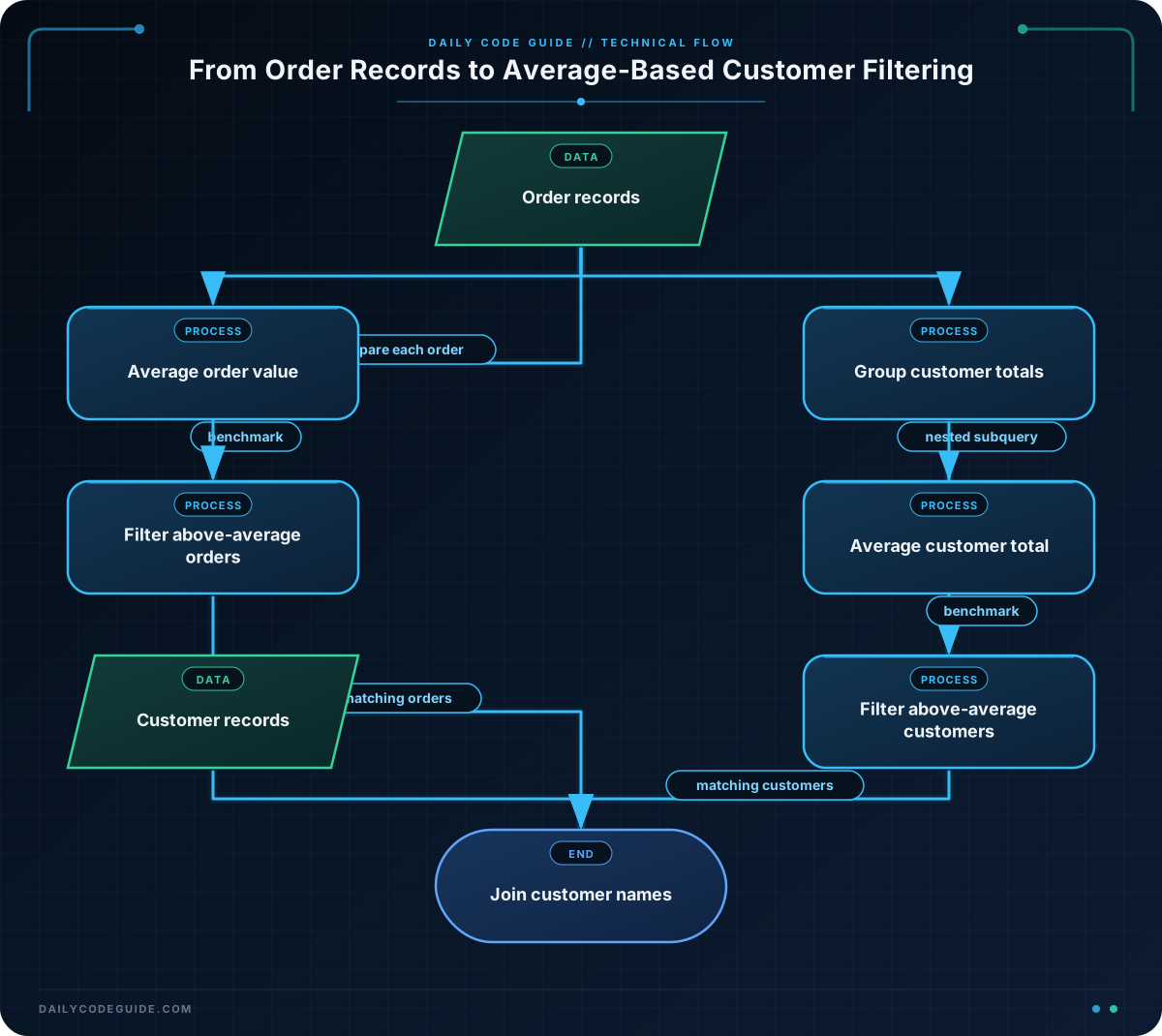
The outer query joins customers and orders so that the result can display a customer name along with the matching order.
The subquery is inside the WHERE clause:
(
    SELECT AVG(order_total)
    FROM orders
)
It calculates the average across all rows in orders. With the sample data, the calculation is:
(120 + 80 + 250 + 150 + 60 + 300) / 6 = 160
The outer query then evaluates o.order_total > 160 for each order. Orders equal to the average are excluded because the comparison uses the greater-than operator. Use >= instead if orders exactly equal to the average should also qualify.
The subquery must return one value for this comparison. Aggregate functions such as AVG(), MIN(), and MAX() normally provide a single value when used without GROUP BY.
Another Example
A different business question is: which customers have spent more than the average total spending per customer?
This requires two levels of aggregation. The inner query first calculates one total for each customer. The outer query compares each customer’s total with the average of those customer totals.
SELECT
    c.customer_name,
    customer_totals.total_spent
FROM customers AS c
JOIN (
    SELECT
        customer_id,
        SUM(order_total) AS total_spent
    FROM orders
    GROUP BY customer_id
) AS customer_totals
    ON customer_totals.customer_id = c.customer_id
WHERE customer_totals.total_spent > (
    SELECT AVG(total_spent)
    FROM (
        SELECT
            customer_id,
            SUM(order_total) AS total_spent
        FROM orders
        GROUP BY customer_id
    ) AS totals_for_average
)
ORDER BY customer_totals.total_spent DESC;
Here, Alice Morgan has spent 200.00, Brian Chen has spent 400.00, Carla Diaz has spent 60.00, and Diego Rossi has spent 300.00. The average customer total is 240.00, so Brian Chen and Diego Rossi are returned.
The two subqueries answer different questions:
customer_totalscalculates the total spending for each customer so it can be displayed.totals_for_averageproduces the per-customer totals used to calculate the comparison average.
Repeating the aggregation makes the query more verbose, but it clearly separates the per-customer calculation from the final comparison. In database systems that support common table expressions, a WITH clause can make this pattern easier to maintain.
Common Mistakes
Comparing with the wrong level of average
An average order value and an average customer total are different metrics. AVG(order_total) averages individual orders, while averaging grouped SUM(order_total) values averages customer spending. Decide which business question you are answering before writing the subquery.
Using a subquery that returns multiple rows with a scalar operator
Operators such as >, <, and = expect one comparable value in this pattern. A subquery that returns several rows can cause an error. If you need to compare against a set of values, use operators such as IN, EXISTS, ANY, or ALL when they fit the requirement.
Forgetting how NULL values affect averages
AVG() ignores NULL order totals. If every order total is NULL, the average is also NULL, and a comparison such as order_total > NULL does not evaluate as true. In production tables, define required monetary columns as NOT NULL when an order must always have a value.
Returning duplicate customers unintentionally
If a customer has several orders above the average, the first example returns one row for each qualifying order. If the requirement is only a customer list, use SELECT DISTINCT or group the results deliberately.
Try It Yourself
Using the tables and data from the basic example, write a query that returns the distinct names of customers who have at least one order below the average order value.
Include the customer name and sort the names alphabetically. Remember that the subquery should calculate the average from the complete orders table, not only from the customer’s orders.
Challenge
Find customers who have at least two orders whose values are above the overall average order value.
Your result must:
- Show the customer name.
- Show the number of above-average orders as
above_average_order_count. - Return only customers with at least two qualifying orders.
- Sort by the count in descending order, then by customer name.
Solution
SELECT
    c.customer_name,
    COUNT(*) AS above_average_order_count
FROM customers AS c
JOIN orders AS o
    ON o.customer_id = c.customer_id
WHERE o.order_total > (
    SELECT AVG(order_total)
    FROM orders
)
GROUP BY c.customer_id, c.customer_name
HAVING COUNT(*) >= 2
ORDER BY above_average_order_count DESC, c.customer_name;
The subquery calculates the overall average before the outer query filters the orders. The remaining rows are grouped by customer, and HAVING keeps only groups with at least two qualifying orders. With the sample data, no customer has two orders above the average, so the result is empty. Adding another above-average order for Brian Chen would make him eligible.
Key Takeaways
- A subquery can calculate a dynamic benchmark for an outer query.
- A scalar subquery with
AVG()can compare each order with the current average order value. - Aggregating before averaging produces a different result from averaging individual rows.
- Use
GROUP BYandHAVINGwhen filtering based on the number or value of grouped results. - Check whether your subquery returns one value, multiple rows, or no value before choosing a comparison operator.

