


What You’ll Learn
In this lesson, you will learn how to define and use Terraform local values, commonly called locals. Locals let you calculate a value once and reuse it across multiple resources.
- Define local values inside a
localsblock. - Reference locals with the
local.prefix. - Reuse computed resource names and common tags.
- Understand when locals are preferable to repeating expressions.
The Concept
A local value is a named expression that Terraform calculates within a module. You define locals in a locals block:
locals {
  environment_label = "${var.project_name}-${var.environment}"
}
After defining the local, reference it with local.environment_label. The local. prefix tells Terraform that the value comes from a local value rather than from a variable or resource.
Locals are useful when the same expression appears in multiple places. For example, several cloud resources might need:
- A name based on the project and environment.
- The same owner, project, and environment tags.
- A shared setting derived from one or more variables.
Unlike input variables, locals are not values that a person supplies when running Terraform. They are calculated inside your configuration. A local can use variables, resource attributes, and other expressions.
Basic Example
This example creates two Amazon S3 buckets. Both bucket names and their tags use local values. The AWS provider is included so the configuration is complete; you would need AWS credentials before running terraform apply.
terraform {
  required_providers {
    aws = {
      source  = "hashicorp/aws"
      version = "~> 5.0"
    }
  }
}

provider "aws" {
  region = var.aws_region
}

variable "aws_region" {
  type    = string
  default = "us-east-1"
}

variable "project_name" {
  type    = string
  default = "billing-api"
}

variable "environment" {
  type    = string
  default = "staging"
}

locals {
  name_prefix = "${var.project_name}-${var.environment}"

  common_tags = {
    Project     = var.project_name
    Environment = var.environment
    ManagedBy   = "Terraform"
  }

  logs_bucket_name   = "${local.name_prefix}-logs"
  backups_bucket_name = "${local.name_prefix}-backups"
}

resource "aws_s3_bucket" "logs" {
  bucket = local.logs_bucket_name
  tags   = local.common_tags
}

resource "aws_s3_bucket" "backups" {
  bucket = local.backups_bucket_name
  tags   = local.common_tags
}

output "logs_bucket_name" {
  value = local.logs_bucket_name
}

output "backups_bucket_name" {
  value = local.backups_bucket_name
}
Expected Output
With the default variable values, Terraform calculates these local values:
logs_bucket_name    = "billing-api-staging-logs"
backups_bucket_name = "billing-api-staging-backups"

common_tags:
  Project     = "billing-api"
  Environment = "staging"
  ManagedBy   = "Terraform"
These are the values Terraform uses for the bucket names, tags, and outputs. S3 bucket names must be globally unique, so you may need to add a unique suffix before applying this example in a real AWS account.
How the Code Works
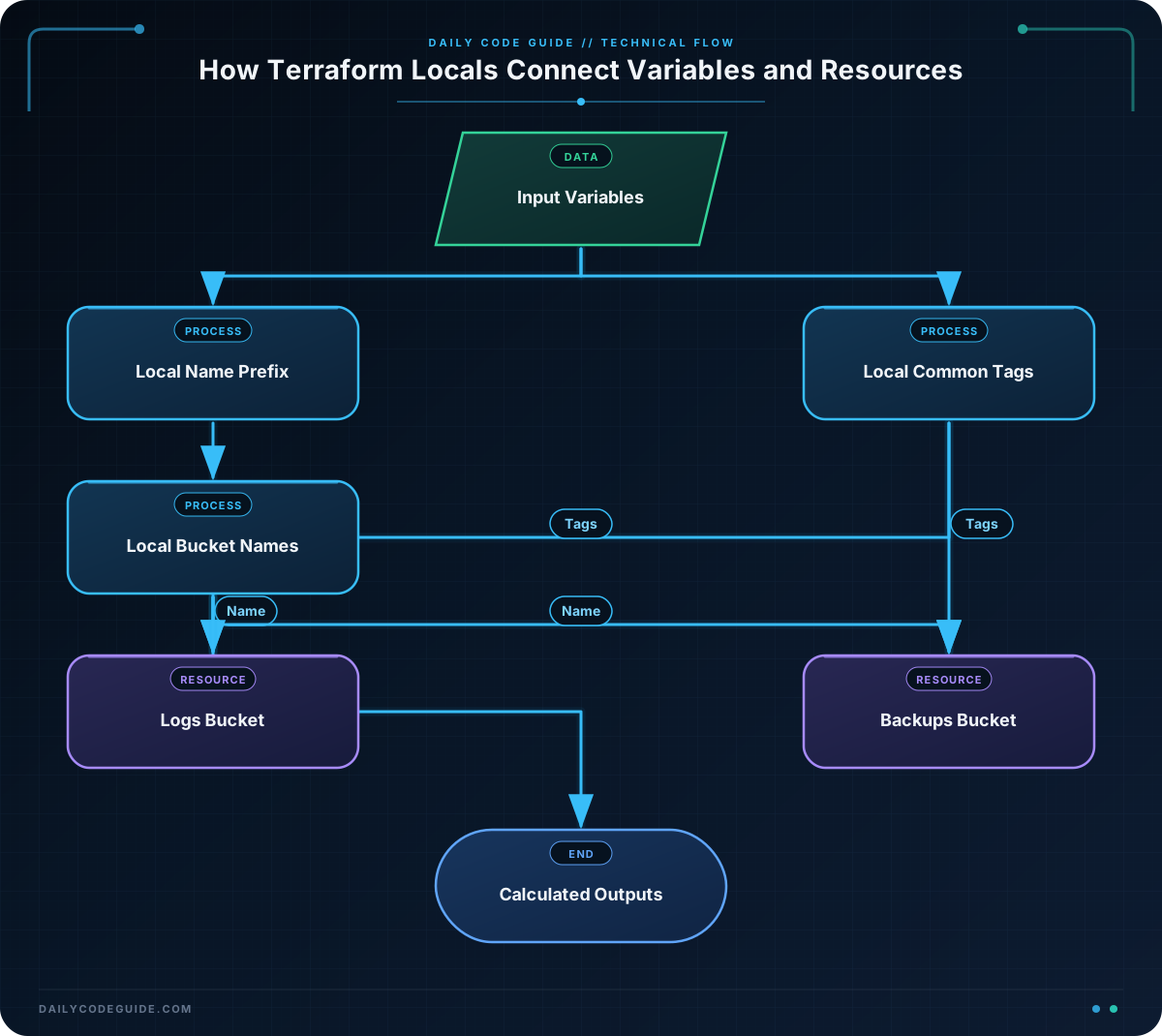
Defining the locals
The locals block contains four local values:
locals {
  name_prefix = "${var.project_name}-${var.environment}"

  common_tags = {
    Project     = var.project_name
    Environment = var.environment
    ManagedBy   = "Terraform"
  }

  logs_bucket_name    = "${local.name_prefix}-logs"
  backups_bucket_name = "${local.name_prefix}-backups"
}
name_prefix combines two input variables. With the default values, it becomes billing-api-staging.
common_tags is a map containing tags shared by both buckets. Defining the map once prevents the resource blocks from repeating the same tag entries.
The bucket name locals use another local value, local.name_prefix. Terraform allows one local value to refer to another local value.
Using locals in resources
Each resource uses the appropriate computed name and the shared tag map:
resource "aws_s3_bucket" "logs" {
  bucket = local.logs_bucket_name
  tags   = local.common_tags
}

resource "aws_s3_bucket" "backups" {
  bucket = local.backups_bucket_name
  tags   = local.common_tags
}
The resource labels, such as logs and backups, are Terraform’s internal names. The actual AWS bucket names come from the bucket arguments.
Using a local in an output
The output blocks also reference the locals directly. This is useful when you want to display a calculated value after Terraform applies the configuration.
Changing the project_name or environment variable automatically changes the values calculated from them. You do not need to edit every resource name manually.
Another Example
Locals can also organize names for different types of resources. This example creates a CloudWatch log group and an SNS topic. The resources use a local map for names and a separate local map for shared tags.
terraform {
  required_providers {
    aws = {
      source  = "hashicorp/aws"
      version = "~> 5.0"
    }
  }
}

provider "aws" {
  region = "us-east-1"
}

variable "service_name" {
  type    = string
  default = "checkout"
}

variable "environment" {
  type    = string
  default = "production"
}

locals {
  resource_names = {
    logs   = "/services/${var.service_name}/${var.environment}"
    alerts = "${var.service_name}-${var.environment}-alerts"
  }

  service_tags = {
    Service     = var.service_name
    Environment = var.environment
    ManagedBy   = "Terraform"
  }
}

resource "aws_cloudwatch_log_group" "application" {
  name              = local.resource_names.logs
  retention_in_days = 30
  tags              = local.service_tags
}

resource "aws_sns_topic" "alerts" {
  name = local.resource_names.alerts
  tags = local.service_tags
}

output "log_group_name" {
  value = local.resource_names.logs
}

output "alerts_topic_arn" {
  value = aws_sns_topic.alerts.arn
}
This pattern is slightly different from the first example. Instead of creating one local for every name, it stores related names in the resource_names map. The log group uses local.resource_names.logs, while the SNS topic uses local.resource_names.alerts.
The topic ARN is not available until the resource is created, so the output uses aws_sns_topic.alerts.arn instead of a local. Locals are best for expressions you can calculate from known values; resource attributes should still be referenced from the resource that creates them.
Common Mistakes
Forgetting the local. prefix
A local named name_prefix must be referenced as local.name_prefix. Writing only name_prefix does not refer to the local.
Using a variable when the value should be calculated
Input variables are appropriate for values supplied from outside the module, such as an environment name or AWS region. A value derived from those inputs usually belongs in a local.
For example, the environment can be a variable, while a full resource name can be a local:
variable "environment" {
  type    = string
  default = "staging"
}

locals {
  application_name = "payments-${var.environment}"
}
Expecting locals to be configurable at runtime
Locals do not create input prompts and cannot be set directly with a -var option. If a user or deployment system needs to provide a value, define it as a variable first, then use a local to build a reusable expression from it.
Repeating tags in every resource
Repeated tag maps are easy to make inconsistent. One resource might accidentally use Production while another uses production. A shared local keeps common tags consistent across resources.
Try It Yourself
Starting with the basic example, change the default project name to inventory-api and the environment to development. Before applying the configuration, predict the two bucket names and the values in the shared tag map.
Then add an output that displays the shared environment value:
output "environment" {
  value = var.environment
}
Use terraform plan to review how Terraform uses the computed names and tags. You do not need to apply the configuration to practice reading the calculated values.
Challenge
Create a Terraform configuration for a small web application with these requirements:
- Define variables named
app_nameandenvironment. - Create a local named
resource_prefixby combining those variables. - Create a local named
common_tagscontaining the application name, environment, andManagedBy = "Terraform". - Create an S3 bucket for uploaded files named with the prefix and the suffix
-uploads. - Create an S3 bucket for reports named with the prefix and the suffix
-reports. - Apply the shared tags to both buckets.
Use the AWS provider and include outputs for both calculated bucket names.
Solution
terraform {
  required_providers {
    aws = {
      source  = "hashicorp/aws"
      version = "~> 5.0"
    }
  }
}

provider "aws" {
  region = "us-east-1"
}

variable "app_name" {
  type    = string
  default = "web-portal"
}

variable "environment" {
  type    = string
  default = "development"
}

locals {
  resource_prefix = "${var.app_name}-${var.environment}"

  common_tags = {
    Application = var.app_name
    Environment = var.environment
    ManagedBy   = "Terraform"
  }

  uploads_bucket_name = "${local.resource_prefix}-uploads"
  reports_bucket_name = "${local.resource_prefix}-reports"
}

resource "aws_s3_bucket" "uploads" {
  bucket = local.uploads_bucket_name
  tags   = local.common_tags
}

resource "aws_s3_bucket" "reports" {
  bucket = local.reports_bucket_name
  tags   = local.common_tags
}

output "uploads_bucket_name" {
  value = local.uploads_bucket_name
}

output "reports_bucket_name" {
  value = local.reports_bucket_name
}
The solution defines the two input variables first, then uses them to calculate resource_prefix. The two bucket-name locals build on that prefix, while common_tags is reused by both resources. This keeps the resource blocks short and ensures both buckets receive the same tags.
Key Takeaways
- Define local values inside a
localsblock. - Reference a local with the
local.prefix. - Use locals to calculate names from variables and other expressions.
- Use shared map locals to apply consistent tags across resources.
- Use variables for external inputs and locals for values calculated from those inputs.

