


What You’ll Learn
In this lesson, you will learn how to use a ForEach loop in PowerShell to process several computer names one at a time.
- Understand what a ForEach loop does.
- Write the basic PowerShell ForEach syntax.
- Use a loop variable to work with each computer name.
- Avoid common loop mistakes.
The Concept
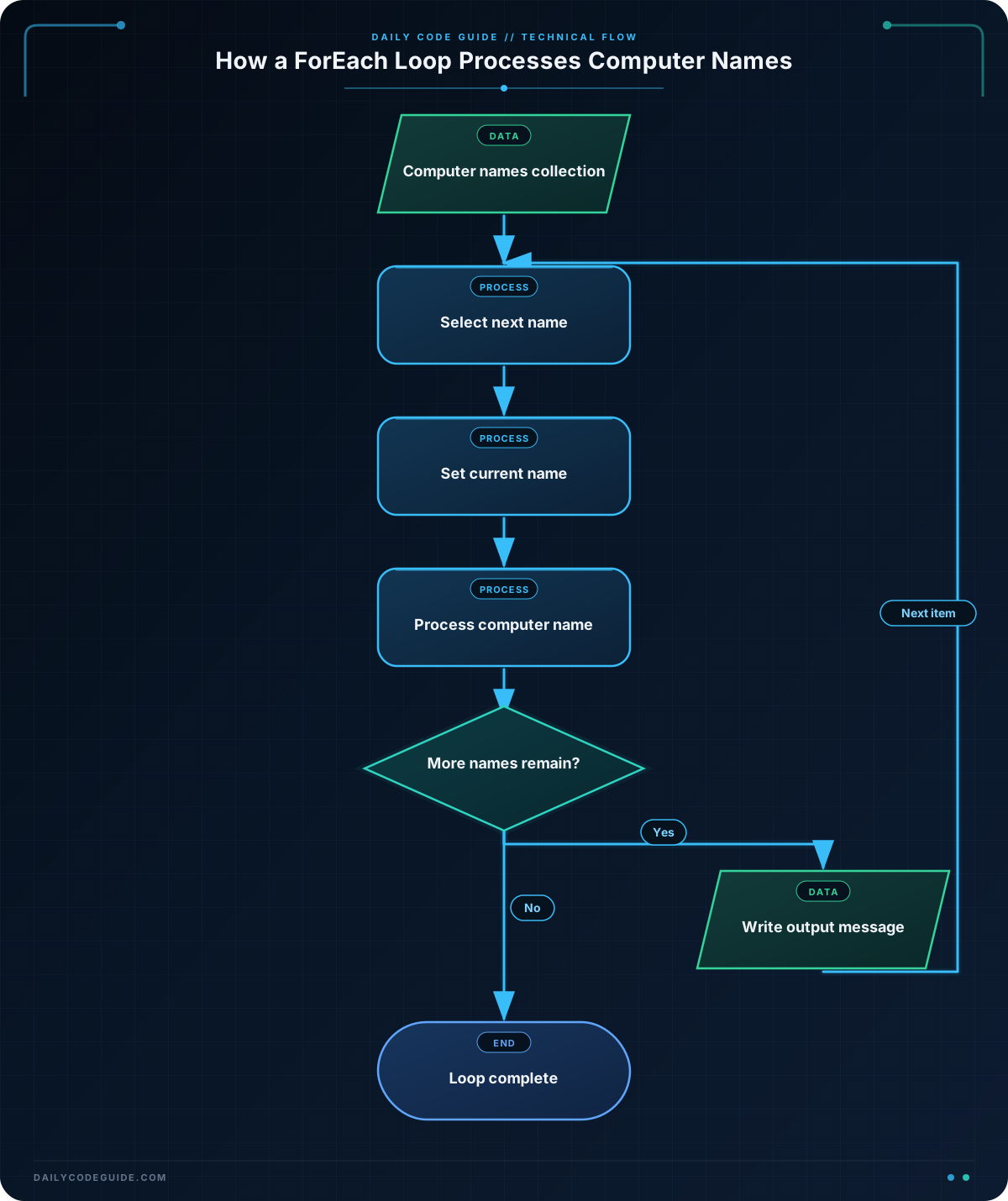
A ForEach loop repeats the same block of code for every item in a collection. A collection is a group of values, such as a list of computer names.
For example, an administrator might need to display a message for every computer in a list. Instead of writing one command for each computer, a ForEach loop handles the entire list:
foreach ($item in $collection) {
    # Code to run for each item
}
PowerShell places the current item in the loop variable. In this example, $item represents one value at a time. The code inside the braces runs once for every value in $collection.
Basic Example
The following example stores several computer names in an array and prints a message for each one.
$computerNames = @(
    "DESKTOP-101"
    "LAPTOP-204"
    "SERVER-305"
)

foreach ($computerName in $computerNames) {
    Write-Output "Processing computer: $computerName"
}
Expected Output
Processing computer: DESKTOP-101
Processing computer: LAPTOP-204
Processing computer: SERVER-305
How the Code Works
The first part creates an array:
$computerNames = @(
    "DESKTOP-101"
    "LAPTOP-204"
    "SERVER-305"
)
The @(...) syntax creates a collection of values. The variable $computerNames now contains three computer names.
Next, the ForEach loop begins:
foreach ($computerName in $computerNames) {
    Write-Output "Processing computer: $computerName"
}
The words have specific roles:
foreachtells PowerShell to repeat the code.$computerNameis the loop variable. It holds the current computer name.inseparates the loop variable from the collection.$computerNamesis the collection being processed.- The braces contain the code that runs for each computer.
During the first iteration, $computerName contains "DESKTOP-101". During the next iteration, it contains "LAPTOP-204", and then it contains "SERVER-305".
PowerShell expands the variable inside the double-quoted string, so the current computer name appears in the output.
Another Example
A ForEach loop can also process computer names from a text file. This example reads names from computers.txt and creates a simple inventory message for each name.
Assume computers.txt contains one computer name on each line. Get-Content reads the file and returns its lines as a collection.
$computerNames = Get-Content -Path "computers.txt"

foreach ($computerName in $computerNames) {
    Write-Output "Inventory record created for: $computerName"
}
This approach is useful when the list of computers changes regularly. You can update the text file without changing the loop itself.
For example, if the file contains these names:
HR-PC-01
SALES-PC-02
LAB-PC-03
The loop processes each line and produces a message for each computer.
Common Mistakes
Using the collection instead of the current item
The loop variable should be used inside the loop. The collection contains all computer names, while the loop variable contains only the current name.
Use this pattern:
foreach ($computerName in $computerNames) {
    Write-Output $computerName
}
If you output $computerNames inside the loop instead, PowerShell may print the entire collection during every iteration.
Forgetting the braces
The statements that should repeat must be inside the opening and closing braces:
foreach ($computerName in $computerNames) {
    Write-Output "Processing: $computerName"
}
Without the braces, PowerShell cannot correctly identify the group of statements controlled by the loop.
Using mismatched variable names
PowerShell variable names must match exactly. If the loop creates $computerName, use that same name in the loop body. A differently spelled variable may not contain the value you expect.
Try It Yourself
Create a list of three computer names and use a ForEach loop to print the message Reviewing: computer-name for each one. Replace the sample names with your own names if you like.
Use this starter code:
$computerNames = @(
    "ACCOUNTING-PC"
    "DESIGN-LAPTOP"
    "BACKUP-SERVER"
)

foreach ($computerName in $computerNames) {
    # Add your output command here
}
Challenge
Create a PowerShell script that processes four computer names. For each computer, display this format:
Ready to check: computer-name
Make sure the message is printed once for every computer name by using a ForEach loop.
Solution
$computerNames = @(
    "OFFICE-PC-01"
    "OFFICE-PC-02"
    "WAREHOUSE-PC-01"
    "FILE-SERVER-01"
)

foreach ($computerName in $computerNames) {
    Write-Output "Ready to check: $computerName"
}
The array contains four computer names. The loop runs four times, and each time the loop variable contains the next name. The output command uses that current value to create the required message.
Key Takeaways
- A ForEach loop repeats code for every item in a collection.
- The loop variable represents the current item being processed.
- PowerShell ForEach loops use the pattern
foreach ($item in $collection). - Code that should repeat belongs inside the loop’s braces.
- ForEach loops are useful for processing lists of computer names and other groups of values.

