


What You’ll Learn
In this lesson, you’ll learn how to combine related rows from multiple tables with SQL JOIN queries. Using customer accounts and their orders, you’ll practice matching records, filtering joined data, and preserving accounts that have no orders.
- Understand how an
INNER JOINmatches related rows. - Use table aliases to make joined queries easier to read.
- Combine account details with order information.
- Use a
LEFT JOINwhen you need to include customers without matching orders. - Avoid common filtering mistakes that change the meaning of a join.
The Concept
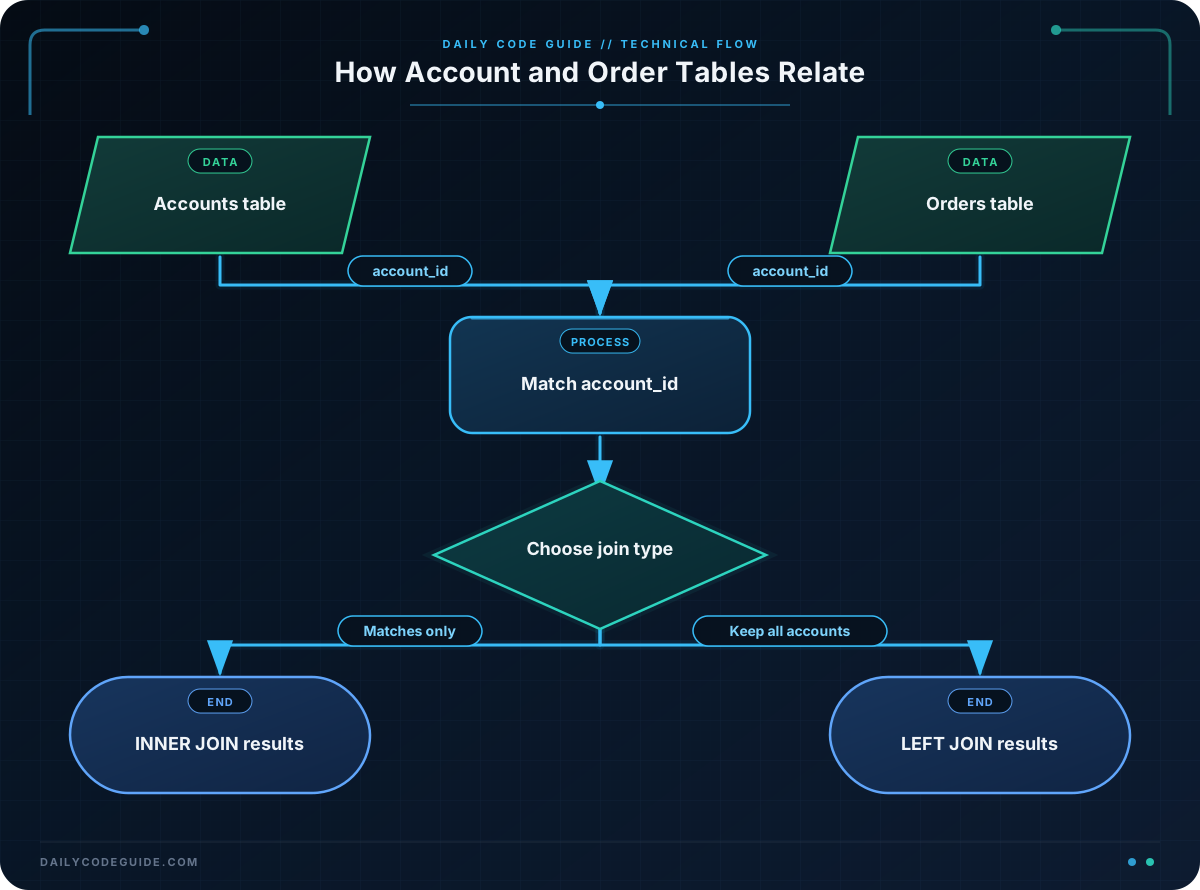
A JOIN combines columns from two or more tables by matching related values. In an order system, the accounts table might store customer information, while the orders table stores individual purchases.
Both tables can be connected through an account_id column:
accounts.account_ididentifies each customer account.orders.account_ididentifies the account that placed an order.
An INNER JOIN returns only rows where a match exists in both tables. This is useful when you want to analyze orders that are associated with known customer accounts.
A LEFT JOIN returns every row from the table on the left, even when there is no matching row on the right. This is useful for finding accounts that have not placed any orders.
The general structure is:
SELECT columns
FROM left_table
JOIN right_table
    ON left_table.matching_column = right_table.matching_column;
The ON clause defines how rows are related. It is different from the WHERE clause, which filters the rows after the join has been formed.
Basic Example
Suppose these tables contain customer accounts and orders. The following script creates sample data, then finds orders placed during 2025 alongside the account details for each customer.
CREATE TABLE accounts (
    account_id INTEGER PRIMARY KEY,
    company_name VARCHAR(100) NOT NULL,
    account_tier VARCHAR(20) NOT NULL
);

CREATE TABLE orders (
    order_id INTEGER PRIMARY KEY,
    account_id INTEGER NOT NULL,
    order_date DATE NOT NULL,
    order_total DECIMAL(10, 2) NOT NULL
);

INSERT INTO accounts (account_id, company_name, account_tier)
VALUES
    (101, 'Northwind Retail', 'Enterprise'),
    (102, 'Greenfield Supplies', 'Standard'),
    (103, 'Summit Health', 'Enterprise');

INSERT INTO orders (order_id, account_id, order_date, order_total)
VALUES
    (5001, 101, DATE '2025-01-15', 1250.00),
    (5002, 102, DATE '2025-02-03', 480.50),
    (5003, 101, DATE '2024-12-20', 875.00),
    (5004, 103, DATE '2025-03-11', 2100.00);

SELECT
    a.company_name,
    a.account_tier,
    o.order_id,
    o.order_date,
    o.order_total
FROM accounts AS a
INNER JOIN orders AS o
    ON a.account_id = o.account_id
WHERE o.order_date >= DATE '2025-01-01'
ORDER BY o.order_date;
Expected Output
company_name       account_tier  order_id  order_date  order_total
Greenfield Supplies Standard     5002      2025-02-03  480.50
Summit Health       Enterprise   5004      2025-03-11  2100.00
Northwind Retail    Enterprise   5001      2025-01-15  1250.00
How the Code Works
accounts AS a and orders AS o assign short aliases to the tables. The aliases let you write a.company_name instead of accounts.company_name, which is especially helpful when both tables contain similarly named columns.
The join condition is:
ON a.account_id = o.account_idThis tells SQL to attach each order to the account with the same ID. The query does not match rows merely because they appear in the same position; it matches them using the relationship defined by the IDs.
Because this is an INNER JOIN, an account appears only if it has a matching order. The WHERE clause then removes orders before January 1, 2025. For example, Northwind Retail’s 2024 order is excluded, but its 2025 order remains.
Always qualify columns that could exist in more than one table. Writing o.order_date makes it clear that the date comes from the orders table and prevents ambiguous-column errors.
Another Example
For account reporting, you may want one row per account rather than one row per order. A LEFT JOIN combined with aggregate functions can show the number and total value of orders for every account, including accounts with no orders.
SELECT
    a.account_id,
    a.company_name,
    a.account_tier,
    COUNT(o.order_id) AS order_count,
    COALESCE(SUM(o.order_total), 0.00) AS total_spend
FROM accounts AS a
LEFT JOIN orders AS o
    ON a.account_id = o.account_id
GROUP BY
    a.account_id,
    a.company_name,
    a.account_tier
ORDER BY total_spend DESC;
COUNT(o.order_id) counts only matching orders. For an account with no order, the joined order columns are NULL, so the count is zero. SUM returns NULL when there are no values to add, which is why COALESCE converts that result to 0.00.
The GROUP BY creates one result row for each account. Every non-aggregated column in the SELECT list is included in the grouping, which is required by many SQL database systems.
Common Mistakes
Joining on the wrong columns
The join should use the primary key in accounts and the corresponding foreign key in orders. Joining on unrelated columns can create incorrect matches or far too many rows.
Turning a LEFT JOIN into an INNER JOIN accidentally
Consider this pattern:
SELECT
    a.company_name,
    o.order_total
FROM accounts AS a
LEFT JOIN orders AS o
    ON a.account_id = o.account_id
WHERE o.order_total > 1000;
The WHERE condition removes rows where o.order_total is NULL. As a result, accounts without orders disappear, making the query behave like an inner join.
If the condition belongs to the relationship being joined and you want to preserve accounts without matching orders, place the condition in the ON clause instead:
SELECT
    a.company_name,
    o.order_total
FROM accounts AS a
LEFT JOIN orders AS o
    ON a.account_id = o.account_id
    AND o.order_total > 1000;
Now every account remains in the result. Accounts without an order above 1000 have NULL in the order columns.
Unexpected duplicate account rows
An account can have many orders, so a regular join returns one row per matching order. That is expected behavior. If you need one row per account, use aggregate functions and GROUP BY, as shown in the reporting example.
Try It Yourself
Using the accounts and orders tables from the first example, write a query that returns the company name, account tier, order ID, and order total for orders greater than 1000. Include only Enterprise accounts and sort the largest order first.
Challenge
Create a customer order review query with these requirements:
- Return the company name, account tier, order ID, order date, and order total.
- Include only orders placed during 2025.
- Include only accounts in the Enterprise tier.
- Include only orders with a total of at least 1000.
- Sort the results from the largest order to the smallest.
Use table aliases and qualify columns so it is clear which table supplies each value.
Solution
SELECT
    a.company_name,
    a.account_tier,
    o.order_id,
    o.order_date,
    o.order_total
FROM accounts AS a
INNER JOIN orders AS o
    ON a.account_id = o.account_id
WHERE a.account_tier = 'Enterprise'
    AND o.order_date >= DATE '2025-01-01'
    AND o.order_date < DATE '2026-01-01'
    AND o.order_total >= 1000
ORDER BY o.order_total DESC;
The INNER JOIN connects each order to its account. The filters restrict the results to Enterprise accounts, dates within the 2025 calendar year, and orders worth at least 1000. Using both a start date and an exclusive end date avoids accidentally including orders from 2026.
Key Takeaways
- An
INNER JOINreturns only rows with matches in both tables. - A
LEFT JOINpreserves every row from the left table, including accounts without orders. - Use the
ONclause to define the relationship between tables. - Use
WHEREto filter the joined result, while remembering that it can remove rows produced by aLEFT JOIN. - When a customer has multiple orders, use
GROUP BYand aggregate functions for one summary row per account.

