


What You’ll Learn
In this lesson, you will learn how to use Python’s built-in json module to save dictionary-based application settings to a file and load them back into your program.
- Understand what JSON is and why it is useful for settings.
- Write a Python dictionary to a JSON file.
- Read JSON data from a file into a Python dictionary.
- Handle a missing or invalid settings file safely.
The Concept
JSON, which stands for JavaScript Object Notation, is a text format commonly used to store and exchange structured data. Although JSON is not Python syntax, it works well with Python dictionaries, lists, strings, numbers, and Boolean values.
For example, an application might store settings such as a chosen color theme, language, and whether notifications are enabled. Saving these settings in a file allows the application to remember them after it closes.
Python’s built-in json module provides two important functions:
json.dump()writes Python data to an open file.json.load()reads JSON data from an open file and converts it into Python data.
When working with files, use with open(...). The with statement closes the file automatically when the block finishes, even if an error occurs.
Basic Example
This example saves application settings to a file named settings.json, then loads the settings back into the program.
import json

settings = {
    "theme": "dark",
    "language": "English",
    "notifications_enabled": True
}

with open("settings.json", "w", encoding="utf-8") as settings_file:
    json.dump(settings, settings_file, indent=4)

print("Settings saved.")

with open("settings.json", "r", encoding="utf-8") as settings_file:
    loaded_settings = json.load(settings_file)

print("Loaded theme:", loaded_settings["theme"])
print("Notifications enabled:", loaded_settings["notifications_enabled"])
Expected Output
Settings saved.
Loaded theme: dark
Notifications enabled: True
After the program runs, the same folder contains a settings.json file containing the saved settings.
How the Code Works
The first line imports Python’s built-in JSON module:
import jsonmakes the JSON functions available to the program.
The settings variable is a dictionary. Its keys are setting names, and its values are the choices made by the application user.
This block opens the file for writing:
"settings.json"is the file name."w"means write mode. It creates the file if it does not exist and replaces its contents if it does exist.encoding="utf-8"supports text characters from many languages.json.dump(settings, settings_file, indent=4)converts the dictionary to JSON and writes it to the file.
The indent=4 argument is optional. It formats the JSON with indentation so that people can read the file more easily.
The second with block opens the file in read mode using "r". Then, json.load(settings_file) reads the JSON and converts it back into a Python dictionary stored in loaded_settings.
Python’s True value is saved as JSON’s true value. When the file is loaded again, it becomes Python’s True value.
Another Example
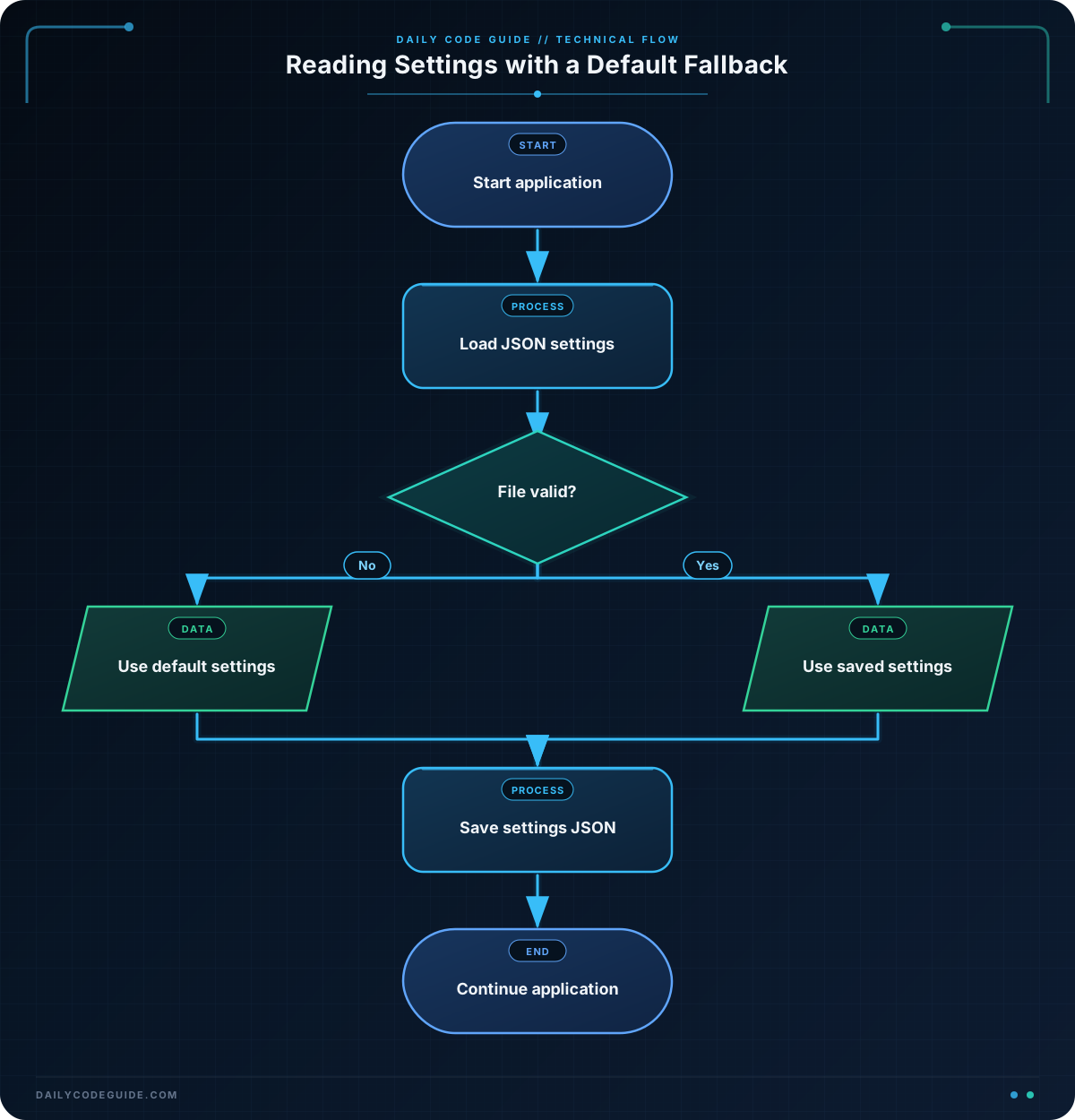
A settings file might not exist the first time a user starts an application. It could also contain invalid JSON if someone edited it incorrectly. The following example handles both situations by using default settings.
import json

settings_file_name = "user_settings.json"

default_settings = {
    "font_size": 14,
    "show_tips": True,
    "start_page": "dashboard"
}

try:
    with open(settings_file_name, "r", encoding="utf-8") as settings_file:
        user_settings = json.load(settings_file)
    print("Saved settings loaded.")

except (FileNotFoundError, json.JSONDecodeError):
    user_settings = default_settings
    print("Using default settings.")

user_settings["show_tips"] = False

with open(settings_file_name, "w", encoding="utf-8") as settings_file:
    json.dump(user_settings, settings_file, indent=4)

print("Tips enabled:", user_settings["show_tips"])
The try block attempts to load existing settings. If the file is missing, Python raises FileNotFoundError. If the file is not valid JSON, Python raises json.JSONDecodeError.
The except block responds to either problem by using the default dictionary. The program can then continue and save a valid settings file instead of stopping with an error.
Common Mistakes
- Using write mode when loading: Use
"r"to read and"w"to write. Opening a file with"w"can erase its existing contents. - Forgetting to import
json: Functions such asjson.dump()andjson.load()are unavailable until the module is imported. - Trying to load a file that does not exist: A first run may need default settings and a
FileNotFoundErrorhandler. - Writing Python syntax instead of JSON: JSON uses lowercase
true,false, andnull. Python usesTrue,False, andNone. Letjson.dump()perform the conversion instead of manually building JSON text. - Using a value JSON cannot represent: Basic JSON supports dictionaries, lists, strings, numbers, Booleans, and
None. Objects such as open files and custom class instances need extra conversion before they can be saved.
Try It Yourself
Create a program that saves a dictionary named window_settings to window.json. Include settings for window width, window height, and whether the window starts maximized. Then load the file and print the width and maximized status.
Use json.dump() when saving and json.load() when reading. Run the program more than once and inspect the generated JSON file.
Challenge
Build a small settings program for a music application.
- Store a username, a preferred music quality, and whether autoplay is enabled in a dictionary.
- Save the dictionary to
music_settings.json. - Load the settings from the file.
- Print the username and music quality after loading.
- If the file does not exist or contains invalid JSON, use a default username of
"guest", a quality of"standard", and autoplay set toFalse.
Solution
import json

file_name = "music_settings.json"

default_music_settings = {
    "username": "guest",
    "quality": "standard",
    "autoplay": False
}

try:
    with open(file_name, "r", encoding="utf-8") as settings_file:
        music_settings = json.load(settings_file)
    print("Music settings loaded.")

except (FileNotFoundError, json.JSONDecodeError):
    music_settings = default_music_settings
    print("No usable settings file found. Using defaults.")

with open(file_name, "w", encoding="utf-8") as settings_file:
    json.dump(music_settings, settings_file, indent=4)

print("Username:", music_settings["username"])
print("Music quality:", music_settings["quality"])
The solution first attempts to read the existing JSON file. If reading fails because the file is missing or invalid, it uses the default dictionary. Finally, it writes the current settings back to the file and prints two loaded settings.
Key Takeaways
- Use Python’s
jsonmodule to convert between dictionaries and JSON data. - Use
json.dump()to write settings to a file. - Use
json.load()to read settings from a file. - Use
with open(...)so files are closed automatically. - Handle missing and invalid settings files with exceptions and sensible defaults.

