


What You’ll Learn
In this lesson, you will learn how Bash redirects input and output and how a here document can write several lines of text to a file. You will use these techniques to generate configuration files during a deployment.
- Understand output redirection with
>and>>. - Understand input redirection with
<and<<. - Use a Bash here document to create a multi-line configuration file.
- Allow Bash variables to expand inside generated configuration.
- Write a file with restricted permissions and reduce the risk of leaving a partial file.
The Concept
Redirection lets a command read input from or send output to somewhere other than the terminal.
>writes command output to a file, replacing the file if it already exists.>>appends command output to the end of a file.<reads a command’s input from a file.<<starts a here document, which provides multiple lines of input directly in the script.
A Bash here document begins with << and a delimiter. The delimiter is usually a word such as EOF. Bash reads every following line until it finds that word on a line by itself.
For example, this command sends two lines to application.conf:
cat > application.conf <<EOF
environment=production
port=8080
EOF
The first EOF tells Bash that a here document is starting. The final EOF tells Bash where the content ends. The delimiter must match exactly, and it must not have extra spaces before or after it.
By default, Bash expands variables inside an unquoted here document. That makes here documents useful for deployment scripts because a script can insert values such as an environment name, host, or port into a configuration file.
If you quote the delimiter, Bash does not expand variables inside the document:
cat > template.txt <<'EOF'
The value will remain $APP_ENV.
EOF
Use an unquoted delimiter when you want deployment variables inserted. Use a quoted delimiter when the file should contain the literal dollar sign and variable name.
Basic Example
This deployment script creates an application environment file. It uses a here document for the multi-line content and a temporary file so the final configuration file is replaced only after the content has been written successfully.
#!/usr/bin/env bash

set -e

app_name="inventory"
app_environment="production"
app_port="8080"
database_url="postgres://db.internal:5432/inventory"

config_dir="deployment-config"
config_file="$config_dir/app.env"

umask 077
mkdir -p "$config_dir"

temp_file=$(mktemp "$config_dir/.app.env.XXXXXX")
trap 'rm -f "$temp_file"' EXIT

cat > "$temp_file" <<EOF
APP_NAME=$app_name
APP_ENV=$app_environment
PORT=$app_port
DATABASE_URL=$database_url
EOF

mv "$temp_file" "$config_file"
trap - EXIT

printf 'Generated: %s\n' "$config_file"
cat "$config_file"
Expected Output
When you save the script as generate-config.sh and run it with bash generate-config.sh, it creates deployment-config/app.env and displays:
Generated: deployment-config/app.env
APP_NAME=inventory
APP_ENV=production
PORT=8080
DATABASE_URL=postgres://db.internal:5432/inventory
How the Code Works
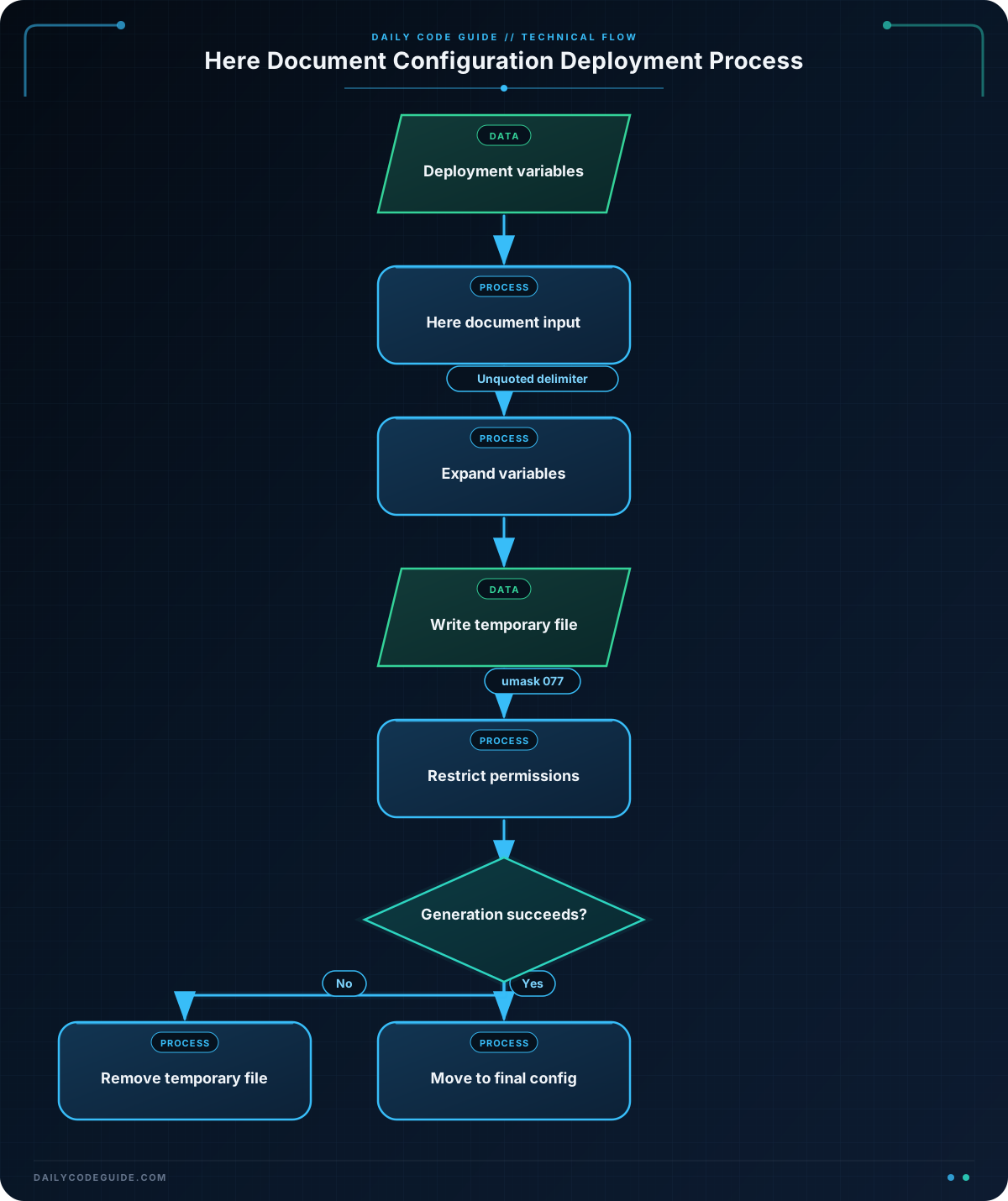
app_name, app_environment, app_port, and database_url are Bash variables. Their values are inserted into the here document because its delimiter, EOF, is not quoted.
The command mkdir -p creates the deployment directory if it does not already exist. The -p option also prevents an error when the directory already exists.
umask 077 sets restrictive default permissions for newly created files. In this example, the generated file is intended to contain application settings and a database connection string, so it should not be readable by every user on the machine.
The following command creates a temporary file inside the target directory:
temp_file=$(mktemp "$config_dir/.app.env.XXXXXX")The XXXXXX characters are replaced with a unique suffix. The here document writes to this temporary file instead of directly overwriting the final file.
The trap command schedules cleanup if the script exits before the file is moved. After the here document finishes, mv moves the completed temporary file to its final name. This is safer than writing directly to the final file because a failure during generation is less likely to leave a partially written configuration file.
Finally, cat "$config_file" reads the generated file and displays it. The same input and output redirection concepts can also be used with other commands.
Another Example
A deployment may also need to create a web server configuration. This example generates an Nginx server block using deployment-specific values.
#!/usr/bin/env bash

set -e

server_name="app.example.com"
upstream_host="127.0.0.1"
upstream_port="8080"

config_dir="deployment-config"
config_file="$config_dir/inventory.nginx.conf"

mkdir -p "$config_dir"

cat > "$config_file" <<EOF
server {
    listen 80;
    server_name $server_name;

    location / {
        proxy_pass http://$upstream_host:$upstream_port;
        proxy_set_header Host \$host;
        proxy_set_header X-Real-IP \$remote_addr;
    }
}
EOF

printf 'Generated: %s\n' "$config_file"
The Bash variables are expanded before the content is written. The backslashes before $host and $remote_addr prevent Bash from expanding those names. As a result, Nginx receives its own variables instead of empty Bash variables.
Common Mistakes
- Changing the closing delimiter: If the document starts with
<<EOF, the closing line must be exactlyEOF. It cannot beEND,EOF;, orEOF. - Accidentally overwriting a file: The
>operator replaces existing contents. Use>>when you intentionally want to append, or write to a temporary file before moving it into place. - Unexpected variable expansion: An unquoted delimiter expands variables. Quote the delimiter, as in
<<'EOF', when the content must remain literal. - Expanding variables meant for another tool: In the Nginx example,
\$hostremains for Nginx because Bash expansion was escaped with a backslash. - Using unquoted file paths: Write paths as
"$config_file". Quoting protects paths that contain spaces or special characters.
Try It Yourself
Create a Bash script that generates deployment-config/worker.env. The file should contain these settings:
APP_ENV=stagingWORKER_COUNT=3QUEUE_HOST=queue.internal
Use a here document and make the script print the generated file after writing it. Use umask 077 and create the directory with mkdir -p.
Challenge
Improve your script from the previous exercise so it uses variables instead of placing the deployment values directly inside the here document. Also write the content to a temporary file in deployment-config and move it to worker.env only after the here document has completed.
Your script should:
- Stop if a command fails.
- Create the target directory if needed.
- Use restrictive permissions for the generated file.
- Remove the temporary file if the script exits early.
- Display the final configuration after it is generated.
Solution
#!/usr/bin/env bash

set -e

app_environment="staging"
worker_count="3"
queue_host="queue.internal"

config_dir="deployment-config"
config_file="$config_dir/worker.env"

umask 077
mkdir -p "$config_dir"

temp_file=$(mktemp "$config_dir/.worker.env.XXXXXX")
trap 'rm -f "$temp_file"' EXIT

cat > "$temp_file" <<EOF
APP_ENV=$app_environment
WORKER_COUNT=$worker_count
QUEUE_HOST=$queue_host
EOF

mv "$temp_file" "$config_file"
trap - EXIT

printf 'Generated: %s\n' "$config_file"
cat "$config_file"
The unquoted EOF delimiter allows the three Bash variables to expand into the file. The temporary file is created in the same directory as the final file, then moved into place after the here document is complete. The cleanup trap removes the temporary file if the script stops before the move.
Key Takeaways
>replaces a file, while>>appends to a file.- A here document uses
<<to provide multi-line input to a command. - Variables expand inside an unquoted here document delimiter.
- Quote the delimiter when you need literal variables such as
$host. - Writing to a temporary file and moving it into place helps prevent incomplete configuration files.

