


What You’ll Learn
In this lesson, you will learn how Terraform remote state lets a small development team share one authoritative infrastructure state without committing the state file to Git. You will also configure state locking and safely read outputs from another Terraform configuration.
- Understand why local state is difficult to share.
- Configure an Amazon S3 backend for shared state.
- Enable state locking with an S3 lock file.
- Separate state by environment and configuration.
- Read outputs from another remote state while considering access and security.
The Concept
Terraform state records the relationship between your configuration and the real infrastructure. Terraform uses it to determine what already exists, what needs to change, and which resource addresses belong to which infrastructure objects.
With the default local backend, this information is stored in a file named terraform.tfstate in the working directory. A local file is acceptable for experimenting alone, but it creates problems for a team:
- Different developers can have different copies of state.
- State changes can be lost when someone runs Terraform from an outdated copy.
- Two people can apply changes at the same time.
- The state file may contain sensitive values and should not be committed to a source repository.
A remote backend stores state in a shared service. In this lesson, the S3 backend stores state in an existing Amazon S3 bucket. The key identifies the state object, while use_lockfile = true enables locking through an S3 lock file. When one team member is performing an operation, Terraform can prevent another operation from changing the same state simultaneously.
The backend bucket must exist before Terraform can use it. This is a bootstrap concern: create the bucket separately, often through a one-time administrative process or a dedicated bootstrap configuration. Do not try to create the backend bucket in the same configuration that depends on that backend.
Basic Example
Assume your team already created an S3 bucket named acme-dev-terraform-state in the us-east-1 region. The following configuration stores the development environment’s state at a specific key and enables encryption and locking.
# versions.tf
terraform {
  required_version = ">= 1.6.0"

  required_providers {
    aws = {
      source  = "hashicorp/aws"
      version = "~> 5.0"
    }
  }
}

# backend.tf
terraform {
  backend "s3" {
    bucket       = "acme-dev-terraform-state"
    key          = "development/storage.tfstate"
    region       = "us-east-1"
    encrypt      = true
    use_lockfile = true
  }
}

# variables.tf
variable "aws_region" {
  type        = string
  description = "AWS region for the development environment"
  default     = "us-east-1"
}

variable "uploads_bucket_name" {
  type        = string
  description = "Globally unique name for the development uploads bucket"
  default     = "acme-development-team-uploads"
}

# main.tf
provider "aws" {
  region = var.aws_region
}

resource "aws_s3_bucket" "team_uploads" {
  bucket = var.uploads_bucket_name

  tags = {
    Environment = "development"
    ManagedBy   = "terraform"
  }
}

# outputs.tf
output "uploads_bucket_name" {
  description = "Name of the shared development uploads bucket"
  value       = aws_s3_bucket.team_uploads.bucket
}
Run the configuration from the project directory:
terraform init
terraform plan
terraform apply
Expected Output
There is no fixed output because Terraform’s plan depends on your AWS account and whether the uploads bucket already exists. After terraform init, Terraform configures the S3 backend. After a successful apply, the state is stored remotely under development/storage.tfstate, and the output displays the uploads bucket name.
How the Code Works
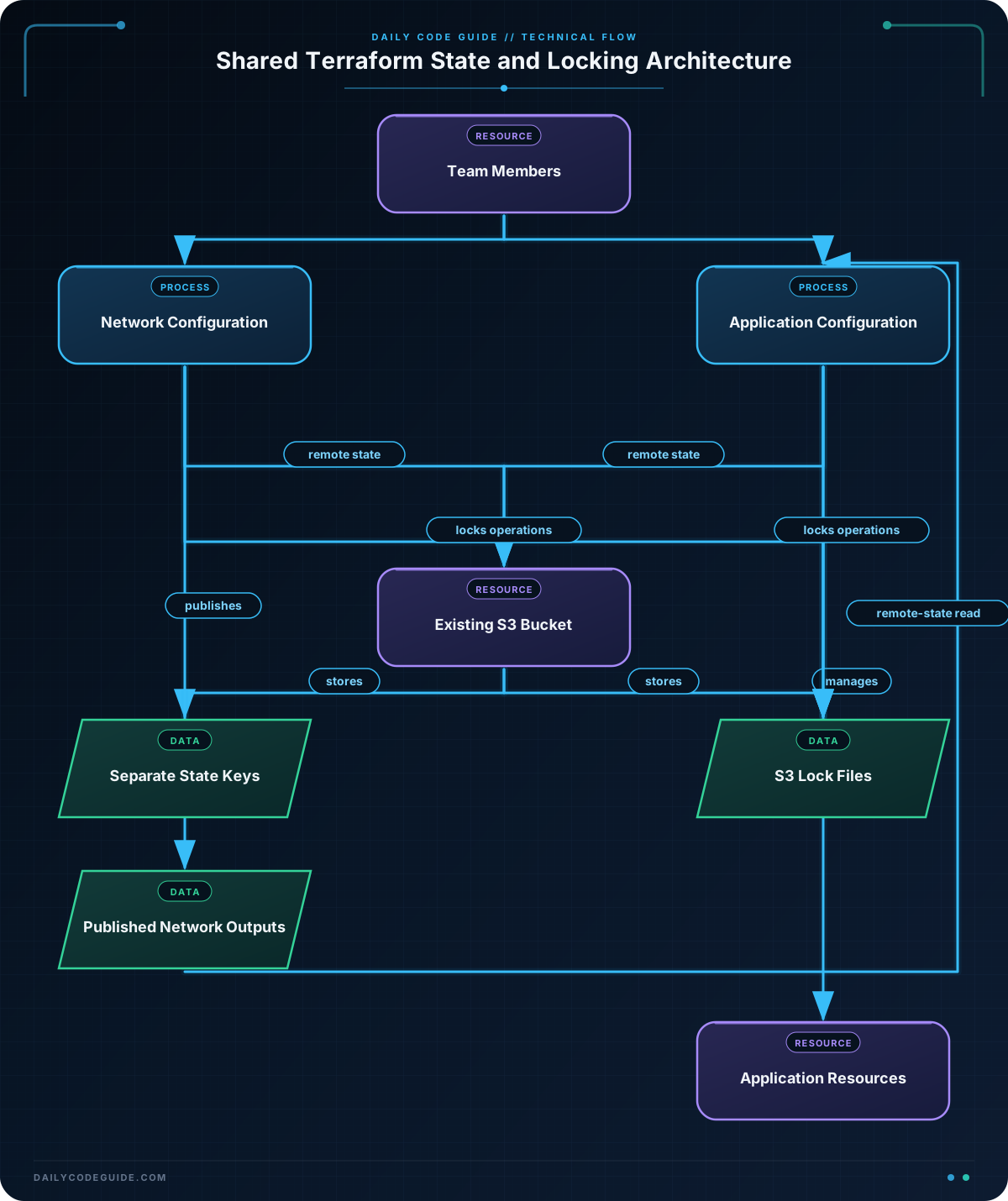
The terraform block in backend.tf selects the S3 backend. Backend configuration is processed during terraform init, before providers and resources are evaluated. This is why backend settings cannot normally use Terraform input variables.
bucketnames the already-existing S3 bucket used for shared state.keygives this configuration its own state path. Separate keys prevent the development state from being mixed with other environments or projects.regionidentifies the region containing the state bucket.encrypt = truerequests server-side encryption for the state object.use_lockfile = trueenables S3-based state locking. Team members should use Terraform versions that support this S3 locking option.
State locking is not a substitute for review. It prevents overlapping state operations, but it does not decide whether a proposed infrastructure change is safe. Continue to use code review, restricted IAM permissions, and a controlled apply process.
For stronger recovery options, enable S3 bucket versioning and restrict access to the state bucket. Terraform state can include resource attributes that are sensitive even when they are not marked sensitive in an output. Grant developers only the S3 and AWS permissions they need, and avoid putting long-lived access keys in backend configuration files or source control.
If you are moving an existing local state file to this backend, run terraform init and approve the migration when Terraform asks whether to copy the existing state. In an automated environment, use terraform init -migrate-state only when the migration is intentional and has been reviewed.
Another Example
A team often separates infrastructure into configurations. For example, a network configuration can own the VPC and subnets, while an application configuration owns security groups and services. The application configuration can read selected outputs from the network configuration with the terraform_remote_state data source.
The network configuration must publish the outputs first:
output "vpc_id" {
  description = "VPC used by application resources"
  value       = aws_vpc.platform.id
}

output "private_subnet_ids" {
  description = "Private subnets available to application resources"
  value       = aws_subnet.private[*].id
}
Then the application configuration can read those values while using its own state key:
terraform {
  backend "s3" {
    bucket       = "acme-dev-terraform-state"
    key          = "development/application.tfstate"
    region       = "us-east-1"
    encrypt      = true
    use_lockfile = true
  }
}

provider "aws" {
  region = "us-east-1"
}

data "terraform_remote_state" "network" {
  backend = "s3"

  config = {
    bucket = "acme-dev-terraform-state"
    key    = "development/network.tfstate"
    region = "us-east-1"
  }
}

resource "aws_security_group" "application" {
  name        = "development-application"
  description = "Security group for development application resources"
  vpc_id      = data.terraform_remote_state.network.outputs.vpc_id

  egress {
    description = "Allow application resources to reach external services"
    protocol    = "-1"
    from_port   = 0
    to_port     = 0
    cidr_blocks = ["0.0.0.0/0"]
  }

  tags = {
    Environment = "development"
    ManagedBy   = "terraform"
  }
}

output "application_security_group_id" {
  description = "Security group assigned to application resources"
  value       = aws_security_group.application.id
}
This arrangement gives each configuration ownership of its own resources and state. The application configuration consumes the network configuration’s published interface rather than duplicating the VPC ID in a variable.
However, remote state access is broad: a configuration that can read a state object may be able to read all values stored in that object, not just the outputs used by the configuration. Publish only the outputs that consumers need, protect the state bucket, and consider whether a different integration mechanism is more appropriate for highly sensitive data.
Common Mistakes
- Using one state key for everything: A single key for development, staging, and production causes unrelated resources to share state. Give each environment or independently managed stack a distinct key.
- Committing credentials or state files: Backend configuration should not contain access keys. Use the AWS credential chain, such as an approved role or environment-based credentials, and add
*.tfstateand*.tfstate.*to.gitignore. - Assuming locking protects every resource: Locking protects Terraform state operations. It does not prevent someone from changing AWS resources manually or from running a different configuration against the same resources.
- Changing backend settings casually: A changed bucket, key, or backend type can make Terraform appear to have no resources. Review the migration prompt carefully and use
terraform init -reconfigureonly when you intentionally want Terraform to accept new backend settings without migrating the old state. - Reading a missing remote-state output: The consumer can reference only outputs that the producer configuration declares. Apply the producer first and verify the output name before running the consumer.
Try It Yourself
Create a separate S3 backend key for a staging environment. Use the same state bucket, but store staging state at staging/storage.tfstate. Enable encryption and S3 lock files, then initialize Terraform with the staging configuration. Confirm that the backend path is different from the development path before applying any changes.
Challenge
Design a small application stack that uses a separate staging state file and consumes the VPC ID from a shared staging network state.
- Use the existing state bucket
acme-dev-terraform-stateinus-east-1. - Store the application state at
staging/application.tfstate. - Enable encryption and S3 lock files.
- Read
vpc_idfromstaging/network.tfstate. - Create an application security group in that VPC.
- Initialize the configuration using a separate backend configuration file.
Solution
Use an empty S3 backend block in the Terraform configuration and provide environment-specific settings in a backend configuration file:
# backend.tf
terraform {
  backend "s3" {}
}

# staging.s3.tfbackend
bucket       = "acme-dev-terraform-state"
key          = "staging/application.tfstate"
region       = "us-east-1"
encrypt      = true
use_lockfile = true

# main.tf
provider "aws" {
  region = "us-east-1"
}

data "terraform_remote_state" "network" {
  backend = "s3"

  config = {
    bucket = "acme-dev-terraform-state"
    key    = "staging/network.tfstate"
    region = "us-east-1"
  }
}

resource "aws_security_group" "application" {
  name        = "staging-application"
  description = "Security group for the staging application"
  vpc_id      = data.terraform_remote_state.network.outputs.vpc_id

  egress {
    description = "Allow outbound application traffic"
    protocol    = "-1"
    from_port   = 0
    to_port     = 0
    cidr_blocks = ["0.0.0.0/0"]
  }

  tags = {
    Environment = "staging"
    ManagedBy   = "terraform"
  }
}

output "application_security_group_id" {
  description = "Security group assigned to the staging application"
  value       = aws_security_group.application.id
}
Initialize and apply the staging application configuration with:
terraform init -backend-config=staging.s3.tfbackend
terraform plan
terraform apply
The backend file determines where this configuration’s own state is stored. The terraform_remote_state block reads the separately managed network state, and the security group uses its exported vpc_id. This keeps staging application state separate while still allowing the two configurations to work together.
Key Takeaways
- Remote state gives a team one shared source of truth instead of disconnected local state files.
- Use distinct state keys for distinct environments or independently managed stacks.
- Enable state locking and protect the backend bucket with encryption, versioning, and least-privilege access.
- Backend settings are initialized separately from normal Terraform variables and require care when changed.
terraform_remote_statecan connect configurations through outputs, but access to a state object may expose more than those outputs.

