


What You’ll Learn
By the end of this lesson, you’ll know how to group related SQL changes into a single transaction so they either all succeed or none of them remain.
- Start a transaction with
BEGINorSTART TRANSACTION. - Use
COMMITto make a group of changes permanent. - Use
ROLLBACKto undo uncommitted changes. - Recognize why transactions are important when updating related customer and order records.
The Concept
A transaction is a group of database statements treated as one unit of work. For example, changing a customer’s shipping address may require updating both the customer record and several pending orders. If only one of those updates succeeds, the database can contain inconsistent information.
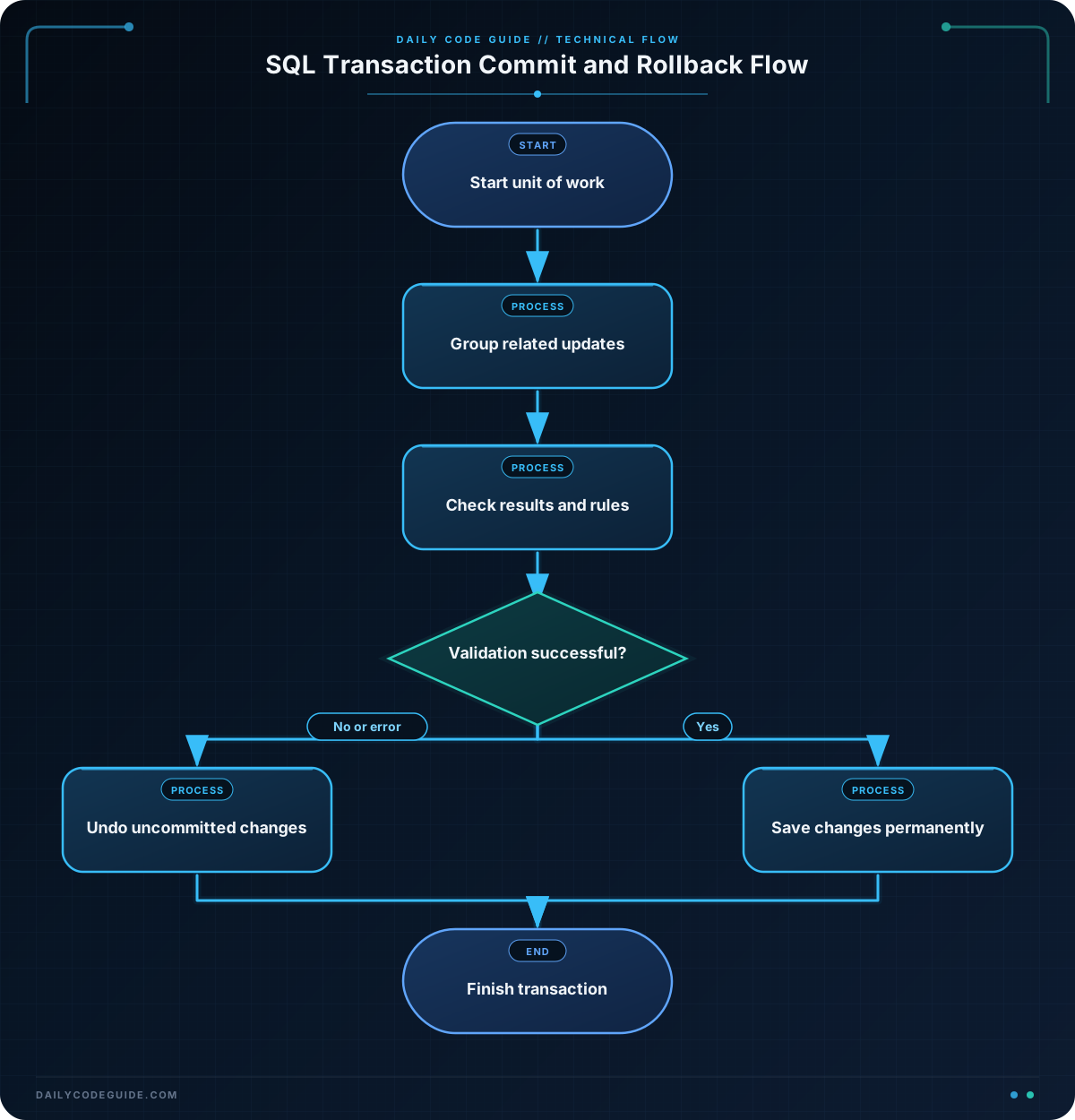
A transaction gives you control over that group of changes:
- BEGIN or START TRANSACTION marks the beginning of the unit of work.
- COMMIT permanently saves all successful changes in the transaction.
- ROLLBACK discards changes made since the transaction began.
Before a transaction is committed, other database sessions may not see its changes, depending on the database system and transaction isolation level. If an application encounters an error or a business rule fails, it should roll back instead of committing partial work.
Transactions are especially useful when several statements must succeed together. They do not automatically validate whether your business logic is correct, though. Your application or SQL procedure still needs to check affected rows, constraints, and other conditions before committing.
Basic Example
This example creates a small customer and order dataset, then updates a customer’s email address and the shipping address on that customer’s pending orders. Both updates are committed together.
CREATE TABLE customers (
    customer_id INTEGER PRIMARY KEY,
    full_name VARCHAR(100) NOT NULL,
    email VARCHAR(255) NOT NULL,
    shipping_address VARCHAR(255) NOT NULL
);

CREATE TABLE orders (
    order_id INTEGER PRIMARY KEY,
    customer_id INTEGER NOT NULL,
    shipping_address VARCHAR(255) NOT NULL,
    status VARCHAR(20) NOT NULL,
    FOREIGN KEY (customer_id) REFERENCES customers(customer_id)
);

INSERT INTO customers (customer_id, full_name, email, shipping_address)
VALUES (101, 'Maya Chen', 'maya@example.com', '18 Oak Street');

INSERT INTO orders (order_id, customer_id, shipping_address, status)
VALUES
    (9001, 101, '18 Oak Street', 'pending'),
    (9002, 101, '18 Oak Street', 'shipped');

BEGIN;

UPDATE customers
SET email = 'maya.chen@example.com',
    shipping_address = '42 River Road'
WHERE customer_id = 101;

UPDATE orders
SET shipping_address = '42 River Road'
WHERE customer_id = 101
  AND status = 'pending';

COMMIT;

SELECT customer_id, email, shipping_address
FROM customers
WHERE customer_id = 101;

SELECT order_id, shipping_address, status
FROM orders
WHERE customer_id = 101
ORDER BY order_id;
Expected Output
The customer’s record and the pending order now use the new address. The shipped order remains unchanged because the transaction deliberately targeted only pending orders.
customer_id | email                    | shipping_address
101         | maya.chen@example.com    | 42 River Road

order_id | shipping_address | status
9001     | 42 River Road    | pending
9002     | 18 Oak Street    | shipped
How the Code Works
The first statements create two related tables. The orders.customer_id foreign key ensures that an order refers to an existing customer.
BEGIN starts the transaction. The two UPDATE statements then run as part of the same unit of work. At this point, the changes are not yet permanent.
The first update changes the customer’s email address and main shipping address. The second update changes only pending orders. Updating shipped orders could be incorrect because they may already have been handed to a carrier.
COMMIT makes both updates permanent. If either update caused an error, or if the application discovered that the resulting data was not acceptable, it could execute ROLLBACK instead.
Many database connections use autocommit by default. In autocommit mode, each individual statement may be committed immediately. Explicitly starting a transaction is therefore important when multiple statements must be treated as one operation.
Another Example
Suppose a customer cancels an order before it is shipped. The application needs to mark the order as cancelled and return the order total to the customer’s account credit. These changes must stay together.
The following example assumes the tables below already contain the required columns. The transaction is rolled back after a validation query demonstrates that the order was not eligible for cancellation. In a real application, the application would make the decision based on the query result and issue either COMMIT or ROLLBACK.
BEGIN;

UPDATE orders
SET status = 'cancelled'
WHERE order_id = 9001
  AND status = 'pending';

UPDATE customers
SET account_credit = account_credit + 74.50
WHERE customer_id = 101;

SELECT order_id, customer_id, status
FROM orders
WHERE order_id = 9001;

SELECT customer_id, account_credit
FROM customers
WHERE customer_id = 101;

ROLLBACK;
Because the final statement is ROLLBACK, the order status and account credit return to their values from before BEGIN. This is useful when validation finds a problem, an external service rejects the operation, or the application catches an error before the work is finalized.
Common Mistakes
- Committing too early: If you commit after the first update, a later failure cannot undo that earlier change. Commit only after all related work and validation are complete.
- Forgetting to roll back after an error: Some database connections remain inside a failed transaction until you explicitly roll them back. Always handle errors by rolling back before reusing the connection.
- Updating the wrong set of orders: A condition such as
status = 'pending'can prevent changes to orders that have already shipped. Review the business rule before writing theWHEREclause. - Assuming a successful statement means the operation is correct: An
UPDATEcan succeed while affecting zero rows or more rows than expected. Check affected-row counts or run validation queries before committing. - Leaving transactions open: An uncommitted transaction can hold locks and interfere with other work. Keep transactions short and always finish them with
COMMITorROLLBACK.
Try It Yourself
Using the tables from the basic example, start a transaction that changes Maya Chen’s email address and the shipping address of her pending orders to 75 Pine Avenue.
Run a SELECT query while the transaction is open to verify the changes. Then roll the transaction back and query the records again. Confirm that the original email address and shipping address are restored.
Challenge
Create a transaction for customer 101 that performs these steps:
- Change the customer’s shipping address to
9 Harbor Lane. - Update only that customer’s pending orders to the same address.
- Run validation queries showing the customer and order values.
- Roll back the transaction to simulate a failed validation.
- Start a second transaction that performs the same updates and commits them.
- Run final queries proving that the committed values remain in the database.
The important part is to demonstrate that the first attempt leaves no lasting changes, while the second attempt persists both related updates.
Solution
BEGIN;

UPDATE customers
SET shipping_address = '9 Harbor Lane'
WHERE customer_id = 101;

UPDATE orders
SET shipping_address = '9 Harbor Lane'
WHERE customer_id = 101
  AND status = 'pending';

SELECT customer_id, shipping_address
FROM customers
WHERE customer_id = 101;

SELECT order_id, shipping_address, status
FROM orders
WHERE customer_id = 101
ORDER BY order_id;

ROLLBACK;

BEGIN;

UPDATE customers
SET shipping_address = '9 Harbor Lane'
WHERE customer_id = 101;

UPDATE orders
SET shipping_address = '9 Harbor Lane'
WHERE customer_id = 101
  AND status = 'pending';

COMMIT;

SELECT customer_id, shipping_address
FROM customers
WHERE customer_id = 101;

SELECT order_id, shipping_address, status
FROM orders
WHERE customer_id = 101
ORDER BY order_id;
The first transaction changes both tables temporarily and then removes those changes with ROLLBACK. The second transaction repeats the work and uses COMMIT, so the customer and pending order retain the new address. The shipped order is not changed in either attempt.
Key Takeaways
- Use
BEGINorSTART TRANSACTIONto group related SQL statements. - Use
COMMITonly after all required changes and validations succeed. - Use
ROLLBACKto remove uncommitted changes after an error or failed business-rule check. - Transactions help prevent partial updates to related customer and order records.
- Keep transactions short, check affected rows, and always finish them explicitly.

