


What You’ll Learn
In this lesson, you’ll learn how Terraform data sources can look up infrastructure that already exists in AWS. You will use those results to deploy new resources into an existing VPC without recreating the networking layer.
- Understand the difference between a resource and a data source.
- Look up an existing VPC, subnet, and security group by tags.
- Pass data source values into a new EC2 instance or load balancer.
- Recognize common filtering and timing mistakes.
The Concept
A Terraform resource creates or manages infrastructure. For example, an aws_instance resource asks Terraform to create an EC2 instance.
A data source reads information about infrastructure that is managed somewhere else. It does not create the object. For example, an aws_vpc data source can find an existing VPC by its tags and expose its ID to the rest of your configuration.
Data sources are useful when your organization manages networking separately from application infrastructure. A platform team might create the VPC, subnets, route tables, and security groups, while an application team uses data sources to deploy compute resources into that network.
Data sources are declared with the data block:
data "aws_vpc" "shared" {
    filter {
        name   = "tag:Name"
        values = ["shared-production"]
    }
}
The first label, aws_vpc, identifies the AWS data source type. The second label, shared, is the local name used by your configuration. The VPC ID is then available as data.aws_vpc.shared.id.
Basic Example
Assume an AWS platform team has already created:
- A VPC tagged
Name=shared-production - Application subnets tagged
Tier=app - A security group tagged
Name=application-web
The following configuration finds those existing objects and creates a new EC2 instance inside the selected application subnet.
terraform {
    required_providers {
        aws = {
            source  = "hashicorp/aws"
            version = "~> 5.0"
        }
    }
}

provider "aws" {
    region = var.aws_region
}

variable "aws_region" {
    type    = string
    default = "us-east-1"
}

variable "ami_id" {
    type        = string
    description = "An AMI available in the selected AWS region."
}

variable "instance_type" {
    type    = string
    default = "t3.micro"
}

data "aws_vpc" "shared" {
    filter {
        name   = "tag:Name"
        values = ["shared-production"]
    }
}

data "aws_subnets" "application" {
    filter {
        name   = "vpc-id"
        values = [data.aws_vpc.shared.id]
    }

    filter {
        name   = "tag:Tier"
        values = ["app"]
    }
}

data "aws_subnet" "selected" {
    id = sort(data.aws_subnets.application.ids)[0]
}

data "aws_security_group" "application" {
    filter {
        name   = "vpc-id"
        values = [data.aws_vpc.shared.id]
    }

    filter {
        name   = "tag:Name"
        values = ["application-web"]
    }
}

resource "aws_instance" "application" {
    ami                    = var.ami_id
    instance_type          = var.instance_type
    subnet_id              = data.aws_subnet.selected.id
    vpc_security_group_ids = [data.aws_security_group.application.id]

    tags = {
        Name        = "orders-application"
        Environment = "production"
    }
}

output "deployment_vpc_id" {
    value = data.aws_vpc.shared.id
}

output "deployment_subnet_id" {
    value = data.aws_subnet.selected.id
}

output "instance_id" {
    value = aws_instance.application.id
}
Expected Output
The exact IDs depend on your AWS account. After a successful apply, Terraform returns the existing network IDs along with the ID of the newly created instance.
deployment_vpc_id    = "vpc-0123456789abcdef0"
deployment_subnet_id = "subnet-0123456789abcdef0"
instance_id          = "i-0123456789abcdef0"
How the Code Works
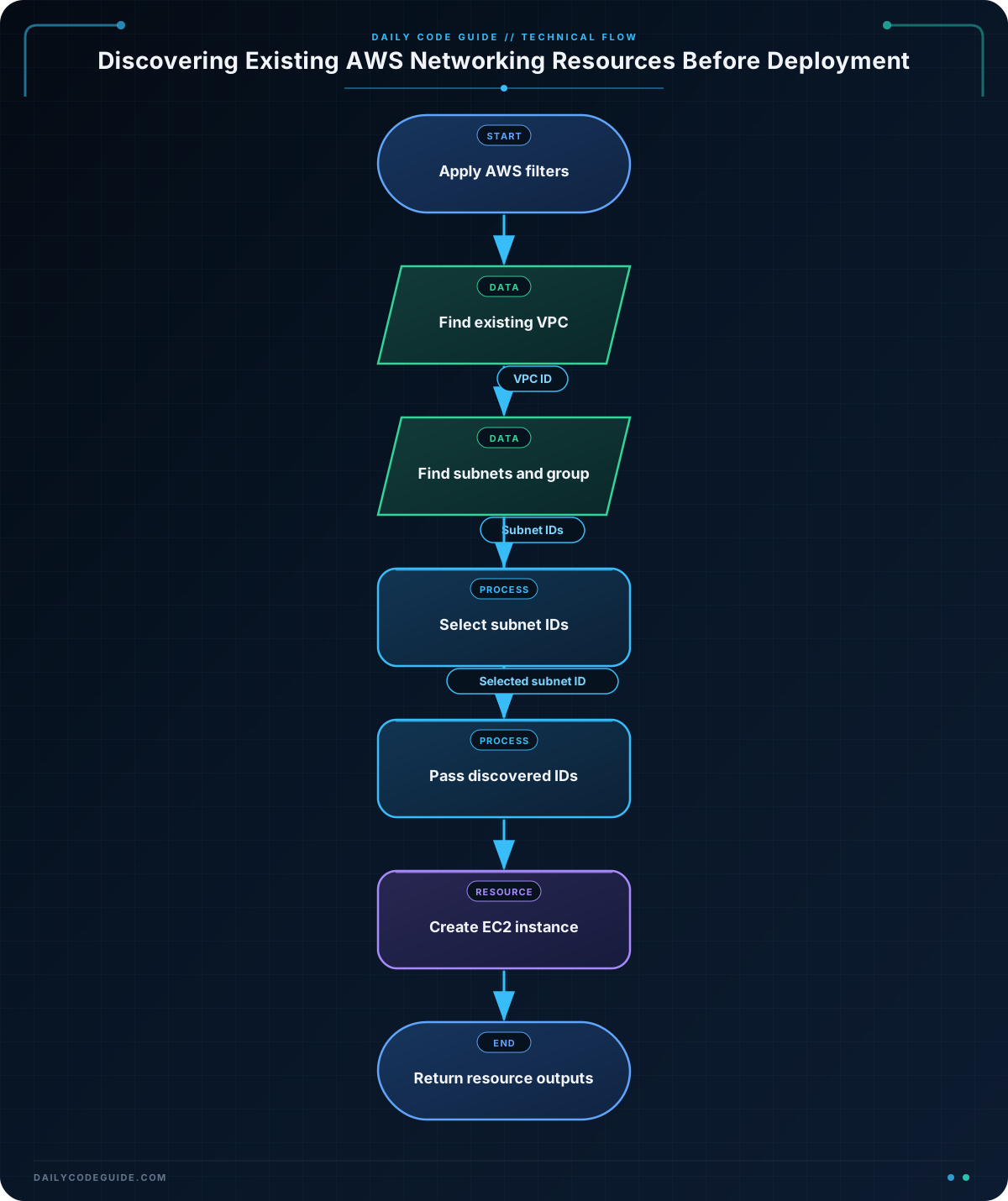
The aws_vpc data source filters by the VPC’s Name tag. The result is read during planning, so the VPC does not need to be declared as a Terraform resource in this configuration.
The aws_subnets data source returns a set of subnet IDs. The first filter limits results to the selected VPC, and the second filter finds only subnets tagged with Tier=app.
A set does not promise an ordering. The expression sort(data.aws_subnets.application.ids)[0] sorts the IDs before selecting one. This makes the selection deterministic, although it does not necessarily select a subnet in a particular availability zone. Production deployments often select subnets by availability zone or use all matching subnet IDs instead.
The singular aws_subnet data source reads details for the selected subnet. Its id argument receives the first ID returned by the plural data source.
The security group data source applies two filters: it must belong to the discovered VPC and have the expected Name tag. The resulting ID is passed to vpc_security_group_ids on the new EC2 instance.
Terraform automatically creates an evaluation dependency. It must discover the VPC before it can filter the subnets, and it must discover the subnet and security group before it can configure the instance.
Another Example
Data sources can also connect a new load balancer to an existing network. This example finds all public subnets and an existing load-balancer security group, then creates an internet-facing application load balancer and listener.
terraform {
    required_providers {
        aws = {
            source  = "hashicorp/aws"
            version = "~> 5.0"
        }
    }
}

provider "aws" {
    region = var.aws_region
}

variable "aws_region" {
    type    = string
    default = "us-east-1"
}

data "aws_vpc" "shared" {
    filter {
        name   = "tag:Name"
        values = ["shared-production"]
    }
}

data "aws_subnets" "public" {
    filter {
        name   = "vpc-id"
        values = [data.aws_vpc.shared.id]
    }

    filter {
        name   = "tag:Tier"
        values = ["public"]
    }
}

data "aws_security_group" "load_balancer" {
    filter {
        name   = "vpc-id"
        values = [data.aws_vpc.shared.id]
    }

    filter {
        name   = "tag:Name"
        values = ["public-load-balancer"]
    }
}

resource "aws_lb" "application" {
    name               = "orders-public"
    internal           = false
    load_balancer_type = "application"
    security_groups    = [data.aws_security_group.load_balancer.id]
    subnets            = data.aws_subnets.public.ids

    tags = {
        Name        = "orders-public"
        Environment = "production"
    }
}

resource "aws_lb_target_group" "application" {
    name     = "orders-http"
    port     = 8080
    protocol = "HTTP"
    vpc_id   = data.aws_vpc.shared.id

    health_check {
        path = "/health"
    }
}

resource "aws_lb_listener" "http" {
    load_balancer_arn = aws_lb.application.arn
    port              = 80
    protocol          = "HTTP"

    default_action {
        type             = "forward"
        target_group_arn = aws_lb_target_group.application.arn
    }
}

output "load_balancer_dns_name" {
    value = aws_lb.application.dns_name
}
This example uses every matching public subnet rather than choosing one. An Application Load Balancer should normally span multiple availability zones, so returning the complete subnet set is more appropriate than selecting a single subnet.
Common Mistakes
- Using a resource when you only need to read an object: Declaring an existing VPC as a resource can make Terraform try to create it or require an import. Use a data source when another system owns the object.
- Using filters that match multiple unexpected objects: A data source usually expects a unique result. Make filters specific by combining tags with a VPC ID, environment, or other distinguishing attribute.
- Assuming a set has a stable order: The
idsattribute fromaws_subnetsis a set. Do not assume its first item is stable unless you sort it first. Better yet, use all matching IDs or filter by a deliberate availability-zone strategy. - Searching for a subnet in the wrong VPC: A tag such as
Tier=appmay exist in several VPCs. Include avpc-idfilter to avoid selecting the wrong network. - Expecting data sources to create dependencies on external changes: Terraform reads data sources during planning, but it does not manage or repair the objects they describe. If the platform team renames a tag or deletes a security group, a later plan can fail.
Try It Yourself
Modify the basic example so that it selects subnets tagged Tier=private instead of Tier=app. Also change the security group tag to Name=internal-application. Run terraform plan and confirm that Terraform proposes an instance in the discovered private subnet without proposing a new VPC or subnet.
Challenge
Create a Terraform configuration for a staging web server with these requirements:
- Find an existing VPC tagged
Name=shared-staging. - Find subnets in that VPC tagged
Tier=web. - Select a deterministic subnet from the matching subnet IDs.
- Find an existing security group tagged
Name=staging-webin the same VPC. - Create an EC2 instance using a variable AMI ID and the discovered subnet and security group.
- Add a
Nametag ofstaging-web-server. - Output the VPC ID, selected subnet ID, and instance ID.
Solution
terraform {
    required_providers {
        aws = {
            source  = "hashicorp/aws"
            version = "~> 5.0"
        }
    }
}

provider "aws" {
    region = var.aws_region
}

variable "aws_region" {
    type    = string
    default = "us-east-1"
}

variable "ami_id" {
    type        = string
    description = "An AMI available in the selected AWS region."
}

data "aws_vpc" "staging" {
    filter {
        name   = "tag:Name"
        values = ["shared-staging"]
    }
}

data "aws_subnets" "web" {
    filter {
        name   = "vpc-id"
        values = [data.aws_vpc.staging.id]
    }

    filter {
        name   = "tag:Tier"
        values = ["web"]
    }
}

data "aws_subnet" "selected" {
    id = sort(data.aws_subnets.web.ids)[0]
}

data "aws_security_group" "web" {
    filter {
        name   = "vpc-id"
        values = [data.aws_vpc.staging.id]
    }

    filter {
        name   = "tag:Name"
        values = ["staging-web"]
    }
}

resource "aws_instance" "web" {
    ami                    = var.ami_id
    instance_type          = "t3.micro"
    subnet_id              = data.aws_subnet.selected.id
    vpc_security_group_ids = [data.aws_security_group.web.id]

    tags = {
        Name = "staging-web-server"
    }
}

output "staging_vpc_id" {
    value = data.aws_vpc.staging.id
}

output "selected_web_subnet_id" {
    value = data.aws_subnet.selected.id
}

output "web_instance_id" {
    value = aws_instance.web.id
}
The solution keeps the VPC, subnet, and security group as data sources because they already exist outside this deployment. Only the EC2 instance is managed by this configuration. Sorting the matching subnet IDs makes the selected result repeatable, while the VPC ID filter prevents a similarly tagged subnet in another VPC from being chosen.
Key Takeaways
- Terraform data sources read existing infrastructure without taking ownership of it.
- Use filters to find AWS networking resources by tags and relationships such as VPC membership.
- Reference data source attributes with expressions such as
data.aws_vpc.shared.id. - Use all matching subnet IDs when high availability requires multiple zones; select one only when that is intentional.
- Data sources make it practical for separate Terraform configurations or teams to share networking infrastructure.

