


What You’ll Learn
In this lesson, you will learn how SQL DISTINCT returns unique values and how it handles NULL values in incomplete customer profiles.
- Remove duplicate region values with
DISTINCT. - Understand why multiple
NULLvalues appear as one unique result. - Filter missing values with
IS NULLandIS NOT NULL.
The Concept
Database tables often contain repeated values. For example, many customers may live in the same region. A normal query returns every matching row, including duplicates.
The DISTINCT keyword tells SQL to return each different value only once:
SELECT DISTINCT region
FROM customer_profiles;
This is useful when you want to create a list of available regions, languages, account types, or other categories without repeating each value.
NULL means that a value is missing or unknown. It is not the same as an empty string, zero, or the text 'NULL'.
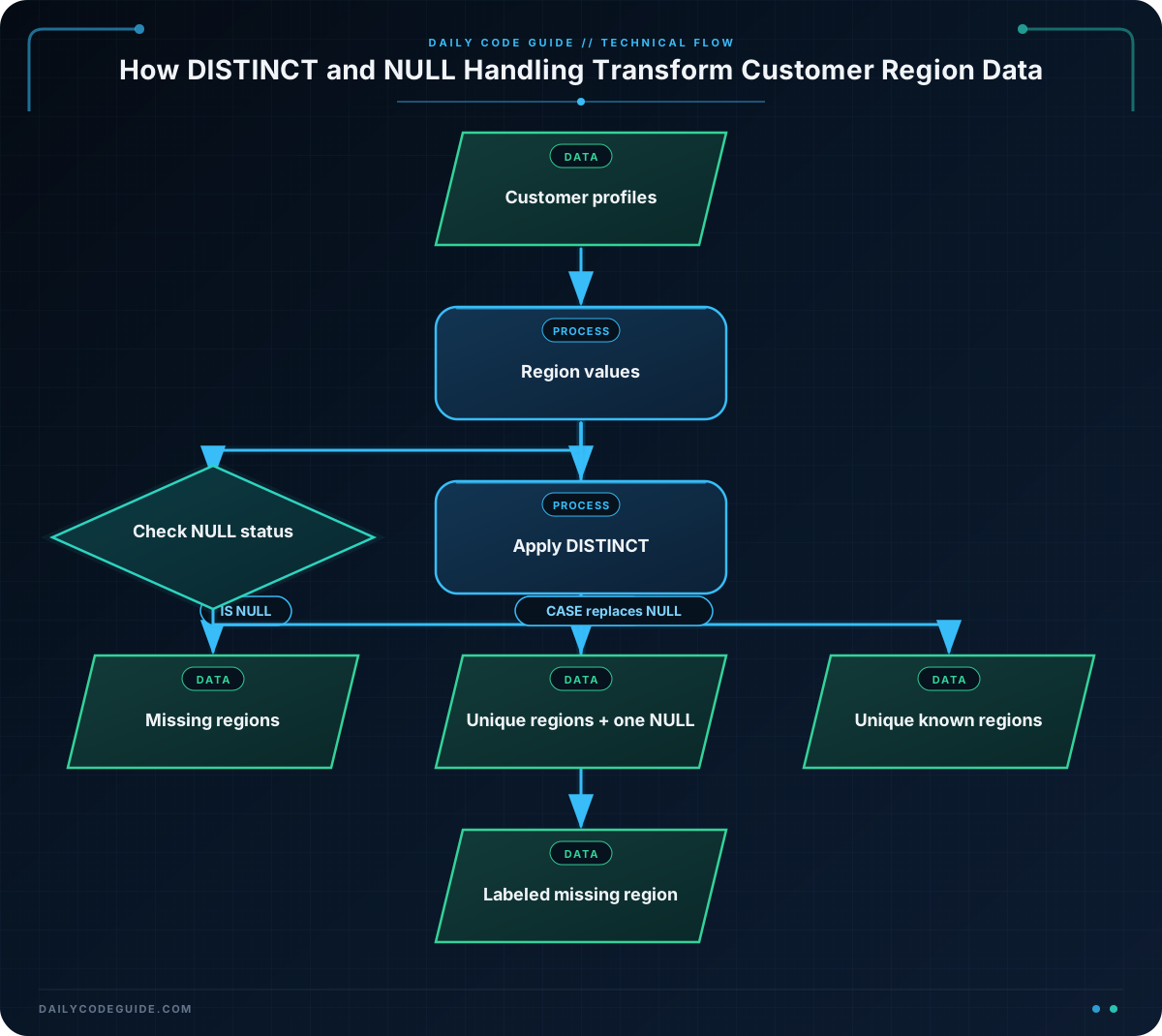
When you use DISTINCT, SQL treats all NULL values in the selected column as one unique value. Therefore, if several customers have no region, the result contains one NULL row rather than one row for every missing region.
Basic Example
Suppose a customer profile table contains repeated regions and some incomplete profiles:
CREATE TABLE customer_profiles (
    customer_id INTEGER,
    customer_name VARCHAR(50),
    region VARCHAR(30)
);

INSERT INTO customer_profiles (customer_id, customer_name, region)
VALUES
    (1, 'Amina Hassan', 'North'),
    (2, 'Diego Ruiz', 'South'),
    (3, 'Priya Shah', 'North'),
    (4, 'Lena Park', NULL),
    (5, 'Owen Smith', 'South'),
    (6, 'Maya Chen', NULL);

SELECT DISTINCT region
FROM customer_profiles;
Expected Output
The order of rows may vary because no ORDER BY clause was used. The unique results are:
region
------
North
South
NULL
How the Code Works
The CREATE TABLE statement creates three columns. The region column stores the customer’s region, but it allows missing values.
The INSERT statement adds six customer profiles. The rows for Lena Park and Maya Chen use the SQL keyword NULL because their regions are missing.
This query selects only the region column:
SELECT DISTINCT region
FROM customer_profiles;
Without DISTINCT, the query would return six rows. With DISTINCT, it returns the three different results: North, South, and one NULL value.
To find only profiles with a missing region, use IS NULL:
SELECT customer_name
FROM customer_profiles
WHERE region IS NULL;
To return only known regions, use IS NOT NULL:
SELECT DISTINCT region
FROM customer_profiles
WHERE region IS NOT NULL;
This last query returns only North and South. The WHERE clause removes missing regions before DISTINCT creates the unique list.
Another Example
A support team may want to review which regions are represented in customer profiles, while also keeping track of whether some profiles still need region information.
The following query returns a readable label for missing regions. The CASE expression changes NULL into the label 'Region not provided' before duplicate values are removed.
SELECT DISTINCT
    CASE
        WHEN region IS NULL THEN 'Region not provided'
        ELSE region
    END AS region_status
FROM customer_profiles;
Unlike the earlier query, this result does not display a database NULL value. It displays a clear label that can be used in a report or customer-data cleanup task.
Common Mistakes
- Forgetting
DISTINCT:SELECT region FROM customer_profilesreturns repeated regions. - Comparing
NULLwith an equals sign:WHERE region = NULLdoes not correctly find missing values. UseWHERE region IS NULL. - Confusing
NULLwith text:NULLmeans missing, while'NULL'is an ordinary text value containing four characters. - Expecting one row per missing customer:
SELECT DISTINCT regioncombines all missing region values into oneNULLresult.
Try It Yourself
Using the customer_profiles table from the basic example, write a query that returns every unique region except missing regions.
Your result should contain North and South, but not NULL. Remember to use both DISTINCT and IS NOT NULL.
Challenge
A data-quality team wants a list of unique region values that need attention. Write a query that returns only one row containing the text 'Region not provided' when at least one customer has a missing region.
Use the customer_profiles table and a WHERE clause. The result should not include known regions such as North or South.
Solution
SELECT DISTINCT 'Region not provided' AS region_status
FROM customer_profiles
WHERE region IS NULL;
The WHERE region IS NULL condition keeps only profiles with missing regions. The selected text is the same for every matching row, so DISTINCT returns the label only once. If no customer has a missing region, the query returns no rows.
Key Takeaways
DISTINCTremoves duplicate values from a query result.- Multiple
NULLvalues appear as one unique result when usingDISTINCT. - Use
IS NULLto find missing values. - Use
IS NOT NULLto exclude missing values. NULLis different from an empty string, zero, and the text'NULL'.

