


What You’ll Learn
In this lesson, you’ll learn how to use a Bash case statement to compare one value with several possible choices. You will use it to route an interactive deployment script to the correct environment-specific action.
- Understand the structure of
caseandesac. - Match one choice or several choices with patterns.
- Provide a default action for unknown input.
- Use case statements in a practical deployment script.
The Concept
A case statement is useful when a script needs to choose between several possible actions. It is similar to using several if and elif conditions, but it often makes menu-based scripts easier to read.
The basic structure looks like this:
case "$value" in
    first-choice)
        # Commands for the first choice
        ;;
    second-choice)
        # Commands for the second choice
        ;;
    *)
        # Commands for any other value
        ;;
esac
The important parts are:
case "$value" instarts the statement and tells Bash which value to examine.- Each pattern, such as
first-choice), describes a possible match. ;;ends the commands for that pattern.*)is the default pattern. It matches anything that did not match earlier patterns.esacends the case statement. It iscasespelled backward.
You can place multiple patterns before one action by separating them with a pipe character. For example, development|dev) matches either development or dev.
Basic Example
This deployment script asks the user which environment to deploy to. Each function represents an environment-specific action. The commands only print what would happen, so you can safely run the example without changing a real system.
#!/usr/bin/env bash

deploy_development() {
    echo "Deploying the latest build to the development environment."
}

deploy_staging() {
    echo "Running checks before deploying to the staging environment."
}

deploy_production() {
    echo "Deploying the approved build to the production environment."
}

read -r -p "Choose an environment (development, staging, production): " environment

case "$environment" in
    development|dev)
        deploy_development
        ;;
    staging|stage)
        deploy_staging
        ;;
    production|prod)
        deploy_production
        ;;
    *)
        echo "Unknown environment: $environment"
        echo "Deployment cancelled."
        ;;
esac
Expected Output
For example, if the user enters staging, the script produces:
Choose an environment (development, staging, production): staging
Running checks before deploying to the staging environment.
How the Code Works
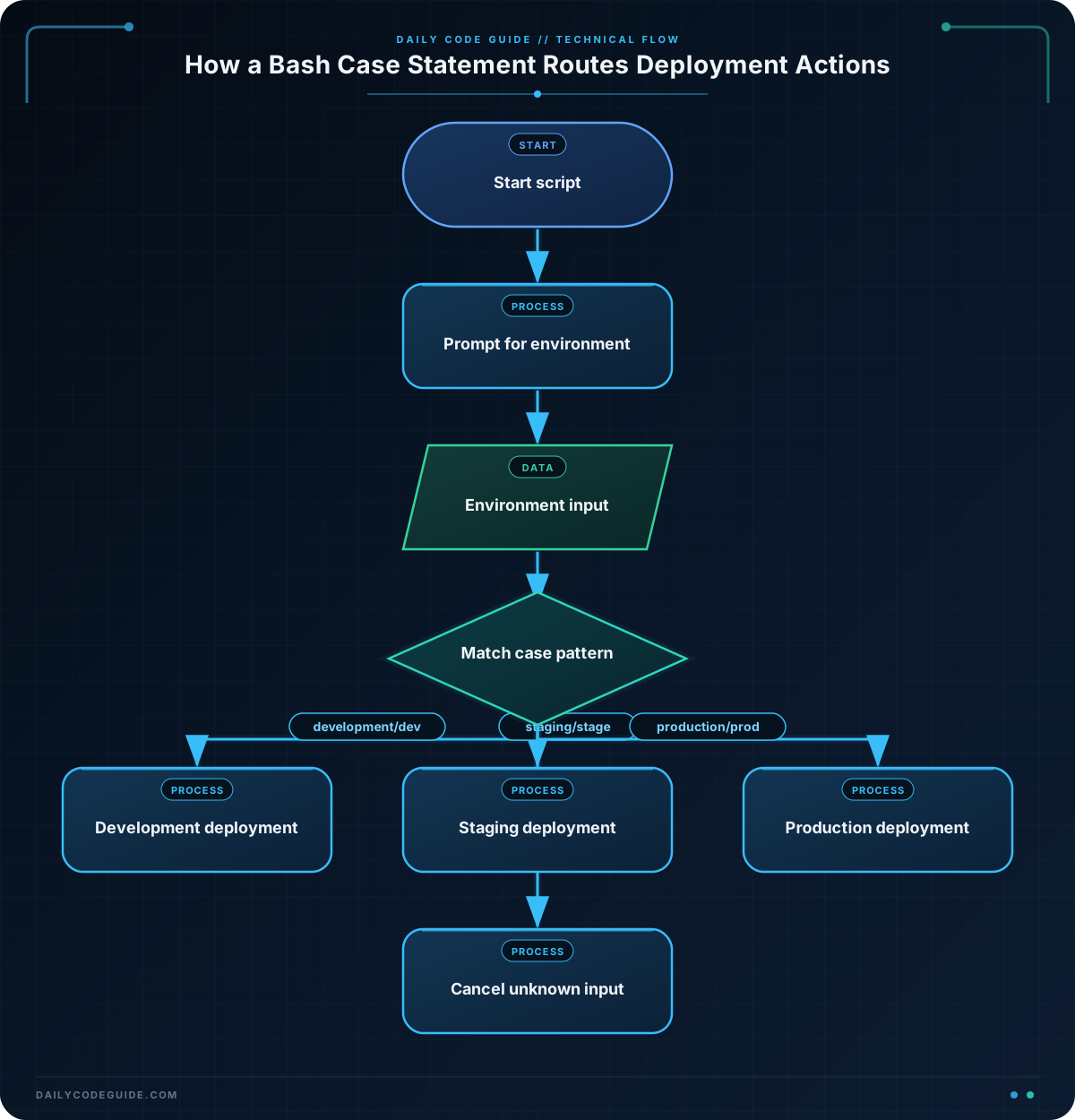
The three functions describe the work for each environment. Functions keep the case statement easy to read and make each action separate:
deploy_developmenthandles development deployments.deploy_staginghandles staging deployments.deploy_productionhandles production deployments.
This line pauses the script and stores the user’s response in the environment variable:
read -r -p "Choose an environment (development, staging, production): " environmentThe -p option displays a prompt. The -r option tells Bash to read the input literally instead of treating backslashes as special characters.
Next, the case statement compares the value of environment with each pattern:
case "$environment" in
    development|dev)
        deploy_development
        ;;
    staging|stage)
        deploy_staging
        ;;
    production|prod)
        deploy_production
        ;;
    *)
        echo "Unknown environment: $environment"
        echo "Deployment cancelled."
        ;;
esac
If the user enters either development or dev, Bash calls deploy_development. After the function runs, the ;; tells Bash to stop checking the remaining patterns.
The final *) handles an invalid response such as testing. This default branch is important because it gives the script a safe response instead of silently doing nothing. In a real deployment script, a safe default can help prevent deploying to the wrong environment.
Another Example
A script does not have to ask an interactive question. It can also receive the environment as a command-line argument. This version lets a user run commands such as ./deploy.sh staging.
#!/usr/bin/env bash

prepare_development() {
    echo "Building development assets."
}

prepare_staging() {
    echo "Building release assets and preparing staging checks."
}

prepare_production() {
    echo "Verifying the approved release for production."
}

environment="${1:-}"

if [[ -z "$environment" ]]; then
    echo "Usage: $0 <development|staging|production>"
    exit 1
fi

case "$environment" in
    development|dev)
        prepare_development
        ;;
    staging|stage)
        prepare_staging
        ;;
    production|prod)
        prepare_production
        ;;
    *)
        echo "Unsupported deployment environment: $environment"
        exit 1
        ;;
esac
$1 contains the first command-line argument. The expression ${1:-} gives environment an empty value when no argument was supplied. The if statement then displays usage instructions when the value is empty.
This example uses the same case statement idea in a different way: the script can be used in automation, while the first example is designed for a person choosing from a prompt.
Common Mistakes
- Forgetting
;;: Each case branch normally needs;;to mark the end of its commands. - Forgetting
esac: The case statement must be closed withesac. - Using
=instead of a pattern: A branch is written asstaging), not= staging. - Ignoring unexpected input: Include a
*)branch so invalid environment names receive a clear response. - Unexpected capitalization: A pattern such as
staging)does not matchStaging. Either document the expected lowercase input or add the forms you want to support.
Try It Yourself
Add a qa environment to this script. Create a deploy_qa function and make the case statement call it when the user enters either qa or quality.
Challenge
Build an interactive deployment script that asks the user for both an action and an environment.
- Ask for an action:
deployorrollback. - Ask for an environment:
development,staging, orproduction. - Use a case statement for the action and another case statement for the environment.
- For a deploy action, print an environment-specific deployment message.
- For a rollback action, print an environment-specific rollback message.
- Print an error and stop when either choice is unknown.
Solution
#!/usr/bin/env bash

deploy_development() {
    echo "Deploying the latest build to development."
}

deploy_staging() {
    echo "Deploying the approved build to staging."
}

deploy_production() {
    echo "Deploying the approved build to production."
}

rollback_development() {
    echo "Rolling back development to the previous build."
}

rollback_staging() {
    echo "Rolling back staging to the previous build."
}

rollback_production() {
    echo "Rolling back production after approval."
}

read -r -p "Choose an action (deploy, rollback): " action
read -r -p "Choose an environment (development, staging, production): " environment

case "$action" in
    deploy)
        case "$environment" in
            development|dev)
                deploy_development
                ;;
            staging|stage)
                deploy_staging
                ;;
            production|prod)
                deploy_production
                ;;
            *)
                echo "Unknown environment: $environment"
                echo "Deployment cancelled."
                ;;
        esac
        ;;
    rollback)
        case "$environment" in
            development|dev)
                rollback_development
                ;;
            staging|stage)
                rollback_staging
                ;;
            production|prod)
                rollback_production
                ;;
            *)
                echo "Unknown environment: $environment"
                echo "Rollback cancelled."
                ;;
        esac
        ;;
    *)
        echo "Unknown action: $action"
        echo "Operation cancelled."
        ;;
esac
The outer case statement selects the operation. The inner case statement selects the environment-specific function for that operation. Every unknown action or environment reaches a default branch, so the script does not accidentally perform an unrelated operation.
Key Takeaways
- A Bash case statement compares one value with several patterns.
- Use
;;to end each branch andesacto end the complete statement. - Separate patterns with
|when multiple inputs should trigger the same action. - Use
*)as a default branch for unexpected input. - Case statements are especially useful for interactive menus and environment-specific deployment actions.

