


What You’ll Learn
Terraform builds a dependency graph to decide which resources must be created, updated, or destroyed first. You can also use lifecycle meta-arguments to make production changes safer.
- Understand implicit and explicit resource dependencies.
- Use
prevent_destroyto protect critical infrastructure. - Use
create_before_destroywhen replacement downtime is unacceptable. - Use
ignore_changeswhen an external system intentionally manages part of a resource. - Recognize the limitations of lifecycle rules during refactoring and resource removal.
The Concept
Terraform normally determines resource creation order from references between resources. If one resource uses an attribute from another resource, Terraform creates the referenced resource first.
For example, this reference creates an implicit dependency:
bucket = aws_s3_bucket.production.idTerraform understands that the S3 bucket must exist before it can configure the resource using the bucket ID.
Sometimes a dependency is real but not visible in an attribute reference. In that situation, use depends_on:
depends_on = [aws_iam_role_policy.app_permissions]Use explicit dependencies sparingly. An unnecessary depends_on can make Terraform wait longer than necessary and can cause unrelated changes to be treated as dependent.
Lifecycle rules are meta-arguments placed inside a resource’s lifecycle block. They change how Terraform handles that resource:
prevent_destroy = truestops Terraform from destroying the resource through a normal plan.create_before_destroy = trueasks Terraform to create a replacement before destroying the old object.ignore_changestells Terraform not to react to changes made to selected attributes outside Terraform.replace_triggered_bymakes a resource replace when another resource or resource attribute changes.
These rules are useful for production infrastructure, but they do not override provider limitations. For example, a resource with a globally unique name might not support create-before-destroy because the old and new objects cannot exist simultaneously with the same name.
Basic Example
This configuration creates a production S3 bucket, enables versioning, and blocks public access. The bucket is protected against accidental destruction, while the other resources depend on it through attribute references.
terraform {
  required_providers {
    aws = {
      source  = "hashicorp/aws"
      version = "~> 5.0"
    }
  }
}

provider "aws" {
  region = var.aws_region
}

variable "aws_region" {
  type        = string
  description = "AWS region for production resources"
  default     = "us-east-1"
}

variable "bucket_name" {
  type        = string
  description = "Globally unique name for the production bucket"
}

resource "aws_s3_bucket" "production" {
  bucket = var.bucket_name

  lifecycle {
    prevent_destroy = true
  }
}

resource "aws_s3_bucket_versioning" "production" {
  bucket = aws_s3_bucket.production.id

  versioning_configuration {
    status = "Enabled"
  }
}

resource "aws_s3_bucket_public_access_block" "production" {
  bucket = aws_s3_bucket.production.id

  block_public_acls       = true
  block_public_policy     = true
  ignore_public_acls      = true
  restrict_public_buckets = true
}
Expected Output
The exact plan depends on the bucket name and the current AWS account. On the first apply, Terraform creates the bucket, then configures versioning and public-access protection. The dependency graph ensures both configuration resources wait for the bucket.
If a future plan would destroy the bucket, Terraform stops with an error instead of proceeding. A normal terraform apply cannot bypass prevent_destroy.
How the Code Works
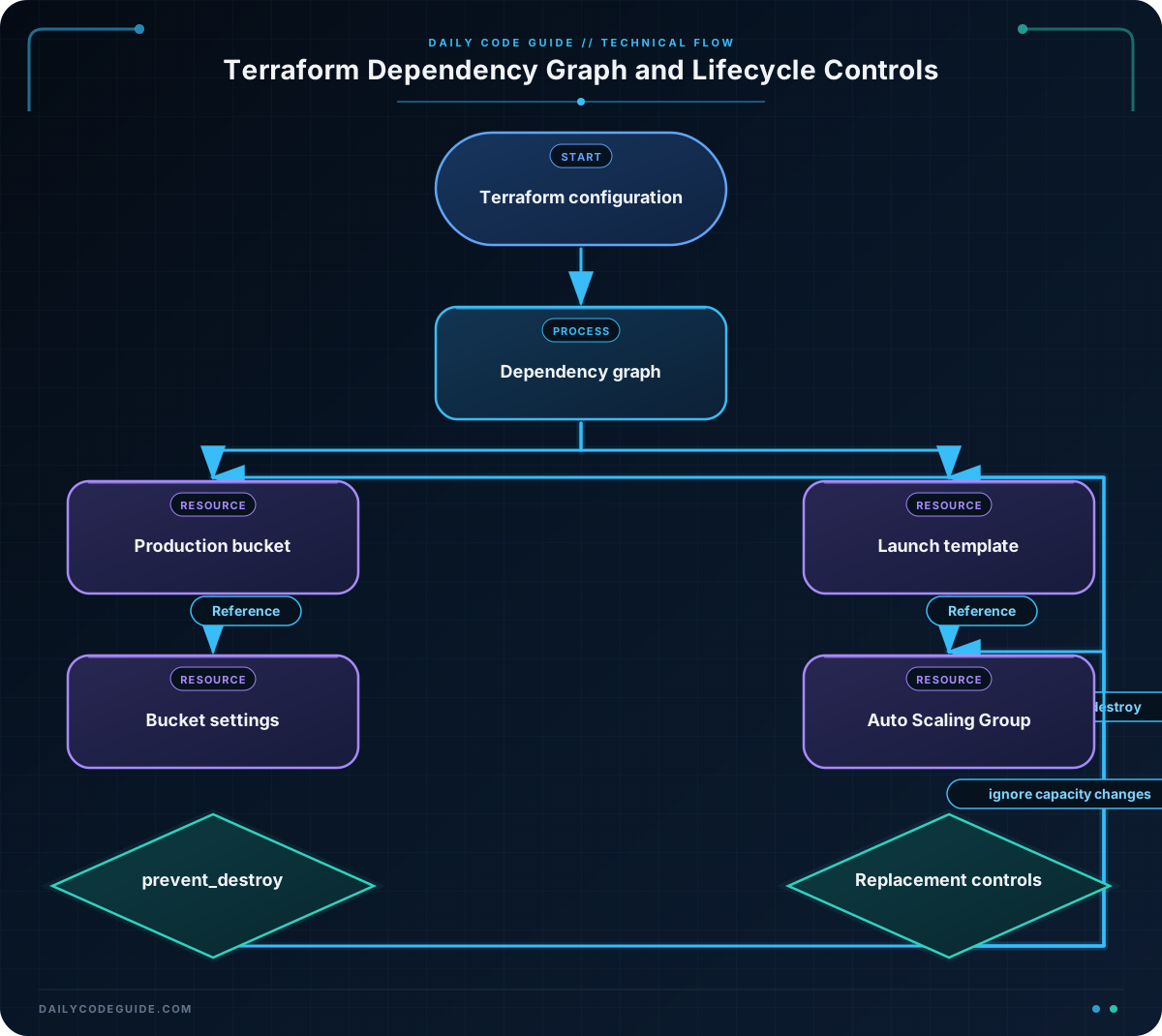
The aws_s3_bucket.production resource is the protected production object. Its prevent_destroy rule is useful for data-bearing infrastructure where deletion would cause unacceptable loss.
Both supporting resources reference aws_s3_bucket.production.id. These references are more than value lookups: they tell Terraform how to order operations. Terraform creates the bucket first and only then configures versioning and public-access blocking.
The lifecycle rule does not prevent every possible deletion. If someone removes the bucket from the Terraform configuration, Terraform still detects that the object is no longer declared, but the plan is blocked by prevent_destroy. An operator must deliberately remove or change the protection before Terraform can destroy it.
The bucket name also matters. S3 bucket names are globally unique, so the value supplied for bucket_name must not already be used by another account. A lifecycle rule cannot solve naming conflicts.
After saving the configuration, a typical workflow is:
terraform init
terraform plan -var="bucket_name=replace-with-a-unique-production-name"
terraform apply -var="bucket_name=replace-with-a-unique-production-name"
Another Example
For a production application, replacing a launch template should not require a gap in the infrastructure definition. The following configuration uses create_before_destroy for the launch template and ignore_changes for the Auto Scaling Group’s desired capacity.
The desired capacity is ignored because an autoscaling policy or an operator may change it outside the Terraform configuration. Terraform still manages the minimum and maximum limits.
terraform {
  required_providers {
    aws = {
      source  = "hashicorp/aws"
      version = "~> 5.0"
    }
  }
}

provider "aws" {
  region = var.aws_region
}

variable "aws_region" {
  type    = string
  default = "us-east-1"
}

variable "ami_id" {
  type        = string
  description = "AMI used by the application instances"
}

variable "instance_type" {
  type        = string
  description = "EC2 instance type for the application"
  default     = "t3.micro"
}

variable "subnet_ids" {
  type        = list(string)
  description = "Subnets where the Auto Scaling Group can place instances"
}

resource "aws_launch_template" "application" {
  name_prefix   = "production-application-"
  image_id      = var.ami_id
  instance_type = var.instance_type

  lifecycle {
    create_before_destroy = true
  }
}

resource "aws_autoscaling_group" "application" {
  name                = "production-application"
  min_size            = 2
  max_size            = 6
  desired_capacity    = 2
  vpc_zone_identifier = var.subnet_ids

  launch_template {
    id      = aws_launch_template.application.id
    version = "$Latest"
  }

  lifecycle {
    ignore_changes = [desired_capacity]
  }

  tag {
    key                 = "Environment"
    value               = "production"
    propagate_at_launch = true
  }
}
The Auto Scaling Group references the launch template ID, so Terraform automatically knows that the group must use the replacement template. The launch template’s lifecycle rule allows Terraform to create the new template before removing the old one.
create_before_destroy reduces replacement downtime, but it does not guarantee that running application instances will be replaced instantly. The Auto Scaling Group still needs time to launch healthy instances and terminate old ones according to its deployment behavior.
Common Mistakes
- Using
depends_onfor every resource: Prefer normal attribute references whenever possible. They communicate the exact dependency and allow Terraform to build a more efficient graph. - Assuming
prevent_destroyis a backup: It prevents a Terraform destroy operation, but it does not protect against deletion through the cloud provider console, another account, or an unrelated tool. - Applying
create_before_destroyto every resource: Some providers or APIs require unique names, fixed identifiers, or exclusive attachments. The old and new resources may not be able to coexist. - Ignoring changes without an ownership decision:
ignore_changescan hide configuration drift. Use it only when another system intentionally owns that attribute. - Expecting lifecycle rules to prevent all replacements:
prevent_destroyblocks destruction, but a provider may still require replacement for an immutable attribute. The resulting plan will fail rather than silently update the object.
Try It Yourself
Take the S3 configuration from the basic example and make these changes:
- Add an
aws_s3_bucket_loggingresource for access logging. - Make it reference
aws_s3_bucket.production.idas itstarget_bucket. - Identify the implicit dependency Terraform creates.
- Run
terraform planand confirm that the logging resource is scheduled after the bucket.
Before applying, check the AWS provider documentation for the required logging arguments and make sure the target logging bucket already exists or is declared in the same configuration.
Challenge
Design a protected production order-processing queue system with a dead-letter queue.
Your configuration must:
- Declare an AWS provider and an
aws_regionvariable. - Create a dead-letter SQS queue named
production-orders-dlq. - Create a main SQS queue named
production-orders. - Configure the main queue to send messages to the dead-letter queue after five receive attempts.
- Protect both queues with
prevent_destroy. - Use a resource reference so Terraform can infer that the dead-letter queue must exist before the main queue.
Solution
terraform {
  required_providers {
    aws = {
      source  = "hashicorp/aws"
      version = "~> 5.0"
    }
  }
}

provider "aws" {
  region = var.aws_region
}

variable "aws_region" {
  type        = string
  description = "AWS region for the order-processing queues"
  default     = "us-east-1"
}

resource "aws_sqs_queue" "orders_dead_letter" {
  name                      = "production-orders-dlq"
  message_retention_seconds = 1209600

  lifecycle {
    prevent_destroy = true
  }
}

resource "aws_sqs_queue" "orders" {
  name                       = "production-orders"
  visibility_timeout_seconds = 60
  message_retention_seconds  = 345600

  redrive_policy = jsonencode({
    deadLetterTargetArn = aws_sqs_queue.orders_dead_letter.arn
    maxReceiveCount     = 5
  })

  lifecycle {
    prevent_destroy = true
  }
}
The redrive_policy references the dead-letter queue ARN, creating an implicit dependency. Terraform therefore creates aws_sqs_queue.orders_dead_letter before configuring the main queue.
Both queues use prevent_destroy, so a configuration change that would delete either production queue is rejected during planning or applying. The queues use fixed names, so create_before_destroy would not be appropriate for replacing them: AWS would not allow the old and new queues to coexist under the same name.
Key Takeaways
- Terraform infers dependencies from resource attribute references and uses them to order operations.
- Use
depends_ononly when a real dependency is not visible in the configuration. prevent_destroyis useful for protecting production data, but it is not a complete security or backup control.create_before_destroycan reduce replacement downtime when the provider allows both objects to exist temporarily.- Use
ignore_changesonly when another system intentionally manages the ignored attribute.

