


What You’ll Learn
In this lesson, you’ll learn how Bash trap handlers make cleanup reliable when an automation script finishes normally, fails, or receives a signal.
- Register cleanup code with
trap. - Remove temporary files and directories safely.
- Restore the original working directory before a script exits.
- Preserve the script’s original exit status during cleanup.
- Handle interrupts such as
SIGINTandSIGTERM.
The Concept
A Bash trap runs a command or function when the shell receives a signal or reaches a particular lifecycle event. The most useful event for cleanup is EXIT, which runs when the script is about to terminate.
Automation scripts commonly create temporary files, change directories, acquire locks, or modify configuration temporarily. Without cleanup, a failure can leave behind stale files or leave a calling environment in an unexpected state.
A typical pattern is to define a cleanup function and register it immediately:
cleanup() {
    local exit_status=$?
    # Remove temporary resources here.
    exit "$exit_status"
}

trap cleanup EXIT
The $? value at the beginning of the function is important. It contains the exit status that caused the script to finish. Cleanup commands can themselves succeed or fail, so save that value before running them. Otherwise, cleanup might accidentally replace the meaningful status with its own result.
Signals need separate consideration. For example, pressing Ctrl+C sends SIGINT. A script can convert that signal into an exit status, allowing the EXIT trap to perform the normal cleanup:
trap 'exit 130' INT
trap 'exit 143' TERM
Exit status 130 conventionally represents an interrupt, while 143 represents termination by SIGTERM. The exact status is less important than consistently communicating that the script did not complete normally.
Basic Example
This script creates a temporary workspace, changes into it while the automation runs, and removes the workspace before exiting. Use --fail to simulate a failed automation step.
#!/usr/bin/env bash

original_dir=$PWD
work_dir=""

cleanup() {
    local exit_status=$?

    if [[ -n "$work_dir" && -d "$work_dir" ]]; then
        rm -rf -- "$work_dir"
        printf 'Cleanup: removed temporary workspace.\n'
    fi

    cd -- "$original_dir" || true
    printf 'Cleanup: restored working directory.\n'
    exit "$exit_status"
}

trap cleanup EXIT
trap 'exit 130' INT
trap 'exit 143' TERM

work_dir=$(mktemp -d)
printf 'Created temporary workspace: %s\n' "$work_dir"

cd -- "$work_dir"
printf 'generated at %s\n' "$(date)" > report.txt
printf 'Automation step completed.\n'

if [[ ${1:-} == "--fail" ]]; then
    printf 'Automation step failed.\n'
    exit 1
fi

printf 'Report is ready at %s/report.txt\n' "$work_dir"
Expected Output
The directory name generated by mktemp varies. A successful run has output similar to this:
Created temporary workspace: /tmp/tmp.abc123
Automation step completed.
Report is ready at /tmp/tmp.abc123/report.txt
Cleanup: removed temporary workspace.
Cleanup: restored working directory.
When you run the script with --fail, it exits with status 1, but the cleanup messages still appear and the temporary directory is still removed.
How the Code Works
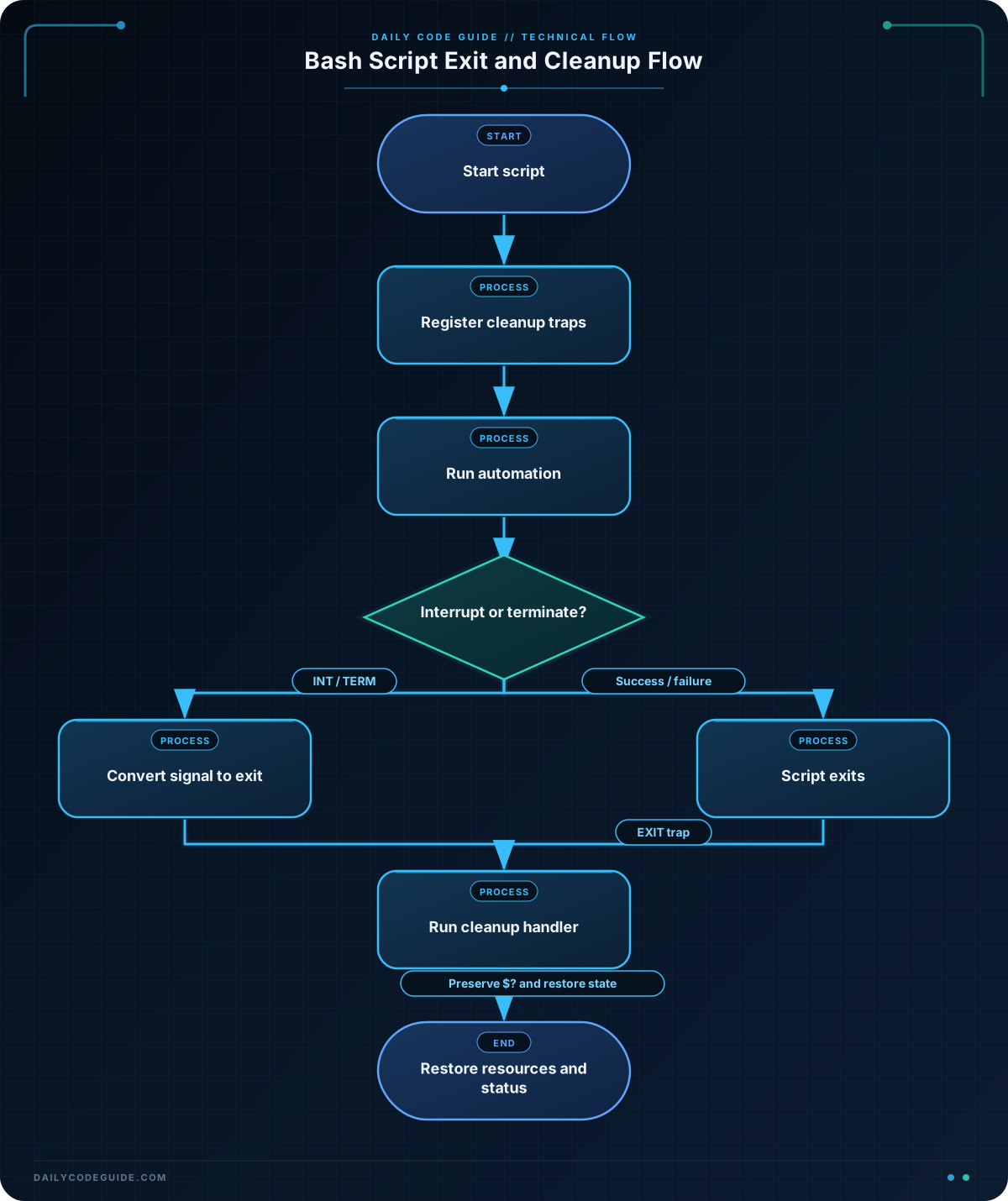
original_dir=$PWDrecords the directory from which the script started. This gives cleanup a known location to restore.work_dir=""initializes the variable before the trap can run. If temporary-directory creation fails, the cleanup function can safely test the empty value.mktemp -dcreates a new temporary directory and prints its path. Storing that path allows cleanup to remove exactly the directory created by this script.rm -rf -- "$work_dir"removes the temporary directory and its contents. Quoting the variable prevents word splitting, and--prevents a path beginning with a hyphen from being interpreted as an option.trap cleanup EXITregisters the function for normal completion and explicit exits such asexit 1.- The
INTandTERMtraps callexit. That causes theEXITtrap to run, so interruption follows the same cleanup path. local exit_status=$?must be the first meaningful command incleanup. It preserves the status from the main script.cd -- "$original_dir" || trueattempts to restore the original directory without replacing the script’s exit status if that directory is no longer available.
Be careful with cleanup paths. Only remove directories that your script created and stored in a trusted variable. A cleanup function containing an unquoted or incorrectly initialized path can delete unrelated files.
Another Example
Temporary files are not the only state that needs restoration. The following script backs up a configuration file, temporarily switches it into maintenance mode, and restores the original contents regardless of whether the deployment step succeeds.
Save a configuration file such as service.conf before running the script:
mode=normal
region=us-east
#!/usr/bin/env bash
config_file=${1:-service.conf}
backup_file=""
cleanup() {
local exit_status=$?
if [[ -n "$backup_file" && -f "$backup_file" ]]; then
if cp "$backup_file" "$config_file"; then
printf 'Cleanup: restored %s.\n' "$config_file"
else
printf 'Cleanup warning: could not restore %s.\n' "$config_file" >&2
fi
rm -f -- "$backup_file"
fi
exit "$exit_status"
}
trap cleanup EXIT
trap 'exit 130' INT
trap 'exit 143' TERM
if [[ ! -f "$config_file" ]]; then
printf 'Configuration file not found: %s\n' "$config_file" >&2
exit 2
fi
backup_file=$(mktemp)
cp "$config_file" "$backup_file"
printf 'mode=maintenance\n' > "$config_file"
printf 'Deployment preparation is using maintenance mode.\n'
if [[ ${2:-} == "--fail" ]]; then
printf 'Deployment preparation failed.\n' >&2
exit 1
fi
printf 'Deployment preparation completed.\n'Here, the trap restores the configuration on both success and failure. The temporary backup is removed after restoration. If restoration itself fails, the script prints a warning to standard error, but it still preserves the original failure status in exit_status.
Common Mistakes
- Registering the trap too late: If temporary resources are created before
trap cleanup EXITis installed, an earlier failure may skip cleanup. Define the cleanup function and install the trap as early as practical. - Overwriting
$?: Runningrm,printf, orcdbefore saving$?can cause the script to report the cleanup command’s status instead of the real failure. - Using unquoted paths: Always quote variables containing filenames or directories. Paths can contain spaces, and unquoted expansions can split into multiple arguments.
- Assuming
EXIThandles every signal automatically: ExplicitINTandTERMhandlers make the intended behavior clear and let the script choose useful signal-related exit statuses. - Deleting a fixed shared path: Prefer a directory created by
mktemp -d. Never blindly remove a path that could be empty, user-controlled, or shared by multiple script instances.
Try It Yourself
Write a script that creates a temporary directory and a file named status.txt inside it. Register an EXIT trap that removes the directory. Add a --fail option that exits with status 7 after writing the file.
Test both paths:
bash temporary_status.sh
bash temporary_status.sh --fail
printf 'Exit status: %s\n' "$?"
Confirm that the temporary directory is gone after both runs and that the failure run reports exit status 7.
Challenge
Create an automation script named package_artifacts.sh with these requirements:
- Record the starting directory.
- Create a temporary workspace with
mktemp -d. - Register cleanup for normal exits,
SIGINT, andSIGTERM. - Create a file named
artifact.txtcontaining a short build message. - Change into the temporary workspace while the build runs.
- Use a
--failargument to simulate a build failure with exit status9. - On every exit, remove the workspace and return to the starting directory.
Solution
#!/usr/bin/env bash

starting_dir=$PWD
workspace=""

cleanup() {
    local exit_status=$?

    if [[ -n "$workspace" && -d "$workspace" ]]; then
        rm -rf -- "$workspace"
        printf 'Removed build workspace.\n'
    fi

    cd -- "$starting_dir" || true
    printf 'Returned to %s.\n' "$starting_dir"
    exit "$exit_status"
}

trap cleanup EXIT
trap 'exit 130' INT
trap 'exit 143' TERM

workspace=$(mktemp -d)
printf 'Build workspace: %s\n' "$workspace"

cd -- "$workspace"
printf 'artifact generated by the Bash build\n' > artifact.txt
printf 'Created artifact.txt.\n'

if [[ ${1:-} == "--fail" ]]; then
    printf 'Build failed during validation.\n' >&2
    exit 9
fi

printf 'Build completed successfully.\n'
The cleanup function saves the original status before removing anything. Both the successful path and exit 9 pass through the EXIT trap, while interrupt and termination signals first convert into exits that also trigger cleanup.
Key Takeaways
- Use
trap cleanup EXITto centralize cleanup for normal and explicit exits. - Save
$?before running cleanup commands so the original result is preserved. - Use explicit
INTandTERMtraps when interrupted automation must clean up predictably. - Quote temporary paths and remove only resources created by the current script.
- Cleanup can restore more than files: it can return to the original directory or restore temporary configuration state.

