


What You’ll Learn
In this lesson, you will learn how to bring an AWS resource that was created manually under Terraform management without accidentally replacing it.
- Understand the difference between Terraform configuration and Terraform state during an import.
- Use an
importblock to import an existing S3 bucket. - Reconcile configuration with the resource’s actual settings before allowing Terraform to manage it.
- Recognize common import mistakes and plan safely.
The Concept
Terraform normally creates a resource and records its identity in the state file at the same time. Importing reverses that order: the resource already exists in AWS, and you tell Terraform which configuration address should represent it.
An import does not automatically create a complete Terraform configuration. It primarily adds the existing resource to Terraform state. You still need a matching resource block, and you should run terraform plan to discover differences between your configuration and the real AWS resource.
For new projects, an import block is usually easier to review and automate than a one-time command. Terraform 1.5 and later can use import blocks such as this:
import {
  to = aws_s3_bucket.manual_logs
  id = "acme-manual-access-logs-2025"
}
The to value is the Terraform resource address. The id value is the identifier AWS uses for that resource. For an S3 bucket, the bucket name is the import ID.
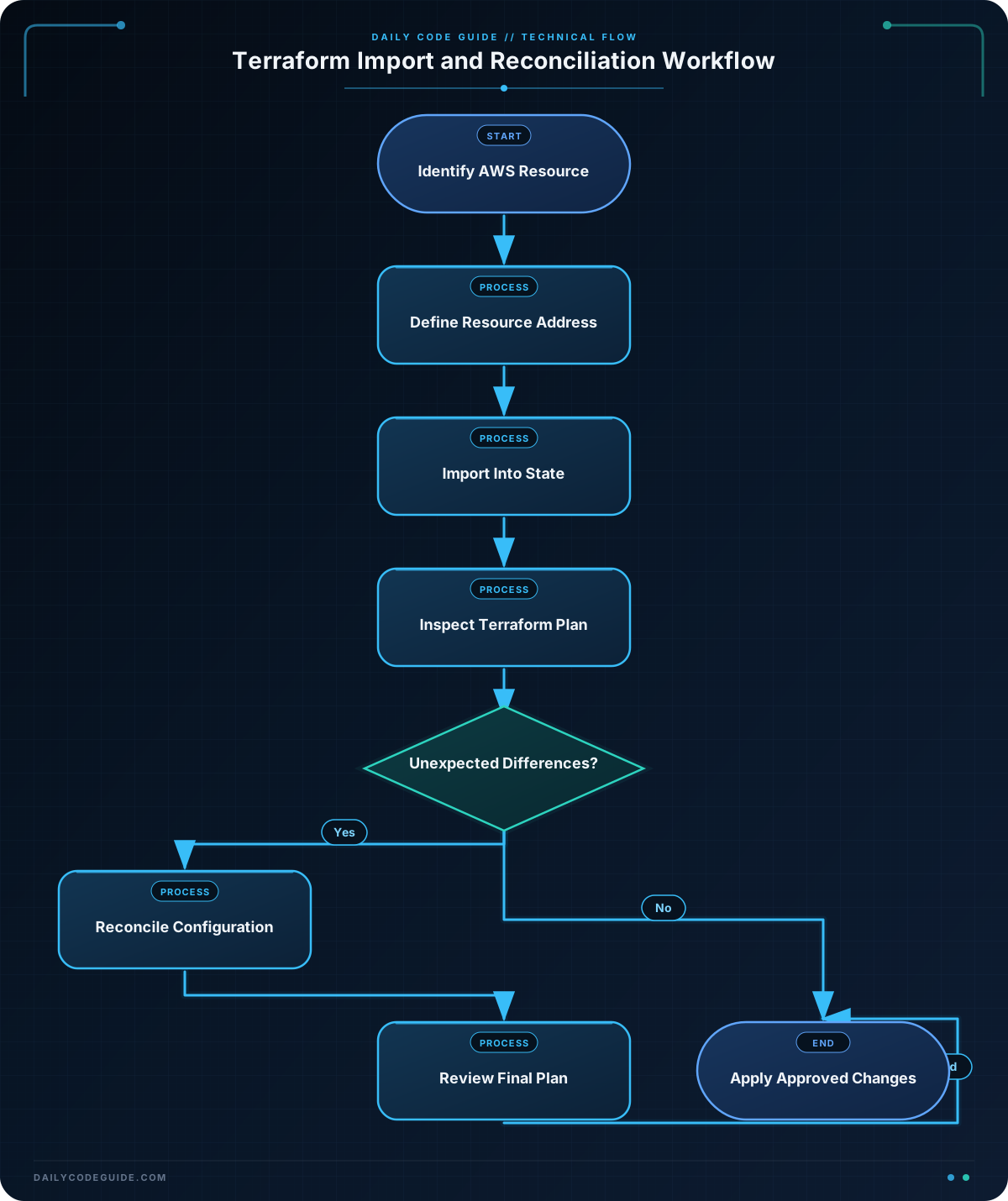
The safe workflow is:
- Identify the exact AWS resource and its identifier.
- Write a resource block at the address that should manage it.
- Add an import block or use the
terraform importcommand. - Run
terraform planand inspect every proposed change. - Adjust the configuration until the plan reflects the changes you actually want.
- Apply only after reviewing the plan.
Basic Example
Assume an operations team manually created an S3 bucket named acme-manual-access-logs-2025. The bucket already contains important access logs, so recreating it is unacceptable. The following configuration imports it into a Terraform resource named manual_logs.
terraform {
  required_version = ">= 1.5.0"

  required_providers {
    aws = {
      source  = "hashicorp/aws"
      version = "~> 5.0"
    }
  }
}

provider "aws" {
  region = "us-east-1"
}

resource "aws_s3_bucket" "manual_logs" {
  bucket = "acme-manual-access-logs-2025"
}

import {
  to = aws_s3_bucket.manual_logs
  id = "acme-manual-access-logs-2025"
}
Run the configuration from the directory containing the file:
terraform init
terraform plan
terraform apply
Terraform contacts AWS during the plan and apply operations. The AWS credentials, account, and region must have permission to read and manage the bucket.
Expected Output
If the bucket exists and the resource block matches its important settings, the plan reports an import rather than a bucket creation:
Plan: 1 to import, 0 to add, 0 to change, 0 to destroy.The exact plan can contain additional provider details. If Terraform proposes changes or destruction, stop and investigate before applying.
How the Code Works
The required_version constraint ensures that the configuration uses a Terraform release that supports import blocks. The provider requirement selects the AWS provider, while the provider block selects the AWS region.
The resource block is the desired Terraform address. Terraform will store the imported bucket under aws_s3_bucket.manual_logs in state. Its name must match the actual bucket being imported.
The import block connects the AWS identifier to that address. During plan, Terraform reads the existing bucket and proposes adding it to state. During apply, Terraform records the imported object instead of creating a second bucket.
After the import, state contains attributes discovered from AWS, but your configuration remains the long-term source of intended settings. For example, if the bucket already has tags, versioning, encryption, or a lifecycle policy, you should decide whether to represent those settings in Terraform. A plan showing those differences is not automatically an error; it is a prompt to reconcile the desired configuration.
For a one-time workflow, the older command-line form is also valid:
terraform import aws_s3_bucket.manual_logs acme-manual-access-logs-2025With this workflow, the resource block should already exist, and the command writes the resource into state. Import blocks are often preferable in teams because the import intent can be reviewed in version control and reproduced by other team members.
Another Example
Importing a manually created VPC demonstrates an important difference: the configuration must describe values that already exist, not values you merely want to be true.
Suppose the AWS console shows a VPC with ID vpc-0abc1234def567890, CIDR block 10.42.0.0/16, and the tags shown below. The following configuration assigns that VPC to a Terraform resource.
terraform {
  required_providers {
    aws = {
      source  = "hashicorp/aws"
      version = "~> 5.0"
    }
  }
}

provider "aws" {
  region = "us-east-1"
}

resource "aws_vpc" "shared_network" {
  cidr_block           = "10.42.0.0/16"
  enable_dns_support   = true
  enable_dns_hostnames = true

  tags = {
    Name        = "shared-network"
    Environment = "production"
  }
}

import {
  to = aws_vpc.shared_network
  id = "vpc-0abc1234def567890"
}
After importing, inspect the result and compare the plan:
terraform plan
terraform state show aws_vpc.shared_network
The state command helps you see the attributes Terraform read from AWS. If the plan wants to change the CIDR block, DNS settings, or tags, update the configuration to match the real VPC when the existing settings are the intended ones. Do not blindly apply a plan just because the import itself succeeded.
Common Mistakes
- Importing into the wrong address:
aws_s3_bucket.manual_logsandaws_s3_bucket.archive_logsare different Terraform objects. Check the address carefully, especially when using modules. - Assuming import generates all configuration: Import adds an existing object to state, but it does not automatically produce a complete, maintainable resource definition.
- Ignoring the first plan after import: A configuration that omits an existing setting may cause Terraform to change it. Review proposed updates, replacements, and destroys.
- Using the wrong identifier: AWS resources have different import IDs. S3 buckets use their bucket name, while VPCs use a VPC ID such as
vpc-0abc1234def567890. Check the AWS provider documentation for the resource type. - Importing into the wrong account or region: Verify the active AWS credentials and provider region before importing. A resource can appear to be missing simply because Terraform is querying a different account or region.
- Leaving an accidental duplicate resource in state: If an import was assigned to the wrong address, do not re-import repeatedly. Carefully remove the incorrect state entry with
terraform state rm, then import it at the intended address.
Try It Yourself
Use an existing, non-production S3 bucket in a test AWS account. Create a resource block for it, add an import block using the bucket name, and run terraform plan. Before applying, use terraform state show to compare the imported attributes with your configuration.
Then add a tag that should be managed by Terraform. Run the plan again and explain whether Terraform proposes an in-place update or no change. Do not use a bucket containing data you cannot safely modify.
Challenge
A manually created production VPC has these known values:
- VPC ID:
vpc-0abc1234def567890 - CIDR block:
10.42.0.0/16 - Region:
us-east-1 - DNS support and DNS hostnames: enabled
- Tags:
Name = "shared-network"andEnvironment = "production"
Write a Terraform configuration that imports this VPC as aws_vpc.shared_network. Include the AWS provider, the resource block, and an import block. Your configuration should represent the known existing settings so that importing does not unnecessarily change them.
Solution
terraform {
  required_version = ">= 1.5.0"

  required_providers {
    aws = {
      source  = "hashicorp/aws"
      version = "~> 5.0"
    }
  }
}

provider "aws" {
  region = "us-east-1"
}

resource "aws_vpc" "shared_network" {
  cidr_block           = "10.42.0.0/16"
  enable_dns_support   = true
  enable_dns_hostnames = true

  tags = {
    Name        = "shared-network"
    Environment = "production"
  }
}

import {
  to = aws_vpc.shared_network
  id = "vpc-0abc1234def567890"
}
This works because the import ID identifies the existing VPC, while the resource block describes the known settings Terraform should manage. Run terraform plan before applying. If AWS reports additional differences, inspect them and decide whether to add the corresponding settings to configuration or intentionally change them.
Key Takeaways
- Importing connects an existing AWS resource to a Terraform resource address; it does not recreate the resource.
- Import blocks make the import process reviewable and repeatable in version control.
- The resource configuration must be reconciled with the real infrastructure after import.
- Always inspect the plan before applying, especially when the resource contains production data or networking dependencies.
- Use the correct provider region, AWS account, resource address, and resource-specific import ID.

