


What You’ll Learn
In this lesson, you will learn how SQL constraints protect related customer and order tables from duplicate, missing, or invalid data.
- Define a primary key to identify each row uniquely.
- Define a foreign key to connect orders to existing customers.
- Use
NOT NULL,UNIQUE, andCHECKconstraints to enforce valid values. - Understand why the database should reject invalid records automatically.
The Concept
A constraint is a rule that the database enforces. Constraints help keep data accurate even when many different applications or users write to the same tables.
A primary key is a column, or group of columns, that uniquely identifies each row. For example, every customer can have a different customer_id. A primary key cannot contain duplicate values or NULL.
A foreign key creates a relationship between tables. An order’s customer_id can refer to the customer_id in the customers table. This prevents an order from being assigned to a customer who does not exist.
Other common constraints include:
NOT NULLrequires a value.UNIQUEprevents duplicate values, such as duplicate email addresses.CHECKrequires a value to satisfy a condition, such as an order total being greater than zero.
In the examples below, the SQL is compatible with PostgreSQL and uses explicit integer IDs to keep the examples easy to follow.
Basic Example
This example creates customer and order tables. The constraints protect the relationship between them and prevent duplicate email addresses or invalid order totals.
CREATE TABLE customers (
    customer_id INTEGER PRIMARY KEY,
    full_name VARCHAR(100) NOT NULL,
    email VARCHAR(255) NOT NULL UNIQUE
);

CREATE TABLE orders (
    order_id INTEGER PRIMARY KEY,
    customer_id INTEGER NOT NULL,
    order_date DATE NOT NULL,
    total_amount DECIMAL(10, 2) NOT NULL CHECK (total_amount > 0),
    FOREIGN KEY (customer_id) REFERENCES customers(customer_id)
);

INSERT INTO customers (customer_id, full_name, email)
VALUES
    (1, 'Maya Chen', 'maya@example.com'),
    (2, 'Jordan Lee', 'jordan@example.com');

INSERT INTO orders (order_id, customer_id, order_date, total_amount)
VALUES
    (1001, 1, '2025-03-01', 49.98),
    (1002, 2, '2025-03-02', 15.50);

SELECT
    orders.order_id,
    customers.full_name,
    orders.total_amount
FROM orders
JOIN customers
    ON orders.customer_id = customers.customer_id
ORDER BY orders.order_id;
Expected Output
The query finds the customer connected to each order through the foreign key.
 order_id | full_name  | total_amount
----------+------------+-------------
     1001 | Maya Chen  |        49.98
     1002 | Jordan Lee |        15.50
How the Code Works
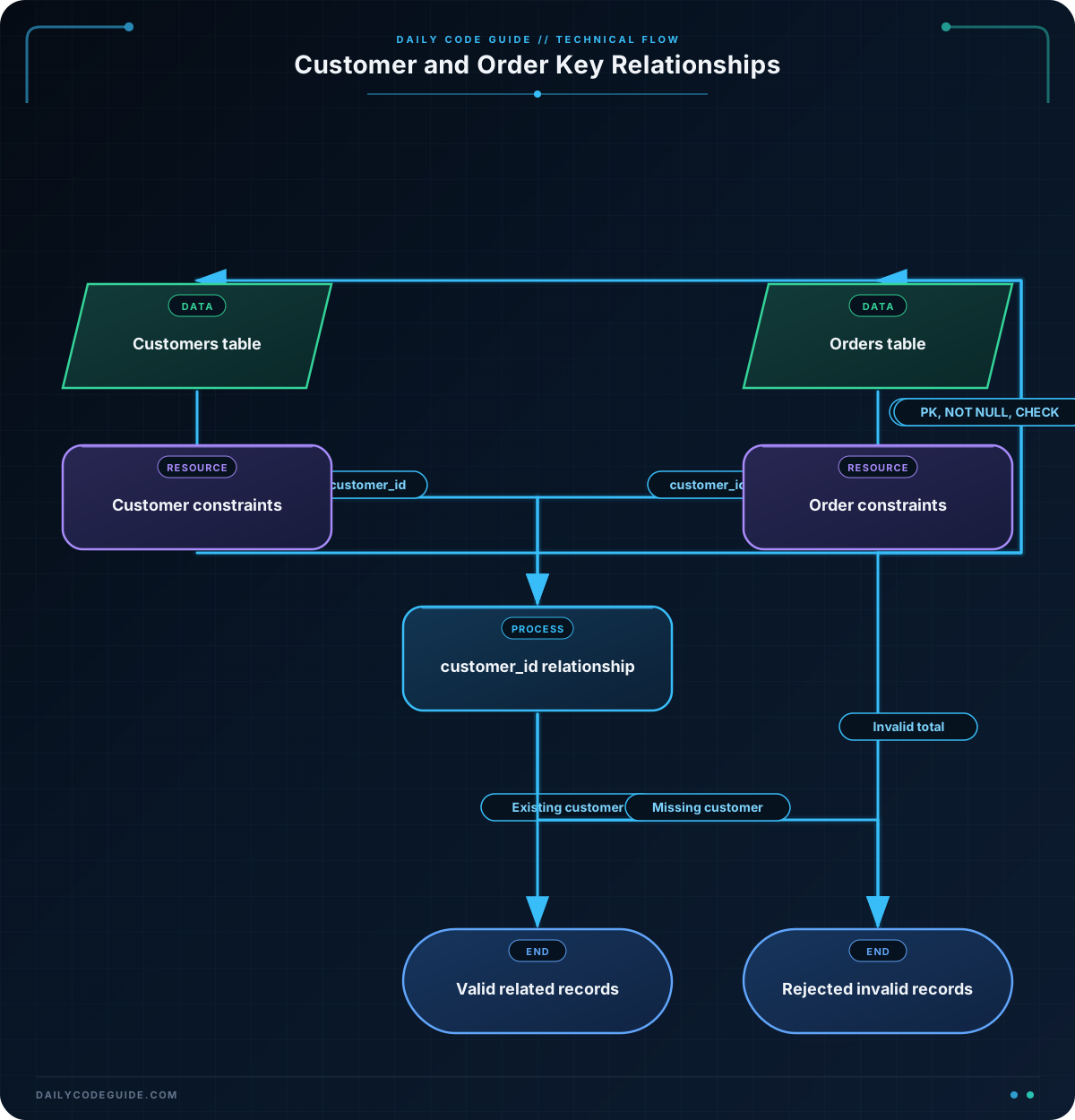
The customers table has three important rules:
customer_id INTEGER PRIMARY KEYgives each customer a unique identifier.full_name ... NOT NULLrequires every customer to have a name.email ... NOT NULL UNIQUErequires an email and prevents two customers from using the same email.
The orders table also has a primary key:
order_id INTEGER PRIMARY KEY ensures that every order has its own unique identifier.
This line creates the relationship between the tables:
FOREIGN KEY (customer_id) REFERENCES customers(customer_id)
It means that every non-null customer_id in orders must already exist in customers. Therefore, the database will reject an order for customer ID 99 if no customer with that ID exists.
The CHECK constraint protects the order total:
CHECK (total_amount > 0)
An order with a zero or negative total will be rejected. The database applies these rules during INSERT and UPDATE operations, not only when the tables are created.
Because customer_id in orders is also NOT NULL, every order must be connected to a customer. This prevents an order from having a missing relationship.
Another Example
A store may need more detail than a single order total. The following design adds products and an order_items table. Each item connects an order to a product, and the combination of order_id and product_id forms a composite primary key. That combination prevents the same product from appearing twice in one order.
CREATE TABLE store_customers (
    customer_id INTEGER PRIMARY KEY,
    full_name VARCHAR(100) NOT NULL,
    email VARCHAR(255) NOT NULL UNIQUE
);

CREATE TABLE products (
    product_id INTEGER PRIMARY KEY,
    product_name VARCHAR(100) NOT NULL,
    price DECIMAL(10, 2) NOT NULL CHECK (price > 0)
);

CREATE TABLE store_orders (
    order_id INTEGER PRIMARY KEY,
    customer_id INTEGER NOT NULL,
    FOREIGN KEY (customer_id) REFERENCES store_customers(customer_id)
);

CREATE TABLE order_items (
    order_id INTEGER NOT NULL,
    product_id INTEGER NOT NULL,
    quantity INTEGER NOT NULL CHECK (quantity > 0),
    PRIMARY KEY (order_id, product_id),
    FOREIGN KEY (order_id) REFERENCES store_orders(order_id),
    FOREIGN KEY (product_id) REFERENCES products(product_id)
);

INSERT INTO store_customers (customer_id, full_name, email)
VALUES (10, 'Avery Smith', 'avery@example.com');

INSERT INTO products (product_id, product_name, price)
VALUES
    (501, 'Canvas Backpack', 39.00),
    (502, 'Water Bottle', 12.50);

INSERT INTO store_orders (order_id, customer_id)
VALUES (2001, 10);

INSERT INTO order_items (order_id, product_id, quantity)
VALUES
    (2001, 501, 1),
    (2001, 502, 2);

SELECT
    store_orders.order_id,
    store_customers.full_name,
    products.product_name,
    order_items.quantity
FROM order_items
JOIN store_orders
    ON order_items.order_id = store_orders.order_id
JOIN store_customers
    ON store_orders.customer_id = store_customers.customer_id
JOIN products
    ON order_items.product_id = products.product_id
ORDER BY products.product_id;
Here, the foreign keys enforce two relationships: an order item must belong to an existing order, and it must refer to an existing product. The CHECK constraint ensures that a product quantity is positive.
Common Mistakes
Using a foreign key value that does not exist
An order cannot refer to an unknown customer. Insert the customer first, or use the ID of an existing customer.
Forgetting NOT NULL
A primary key is automatically required, but other important columns are not. If an order must always have a customer or date, explicitly add NOT NULL.
Confusing UNIQUE with a primary key
A table normally has one primary key, which identifies each row. It may have several UNIQUE constraints for values such as email addresses, usernames, or invoice numbers.
Deleting a customer who still has orders
With the default foreign key behavior, the database usually rejects deleting a customer while related orders still exist. This protects the order history from pointing to a missing customer. Decide how related records should be handled before adding options such as cascading deletes.
Assuming constraints only protect inserts
Constraints also apply when data is changed with UPDATE. For example, changing an order’s customer_id to an unknown value or changing its total to a negative number should be rejected.
Try It Yourself
Create a table named shipments for orders that have been shipped. Include:
shipment_idas the primary key.order_idas a required foreign key referencingstore_orders(order_id).tracking_codeas a required, unique value.package_weightas a required decimal value greater than zero.
Insert one valid shipment for order 2001. Then consider which inserts the constraints should reject: a duplicate tracking code, a missing order, or a zero package weight.
Challenge
Design a small customer and order database for a coffee subscription service.
Your solution must:
- Create a
subscriberstable with a primary key, required name, and unique email. - Create a
subscription_orderstable with a primary key and a required foreign key tosubscribers. - Require an order status and allow only
'pending','shipped', or'delivered'. - Require a positive monthly price.
- Insert at least two subscribers and two valid orders.
- Display each order with the subscriber’s name.
Solution
CREATE TABLE subscribers (
    subscriber_id INTEGER PRIMARY KEY,
    full_name VARCHAR(100) NOT NULL,
    email VARCHAR(255) NOT NULL UNIQUE
);

CREATE TABLE subscription_orders (
    subscription_order_id INTEGER PRIMARY KEY,
    subscriber_id INTEGER NOT NULL,
    status VARCHAR(20) NOT NULL
        CHECK (status IN ('pending', 'shipped', 'delivered')),
    monthly_price DECIMAL(10, 2) NOT NULL
        CHECK (monthly_price > 0),
    FOREIGN KEY (subscriber_id) REFERENCES subscribers(subscriber_id)
);

INSERT INTO subscribers (subscriber_id, full_name, email)
VALUES
    (1, 'Nina Patel', 'nina@example.com'),
    (2, 'Luis Garcia', 'luis@example.com');

INSERT INTO subscription_orders (
    subscription_order_id,
    subscriber_id,
    status,
    monthly_price
)
VALUES
    (3001, 1, 'shipped', 24.99),
    (3002, 2, 'pending', 19.99);

SELECT
    subscription_orders.subscription_order_id,
    subscribers.full_name,
    subscription_orders.status,
    subscription_orders.monthly_price
FROM subscription_orders
JOIN subscribers
    ON subscription_orders.subscriber_id = subscribers.subscriber_id
ORDER BY subscription_orders.subscription_order_id;
The primary keys uniquely identify subscribers and orders. The foreign key ensures every subscription order belongs to an existing subscriber. The UNIQUE constraint prevents duplicate email addresses, while the two CHECK constraints restrict order statuses and require a positive monthly price.
Key Takeaways
- A primary key uniquely identifies each row in a table.
- A foreign key connects rows in one table to existing rows in another table.
NOT NULL,UNIQUE, andCHECKconstraints prevent missing, duplicate, and invalid values.- Constraints protect data during inserts and updates.
- Good table relationships help prevent orphaned orders and inconsistent customer records.

