


What You’ll Learn
Terraform functions and expressions let you transform input values into consistent configuration without duplicating values throughout your infrastructure code. In this lesson, you will use string functions, map functions, list comprehensions, and conditional expressions to generate reusable resource settings.
- Normalize names with functions such as
trimspace,lower, andreplace. - Transform maps and lists with
forexpressions. - Combine configuration maps with
merge. - Build predictable settings for multiple environments and services.
The Concept
A Terraform function accepts values and returns a transformed value. For example, lower("Production") returns "production", while join("-", ["payments", "api"]) returns "payments-api".
An expression is a Terraform statement that produces a value. Function calls are expressions, but so are references such as var.project_name, conditional expressions, and for expressions.
These features are useful when resource settings need to follow a consistent convention. Instead of manually creating a different name and tag map for every environment, you can transform one set of variables into a complete configuration map.
Commonly useful functions include:
trimspace(string)removes whitespace at the beginning and end of a string.lower(string)converts a string to lowercase.replace(string, old, new)replaces matching text.join(separator, list)combines list elements into one string.merge(map1, map2)combines maps, with later maps overriding duplicate keys.distinct(list)removes duplicate list elements.
A for expression transforms every item in a collection. For example, [for region in var.regions : lower(region)] returns a new list containing a lowercase version of every region.
Basic Example
This configuration receives a project name, common tags, a list of regions, and settings for several environments. It then generates normalized names and complete environment settings.
variable "project_name" {
  type    = string
  default = "  Payments API "
}

variable "common_tags" {
  type = map(string)

  default = {
    ManagedBy = "Terraform"
    Team      = "platform"
  }
}

variable "regions" {
  type    = list(string)
  default = ["US-EAST-1", "EU-WEST-1"]
}

variable "environments" {
  type = map(object({
    instance_type = string
    replicas      = number
  }))

  default = {
    development = {
      instance_type = "t3.small"
      replicas      = 1
    }

    production = {
      instance_type = "t3.medium"
      replicas      = 3
    }
  }
}

locals {
  normalized_name = lower(replace(trimspace(var.project_name), " ", "-"))

  normalized_regions = [
    for region in var.regions : lower(region)
  ]

  environment_settings = {
    for environment, settings in var.environments :
    environment => merge(
      settings,
      {
        name = join("-", [local.normalized_name, environment])

        tags = merge(
          var.common_tags,
          {
            Environment = environment
            Service     = local.normalized_name
          }
        )
      }
    )
  }
}

output "normalized_name" {
  value = local.normalized_name
}

output "normalized_regions" {
  value = local.normalized_regions
}

output "environment_settings" {
  value = local.environment_settings
}
Expected Output
After running terraform apply, the outputs contain normalized names and generated settings similar to these values:
normalized_name = "payments-api"
normalized_regions = [
  "us-east-1",
  "eu-west-1",
]
environment_settings = {
  development = {
    instance_type = "t3.small"
    name          = "payments-api-development"
    replicas      = 1
    tags = {
      Environment = "development"
      ManagedBy   = "Terraform"
      Service     = "payments-api"
      Team        = "platform"
    }
  }
  production = {
    instance_type = "t3.medium"
    name          = "payments-api-production"
    replicas      = 3
    tags = {
      Environment = "production"
      ManagedBy   = "Terraform"
      Service     = "payments-api"
      Team        = "platform"
    }
  }
}
How the Code Works
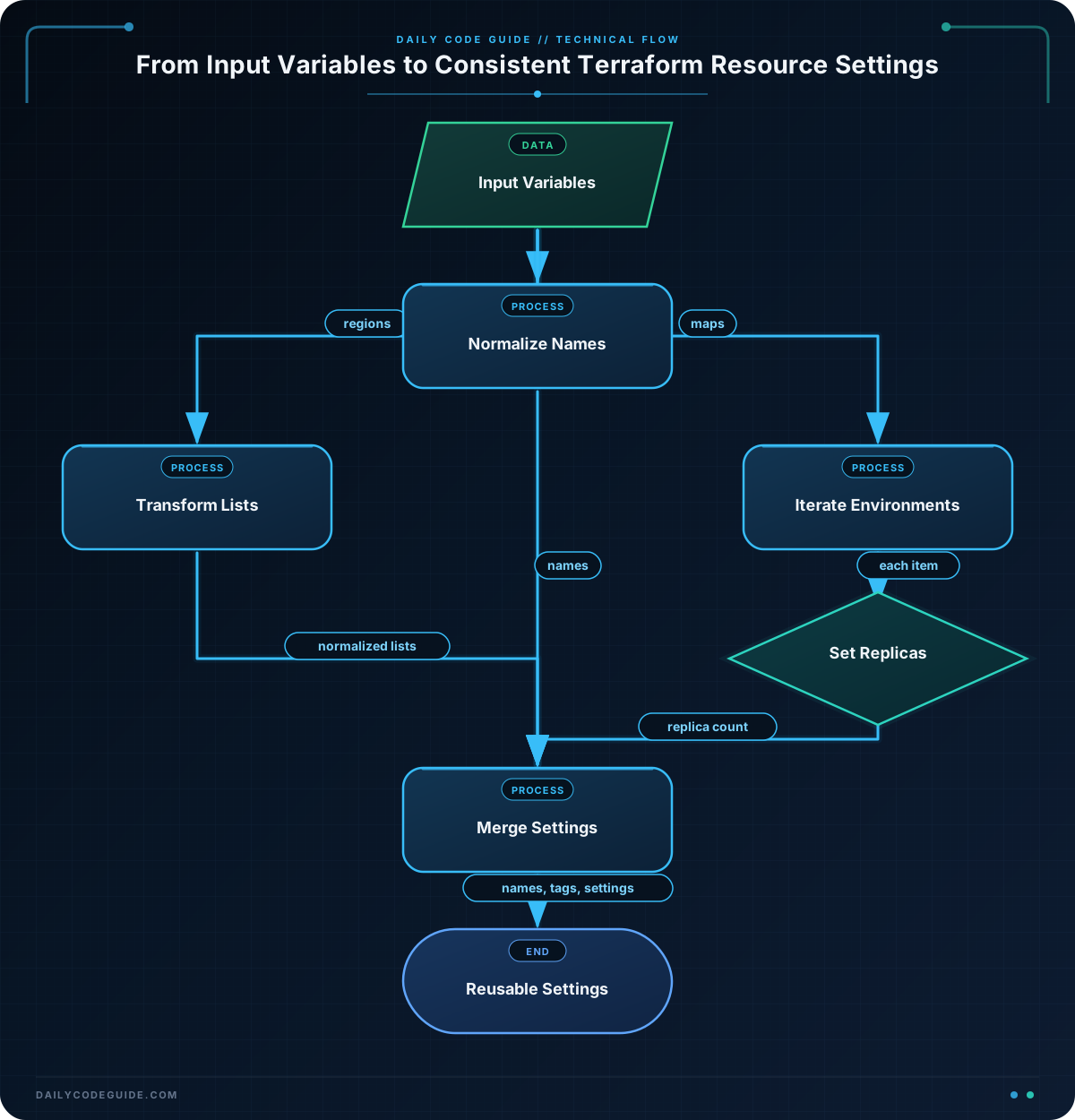
trimspace(var.project_name) removes the extra spaces from the input. The result is passed to replace, which changes the remaining space between the words to a hyphen. Finally, lower makes the name lowercase:
" Payments API " becomes "payments-api".
The normalized_regions local uses a list for expression. Terraform evaluates lower(region) once for each item in var.regions and returns a new list.
The map for expression iterates over both the environment name and its settings:
environmentbecomes the key in the generated map.settingscontains values such asinstance_typeandreplicas.mergepreserves those settings and adds a generatednameandtagsmap.
The nested merge combines shared tags with environment-specific tags. If both maps contain the same key, the later map wins. Therefore, the generated Environment or Service value would override a value with the same key in var.common_tags.
These locals can be passed into resource arguments, modules, or other locals. Keeping the transformation in one place makes resource configuration easier to review and reduces naming inconsistencies.
Another Example
A common variation is generating settings for several services from a list of service definitions. This example removes duplicate team members, creates a stable service name, and uses a conditional expression to select the number of replicas.
variable "application_name" {
  type    = string
  default = "Customer Portal"
}

variable "services" {
  type = list(object({
    name    = string
    tier    = string
    owners  = list(string)
    enabled = bool
  }))

  default = [
    {
      name    = "Web API"
      tier    = "production"
      owners  = ["platform", "platform", "payments"]
      enabled = true
    },
    {
      name    = "Worker"
      tier    = "staging"
      owners  = ["operations", "platform"]
      enabled = true
    }
  ]
}

locals {
  application_slug = lower(replace(trimspace(var.application_name), " ", "-"))

  service_settings = {
    for service in var.services :
    lower(replace(trimspace(service.name), " ", "-")) => {
      enabled = service.enabled
      name    = join("-", [
        local.application_slug,
        lower(replace(trimspace(service.name), " ", "-"))
      ])
      owners   = distinct(service.owners)
      replicas = service.tier == "production" ? 3 : 1
      tier     = service.tier
    }
  }
}

output "service_settings" {
  value = local.service_settings
}
Here, distinct(service.owners) changes the repeated "platform" entry into one entry. The conditional expression sets three replicas for production services and one replica for other tiers.
The map key is generated from the service name. This is convenient for lookups, but each normalized service name must be unique. Two names that normalize to the same value could overwrite one another in the generated map.
Common Mistakes
- Forgetting to normalize before constructing names: Inputs such as
"Customer Portal"and" customer portal "can produce inconsistent resource names unless you trim, replace, and lowercase them. - Assuming
mergeperforms a deep merge: Terraform’smergefunction is shallow. If two maps contain a nested map under the same key, the later nested map replaces the earlier one rather than merging each nested key. - Creating duplicate map keys: A
forexpression that generates a map requires unique keys. Normalize names carefully and check whether two input names can become identical. - Confusing lists and sets: A list preserves order and can contain duplicates. A set is intended for unique unordered values. Use
distinctwhen you need to remove duplicates from a list while retaining list output. - Using a function with the wrong type: String functions require strings, while functions such as
distinctrequire a collection. Variable type constraints help Terraform detect invalid inputs early.
Try It Yourself
Modify the basic example so that it also creates a resource_prefix local. The prefix should combine the normalized project name and the first normalized region using join. For the default values, the result should be "payments-api-us-east-1".
Then add the prefix to each environment’s generated settings by including it in the map passed to merge.
Challenge
Create a complete Terraform configuration that generates consistent settings for several workloads.
- Normalize
application_nameby trimming whitespace, replacing spaces with hyphens, and converting it to lowercase. - Generate a settings map keyed by each workload name.
- Build each workload’s resource name from the normalized application name and workload name.
- Convert every region to lowercase with a list
forexpression. - Set
replicasto 3 for production workloads and 1 for all other tiers. - Combine common tags with an owner and tier tag.
Solution
variable "application_name" {
  type    = string
  default = " Inventory Portal "
}

variable "regions" {
  type    = list(string)
  default = ["US-EAST-1", "EU-WEST-1"]
}

variable "workloads" {
  type = map(object({
    tier  = string
    owner = string
  }))

  default = {
    frontend = {
      tier  = "production"
      owner = "web-team"
    }

    reporting = {
      tier  = "staging"
      owner = "data-team"
    }
  }
}

variable "common_tags" {
  type = map(string)

  default = {
    ManagedBy = "Terraform"
    Project   = "shared-platform"
  }
}

locals {
  application_slug = lower(
    replace(trimspace(var.application_name), " ", "-")
  )

  workload_settings = {
    for workload, configuration in var.workloads :
    workload => {
      name = join("-", [
        local.application_slug,
        lower(workload)
      ])

      regions = [
        for region in var.regions : lower(region)
      ]

      replicas = configuration.tier == "production" ? 3 : 1

      tags = merge(
        var.common_tags,
        {
          Owner = configuration.owner
          Tier  = configuration.tier
        }
      )
    }
  }
}

output "workload_settings" {
  value = local.workload_settings
}
The solution centralizes the application naming rule in application_slug, then uses a map for expression to create one settings object per workload. The conditional expression handles replica counts, while merge combines shared and workload-specific tags.
Key Takeaways
- Terraform functions transform individual values, while expressions combine references, functions, comprehensions, and conditions into configuration values.
- Normalize user-provided names before using them in resource names or map keys.
- Use list and map
forexpressions to generate consistent settings from collections. mergecombines maps shallowly, and later maps override duplicate keys.- Centralizing transformations in local values makes resource configuration reusable and predictable.

