


What You’ll Learn
In this lesson, you’ll learn how Python generators and the yield keyword produce values lazily. You will apply the pattern to log processing so that a program can inspect a large file one line at a time instead of loading the entire file into memory.
- Understand how
yieldpauses and resumes a function. - Create a generator that streams matching log lines.
- Use generators in loops and generator pipelines.
- Recognize common mistakes involving generator reuse and file handling.
The Concept
A generator is a special kind of iterator. Instead of returning all results at once, it produces one result at a time as the caller requests it.
A generator function contains the yield keyword. When Python reaches yield, it sends that value to the caller and pauses the function. The next time the generator is requested to produce a value, execution resumes immediately after the previous yield.
This behavior is useful when processing large inputs. A list containing millions of log lines requires memory for every line. A generator only keeps the current line and a small amount of function state in memory.
Calling a generator function does not immediately execute its body. It returns a generator object:
returnfinishes a function and optionally sends back one result.yieldpauses a generator and allows it to continue later.- A generator normally produces values once and then becomes exhausted.
Basic Example
The following program creates a small log file, then defines a generator that yields only lines containing the ERROR level. The same pattern works with a much larger file.
from pathlib import Path


def error_lines(log_path):
    with Path(log_path).open("r", encoding="utf-8") as log_file:
        for line in log_file:
            if " ERROR " in line:
                yield line.rstrip("\n")


sample_log = """2026-08-18 10:14:22 INFO User login succeeded
2026-08-18 10:14:25 ERROR Database connection failed
2026-08-18 10:14:28 INFO Retrying database connection
2026-08-18 10:14:31 ERROR Database connection timed out
"""

Path("application.log").write_text(sample_log, encoding="utf-8")

for line in error_lines("application.log"):
    print(line)
Expected Output
2026-08-18 10:14:25 ERROR Database connection failed
2026-08-18 10:14:31 ERROR Database connection timed out
How the Code Works
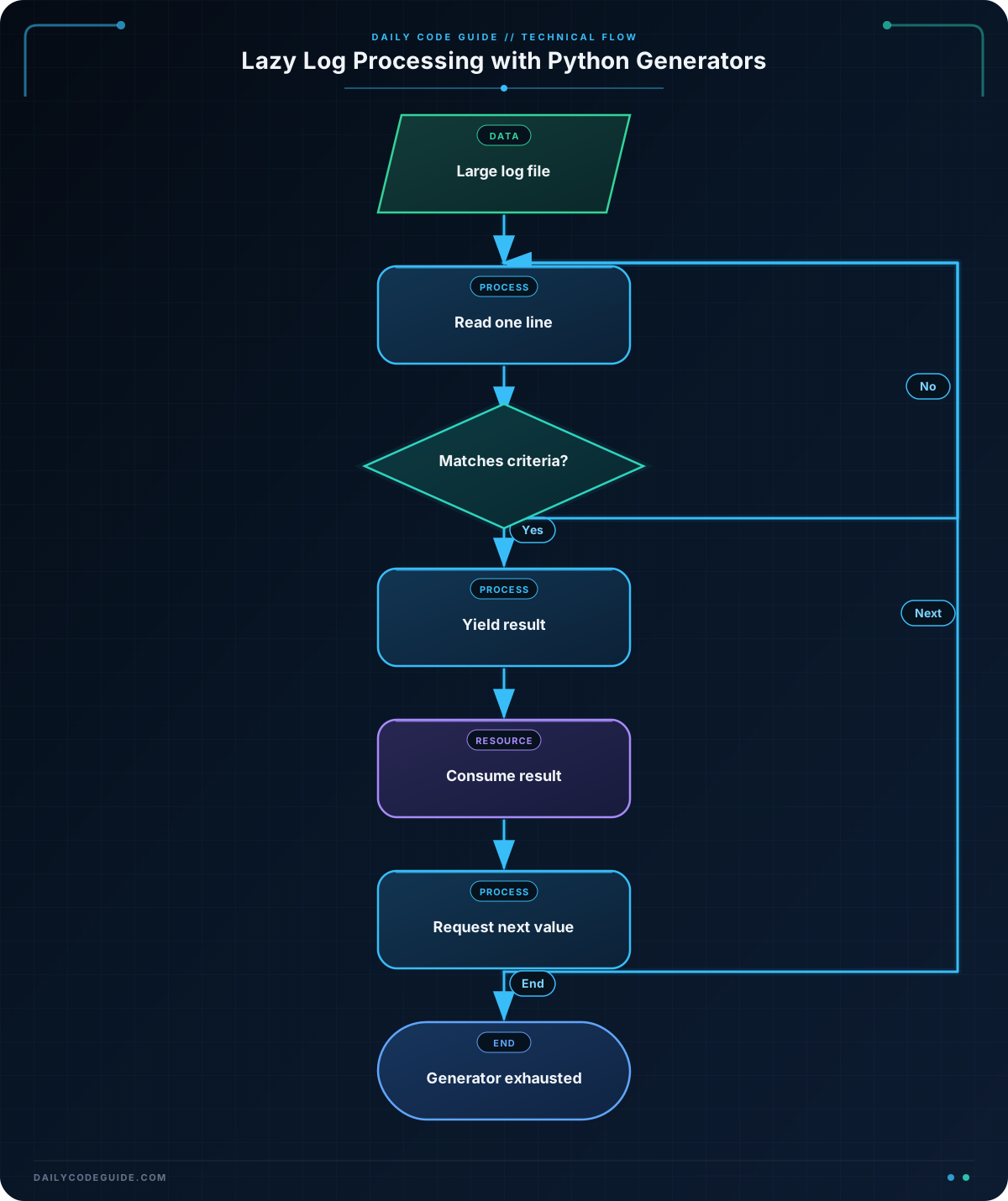
error_lines is a generator function because it contains yield. Calling error_lines("application.log") creates a generator object, but the file is not opened until the for loop begins requesting values.
The file object itself is iterable. The statement for line in log_file reads the file progressively rather than creating a list of every line. For a very large log file, this avoids a potentially large memory allocation.
When a matching line reaches yield, the generator pauses. The loop prints that line, then asks for the next value. The generator resumes at the next iteration of the file loop.
rstrip("\n") removes the line ending before the line is printed. The with statement ensures that the file is closed when the generator finishes or is closed.
The generator is lazy, but it does not make every operation free. The program still has to read and inspect each line until it finds matches. Its main benefit here is bounded memory usage and the ability to stop early if the consumer has found enough results.
Another Example
Generators can also be combined into a processing pipeline. This example reads a structured log format and yields only slow requests. Each stage handles one record at a time, so the complete file does not need to be stored.
Assume each line has this format:
timestamp|level|duration_ms|request_path
from pathlib import Path


def slow_requests(log_path, minimum_duration):
    with Path(log_path).open("r", encoding="utf-8") as log_file:
        for line_number, line in enumerate(log_file, start=1):
            fields = line.rstrip("\n").split("|", maxsplit=3)

            if len(fields) != 4:
                continue

            timestamp, level, duration_text, request_path = fields

            try:
                duration_ms = int(duration_text)
            except ValueError:
                continue

            if duration_ms >= minimum_duration:
                yield {
                    "line_number": line_number,
                    "timestamp": timestamp,
                    "level": level,
                    "duration_ms": duration_ms,
                    "request_path": request_path,
                }


for request in slow_requests("requests.log", minimum_duration=1000):
    print(
        f'{request["duration_ms"]} ms '
        f'{request["level"]} {request["request_path"]}'
    )
This generator handles two practical issues: malformed lines are skipped, and a nonnumeric duration does not crash the whole scan. In a production system, you might record those skipped lines separately instead of silently ignoring them.
Common Mistakes
- Using a list when lazy processing is intended:
list(error_lines("application.log"))forces every matching line into memory. That may be appropriate when you need to reuse the results, but it removes the generator’s memory advantage. - Expecting a generator to restart: a generator is generally one-pass. After a loop consumes it, another loop over the same generator produces no values. Call the generator function again when a fresh scan is needed.
- Returning instead of yielding: a
returninside the loop ends the function immediately. Useyieldfor each value that should be streamed. - Closing the file too early: keep file iteration and
yieldinside thewithblock. Otherwise, the generator may try to read from a closed file when it resumes. - Using overly broad matching: searching for
"ERROR"without considering the log format might match a message containing that word even when the level is different. Parse fields when reliable structured fields are available.
Try It Yourself
Write a generator named warning_lines that reads service.log and yields lines whose log level is exactly WARNING. Assume each line begins with a timestamp followed by a level, separated by spaces.
For example, a matching line might look like this:
2026-08-18 11:02:04 WARNING Cache response is staleUse a for loop to print each yielded line. Do not read the entire file with read() or readlines().
Challenge
Create a generator named matching_log_lines with these requirements:
- Accept a file path and a search phrase.
- Read the file one line at a time.
- Yield only lines that contain the search phrase, ignoring letter case.
- Yield each result as a tuple containing the one-based line number and the stripped line text.
- Skip blank lines.
- Use the generator to print matching lines from
server.login the formatline_number: text.
The case-insensitive behavior means a search phrase such as "timeout" should match both "Timeout" and "TIMEOUT".
Solution
from pathlib import Path


def matching_log_lines(log_path, search_phrase):
    normalized_phrase = search_phrase.casefold()

    with Path(log_path).open("r", encoding="utf-8") as log_file:
        for line_number, line in enumerate(log_file, start=1):
            text = line.strip()

            if not text:
                continue

            if normalized_phrase in text.casefold():
                yield line_number, text


for line_number, text in matching_log_lines("server.log", "timeout"):
    print(f"{line_number}: {text}")
The generator checks each line as it is read and yields a tuple only when the phrase is present. casefold() provides robust case-insensitive matching for text. Because the results are consumed directly by the loop, the program does not retain all matching lines in memory.
Key Takeaways
yieldpauses a function and produces one value at a time.- Generators are useful for streaming large files with bounded memory usage.
- A generator function returns a generator object and starts running when values are requested.
- Generators are usually one-pass and become exhausted after consumption.
- Generator pipelines can parse, filter, and transform log records incrementally.

