


What You’ll Learn
In this lesson, you’ll learn how to use Bash getopts to parse short command-line options and option values in a deployment script. By the end, you will be able to:
- Read flags such as
-nand-v. - Read option values such as the environment supplied with
-e production. - Handle missing values and unknown options safely.
- Remove processed options before handling positional arguments.
The Concept
Command-line options let users control a script without editing its source code. For example, a deployment script might accept an environment, enable dry-run mode, or turn on verbose logging:
./deploy.sh -e production -n -vBash’s getopts builtin parses short options consistently. It handles options such as -e, flags that can be combined such as -nv, and values that follow an option.
An option string tells getopts what to expect:
e:means-erequires a value.nmeans-nis a flag with no value.vmeans-vis another flag.
A leading colon, as in :e:nvh, enables silent error handling. The script can then handle missing values with the : case and unknown options with the ? case instead of allowing Bash to print its own error message.
Basic Example
This deployment script accepts an environment, dry-run mode, verbose mode, and help:
#!/usr/bin/env bash

environment="staging"
dry_run=false
verbose=false

usage() {
    printf 'Usage: %s [-e environment] [-n] [-v] [-h]\n' "$0"
    printf '  -e environment  Deployment target: staging, qa, or production\n'
    printf '  -n              Print actions without applying them\n'
    printf '  -v              Enable verbose logging\n'
    printf '  -h              Show this help message\n'
}

while getopts ":e:nvh" option; do
    case "$option" in
        e)
            environment="$OPTARG"
            ;;
        n)
            dry_run=true
            ;;
        v)
            verbose=true
            ;;
        h)
            usage
            exit 0
            ;;
        :)
            printf 'Error: option -%s requires a value.\n' "$OPTARG" >&2
            usage >&2
            exit 2
            ;;
        \?)
            printf 'Error: unknown option -%s.\n' "$OPTARG" >&2
            usage >&2
            exit 2
            ;;
    esac
done

shift $((OPTIND - 1))

if (($# > 0)); then
    printf 'Error: unexpected positional argument: %s\n' "$1" >&2
    usage >&2
    exit 2
fi

case "$environment" in
    staging|qa|production)
        ;;
    *)
        printf 'Error: unsupported environment: %s\n' "$environment" >&2
        exit 2
        ;;
esac

if [[ "$verbose" == true ]]; then
    printf '[verbose] environment=%s dry_run=%s\n' "$environment" "$dry_run"
fi

if [[ "$dry_run" == true ]]; then
    printf 'Dry run: would deploy application to %s.\n' "$environment"
else
    printf 'Deploying application to %s.\n' "$environment"
    printf 'Deployment completed successfully.\n'
fi
Expected Output
Running the script with combined -n and -v flags produces:
[verbose] environment=production dry_run=true
Dry run: would deploy application to production.
How the Code Works
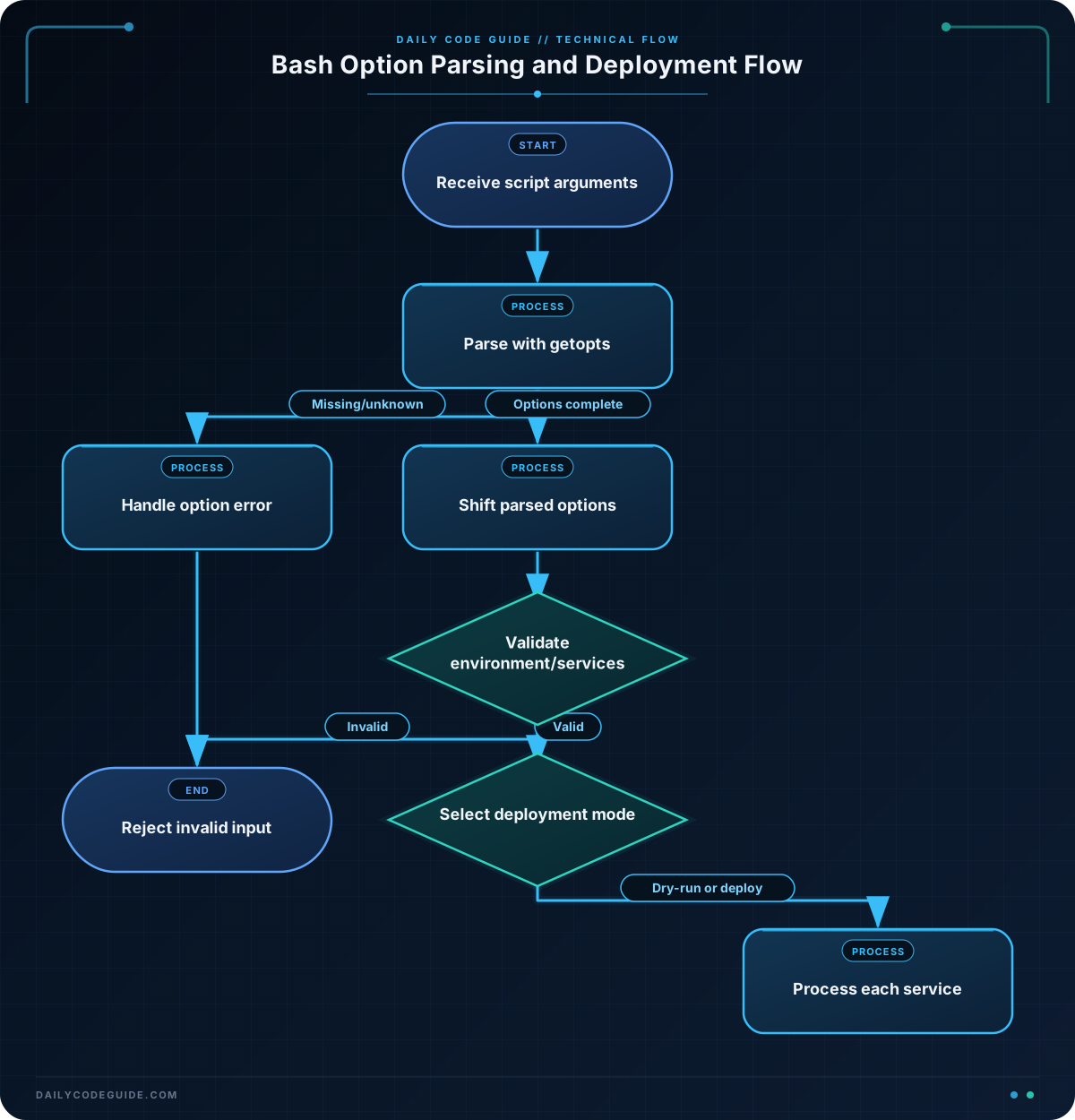
The variables establish useful defaults. If the user does not provide an environment, the script targets staging. Dry-run and verbose mode are initially disabled.
The loop calls getopts repeatedly. On each iteration, the selected option is stored in option. When an option requires a value, that value is stored in OPTARG:
- For
-e production,optioniseandOPTARGisproduction. - For
-n,optionisn, so the script changesdry_runtotrue. - For
-v, the script enables verbose output.
The case statement dispatches the behavior for each parsed option. The : branch handles a missing value, such as -e without an environment. The \? branch handles an unknown option.
getopts tracks its current position in the special variable OPTIND. After parsing finishes, shift $((OPTIND - 1)) removes the options from the script’s positional arguments. This matters when a script accepts both options and regular arguments.
The final case validates the environment. Parsing an option only confirms that a value was supplied; it does not confirm that the value is meaningful for your application.
Another Example
A rollback script can use the same pattern while also accepting positional service names. This example uses -r for a required release identifier and -f to allow a forced rollback.
#!/usr/bin/env bash

environment="staging"
release=""
force=false
verbose=false

usage() {
    printf 'Usage: %s -r release [-e environment] [-f] [-v] service...\n' "$0"
    printf '  -r release       Release identifier to restore\n'
    printf '  -e environment   Rollback target: staging, qa, or production\n'
    printf '  -f               Skip the confirmation requirement\n'
    printf '  -v               Show each service as it is processed\n'
}

while getopts ":e:r:fvh" option; do
    case "$option" in
        e)
            environment="$OPTARG"
            ;;
        r)
            release="$OPTARG"
            ;;
        f)
            force=true
            ;;
        v)
            verbose=true
            ;;
        h)
            usage
            exit 0
            ;;
        :)
            printf 'Error: option -%s requires a value.\n' "$OPTARG" >&2
            usage >&2
            exit 2
            ;;
        \?)
            printf 'Error: unknown option -%s.\n' "$OPTARG" >&2
            usage >&2
            exit 2
            ;;
    esac
done

shift $((OPTIND - 1))

if [[ -z "$release" ]]; then
    printf 'Error: -r release is required.\n' >&2
    usage >&2
    exit 2
fi

if (($# == 0)); then
    printf 'Error: provide at least one service to roll back.\n' >&2
    usage >&2
    exit 2
fi

case "$environment" in
    staging|qa|production)
        ;;
    *)
        printf 'Error: unsupported environment: %s\n' "$environment" >&2
        exit 2
        ;;
esac

if [[ "$force" != true ]]; then
    printf 'Rollback requires confirmation; rerun with -f to continue.\n' >&2
    exit 1
fi

for service in "$@"; do
    if [[ "$verbose" == true ]]; then
        printf '[verbose] rolling back %s in %s\n' "$service" "$environment"
    fi
    printf 'Would restore %s to release %s.\n' "$service" "$release"
done
Here, getopts parses only the options. After the shift, the remaining arguments are service names, which the for loop processes safely as individual values.
Common Mistakes
- Forgetting the colon after an option that needs a value. The option string must use
e:for an environment option. Without the colon,getoptstreats-eas a flag. - Using
$1instead ofOPTARG. Inside thee)branch, the value belongs inOPTARG. Positional parameters are separate from the options being parsed. - Forgetting to shift parsed options. If you later process positional arguments, use
shift $((OPTIND - 1))first. Otherwise, the option text may be mistaken for a service name or another argument. - Assuming any value is valid.
getoptsdoes not validate values such as environment names. Use a separatecasestatement or conditional check. - Expecting long options. Bash
getoptsis intended for short options. Options such as--environmentrequire a different parsing approach or a short-option interface.
When a command includes a value containing spaces, quote the value, for example -e "production region". In deployment scripts, also validate values before using them in commands.
Try It Yourself
Create a script that parses these deployment options:
-efollowed bystaging,qa, orproduction.-nto enable dry-run mode.-vto enable verbose output.-hto display usage information.
Start with the default environment set to staging. Test separate flags and combined flags, such as -n -v and -nv. Also test an unknown option and -e without a value. The script should exit with a nonzero status for invalid input.
Challenge
Write a deployment planning script that accepts the following options:
-e environmentto selectstaging,qa, orproduction.-nto enable dry-run mode.-vto enable verbose output.-hto show usage information.
After the options, require at least one service name as a positional argument. Validate the environment and print one deployment line per service. In dry-run mode, say what would happen without applying it. Reject unknown options, missing option values, unsupported environments, and missing service names.
Solution
#!/usr/bin/env bash

environment="staging"
dry_run=false
verbose=false

usage() {
    printf 'Usage: %s [-e environment] [-n] [-v] [-h] service...\n' "$0"
    printf '  -e environment  Deployment target: staging, qa, or production\n'
    printf '  -n              Show the plan without applying it\n'
    printf '  -v              Enable verbose output\n'
    printf '  -h              Show this help message\n'
}

while getopts ":e:nvh" option; do
    case "$option" in
        e)
            environment="$OPTARG"
            ;;
        n)
            dry_run=true
            ;;
        v)
            verbose=true
            ;;
        h)
            usage
            exit 0
            ;;
        :)
            printf 'Error: option -%s requires a value.\n' "$OPTARG" >&2
            usage >&2
            exit 2
            ;;
        \?)
            printf 'Error: unknown option -%s.\n' "$OPTARG" >&2
            usage >&2
            exit 2
            ;;
    esac
done

shift $((OPTIND - 1))

case "$environment" in
    staging|qa|production)
        ;;
    *)
        printf 'Error: unsupported environment: %s\n' "$environment" >&2
        exit 2
        ;;
esac

if (($# == 0)); then
    printf 'Error: provide at least one service name.\n' >&2
    usage >&2
    exit 2
fi

if [[ "$verbose" == true ]]; then
    printf '[verbose] environment=%s dry_run=%s services=%s\n' \
        "$environment" "$dry_run" "$#"
fi

for service in "$@"; do
    if [[ "$dry_run" == true ]]; then
        printf 'Dry run: would deploy %s to %s.\n' "$service" "$environment"
    else
        printf 'Deploying %s to %s.\n' "$service" "$environment"
    fi
done
The solution uses OPTARG for the environment value, OPTIND to remove parsed options, and "$@" to preserve each service name as a separate argument. Validation happens before the deployment loop, so invalid input cannot produce a partial deployment plan.
Key Takeaways
getoptsparses short Bash options in a predictable way.- Put a colon after an option letter when that option requires a value.
- Use
OPTARGfor option values andOPTINDto find the remaining arguments. - A leading colon lets your script handle missing and unknown options itself.
- Always validate parsed values, especially when they control deployment behavior.

