


What You’ll Learn
In this lesson, you’ll learn how to use SQL Common Table Expressions (CTEs) with the WITH clause to divide a multi-step sales analysis into named, readable stages.
- Define a CTE and reference it from a later query stage.
- Build a sales analysis from order-level, customer-level, and summary-level data.
- Understand how CTEs improve readability compared with deeply nested subqueries.
- Recognize important CTE limitations and common mistakes.
The Concept
A Common Table Expression is a temporary named result set created at the beginning of a single SQL statement. You define it with WITH, then use its name like a table in the main query or in another CTE.
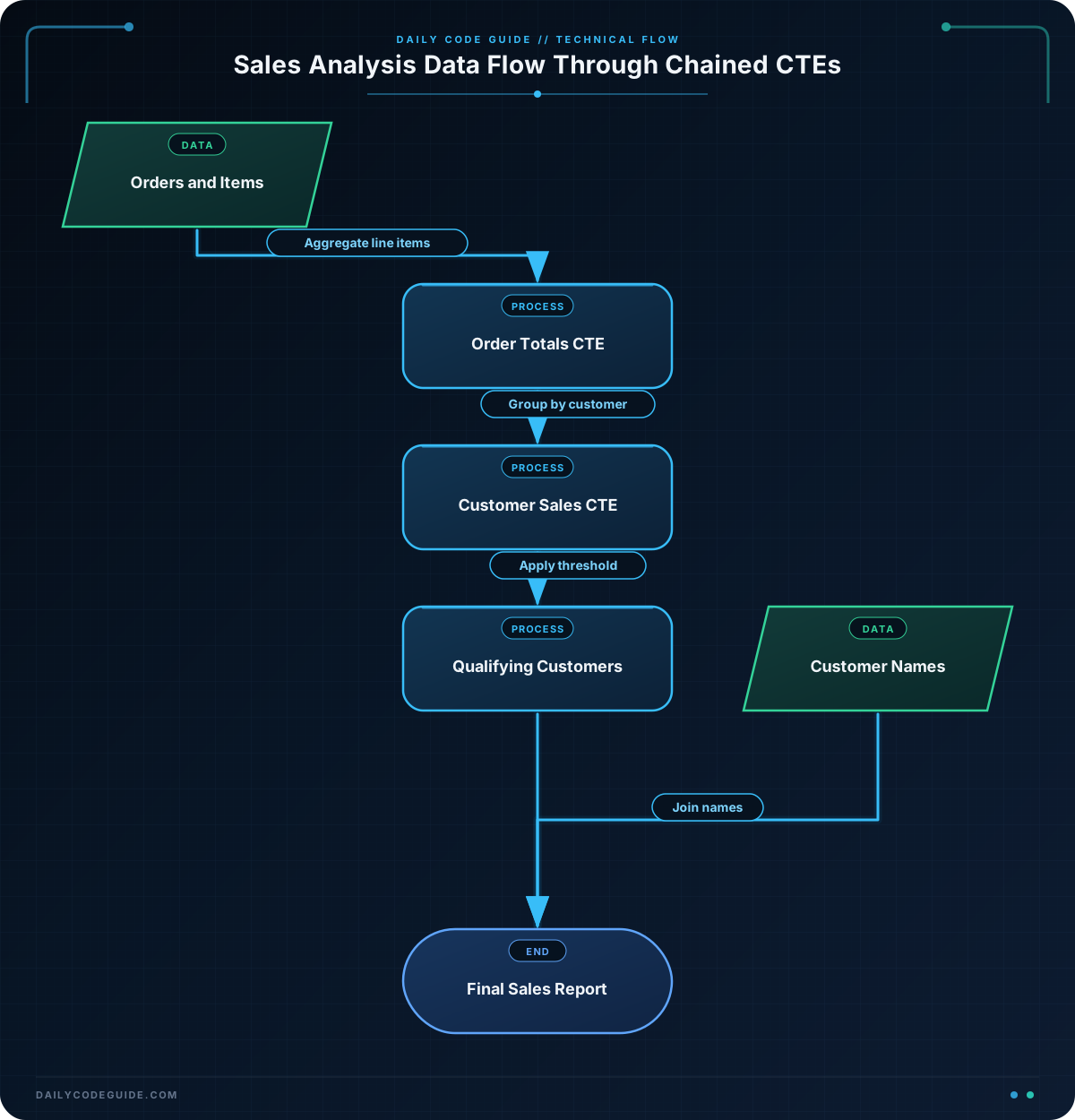
For example, a sales report might need to:
- Calculate the total for every order.
- Combine those order totals for each customer.
- Keep only customers above a revenue threshold.
- Join the results to customer names.
Without CTEs, these steps often become nested subqueries that are difficult to read and maintain. With CTEs, each stage receives a meaningful name:
WITH first_stage AS (
    SELECT ...
),
second_stage AS (
    SELECT ...
    FROM first_stage
)
SELECT ...
FROM second_stage;
Each CTE exists only for the statement that follows it. It does not create a permanent database table, and it cannot normally be referenced by a separate SQL statement.
Basic Example
Assume the database contains these tables:
orders(order_id, customer_id, order_date)order_items(order_id, product_id, quantity, unit_price)customers(customer_id, customer_name)
The following query finds customers who generated at least $1,000 in sales during the first quarter of 2025. The query uses one CTE to calculate order totals, another to calculate customer totals, and a third to filter qualifying customers.
WITH order_totals AS (
    SELECT
        o.order_id,
        o.customer_id,
        SUM(oi.quantity * oi.unit_price) AS order_total
    FROM orders AS o
    JOIN order_items AS oi
        ON oi.order_id = o.order_id
    WHERE o.order_date >= DATE '2025-01-01'
      AND o.order_date < DATE '2025-04-01'
    GROUP BY
        o.order_id,
        o.customer_id
),
customer_sales AS (
    SELECT
        customer_id,
        SUM(order_total) AS total_sales
    FROM order_totals
    GROUP BY customer_id
),
qualifying_customers AS (
    SELECT
        customer_id,
        total_sales
    FROM customer_sales
    WHERE total_sales >= 1000
)
SELECT
    c.customer_name,
    q.total_sales
FROM qualifying_customers AS q
JOIN customers AS c
    ON c.customer_id = q.customer_id
ORDER BY q.total_sales DESC;
Expected Output
For sample data containing the relevant orders, the result could look like this:
customer_name     total_sales
----------------  -----------
Northwind Market  2450.00
Acme Retail       1325.50
Bluebird Supply   1000.00
How the Code Works
1. Calculate each order total
The order_totals CTE joins orders to their line items. Multiplying quantity by unit_price gives the value of each line item, and SUM adds the line items belonging to the same order.
The date filter is applied before the grouping, so only orders from January 1 through March 31, 2025 are included. The upper bound is exclusive, which is useful when order_date includes a time component.
2. Add orders for each customer
The customer_sales CTE reads from order_totals as if it were a table. It groups the calculated order totals by customer_id.
This separation keeps the two aggregation levels distinct. The first stage aggregates line items into orders; the second aggregates orders into customers.
3. Filter the customer totals
The qualifying_customers CTE applies the $1,000 threshold after customer totals have been calculated. Filtering at this stage is important: filtering individual order rows for a value of $1,000 would produce a different result.
4. Add names and sort the report
The final query joins the filtered results to customers so the report can display customer names instead of only IDs. The final ORDER BY sorts the highest-value customers first.
A CTE is especially useful here because each named stage represents a business idea. Someone reviewing the query can understand the workflow without mentally unpacking several nested subqueries.
Another Example
CTEs can also help compare individual products with a summary for their category. This query calculates product sales for the first half of 2025, calculates the average product sales within each category, and returns products whose sales are at least twice their category average.
Assume products contains product_id, product_name, and category_name.
WITH product_sales AS (
    SELECT
        p.product_id,
        p.product_name,
        p.category_name,
        SUM(oi.quantity * oi.unit_price) AS total_sales
    FROM products AS p
    JOIN order_items AS oi
        ON oi.product_id = p.product_id
    JOIN orders AS o
        ON o.order_id = oi.order_id
    WHERE o.order_date >= DATE '2025-01-01'
      AND o.order_date < DATE '2025-07-01'
    GROUP BY
        p.product_id,
        p.product_name,
        p.category_name
),
category_averages AS (
    SELECT
        category_name,
        AVG(total_sales) AS average_product_sales
    FROM product_sales
    GROUP BY category_name
),
high_performers AS (
    SELECT
        ps.product_name,
        ps.category_name,
        ps.total_sales,
        ca.average_product_sales
    FROM product_sales AS ps
    JOIN category_averages AS ca
        ON ca.category_name = ps.category_name
    WHERE ps.total_sales >= ca.average_product_sales * 2
)
SELECT
    product_name,
    category_name,
    total_sales,
    average_product_sales
FROM high_performers
ORDER BY total_sales DESC;
This example demonstrates that one CTE can be reused by multiple later stages. Both category_averages and high_performers are based on the product-level results. The query does not need to repeat the product sales calculation.
Common Mistakes
Forgetting that the CTE belongs to one statement
A CTE is not a permanent view or table. This works because the final SELECT immediately follows the CTE definitions:
WITH recent_orders AS (
    SELECT order_id, customer_id
    FROM orders
)
SELECT *
FROM recent_orders;
After this statement finishes, recent_orders is no longer available. If several reports need the same reusable result, consider creating a view or storing the logic in another database object instead.
Referencing a CTE before it is defined
In a regular, non-recursive CTE chain, define a CTE before using it. The order should follow the dependency flow: raw rows first, summaries next, and the final report last.
Aggregating at the wrong level
Sales data often has one row per item rather than one row per order. If you join several detail tables before aggregating, you can accidentally multiply rows and inflate totals. Check the intended grain of each CTE: in the first example, order_totals has one row per order, while customer_sales has one row per customer.
Assuming every database optimizes CTEs identically
CTEs improve organization, but they do not automatically make a query faster. Database engines may inline a CTE, materialize it, or make that behavior depend on the query and database version. For large reports, inspect the execution plan and add appropriate indexes to join and filter columns.
Try It Yourself
Create a query with two CTEs that reports total sales for each product during April 2025. The first CTE should calculate each order item’s line total. The second should group those line totals by product. Return the product name and total sales, ordered from highest to lowest.
Use the same orders, order_items, and products tables from the examples. Remember to join the tables through their IDs and to filter dates before May 1, 2025.
Challenge
Find customers whose total sales during the second quarter of 2025 were greater than the average customer sales for that same quarter.
Your query should:
- Calculate totals for individual orders.
- Calculate total sales for each customer.
- Calculate the average customer total in a separate CTE.
- Return the customer name, their total sales, and the average customer sales.
- Sort the highest-selling customers first.
Solution
WITH order_totals AS (
    SELECT
        o.order_id,
        o.customer_id,
        SUM(oi.quantity * oi.unit_price) AS order_total
    FROM orders AS o
    JOIN order_items AS oi
        ON oi.order_id = o.order_id
    WHERE o.order_date >= DATE '2025-04-01'
      AND o.order_date < DATE '2025-07-01'
    GROUP BY
        o.order_id,
        o.customer_id
),
customer_sales AS (
    SELECT
        customer_id,
        SUM(order_total) AS total_sales
    FROM order_totals
    GROUP BY customer_id
),
sales_benchmark AS (
    SELECT
        AVG(total_sales) AS average_customer_sales
    FROM customer_sales
)
SELECT
    c.customer_name,
    cs.total_sales,
    sb.average_customer_sales
FROM customer_sales AS cs
JOIN sales_benchmark AS sb
    ON cs.total_sales > sb.average_customer_sales
JOIN customers AS c
    ON c.customer_id = cs.customer_id
ORDER BY cs.total_sales DESC;
The first CTE establishes the order-level totals, and the second establishes the customer-level totals. The benchmark CTE produces one average value from those customer totals. The final query compares each customer against that value and joins the matching IDs to customer names.
Key Takeaways
- A CTE is a named temporary result set defined with
WITH. - Multiple CTEs can express a complex analysis as a sequence of readable stages.
- Each CTE should have a clear level of detail, such as one row per order or one row per customer.
- CTEs exist only for the SQL statement that follows them.
- CTEs improve query organization, but performance should still be checked with an execution plan when data volumes are large.

