


What You’ll Learn
In this lesson, you’ll learn how to use a SQL CASE expression to apply conditional logic inside a SELECT query. You will create calculated columns that classify orders by shipping region and revenue level without changing the stored data.
- Understand the structure of a
CASEexpression. - Create shipping and revenue categories in query results.
- Use multiple conditions and a default
ELSEresult. - Avoid common mistakes involving condition order and missing values.
The Concept
A CASE expression lets SQL choose a result based on one or more conditions. It works like an if/else decision in many programming languages.
A basic searched CASE expression has this structure:
CASE
    WHEN condition THEN result
    WHEN another_condition THEN another_result
    ELSE default_result
END
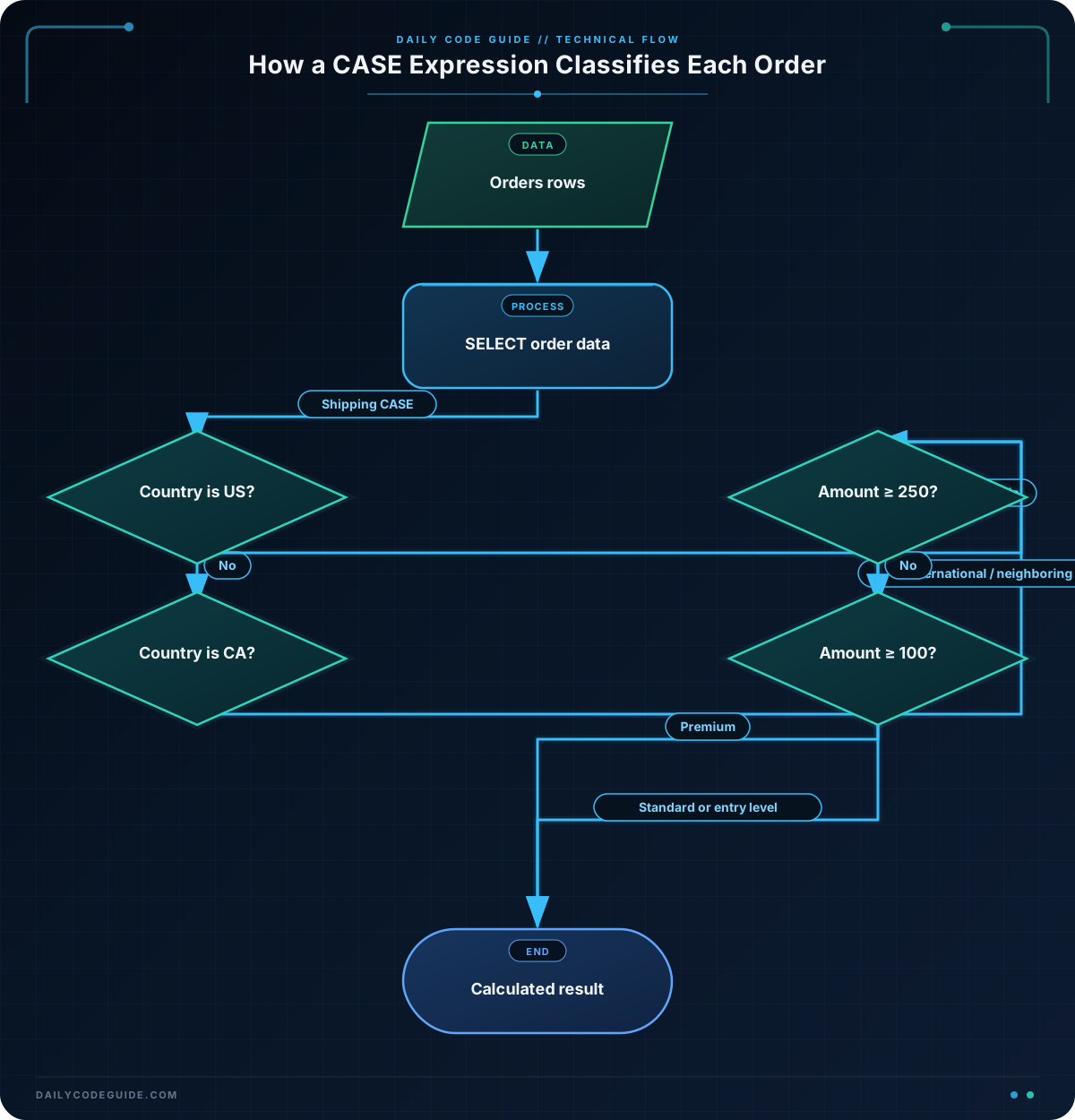
SQL checks each WHEN condition from top to bottom. As soon as it finds a condition that is true, it returns the matching THEN result and stops checking the rest. If no condition is true, SQL returns the ELSE result.
You can place a CASE expression in a SELECT list to create a calculated column. The original table remains unchanged; the category appears only in the query result.
This is useful when you need to classify data for reports, dashboards, exports, or quick analysis. For example, an order report might show whether an order is domestic or international and whether it represents standard or high revenue.
Basic Example
Assume an orders table contains these columns:
order_idcustomer_nameshipping_countrytotal_amount
The following query adds a shipping category and a revenue category to each order:
SELECT
    order_id,
    customer_name,
    shipping_country,
    total_amount,
    CASE
        WHEN shipping_country = 'US' THEN 'Domestic'
        ELSE 'International'
    END AS shipping_category,
    CASE
        WHEN total_amount >= 100 THEN 'High revenue'
        ELSE 'Standard revenue'
    END AS revenue_category
FROM orders
ORDER BY order_id;
Expected Output
For example, if the table contains orders for Alex, Priya, and Mateo, the calculated result could look like this:
order_id | customer_name | shipping_country | total_amount | shipping_category | revenue_category
1001     | Alex          | US                | 125.00       | Domestic           | High revenue
1002     | Priya         | CA                | 80.00        | International      | Standard revenue
1003     | Mateo         | US                | 45.00        | Domestic           | Standard revenue
How the Code Works
The first part of the query selects the original order details:
SELECT
    order_id,
    customer_name,
    shipping_country,
    total_amount,
The first CASE expression checks the shipping country:
CASE
    WHEN shipping_country = 'US' THEN 'Domestic'
    ELSE 'International'
END AS shipping_category,- If
shipping_countryis'US', SQL returns'Domestic'. - For every other country, SQL returns
'International'. ENDmarks the end of the expression.AS shipping_categorygives the calculated column a readable name.
The second expression checks the order amount:
CASE
    WHEN total_amount >= 100 THEN 'High revenue'
    ELSE 'Standard revenue'
END AS revenue_category
An order worth $100 or more is labeled 'High revenue'. Smaller orders receive the 'Standard revenue' label.
These expressions do not update shipping_country or total_amount. They only calculate labels while SQL builds the result set.
Another Example
You can use several WHEN clauses to create more detailed categories. This example classifies shipping progress and divides revenue into three levels.
Assume the orders table also contains shipped_date and order_status:
SELECT
    order_id,
    order_status,
    shipped_date,
    total_amount,
    CASE
        WHEN shipped_date IS NOT NULL THEN 'Shipped'
        WHEN order_status = 'Cancelled' THEN 'Cancelled'
        ELSE 'Awaiting shipment'
    END AS shipping_status,
    CASE
        WHEN total_amount >= 250 THEN 'Premium order'
        WHEN total_amount >= 100 THEN 'Regular order'
        ELSE 'Small order'
    END AS revenue_category
FROM orders
ORDER BY order_id;
The condition shipped_date IS NOT NULL identifies orders that have a shipping date. An order with no shipping date is checked next. If its status is 'Cancelled', it receives the cancellation label; otherwise, it is labeled 'Awaiting shipment'.
The revenue expression demonstrates why condition order matters. An amount of $275 satisfies both >= 250 and >= 100, but SQL returns 'Premium order' because that condition appears first.
Common Mistakes
Forgetting END
Every CASE expression must end with END. The expression is not complete after the final ELSE result.
Putting broad conditions first
When conditions overlap, place the most specific or highest threshold first. For example, this order correctly identifies premium orders before regular orders:
CASE
    WHEN total_amount >= 250 THEN 'Premium order'
    WHEN total_amount >= 100 THEN 'Regular order'
    ELSE 'Small order'
END
If total_amount >= 100 appeared first, a $250 order would be labeled 'Regular order' and the premium condition would never be reached.
Using = NULL
SQL uses three-valued logic for missing values. To check whether a value is missing, use IS NULL or IS NOT NULL, not = NULL:
CASE
    WHEN shipped_date IS NULL THEN 'Awaiting shipment'
    ELSE 'Shipped'
END AS shipping_status
Leaving out ELSE unintentionally
If no condition matches and there is no ELSE clause, SQL normally returns NULL. Include an ELSE when you want every order to receive a clear category.
Try It Yourself
Write a query against the orders table that returns order_id, shipping_country, and total_amount. Add these two calculated columns:
shipping_category:'Domestic'for US orders and'International'for all other orders.revenue_category:'High revenue'for orders of $200 or more and'Standard revenue'for smaller orders.
Sort the results by order_id.
Challenge
Create a query that returns order_id, shipping_country, and total_amount from orders.
Add the following calculated columns:
shipping_category:'Domestic'for the US,'Neighboring'for Canada, and'International'for all other countries.revenue_category:'Premium'for orders of $250 or more,'Standard'for orders from $100 through $249.99, and'Entry level'for smaller orders.
Sort the results from the highest order amount to the lowest.
Solution
SELECT
    order_id,
    shipping_country,
    total_amount,
    CASE
        WHEN shipping_country = 'US' THEN 'Domestic'
        WHEN shipping_country = 'CA' THEN 'Neighboring'
        ELSE 'International'
    END AS shipping_category,
    CASE
        WHEN total_amount >= 250 THEN 'Premium'
        WHEN total_amount >= 100 THEN 'Standard'
        ELSE 'Entry level'
    END AS revenue_category
FROM orders
ORDER BY total_amount DESC;
The shipping expression checks the US first, then Canada, and uses ELSE for every other country. The revenue expression checks the highest threshold first, so orders of $250 or more are not accidentally classified as standard orders. DESC sorts the largest amounts first.
Key Takeaways
- A
CASEexpression adds conditional logic directly to a SQL query. - Use
WHENfor a condition,THENfor its result, andELSEfor the default result. - Use
ENDto finish everyCASEexpression. - SQL checks conditions from top to bottom and uses the first true condition.
- A
CASEexpression calculates labels in the result without changing the stored table data.

