


What You’ll Learn
Terraform meta-arguments control how a resource block becomes one or more resource instances. In this lesson, you will learn how to use count and for_each to provision similarly configured cloud resources from lists, sets, and maps.
- Use count when instances are best represented by numeric positions.
- Use for_each when instances have stable keys or meaningful configuration.
- Understand how Terraform addresses instances and why changing collection structure can cause replacements.
- Choose a collection type that supports safe, maintainable infrastructure changes.
The Concept
A normal Terraform resource block creates one instance. A meta-argument changes that behavior so the block can create multiple instances.
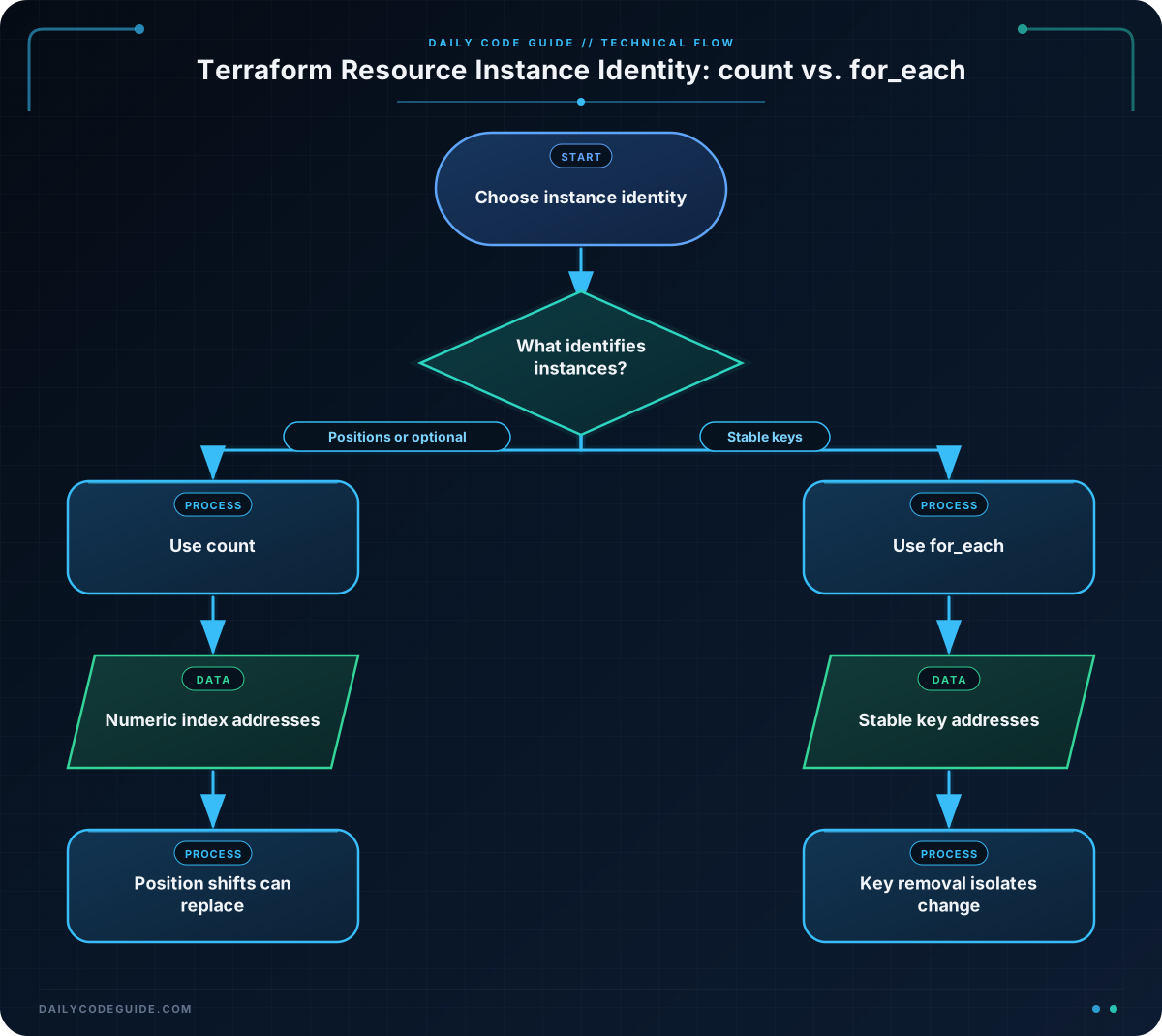
count creates instances identified by numeric indexes:
aws_s3_bucket.archive[0], aws_s3_bucket.archive[1], and so on.
for_each creates instances identified by keys:
aws_s3_bucket.logs["application"] and aws_s3_bucket.logs["audit"].
Use count when the instances are interchangeable and a number or simple list is enough. It is also useful for conditionally creating one optional resource with an expression such as count = var.enable_backup ? 1 : 0.
Use for_each when each instance has a meaningful identity. A set of strings works well when every instance shares the same configuration. A map is better when each instance needs different values, such as a different instance type or tag.
The choice affects resource addresses in Terraform state. Removing the first element from a list used with count shifts later indexes. Terraform may then plan replacements even though the remaining items still exist. With for_each, removing one map key normally affects only that key.
Basic Example
This configuration provisions two groups of Amazon S3 buckets. The archive buckets use count because they are interchangeable. The operational buckets use for_each because each bucket has a meaningful name.
The AWS provider requires valid AWS credentials and a region before you run terraform apply. These resources can incur cloud-provider charges, so use a test account and destroy them when finished.
terraform {
  required_version = ">= 1.5.0"

  required_providers {
    aws = {
      source  = "hashicorp/aws"
    }
  }
}

provider "aws" {
  region = var.aws_region
}

variable "aws_region" {
  type        = string
  description = "AWS region where the buckets will be created."
  default     = "us-east-1"
}

variable "project_name" {
  type        = string
  description = "Short name used in bucket names."
  default     = "platform-demo"
}

variable "archive_bucket_count" {
  type        = number
  description = "Number of interchangeable archive buckets."
  default     = 2
}

variable "operational_bucket_names" {
  type        = set(string)
  description = "Meaningful names for operational buckets."
  default     = ["application-logs", "audit-logs"]
}

resource "aws_s3_bucket" "archive" {
  count  = var.archive_bucket_count
  bucket = "${var.project_name}-archive-${count.index + 1}"

  tags = {
    Project = var.project_name
    Purpose = "archive"
  }
}

resource "aws_s3_bucket" "operational" {
  for_each = var.operational_bucket_names
  bucket   = "${var.project_name}-${each.key}"

  tags = {
    Project = var.project_name
    Purpose = each.key
  }
}

output "archive_bucket_ids" {
  value = aws_s3_bucket.archive[*].id
}

output "operational_bucket_ids" {
  value = {
    for bucket_name, bucket in aws_s3_bucket.operational :
    bucket_name => bucket.id
  }
}
Expected Output
After terraform plan, Terraform plans four bucket instances. The exact AWS-generated values and plan formatting vary, but the resource addresses follow this pattern:
aws_s3_bucket.archive[0]
aws_s3_bucket.archive[1]
aws_s3_bucket.operational["application-logs"]
aws_s3_bucket.operational["audit-logs"]
To initialize the provider and inspect the plan, run:
terraform init
terraform plan
How the Code Works
count = var.archive_bucket_countcreates one archive bucket for each number from zero throughcount - 1.count.indexis the current numeric index. Adding one makes the human-facing suffix start at1.for_each = var.operational_bucket_namescreates one bucket for every value in the set.- Inside a for_each resource,
each.keyandeach.valueidentify the current instance. For a set of strings, the key and value are the same string. - The splat expression
aws_s3_bucket.archive[*].idcollects the IDs from the indexed instances into a list. - The output for expression converts the keyed bucket instances into a map, preserving the operational bucket names.
A set does not guarantee a useful ordering, which is one reason it is appropriate for for_each but generally not for positional logic. If each item has several attributes, use a map of objects instead.
Another Example
In a service platform, different services may need different EC2 instance types. A map of objects gives every service a stable key and keeps its configuration together. An optional CloudWatch log group uses count because it is either present once or absent.
variable "service_instances" {
  type = map(object({
    instance_type = string
    role          = string
  }))

  default = {
    api = {
      instance_type = "t3.micro"
      role          = "api"
    }
    worker = {
      instance_type = "t3.small"
      role          = "background-worker"
    }
  }
}

variable "service_ami_id" {
  type        = string
  description = "A valid Linux AMI ID for the selected AWS region."
}

variable "enable_audit_logs" {
  type        = bool
  description = "Whether to create the shared audit log group."
  default     = true
}

resource "aws_instance" "service" {
  for_each = var.service_instances

  ami           = var.service_ami_id
  instance_type = each.value.instance_type

  tags = {
    Name = "${each.key}-service"
    Role = each.value.role
  }
}

resource "aws_cloudwatch_log_group" "audit" {
  count             = var.enable_audit_logs ? 1 : 0
  name              = "/platform/audit"
  retention_in_days = 30

  tags = {
    Purpose = "audit"
  }
}

output "service_instance_ids" {
  value = {
    for service_name, instance in aws_instance.service :
    service_name => instance.id
  }
}

output "audit_log_group_name" {
  value = var.enable_audit_logs ? aws_cloudwatch_log_group.audit[0].name : null
}
The service instances have addresses such as aws_instance.service["api"]. Changing the worker’s instance type updates that instance without changing the API instance’s address. The log group has address aws_cloudwatch_log_group.audit[0] when enabled.
Common Mistakes
Using count for uniquely named items
If a list is used with count, Terraform identifies items by position. Removing the first item shifts every later item:
items[0]becomes the new first item.items[1]becomes the new second item.
For long-lived resources, this can produce unwanted updates or replacements. Prefer a map or set with for_each when names represent identity.
Changing between count and for_each without moving state
Changing a resource from count to for_each changes its addresses. Terraform does not automatically know that resource.example[0] is the same object as resource.example["api"]. For existing infrastructure, plan the migration carefully with state moves, such as Terraform’s moved blocks, rather than making the change blindly.
Using a list directly with for_each
for_each accepts a map or a set of strings, not an arbitrary list. Convert a list to a set when ordering does not matter, or create a map when stable names and per-item values matter:
locals {
  service_names = toset(var.service_name_list)

  service_configs = {
    for service in var.service_configs_list :
    service.name => service
  }
}
Do not use a set when duplicate values are meaningful, because converting to a set removes duplicates.
Try It Yourself
Create a Terraform configuration that provisions three interchangeable S3 buckets with count. Use variables for the AWS region, a name prefix, and the number of buckets. Add a Project tag and output the bucket IDs as a list.
Then change the design to use for_each with a set of environment names such as development, staging, and production. Compare the resource addresses in the plan.
Challenge
Design storage for a small application using both meta-arguments:
- Create one S3 bucket for each entry in a map of named application data buckets.
- Each map value must provide a purpose tag.
- Create one optional backup bucket when
enable_backupis true, and no backup bucket otherwise.
Use the AWS provider and variables for the region, project name, bucket configuration, and backup flag. Do not use count for the named application data buckets.
Solution
terraform {
  required_version = ">= 1.5.0"

  required_providers {
    aws = {
      source  = "hashicorp/aws"
    }
  }
}

provider "aws" {
  region = var.aws_region
}

variable "aws_region" {
  type    = string
  default = "us-east-1"
}

variable "project_name" {
  type    = string
  default = "inventory-demo"
}

variable "data_buckets" {
  type = map(object({
    purpose = string
  }))

  default = {
    uploads = {
      purpose = "user uploads"
    }
    reports = {
      purpose = "generated reports"
    }
  }
}

variable "enable_backup" {
  type    = bool
  default = true
}

resource "aws_s3_bucket" "data" {
  for_each = var.data_buckets
  bucket   = "${var.project_name}-${each.key}"

  tags = {
    Project = var.project_name
    Purpose = each.value.purpose
    Type    = "data"
  }
}

resource "aws_s3_bucket" "backup" {
  count  = var.enable_backup ? 1 : 0
  bucket = "${var.project_name}-backup"

  tags = {
    Project = var.project_name
    Purpose = "backup"
    Type    = "backup"
  }
}

output "data_bucket_ids" {
  value = {
    for bucket_name, bucket in aws_s3_bucket.data :
    bucket_name => bucket.id
  }
}

output "backup_bucket_id" {
  value = var.enable_backup ? aws_s3_bucket.backup[0].id : null
}
The map keys, such as uploads and reports, become stable instance addresses. The backup resource uses count only for its optional one-or-zero behavior, so the expression does not create a positional collection of named application buckets.
Key Takeaways
- Use count for interchangeable or optional instances identified by numeric indexes.
- Use for_each for instances with stable keys or different per-instance configuration.
- Maps provide both identity and configuration; sets provide unique string identities without meaningful ordering.
- Changing list positions can cause address shifts, while removing a for_each key usually affects only that key.
- Changing a resource’s meta-argument changes its state addresses, so existing resources may require a deliberate state migration.

