


What You’ll Learn
In this lesson, you will learn how to order a Python list of customer dictionaries using sorted(), list.sort(), and custom sort keys.
- Sort records by a dictionary field.
- Sort by multiple fields at once.
- Use a
lambdafunction as a custom key. - Place missing values predictably, such as always putting them last.
The Concept
Python can sort a list with the built-in sorted() function or the sort() method.
sorted() creates and returns a new sorted list. The original list stays unchanged. The sort() method changes the existing list directly.
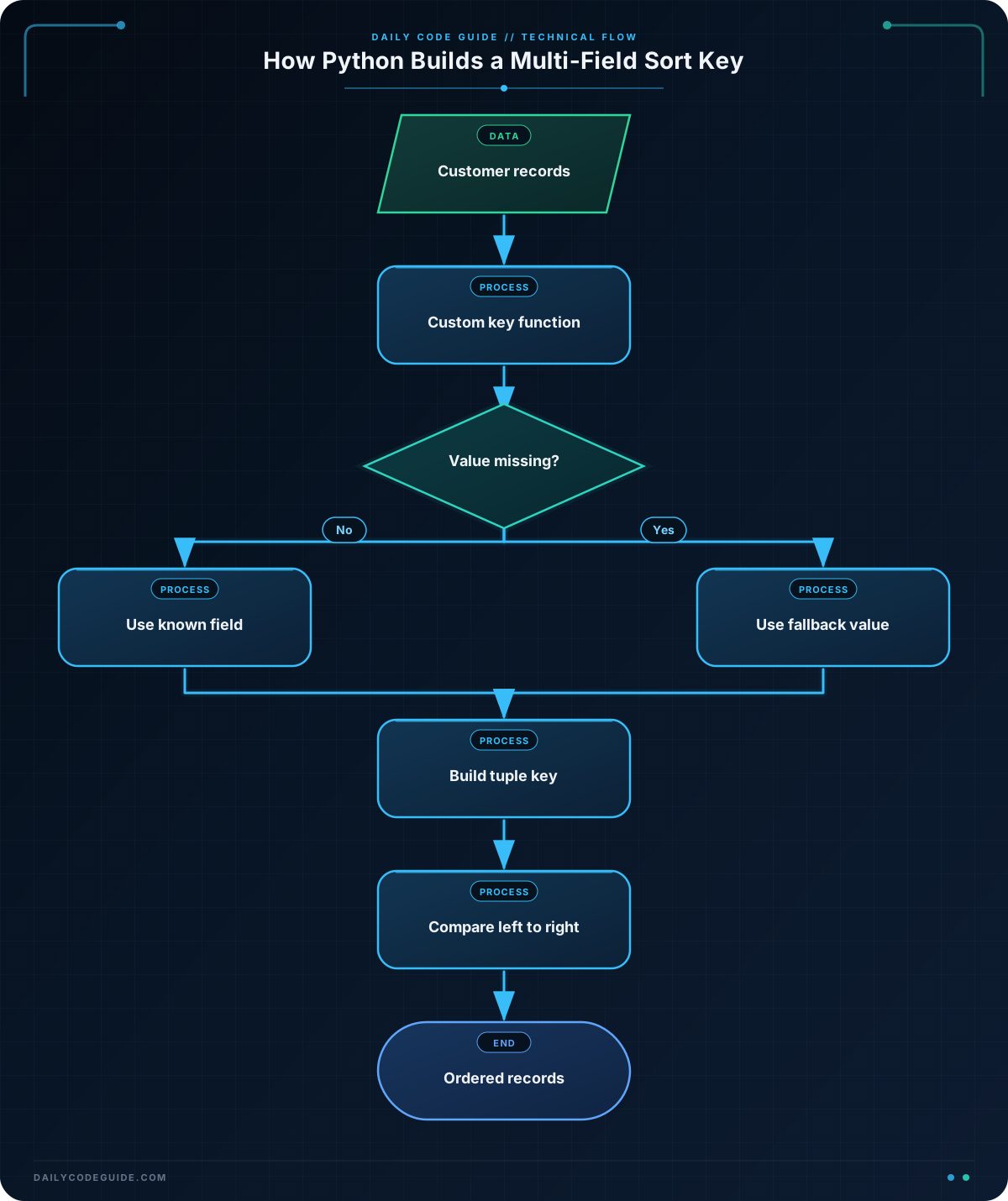
When sorting dictionaries, Python needs to know which dictionary value to use. You provide that information with the key argument. A key is a function that receives one item and returns the value Python should compare.
For example, this key function returns a customer’s name:
key=lambda customer: customer["name"]A lambda is a short function. In this example, customer represents one dictionary, and customer["name"] is the value used for sorting.
You can sort by multiple fields by returning a tuple. Python compares tuple values from left to right. For example, (city, name) sorts by city first, then by name when two customers have the same city.
Missing values need special care. Values such as None cannot always be compared directly with strings. A useful pattern is to return a tuple containing a missing-value flag first:
key=lambda customer: (
    customer["city"] is None,
    customer["city"] or "",
    customer["name"],
)
The first value is False for customers with a city and True for customers without one. Since False sorts before True, customers with cities appear first and missing cities appear last.
Basic Example
Suppose a customer-service team wants to group customers by city and then alphabetize customers within each city. Customers without a city should appear at the end.
customers = [
    {"name": "Maya Chen", "city": "Denver", "orders": 4},
    {"name": "Owen Brooks", "city": None, "orders": 2},
    {"name": "Priya Shah", "city": "Austin", "orders": 7},
    {"name": "Luis Garcia", "city": "Denver", "orders": 3},
    {"name": "Nora Patel", "city": None, "orders": 5},
]

ordered_customers = sorted(
    customers,
    key=lambda customer: (
        customer["city"] is None,
        customer["city"] or "",
        customer["name"],
    ),
)

for customer in ordered_customers:
    city = customer["city"] or "Unknown"
    print(f"{city}: {customer['name']} ({customer['orders']} orders)")
Expected Output
Austin: Priya Shah (7 orders)
Denver: Luis Garcia (3 orders)
Denver: Maya Chen (4 orders)
Unknown: Nora Patel (5 orders)
Unknown: Owen Brooks (2 orders)
How the Code Works
The customers variable contains a list. Each item in the list is a dictionary with a name, city, and order count.
This line creates a new list:
ordered_customers = sorted(customers, key=...)The original customers list is still available. The result is stored in ordered_customers.
The custom key returns three values:
(
    customer["city"] is None,
    customer["city"] or "",
    customer["name"],
)
customer["city"] is Noneputs missing cities after real cities.customer["city"] or ""sorts real city names alphabetically. The empty string prevents a missing city from being used as a string comparison value.customer["name"]breaks ties when two customers have the same city.
Python compares the first tuple item first. If those values are equal, it compares the second item, and then the third item. This is how one key can describe multi-field ordering.
The expression customer["city"] or "Unknown" is used only for display. It changes None into readable text when printing; it does not change the customer dictionaries.
Another Example
Now imagine a sales team wants a work queue. VIP customers should appear first, followed by regular customers. Within each group, customers with a known last-contact date should come first, ordered from oldest contact to newest. Customers who have never been contacted should appear last in their group.
This example uses list.sort(), so the existing list is changed.
follow_up_queue = [
    {"name": "Ava Wilson", "tier": "regular", "last_contact": "2025-02-14"},
    {"name": "Ethan Lee", "tier": "vip", "last_contact": None},
    {"name": "Sofia Martin", "tier": "vip", "last_contact": "2025-01-20"},
    {"name": "Daniel Kim", "tier": "regular", "last_contact": None},
    {"name": "Grace Taylor", "tier": "vip", "last_contact": "2025-02-03"},
]

tier_order = {"vip": 0, "regular": 1}

def follow_up_key(customer):
    return (
        tier_order[customer["tier"]],
        customer["last_contact"] is None,
        customer["last_contact"] or "",
    )

follow_up_queue.sort(key=follow_up_key)

for customer in follow_up_queue:
    contact = customer["last_contact"] or "Never"
    print(f"{customer['tier'].upper()}: {customer['name']} - {contact}")
Expected Output
VIP: Sofia Martin - 2025-01-20
VIP: Grace Taylor - 2025-02-03
VIP: Ethan Lee - Never
REGULAR: Ava Wilson - 2025-02-14
REGULAR: Daniel Kim - Never
Here, tier_order converts the business priority into numbers. A smaller number sorts first, so VIP customers come before regular customers.
The date strings use the year-month-day format, such as 2025-02-03. In this format, alphabetic sorting produces chronological order. The missing-date flag ensures that None is never compared directly with a string and that missing dates appear last.
Common Mistakes
- Sorting by the dictionary itself: A dictionary does not automatically tell Python which field matters. Use a key such as
key=lambda customer: customer["name"]. - Comparing
Nonewith text: A key that sometimes returns a string and sometimes returnsNonecan cause a comparison error. Add a missing-value flag and a fallback value. - Forgetting that
sort()returnsNone: Usecustomers.sort(key=...)by itself. Do not assign its result to another variable expecting a sorted list. - Reversing every part of a multi-field sort: The
reverse=Trueoption reverses the complete ordering. If different fields need different directions, create a more specific key or perform carefully planned stable sorts.
Try It Yourself
Sort these customer records by region, then by customer name. Customers with no region should appear last.
customers = [
    {"name": "Jordan Reed", "region": "West"},
    {"name": "Casey Morgan", "region": None},
    {"name": "Taylor Nguyen", "region": "East"},
    {"name": "Alex Rivera", "region": "West"},
    {"name": "Morgan Ellis", "region": None},
]

# Create a new sorted list and print each customer's region and name.
Challenge
Create a customer report with these requirements:
- Sort customers by account status, with
"active"customers first and"paused"customers second. - Within each status, sort customers by total spending from highest to lowest.
- Customers with missing spending values should appear after customers with known spending in the same status.
- Print each customer’s status, name, and spending. Display
"Unknown"when spending is missing.
Solution
customers = [
    {"name": "Riley Adams", "status": "paused", "spending": 120.50},
    {"name": "Jamie Foster", "status": "active", "spending": None},
    {"name": "Sam Carter", "status": "active", "spending": 450.00},
    {"name": "Lee Morgan", "status": "paused", "spending": 275.25},
    {"name": "Chris Parker", "status": "active", "spending": 310.75},
]

status_order = {"active": 0, "paused": 1}

def customer_key(customer):
    spending_is_missing = customer["spending"] is None
    spending_for_sorting = customer["spending"] or 0

    return (
        status_order[customer["status"]],
        spending_is_missing,
        -spending_for_sorting,
    )

ordered_customers = sorted(customers, key=customer_key)

for customer in ordered_customers:
    spending = customer["spending"]
    spending_text = f"${spending:.2f}" if spending is not None else "Unknown"
    print(f"{customer['status'].upper()}: {customer['name']} - {spending_text}")
Expected Output
ACTIVE: Sam Carter - $450.00
ACTIVE: Chris Parker - $310.75
ACTIVE: Jamie Foster - Unknown
PAUSED: Lee Morgan - $275.25
PAUSED: Riley Adams - $120.50
The status number controls the first level of ordering. The Boolean missing-value field places known spending before missing spending. The negative spending value reverses the numeric order so that larger spending amounts appear first. The display code uses a conditional expression to show "Unknown" for missing values.
Key Takeaways
- Use
sorted()when you want a new sorted list, andlist.sort()when changing the existing list is appropriate. - Use the
keyargument to choose the dictionary field or fields used for sorting. - Return a tuple from a custom key to sort by multiple fields in priority order.
- Use a Boolean missing-value flag to place
Nonevalues consistently. - For descending numeric values within a tuple, use a negative number when appropriate.

